






 这篇博客通过HTML代码展示了如何绘制皮卡丘,主要利用了绝对定位和圆角属性,适合初学者入门。
效果图

练习代码
.face {
    width: 600px;
    height: 320px;
    background: #FEE443;
    position: relative;
}

.eye {
    width: 60px;
    height: 60px;
    border-radius: 100%;
    background: #222;
    position: absolute;
}

.eye-l? {
    left: 105px;
    top: 100px;
}

.eye-r? {
    right: 105px;
    top: 100px;
}

.eye?.bright {
    width: 30px;
    height: 30px;
    position: absolute;
    background: #fff;
    border-radius: 50%;
}

.norse? {
    width: 0px;
    height: 0px;
    border: 18 px?solid #000;
    border-radius: 50%;
    transform: translateX(-50%);
    left: 50%;
    top: 52%;
    border-color: #000? #a9505000?transparent;
    position: absolute;
}

.lip-l? {
    width: 50px;
    height: 50px;
    border: 4 px?solid #000;
    position: absolute;
    background: red;
    border-radius: 50%;
    top: 66%;
    left: 10%;
}

.lip-r? {
    width: 50px;
    height: 50px;
    border: 4 px?solid #000;
    position: absolute;
    background: red;
    border-radius: 50%;
    top: 66%;
    right: 10%;
}

.mouth {
    overflow: hidden;
    width: 150px;
    height: 60px;
    background: transparent;
    position: absolute;
    left: 50%;
    bottom: 10%;
    margin-left: -68px;
}

.mouth?.a? {
    top: -30px;
    position: absolute;
    width: 60px;
    height: 60px;
    border: 6 px?solid #222;
    border-radius: 50%;
}

.mouth?.b? {
    top: -30px;
    position: absolute;
    left: 65px;
    width: 60px;
    height: 60px;
    border: 6 px?solid #222;
    border-radius: 50%;
}
html:
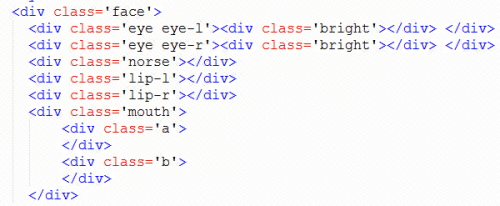
主要还是绝对定位还有圆角属性,比较基础,不喜勿喷。






 扫一扫
扫一扫


 5580
5580

 被折叠的 条评论
为什么被折叠?
被折叠的 条评论
为什么被折叠?
 到【灌水乐园】发言





