安装graphlab 报错 No matching distribution found for graphlab-create>=2.1

本文详细介绍了在Python2.7环境下安装GraphLab的步骤,包括使用Anaconda创建虚拟环境、确保pip版本、安装GraphLab及依赖项等关键信息。
部署运行你感兴趣的模型镜像

异常记录

在安装graphlab 的过程中,发现如下错误

Could not find a version that satisfies the requirement graphlab-create>=2.1 (from GraphLab-Create-License==2.1) (from versions: )
No matching distribution found for graphlab-create>=2.1 (from GraphLab-Create-License==2.1)

异常原因

翻阅官方文档找到这么一句话

Option 2: Install in Python environment using virtualenv

The below instructions assume an existing Python 2.7.x (64-bit) environment and virtualenv is already installed on your machine. GraphLab Create installation requires pip version >= 7. IPython Notebook is recommended for getting the most out our code samples.

好了,知道问题所在了

graphlab要求python 2.7的环境。

解决办法,如果你安装的是 anaconda

重新设置一下python2.7
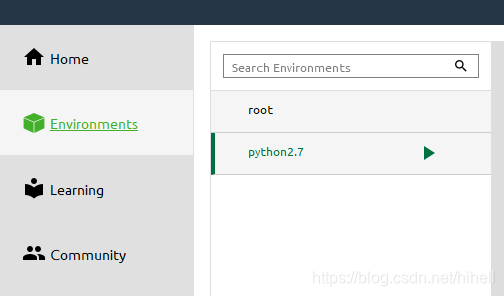
在这里插入图片描述

打开你邮箱中的那封安装邮件,然后按照流程安装即可

在这里插入图片描述

Step 1: Download Anaconda2 v4.0.0

Step 2: Install Anaconda

# Run Anaconda2 v4.0.0 installer.
# Double-click the .exe file to install Anaconda and follow the instructions on the screen.
Step 3: Create conda environment

# Create a new conda environment with Python 2.7.x
conda create -n gl-env python=2.7 anaconda=4.0.0

# Activate the conda environment
activate gl-env
Step 4: Ensure pip version >= 7

# Ensure pip is updated to the latest version
# miniconda users may need to install pip first, using 'conda install pip'
conda update pip
Step 5: Install GraphLab Create

# Install your licensed copy of GraphLab Create
pip install --upgrade --no-cache-dir https://get.graphlab.com/GraphLab-Create/2.1/你的邮箱/邮箱收到的安装码/GraphLab-Create-License.tar.gz
Step 4: Ensure installation of IPython and IPython Notebook

# Install or update IPython and IPython Notebook
conda install ipython-notebook

上述命令中,也可以在软件直接操作,记得切换一下python环境 activate gl-env

然后使用pip进行安装
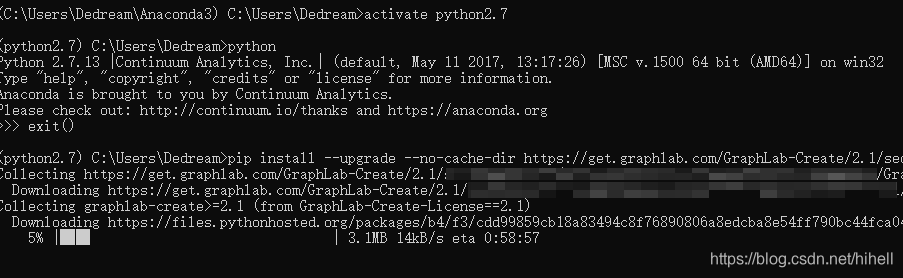
在这里插入图片描述

安装完毕,运行jupyter之后,如果导入报错

ACTION REQUIRED: Dependencies libstdc+±6.dll and libgcc_s_seh-1.dll not found.

使用这个命令

graphlab.get_dependencies()
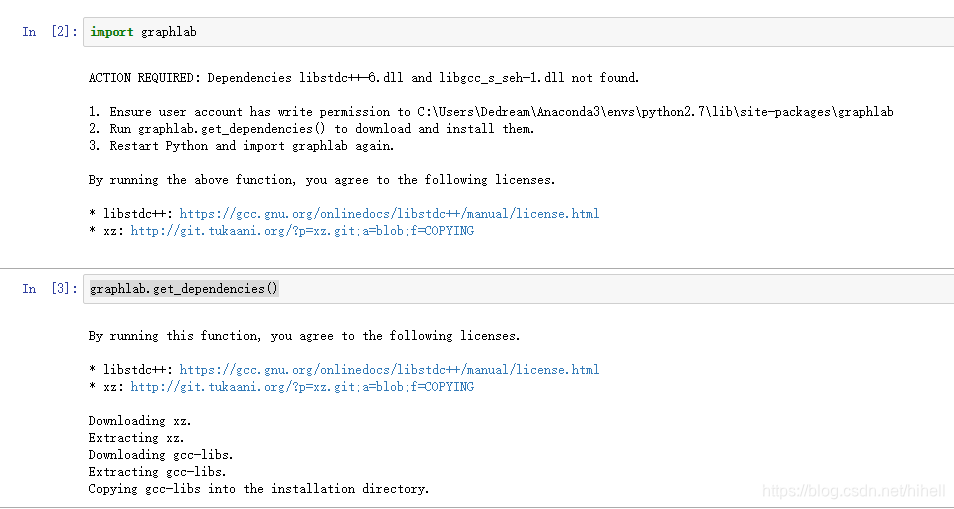
在这里插入图片描述

您可能感兴趣的与本文相关的镜像

Python3.8

Python3.8

Conda
Python

Python 是一种高级、解释型、通用的编程语言,以其简洁易读的语法而闻名,适用于广泛的应用,包括Web开发、数据分析、人工智能和自动化脚本

ERROR: Ignored the following yanked versions: 3.4.11.39, 3.4.17.61, 4.4.0.42, 4.4.0.44, 4.5.4.58, 4.5.5.62, 4.7.0.68 ERROR: Ignored the following versions that require a different python version: 1.4.10rc0 Requires-Python >=3.10; 1.4.8 Requires-Python >=3.10; 1.4.9 Requires-Python >=3.10; 2.1.0 Requires-Python >=3.10; 2.1.1 Requires-Python >=3.10; 2.1.2 Requires-Python >=3.10; 2.1.3 Requires-Python >=3.10; 2.2.0 Requires-Python >=3.10; 2.2.1 Requires-Python >=3.10; 2.2.2 Requires-Python >=3.10; 2.2.3 Requires-Python >=3.10; 2.2.4 Requires-Python >=3.10; 2.2.5 Requires-Python >=3.10; 2.2.6 Requires-Python >=3.10; 2.3.0 Requires-Python >=3.11; 2.3.1 Requires-Python >=3.11; 2.3.2 Requires-Python >=3.11; 2.3.3 Requires-Python >=3.11; 3.10.0 Requires-Python >=3.10; 3.10.0rc1 Requires-Python >=3.10; 3.10.1 Requires-Python >=3.10; 3.10.3 Requires-Python >=3.10; 3.10.5 Requires-Python >=3.10; 3.10.6 Requires-Python >=3.10; 3.3 Requires-Python >=3.10; 3.3rc0 Requires-Python >=3.10; 3.4 Requires-Python >=3.10; 3.4.1 Requires-Python >=3.10; 3.4.2 Requires-Python >=3.10; 3.4rc0 Requires-Python >=3.10; 3.5 Requires-Python >=3.11; 3.5rc0 Requires-Python >=3.11 ERROR: Could not find a version that satisfies the requirement opencv-python==4.5.5 (from versions: 3.4.0.14, 3.4.10.37, 3.4.11.41, 3.4.11.43, 3.4.11.45, 3.4.13.47, 3.4.14.51, 3.4.14.53, 3.4.15.55, 3.4.16.57, 3.4.16.59, 3.4.17.63, 3.4.18.65, 4.3.0.38, 4.4.0.40, 4.4.0.46, 4.5.1.48, 4.5.2.52, 4.5.2.54, 4.5.3.56, 4.5.4.60, 4.5.5.64, 4.6.0.66, 4.7.0.72, 4.8.0.74, 4.8.0.76, 4.8.1.78, 4.9.0.80, 4.10.0.82, 4.10.0.84, 4.11.0.86, 4.12.0.88) ERROR: No matching distribution found for opencv-python==4.5.5 又报错
09-14
评论 3
成就一亿技术人!
拼手气红包6.0元
还能输入1000个字符
 
红包 添加红包
表情包 插入表情
 条评论被折叠 查看
添加红包

请填写红包祝福语或标题

红包个数最小为10个

红包金额最低5元

当前余额3.43前往充值 >
需支付:10.00
成就一亿技术人!
领取后你会自动成为博主和红包主的粉丝 规则
hope_wisdom
发出的红包

打赏作者

梦想橡皮擦

如有帮助,来瓶可乐

¥1 ¥2 ¥4 ¥6 ¥10 ¥20
扫码支付:¥1
获取中
扫码支付

您的余额不足,请更换扫码支付或充值

打赏作者

实付
使用余额支付
点击重新获取
扫码支付
钱包余额 0

抵扣说明:

1.余额是钱包充值的虚拟货币,按照1:1的比例进行支付金额的抵扣。
2.余额无法直接购买下载,可以购买VIP、付费专栏及课程。

余额充值