


在Linux系统中,使用C语言编写程序时,可以通过实现命令行参数自动补全功能来支持用户在命令行中按下Tab键时显示支持的参数。这通常涉及到以下几个步骤:
-
使用GNU Readline库:GNU Readline库提供了行编辑和历史记录功能,并且支持Tab键补全。你可以使用它来实现命令行参数的自动补全。
-
编写补全函数:你需要编写一个补全函数,该函数会根据当前输入的内容返回可能的补全选项。
-
注册补全函数:将你的补全函数注册到Readline库中,以便在用户按下Tab键时调用。
-
- 使用GNU Readline库:GNU Readline库提供了行编辑和历史记录功能,并且支持Tab键补全。你可以使用它来实现命令行参数的自动补全。
-
- 编写补全函数:你需要编写一个补全函数,该函数会根据当前输入的内容返回可能的补全选项。
-
- 注册补全函数:将你的补全函数注册到Readline库中,以便在用户按下Tab键时调用。
以下是一个简单的示例代码,展示了如何使用GNU Readline库实现命令行参数的自动补全功能:
#include <stdio.h>
#include <stdlib.h>
#include <readline/readline.h>
#include <readline/history.h>

// 定义支持的参数列表
const char *supported_args[] = {
    "--help",
    "--version",
    "--input",
    "--output",
    "--verbose",
    NULL
};

// 补全函数
char *command_generator(const char *text, int state) {
    static int list_index, len;
    const char *name;

    if (!state) {
        list_index = 0;
        len = strlen(text);
    }

    while ((name = supported_args[list_index++])) {
        if (strncmp(name, text, len) == 0) {
            return strdup(name);
        }
    }

    return NULL;
}

// 补全函数的包装器
char **command_completion(const char *text, int start, int end) {
    rl_attempted_completion_over = 1;
    return rl_completion_matches(text, command_generator);
}

int main(int argc, char **argv) {
    char *input;

    // 注册补全函数
    rl_attempted_completion_function = command_completion;

    while ((input = readline("prompt> ")) != NULL) {
        if (*input) {
            add_history(input);
        }

        printf("You entered: %s\\n", input);
        free(input);
    }

    return 0;
}
编译和运行
要编译这个程序,你需要安装GNU Readline库。可以使用以下命令进行编译:
gcc -o autocomplete autocomplete.c -lreadline
运行程序后,你可以在提示符下输入部分参数并按下Tab键,程序会显示匹配的参数选项。
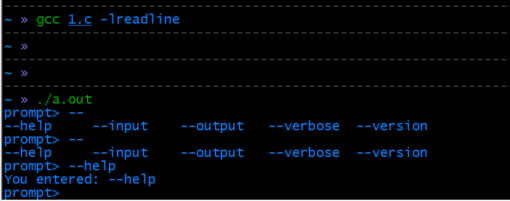
说明
- supported_args:这是一个包含支持的参数列表的数组。
- command_generator:这是一个补全函数,根据当前输入的文本返回可能的补全选项。
- command_completion:这是补全函数的包装器,调用rl_completion_matches来生成补全选项。
- rl_attempted_completion_function:将补全函数注册到Readline库中。
通过这种方式,你可以在Linux C语言程序中实现命令行参数的自动补全功能,提升用户体验。





 扫一扫
扫一扫


 1427
1427

 被折叠的 条评论
为什么被折叠?
被折叠的 条评论
为什么被折叠?
 到【灌水乐园】发言





