


 本文详细介绍了Visual Studio 2008中JavaScript IntelliSense的功能,包括类型推断、外部JavaScript库的支持、注释提示、跨文件引用解析等,使开发者能更高效地进行JavaScript和AJAX应用开发。
One of the features that web developers will really like with VS 2008 is its built-in support for JavaScript intellisense. This is enabled in both the free Visual Web Developer 2008 Express edition as well as in Visual Studio, and makes using JavaScript and building AJAX applications significantly easier.
Below is a quick tour of some of the new JavaScript intellisense features to take advantage of:
JavaScript Type Inference
One of the things you'll notice immediately when you start typing within a script block is the richer support that Visual Studio 2008 now has for JavaScript keywords and language features:

JavaScript is a dynamic language, and doesn't support explicit type declarations, which has made implementing good intellisense difficult in the past.
Visual Studio 2008 adds support for type inference, which means that it evaluates and computes how a JavaScript block is being used and dynamically infers the variable usage and type information of the code to provide accurate intellisense support.
For example, Visual Studio below will infer that an html element is being retrieved by the document.getElementById() method, and provide appropriate html element intellisense for the variable result:

If I later assign a numeric value to the "myElement" variable (which in JavaScript converts it to a number), notice how VS will detect this and now provide integer intellisense for the variable later in the method:

Intellisense for External JavaScript Libraries
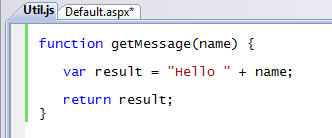
VS 2008 supports intellisense not just for in-line script, but also for externally referenced JavaScript files. For example, assume we have a "getMessage" function like below defined within a "Util.js" javascript file:
I can then simply add a standard JavaScript script refrence element to my page, and I will then automatically receive intellisense support for it as I code:
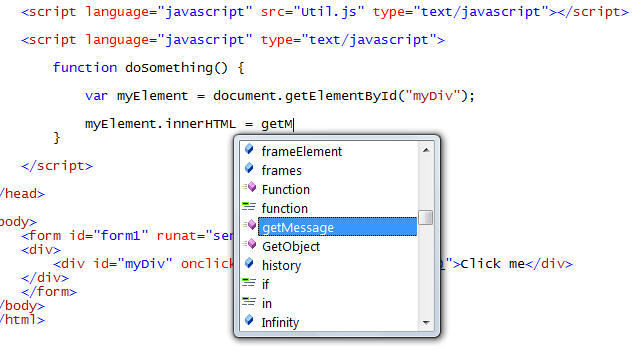
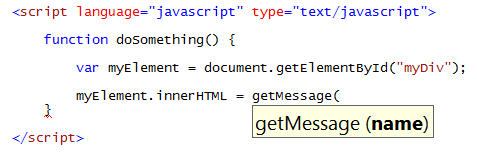
Notice how VS automatically provides basic parameter intellisense information on the method without us having to do anything special to the JavaScript for it to appear:
Adding Intellisense Hints to JavaScript
As you saw above, Visual Studio will automatically provide basic intellisense help information for the method name and parameters of standard JavaScript.
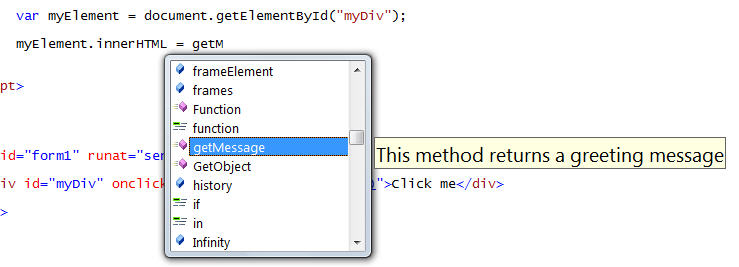
You can optionally make this intellisense richer by adding comments to your JavaScript code that the intellisense engine can then pick up and use when you consume a method or library. For example, I could add the below comments to the getMessage function in my util.js file:
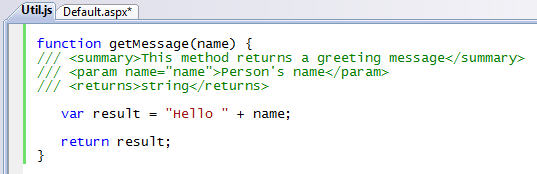
And when I then code against it within my "Default.aspx" file Visual Studio will automatically display this summary information for the method:
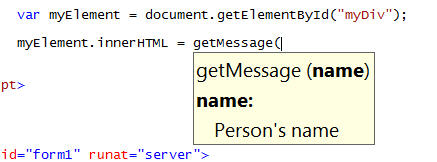
As well as the parameter details:
We'll provide a tool that then allows you to automatically strip out your comments (and compress the whitespace and size) of your JavaScript once you've finished building your application. For more details about the comment format that both VS and ASP.NET AJAX support, please read Bertrand Le Roy's post here.
Intellisense within External JavaScript files
Obviously you get full intellisense support within external JavaScript files, just like you do within script blocks inside .htm and .aspx files.
One of the interesting characteristics about external JavaScript files is that they can call and use the JavaScript functions and variables declared within other JavaScript files that a page loads.
For example, if we declare two external Javascript files referenced on a page like so:

The JavaScript code within the "MyLibrary.js" javascript file will be able to call the methods declared within the Util.js file.
You can tell Visual Studio to provide intellisense for the "Util.js" library within the "MyLibrary.js" file by adding a /// <reference> comment at the top of the external library. Once you do this, you'll get full intellisense support for those methods and variables:
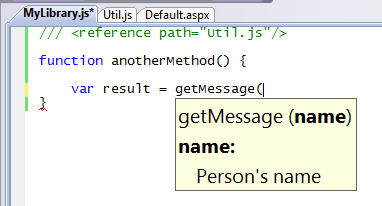
This ends up being super useful when partitioning your JavaScript routines across multiple files.
To reference the ASP.NET AJAX client side JavaScript libraries, you can either add a <refrence> that points to your own copy of the .JS file (if you are manually including it in your project), or add a <reference> element with a name value if the library is being dynamically output by the <asp:scriptmanager> control on the host page:
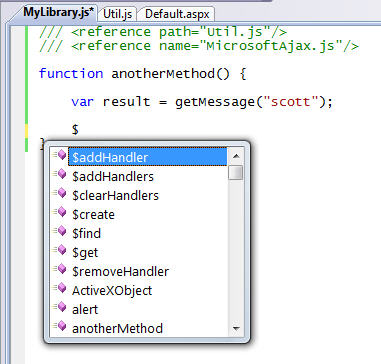
Once you do this you'll get full intellisense for all of the JavaScript libraries and type-library patterns inside ASP.NET AJAX.
Calling Web Services using ASP.NET AJAX
ASP.NET AJAX makes it easy to expose methods on the server that can be called and accessed via client-side JavaScript. For example, assume we define a simple webmethod in a .asmx web-service like below:
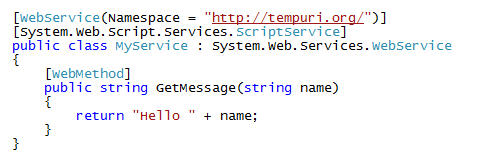
I could then have ASP.NET AJAX automatically create a client-side JavaScript proxy object that uses the JSON protocol to call and use it from the client by adding a reference to it with a <asp:scriptmanager> control in my page like below:

What is cool about VS 2008 is that when you declare a reference to a web-service using the <asp:scriptmanager> control like above, it will add client JavaScript intellisense support for it within the page automatically:
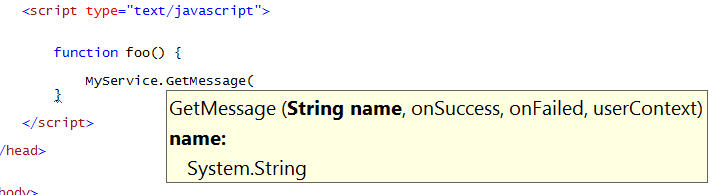
Obviously this makes it much easier to identify methods on the server and asynchronously call and invoke them. You can use this to both exchange data between the client and server. You can also use the AJAX UI templating technique I described here to retrieve HTML UI from the server using these callbacks and then dynamically update the page with them.
Creating Re-Usable ASP.NET AJAX Behaviors, Controls and Libraries
ASP.NET AJAX provides type-system support within JavaScript for defining classes, interfaces, and other object oriented concepts. This makes it much easier to define re-usable libraries of JavaScript that encapsulate functionality and re-use it safely across pages and applications (without having to worry about the JavaScript conflicting with other JavaScript or libraries).
VS 2008 provides new "Add-Item" templates that makes it easy to create new ASP.NET AJAX behaviors, controls and libraries:
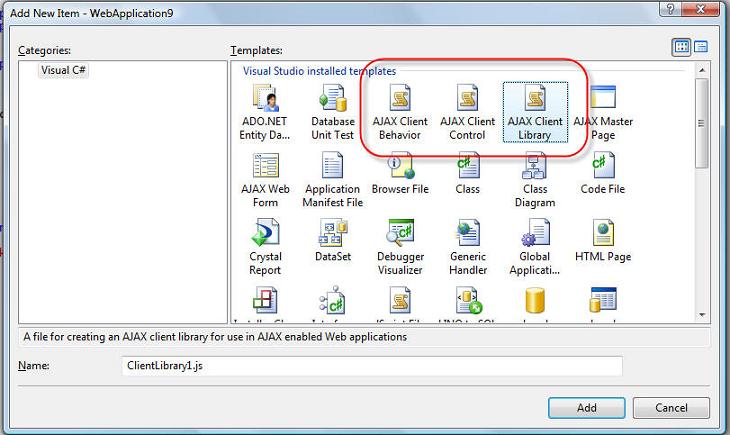
ASP.NET AJAX uses the "prototype" pattern within JavaScript to enable you to define classes and interfaces. For example, I can create an encapsulated JavaScript class using this pattern using one of the project item templates above (notice below how the namespace created by Visual Studio by default is the same as my project namespace):
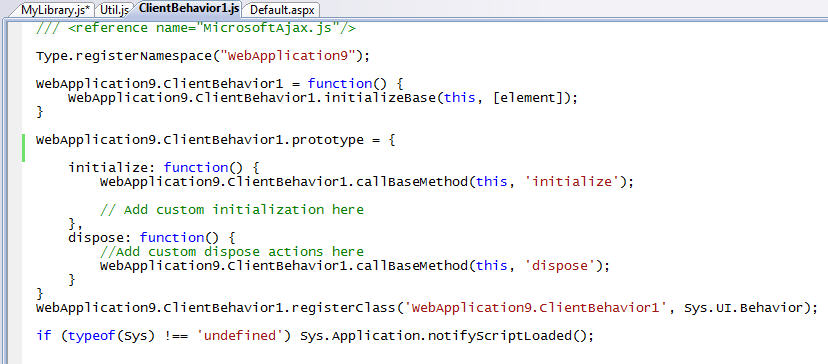
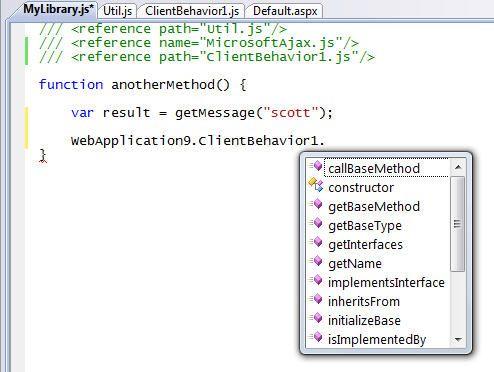
Obviously I then get full intellisense support when consuming my new library from any page or other JavaScript file:
Summary
Hopefully the above walkthrough provides a first look at some of the new JavaScript intellisense features coming soon (there are more - but this is a start). In future blog-posts I'll also cover some of the new JavaScript debugging features that VS 2008 brings, as well as some of the WYSIWYG designer support for ASP.NET AJAX and the ASP.NET AJAX Control Toolkit.
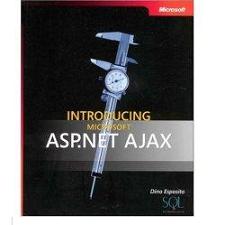
To learn more about ASP.NET AJAX (and how you can use all of the runtime features I described above starting today with ASP.NET 2.0), I'd also highly recommend checking out these two new books that have recently been published and which cover the official ASP.NET AJAX 1.0 release:

Note that because of the new VS 2008 multi-targeting support, you can use the JavaScript intellisense features I showed above with both ASP.NET applications built using .NET 3.5 (which has ASP.NET AJAX built-in), as well as with existing ASP.NET 2.0 applications (including ones that use the separate ASP.NET AJAX 1.0 download). This provides a very compelling reason to start using VS 2008 - even if you are using it to only target .NET 2.0 applications.
Hope this helps,
Scott






 扫一扫
扫一扫


 1437
1437

 被折叠的 条评论
为什么被折叠?
被折叠的 条评论
为什么被折叠?
 到【灌水乐园】发言





