


管家婆财贸软件如何设置做单时按往来单位自动带出对应税率

近日,小编的一个客户在使用管家婆财贸软件时遇到一个问题,他想要针对不同的客户设置不同的税率,然后开具销售单时选择了客户单位后就可以自动带出税率。今天来和小编一起学习下管家婆财贸软件如何设置做单时按往来单位自动带出对应税率吧!

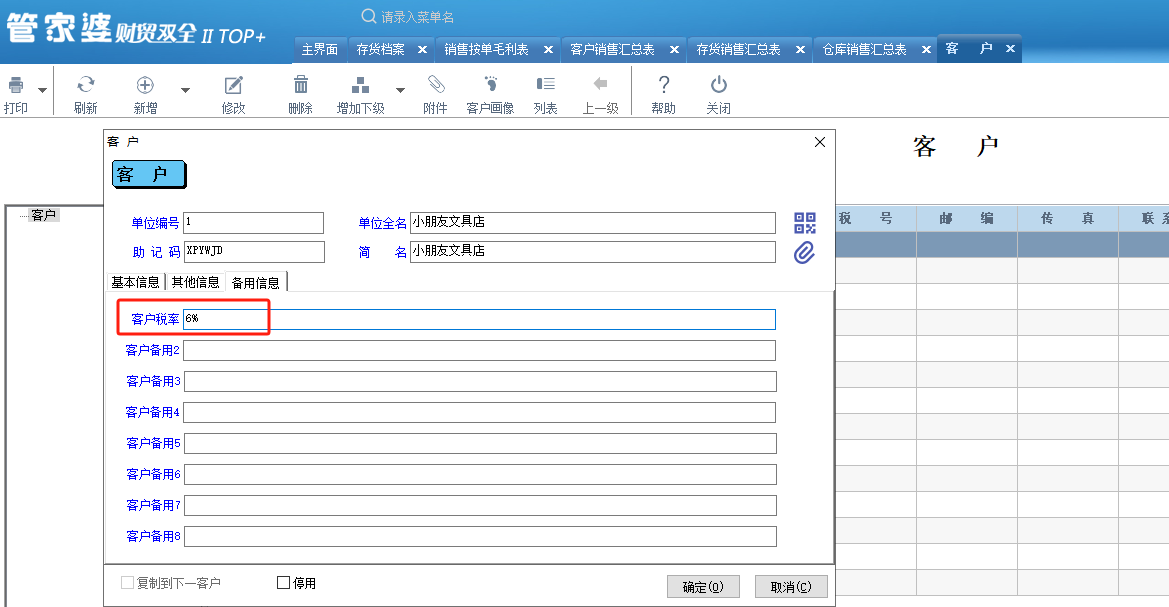
登录进入管家婆财贸软件,点击基础资料-客户,在每个客户信息的编辑页面备用信息里将客户备用字段1修改为客户税率,并录入该客户对应的税率后点击确定保存。
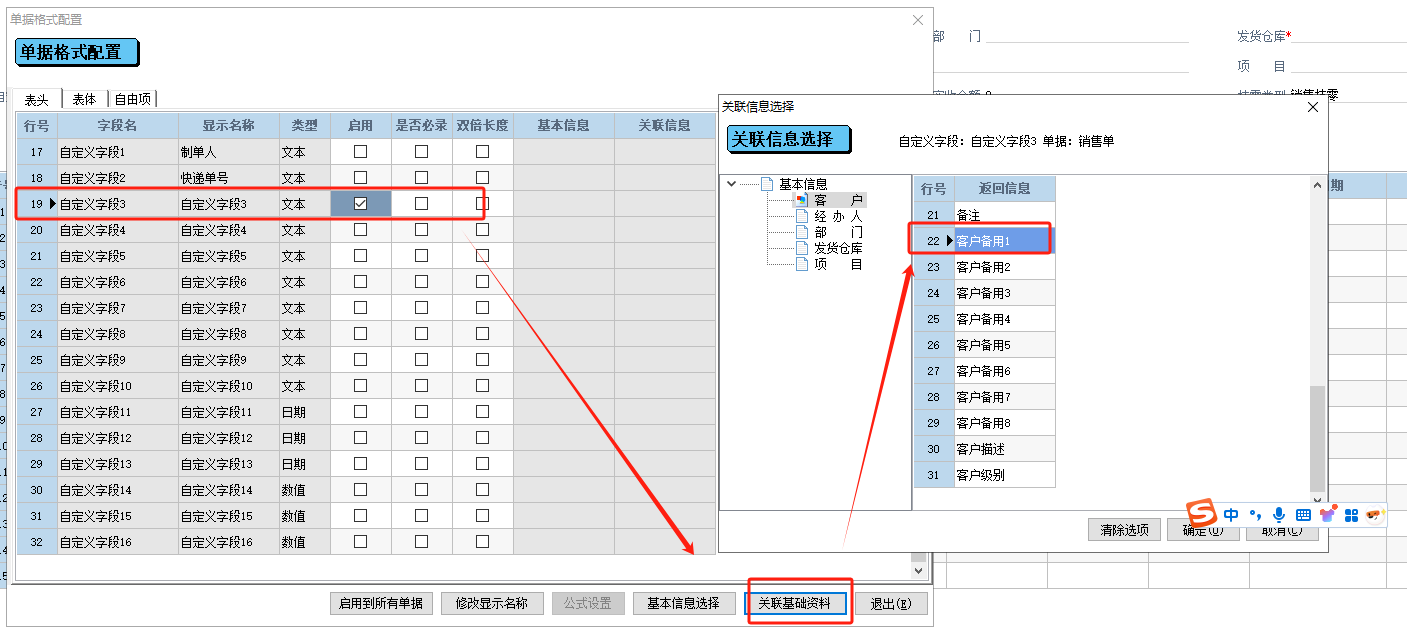
设置好每个客户对应的税率后,点击软件左上角的文件-单据格式配置,进入单据格式配置页面表头后下拉选择销售单,销售单表头启用自定义字段3,并通过关联基础资料关联到客户备用字段1。
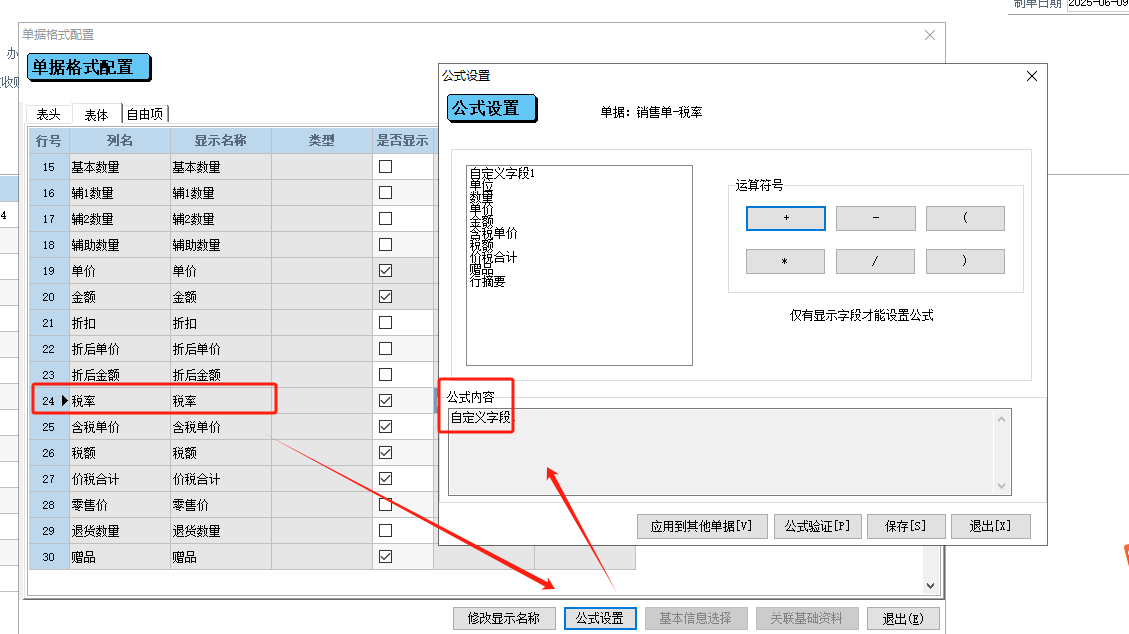
单据格式配置里选择表体,下拉找到税率选中并设置公式等于自定义字段3,确定保存退出。
设置好后,开具销售单时,表体现选择商品,商品选择好后表头再选择往来单位即可带出该单位的默认税率了。

Stata is a powerful statistical software that can be used to perform a single-group proportion meta-analysis. This type of analysis is commonly used when the goal is to estimate an overall proportion (e.g., prevalence, success rate) across multiple studies reporting binary outcomes. Below are the general methods to conduct a single-group proportion meta-analysis using Stata. --- To begin, prepare your dataset in Stata. Each row should represent a study, and at minimum, you need two variables: the number of events (e.g., successes) and the total number of participants (sample size) for each study. Install the `metaprop` command if it is not already available. This user-written command is specifically designed for meta-analysis of proportions. Run the following: ``` ssc install metaprop ``` Use the `metaprop` command to perform the analysis. The basic syntax is as follows: ```stata metaprop event total, random ``` Here, `event` refers to the variable containing the number of events, and `total` refers to the variable containing the total sample size. The `random` option specifies the use of a random-effects model, which is often appropriate when heterogeneity is expected across studies. Consider applying a transformation to stabilize variances, especially when proportions are close to 0 or 1. The default transformation in `metaprop` is the Freeman-Tukey double arcsine transformation, which is generally recommended for such cases. Assess heterogeneity using the output from the `metaprop` command. Look at the I² statistic and the Q-test results to evaluate the consistency of the effect sizes across studies. Visualize the results using a forest plot, which is automatically generated by the `metaprop` command. If further customization is needed, additional options can be applied within the command. If necessary, perform subgroup analysis or meta-regression to explore potential sources of heterogeneity. Use the `metareg` command from the `metan` package for meta-regression: ``` ssc install metareg metareg logitp covariate, wsse(se_logitp) ``` Ensure that `logitp` and `se_logitp` are appropriately calculated for the logit-transformed proportions. ---
评论
成就一亿技术人!
拼手气红包6.0元
还能输入1000个字符
 
红包 添加红包
表情包 插入表情
 条评论被折叠 查看
添加红包

请填写红包祝福语或标题

红包个数最小为10个

红包金额最低5元

当前余额3.43前往充值 >
需支付:10.00
成就一亿技术人!
领取后你会自动成为博主和红包主的粉丝 规则
hope_wisdom
发出的红包
实付
使用余额支付
点击重新获取
扫码支付
钱包余额 0

抵扣说明:

1.余额是钱包充值的虚拟货币,按照1:1的比例进行支付金额的抵扣。
2.余额无法直接购买下载,可以购买VIP、付费专栏及课程。

余额充值


