


这篇主要介绍实现QQ的分享图片功能,这里用QQ官方提供的SDK。QQ的分享功能直接使用,不需要授权软件,所以比较方便。
一、准备工作
1、创建应用
腾讯QQ互联官网进行注册登录,并且创建应用管理,,获取到你的APP ID和APP Key。这里我已经完成了
2、集成SDK
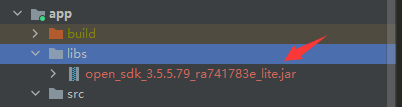
QQ互联的官方文档下载SDK,并将jar包导入项目中,这里我已经导入完成了。按照官方文档的步骤一步一步的完成。
二、代码
1、将open-sdk.jar加入编译路径
在app目录下的build.gradle中添加
dependencies {
    implementation fileTree(dir: 'libs', include: '*.jar')
}
然后重新导入一下,这样open-sdk就会导入进来了。
2、配置AndroidManifest.xml
<uses-permission android:name="android.permission.INTERNET" />
<uses-permission android:name="android.permission.ACCESS_NETWORK_STATE" />


 <activity
            android:name="com.tencent.tauth.AuthActivity"
            android:launchMode="singleTask"
            android:noHistory="true">
            <intent-filter>
                <action android:name="android.intent.action.VIEW" />

                <category android:name="android.intent.category.DEFAULT" />
                <category android:name="android.intent.category.BROWSABLE" />

                <data android:scheme="tencent+你的id" />
            </intent-filter>
        </activity>
        <activity
            android:name="com.tencent.connect.common.AssistActivity"
            android:configChanges="orientation|keyboardHidden"
            android:screenOrientation="behind"
            android:theme="@android:style/Theme.Translucent.NoTitleBar" />
注意 "tencent+你的id"这个地方:如果你的id是123456,那么android:scheme:这个地方你要写成tencent123456。
3、布局文件activity_avatarupload.xml
<?xml version="1.0" encoding="utf-8"?>
<ScrollView xmlns:android="http://schemas.android.com/apk/res/android"
    xmlns:app="http://schemas.android.com/apk/res-auto"
    android:id="@+id/scrollView"
    android:layout_width="match_parent"
    android:layout_height="match_parent" >
    <LinearLayout
        android:layout_width="match_parent"
        android:layout_height="match_parent"
        android:orientation="vertical">
        <Button
            android:id="@+id/share"
 最低0.47元/天 解锁文章






 扫一扫
扫一扫


 785
785

 被折叠的 条评论
为什么被折叠?
被折叠的 条评论
为什么被折叠?
 到【灌水乐园】发言





