


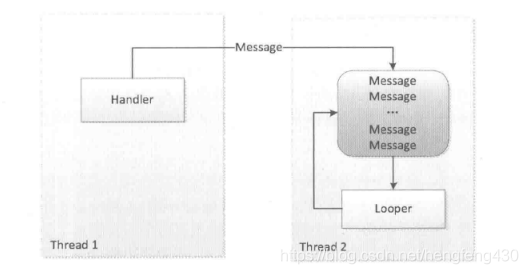
1.Android消息机制原理图:
2.Handler运行官方说明:
A Handler allows you to send and process Message and Runnable objects associated with a thread's MessageQueue. Each Handler instance is associated with a single thread and that thread's message queue. When you create a new Handler it is bound to a Looper. It will deliver messages and runnables to that Looper's message queue and execute them on that Looper's thread.
There are two main uses for a Handler: (1) to schedule messages and runnables to be executed at some point in the future; and (2) to enqueue an action to be performed on a different thread than your own.
3.Handler运行可以简述为:
Handler将Message发送到Looper的消息队列中,即MessageQueue,等待Looper的循环读取Message,处理Message,然后调用Message的target,即附属的Handler的dispatchMessage()方法,将该消息回调到handleMessage()方法中,然后完成更新UI操作。
4.Handler的工作原理
Handler的工作主要包含消息的发送和接收过程。消息的发送可以通过post的一系列方法以及send的一系列方法来实现,post的一系列方法最终是通过send的一系列方法来实现的。
public final boolean sendMessage(Message msg){
    return sendMessageDelayed(msg, 0);
}

public final boolean sendMessageDelayed(Message msg, long delayMillis) {
    if (delayMillis < 0) {
        delayMillis = 0;
    }
    return sendMessageAtTime(msg, SystemClock.uptimeMillis () + delayMillis);
}

public boolean sendMessageAtTime(Message msg, long uptimeMillis) {
    MessageQueue queue = mQueue;
    if (queue == null) {
        RuntimeException e = new RuntimeException(this + "sendMessageAtTime() called with no mQueue");
        Log.w("LooperH, e.getMessage(), e);
        return false;
    }
    return enqueueMessage(queue, msg, uptimeMillis);
}

private boolean enqueueMessage(MessageQueue queue. Message msg, long uptimeMillis) (
    msg.target = this;
    if (mAsynchronous) {
        msg.setAsynchronous(true);
    }
    return queue.enqueueMessage(msg, uptimeMillis);
}
可以发现,Handler发送消息的过程仅仅是向消息队列中插入了一条消息, MessageQueue的next方法就会返回这条消息给Looper, Looper收到消息后就开始处理了, 最终消息由Looper交由Handler处理,即Handler的dispatchMessage方法会被调用,这时 Handler就进入了处理消息的阶段。dispatchMessage的实现如下所示。
public void dispatchMessage(Message msg) {
    if (msg.callback != null) {
        handlecallback(msg);
    } else {
        if (mCallback != null) {
            if (mCallback.handleMessage(msg)) {
                return;
            }
        }
        handleMessage(msg);
    }
}
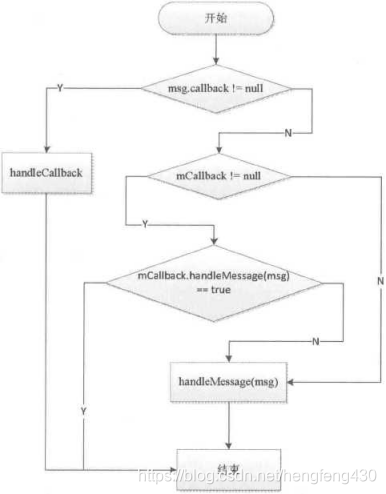
Handler处理消息的过程如下:
首先,检查Message的callback是否为null,不为null就通过handleCallback来处理消息。Message的callback是一个Runnable对象,实际上就是Handler的post方法所传递的 Runnable参数。
其次,检査mCallback是否为null,不为null就调用mCallback的handleMessage方法来处理消息。
最后,调用Handler的handleMessage方法来处理消息。Handler处理消息的过程可以
归纳为一个流程图。
5.消息队列的工作原理
MessageQueue主要包含两个操作:插入和读取。插入和读取对应的方法分别为enqueueMessage 和next。尽管MessageQueue叫消息队列,但是它的内部实现并不是用的队列,实际上它是通过一个单链表的数据结构来维护消息列表,单链表在插入和删除上比较有优势。
boolean enqueueMessage(Message msg, long when) {
    synchronized (this) {
        msg.marklnUse ();
        msg.when = when;
        Message p = mMessages;

        boolean needWake;
        if (p == null || when == 0 || when < p.when) {
            // New head, wake up the event queue if blocked.
            msg.next = p;
            mMessages = msg;
            needWake = mBlocked;
        } else {
            // Inserted within the middle of the queue. Usually we don*t have to wake
            // up the event queue unless there is a barrier at the head of the queue
            // and the message is the earliest asynchronous message in the queue.

            needWake = mBlocked && p. target == null && msg. isAsynchronous ();
            Message prev;
            for (;;) {
                prev = p;
                p = p.next;
                if (p == null || when < p.when) {
                    break;
                }

                if (needWake && p.isAsynchronous()) {
                    needWake = false;
                }
                msg.next = p; // invariant: p == prev.next
                prev.next = msg;
            }
            // We can assume mPtr != 0 because mQuitting is false.
            if (needWake) {
                nativeWake(mPtr);
            }
        }
    }
    return true;
}
next的主要逻辑如下所示。
Message next(){
    int pendingldleHandlerCount = -1; // -1 only during first iteration int
    nextPollTimeoutMiIlls = 0;
    for (;;)(
        if (nextPollTimeoutMillis != 0) {
            Binder.flushPendingCommands();
            nativePollOnce(ptr, nextPollTimeoutMillis);
            synchronized (this) {
                // Try to retrieve the next message.Return if found.
                final long now = SystemClock.uptimeMillis();
                Message prevMsg = null;
                Message msg = mMessages;
                if (msg != null && msg.target == null) {
                    // Stalled by a barrier. Find the next asynchronous message in the queue.
                    do {
                        prevMsg = msg;
                        msg = msg.next;
                    } while (msg !- null && !msg.isAsynchronous());
                }
                if (msg != null) {
                    if (now < msg.when) {
                        // Next message is not ready. Set a timeout to wake up when it is ready.
                        nextPollTimeoutMillis = (int) Math.min(msg.when - now, Integer.MAX VALUE);
                    } else {
                        // Got a message.
                        mBlocked = false;
                        if (prevMsg !- null) {
                            prevMsg.next = msg.next;
                        } else {
                            mMessages - msg.next;
                        }
                        msg.next = null;
                        if (false) Log. v ("MessageQueue'*, MReturning message:" + msg);
                        return msg;
                    }
                } else {
                    // No more messages.
                    nextPollTimeoutMillis = -1;
                }
            }
        }
}
可以发现next方法是一个无限循环的方法,如果消息队列中没有消息,那么next方法会一直阻塞在这里。当有新消息到来时,next方法会返回这条消息并将其从单链表中移除。
6.Looper的工作原理
首先看一下它的构造方法,在构造方法中它会创建一个MessageQueue即消息队列,然后将当前线程的对象保存起来,如下所示。
private Looper(boolean quitAllowed) (
    mQueue = new MessageQueue(quitAllowed);
    mThread = Thread.currentThread();
}
我们知道,Handler的工作需要Looper,没有Looper的线程就会报错,那么如何为一 个线程创建Looper呢?其实很简单,通过Looper.prepare。即可为当前线程创建一个Looper, 接着通过Looper.loop来开启消息循环,如下所示。
new Thread("Thread#2") {

    @Override
    public void run() {
        Looper.prepare();
        Handler handler = new Handler();
        Looper.loop();
    };
}・start ();
Looper提供了 quit和quitSafely 来退岀一个Looper,二者的区别是:quit会直接退出Looper,而quitSafely只是设定一个退出标记,然后把消息队列中的已有消息处理完毕后才安全地退出。Looper退出后,通过 Handler发送的消息会失败,这个时候Handler的send方法会返回false。在子线程中,如果手动为其创建了 Looper,那么在所有的事情完成以后应该调用quit方法来终止消息循环, 否则这个子线程就会一直处于等待的状态,而如果退出Looper以后,这个线程就会立刻终止,因此建议不需要的时候终止Looper。
Looper最重要的一个方法是loop方法,它的实现如下所示。
public static void loop () {
    final Looper me = myLooper();
    if (me == null) {
        throw new RuntimeException("No Looper; Looper.prepare() wasn't called on this thread.");
    }

    final MessageQueue queue = me.mQueue;
    // Make sure the identity of this thread is that of the local process,
    // and keep track of what that identity token actually is.

    Binder.clearCallingldentity();
    final long ident = Binder.clearCallingldentity();
    for (;;) {
        Message msg = queue.next(); // might block
        if (msg == null) {
            // No message indicates that the message queue is quitting.
            return;
        }

        // This must be in a local variable, in case a UI event sets the logger Printer
        logging = me.mLogging;
        if (logging != null) {
            logging.printin (">>> Dispatching to " + msg. target + " " +msg.callback + ": " + msg.what);
         }

         msg.target.dispatchMessage(msg);
         if (logging != null) {
             logging .printin ("<<< Finished to " + msg. target + msg.callback);
             // Make sure that during the course of dispatching the
             // identity of the thread wasn't corrupted,

             final long newldent = Binder.clearCallingldentity();
             if (ident != newldent) {
                 Log.wtf(TAG, "Thread identity changed from Ox"+ Long.toHexString(ident) + ” to Ox"+ Long.toHexString(newldent)+n while dispatching to + msg.target.getClass().getName() + ""+ msg.callback + n what=n + msg.what);
             }
          }
        msg.recycleUnchecked();
    }
}
Looper的loop方法的工作过程也比较好理解,loop方法是一个死循环,唯一跳岀循环 的方式是MessageQueue的next方法返回了 null.当Looper的quit方法被调用时,Looper 就会调用MessageQueue的quit或者quitSafely方法来通知消息队列退出,当消息队列被标记为退出状态时,它的next方法就会返回null。
Looper和ThreadLocal之间的联系,如下代码所示
private static void prepare(boolean quitAllowed) {
    if (sThreadLocal.get() != null) {
        throw new RuntimeException("Only one Looper may be created per thread");
    }
    sThreadLocal.set(new Looper(quitAllowed));
}

public static @Nullable Looper myLooper() {
    return sThreadLocal.get();
}
Looper在prepare时,就通过ThreadLocal将新建的Looper保存起来,当需要Looper对象时就通过Looper的静态方法myLooper将ThreadLocal中保存的Looper对象取出。
7.ThreadLocal 的工作原理
ThreadLocal是一个线程内部的数据存储类,通过它可以在指定的线程中存储数据,数据存储以后,只有在指定线程中可以获取到存储的数据,对于其他线程来说则无法获取到数据。
只要弄清楚 ThreadLocal 的get和set方法就可以明白它的工作原理。
首先看ThreadLocal的set方法,如下所示。
public void set(T value) {
    Thread t = Thread.currentThread();
    ThreadLocalMap map = getMap(t);
    if (map != null)
        map.set(this, value);
    else
        createMap(t, value);
}
上面分析了 ThreadLocal的set方法,这里分析它的get方法,如下所示。
public T get() {
    Thread t = Thread.currentThread();
    ThreadLocalMap map = getMap(t);
    if (map != null) {
        ThreadLocalMap.Entry e = map.getEntry(this);
        if (e != null) {
            @SuppressWarnings("unchecked")
            T result = (T)e.value;
            return result;
        }
    }
    return setInitialValue();
}
总结 :
ThreadLocal对象的set/get方法都是操作的当前线程的ThreadLocalMap对象,所以ThreadLocal并不是存放数据的地方,它只是代理了线程ThreadLocalMap容器的set/get方法。画一个示意图就知道了:
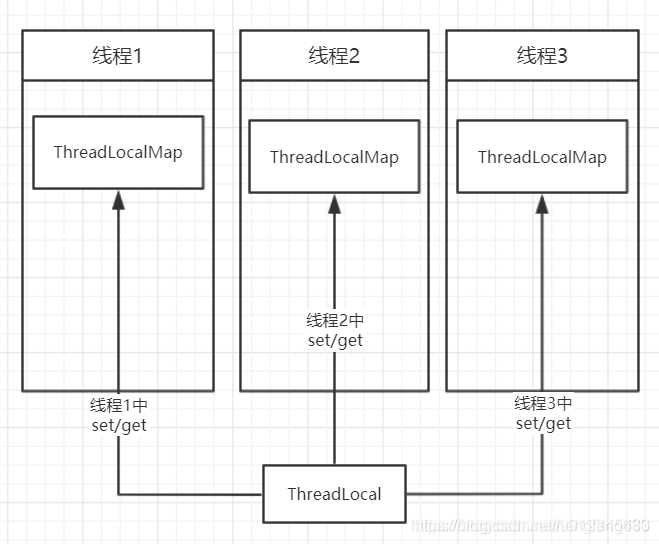
ThreadLocal的get方法的key是当前的ThreadLocal.hashcode,而容器是所在线程的map,这两者决定了获取的对象是哪个。
8.主线程的消息循环
Android的主线程就是ActivityThread,主线程的入口方法为main,在main方法中系统会通过Looper.prepareMainLooper()来创建主线程的Looper以及MessageQueue»并通过 Looper.loop。来开启主线程的消息循环,这个过程如下所示。
public static void main(String[] args) (

    Process.setArgV0("<pre-initialized>");
    Looper.prepareMainLooper();
    ActivityThread thread = new ActivityThread();
    thread.attach(false);
    if (sMainThreadHandler == null) {
        sMainThreadHandler = thread.getHandler();
    }
    AsyncTask.init();
    if (false) {
        Looper.myLooper().setMessageLogging(newLogPrinter(Log.DEBUG, "ActivityThread"));
    }
    Looper.loop();
    throw new RuntimeException("Main thread loop unexpectedly exited");
}
主线程的消息循环开始了以后,ActivityThread还需要一个Handler来和消息队列进行 交互,这个Handler就是ActivityThread.H,它内部定义了一组消息类型,主要包含了四大 组件的启动和停止等过程,如下所示。
private class H extends Handler {

    public static final int LAUNCH_ACTIVITY    =100;
    public static final int PAUSE_ACTIVITY    =101;
    public static final int PAUSE_ACTIVITY_FINISHING    =102;
    public static final int STOP_ACTIVITY_SHOW    =103;
    public static final int STOP_ACTIVITY_HIDE    =104;
    public static final int SHOW__W INDOW    =105;
    public static final int HIDE_WINDOW    =106;
    public static final int RESUME_ACTIVITY    =107;
    public static final int SEND_RESULT    =108;
    public static final int DESTROY_ACTIVITY    =109;
    public static final int BIND_APPLICATION    =110;
    public static final int EXIT_APPLICATION    =111;
    public static final int NEW_INTENT    =112;
    public static final int RECEIVER    =113;
    public static final int CREATE_SERVICE    =114;
    public static final int SERVICE_ARGS    =115;
    public static final int STOP_SERVICE    =116;
}
ActivityThread通过ApplicationThread和AMS进行进程间通信,AMS以进程间通信的 方式完成ActivityThread的请求后会回调ApplicationThread中的Binder方法,然后 ApplicationThread会向H发送消息,H收到消息后会将ApplicationThread中的逻辑切换到 ActivityThread中去执行,即切换到主线程中去执行,这个过程就是主线程的消息循环模型。





 扫一扫
扫一扫


 897
897

 被折叠的 条评论
为什么被折叠?
被折叠的 条评论
为什么被折叠?
 到【灌水乐园】发言





