
Thymeleaf功能标签th:block

需求背景:在html中,当满足什么条件时,显示什么html元素,否则不显示什么元素

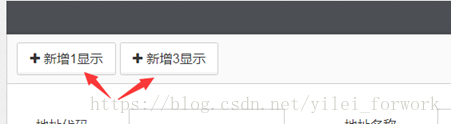
举个简单的th:block使用,三个按钮1和3为true,2是false,那么2中被th:block包含的代码段则不显示,效果如下图

 <th:block th:if='${1==1}'>
      <button class="btn btn-default" data-toggle="modal" data-target="#myModal">
          <i class="fa fa-plus"></i> 新增1显示
      </button>
 </th:block>
 <th:block th:if='${1!=1}'>
      <button class="btn btn-default" data-toggle="modal" data-target="#myModal">
          <i class="fa fa-plus"></i> 新增2不显示
      </button>
 </th:block>
 <th:block th:if='${1==1}'>
      <button class="btn btn-default" data-toggle="modal" data-target="#myModal">
          <i class="fa fa-plus"></i> 新增3显示
      </button>
 </th:block>
<!DOCTYPE html> <html lang="zh" xmlns:th="http://www.thymeleaf.org" xmlns:shiro="http://www.pollix.at/thymeleaf/shiro"> <head> <th:block th:include="include :: header('123456789')"/> <th:block th:include="include :: datetimepicker-css"/> <!-- <th:block th:include="include :: datetimepicker-css"/>--> <th:block th:include="include :: bootstrap-fileinput-css"/> </head> <style> </style> <body> <div> <div> <input type="text" name="filex" id="inputfile"> <div class='file-loading'> <input class='form-control file-upload' name='file' type='file' id="filex"> </div> </div> <div> <button onclick="chuli()">确定</button> </div> </div> <th:block th:include="include :: footer"/> <th:block th:include="include :: echarts-js"/> <th:block th:include="include :: datetimepicker-js"/> <th:block th:include="include :: bootstrap-fileinput-js"/> <script th:inline="javascript"> $(".file-upload").fileinput({ uploadUrl: ctx + 'common/upload', maxFileCount: 1, autoReplace: true, showPreview: false }).on('fileuploaded', function (event, data, previewId, index) { $("input[name='" + event.currentTarget.id + "']").val(data.response.url) }).on('fileremoved', function (event, id, index) { $("input[name='" + event.currentTarget.id + "']").val('') }) function chuli() { const x = document.getElementById("inputfile"); alert(x.value); } </script> </body> </html> 我使用的ruoyi框架,是bootstrap版本的,这是我的代码,我现在是通过组件打开的,我现在希望我点击确定能把我拿到的值传回上一个页面
最新发布
09-09
thymleaf代码<form id="seatForm" th:action="@{/seatMap}" method="post"> <input type="hidden" name="sid" th:value="${screening.sid}"> <div class="seating-grid"> <!-- 列标题 --> <div class="header-cell corner"></div> <th:block th:each="col : ${#numbers.sequence(1, maxCol)}"> <div class="header-cell column-label" th:text="${col}"></div> </th:block> <!-- 行内容 --> <th:block th:each="row : ${#numbers.sequence(1, maxRow)}"> <div class="header-cell row-label" th:text="${row}"></div> <th:block th:each="col : ${#numbers.sequence(1, maxCol)}"> <!-- 使用传统方式查找座位 --> <th:block th:with="seat=${null}, isBooked=${false}"> <!-- 查找匹配的座位 --> <th:block th:each="s : ${allSeats}" th:if="${s.row == row and s.col == col}" th:with="seat=${s}"></th:block> <!-- 检查是否已预订 --> <th:block th:if="${seat != null}"> <th:block th:each="bs : ${bookedSeats}" th:if="${bs.seat_id == seat.seat_id}" th:with="isBooked=${true}"></th:block> </th:block> <!-- 检查是否已选择 --> <th:block th:with="isSelected=${false}"> <th:block th:each="ss : ${selectedSeats}" th:if="${ss.seat_id == seat.seat_id}" th:with="isSelected=${true}"></th:block> </th:block> <!-- 显示座位按钮 --> <button th:if="${seat != null}" type="button" th:classappend="${isBooked} ? 'booked' : (isSelected ? 'selected' : 'available')" class="seat-btn" th:data-seat-id="${seat.seat_id}" th:data-row="${row}" th:data-col="${col}" onclick="toggleSeat(this)"> <span th:text="${row}+'-'+${col}"></span> </button> <!-- 空白位置 --> <div th:if="${seat == null}" class="seat-btn empty" th:attr="data-row=${row}, data-col=${col}"></div> </th:block> </th:block> </th:block> </div> </form>
06-28
评论
添加红包

请填写红包祝福语或标题

红包个数最小为10个

红包金额最低5元

当前余额3.43前往充值 >
需支付:10.00
成就一亿技术人!
领取后你会自动成为博主和红包主的粉丝 规则
hope_wisdom
发出的红包
实付
使用余额支付
点击重新获取
扫码支付
钱包余额 0

抵扣说明:

1.余额是钱包充值的虚拟货币,按照1:1的比例进行支付金额的抵扣。
2.余额无法直接购买下载,可以购买VIP、付费专栏及课程。

余额充值


