


目录
一、系统介绍
1.开发环境
操作系统:Win10
开发工具 :Eclipse2018
JDK版本:jdk1.8
存储方式:Txt文件存储
2.技术选型
Java+Swing+Txt
3.功能模块
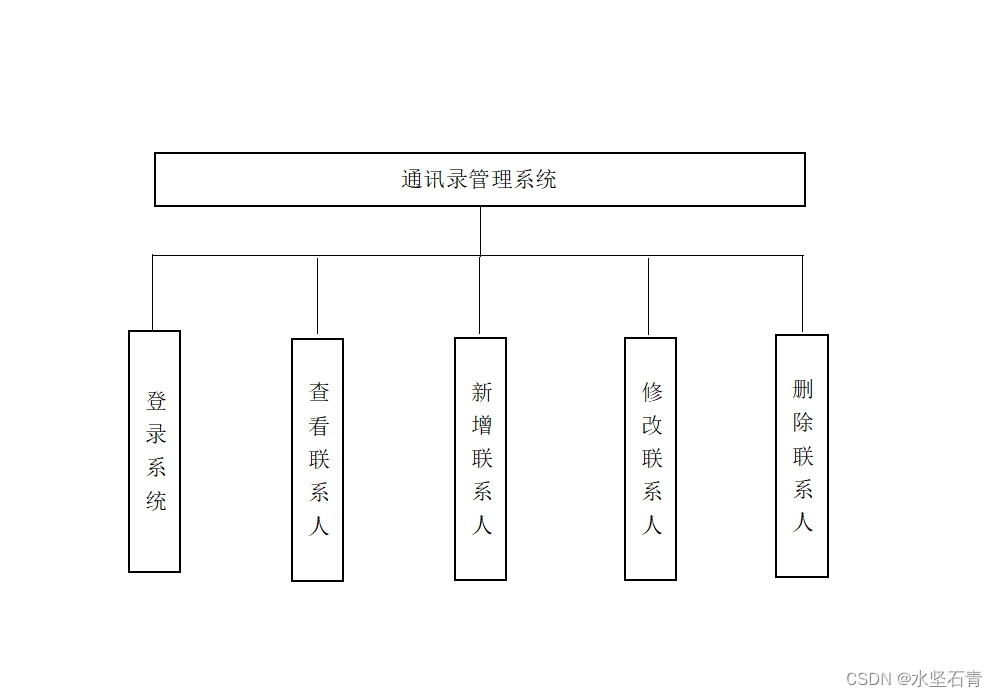
4.系统功能
1.系统登录
管理员可以登录系统
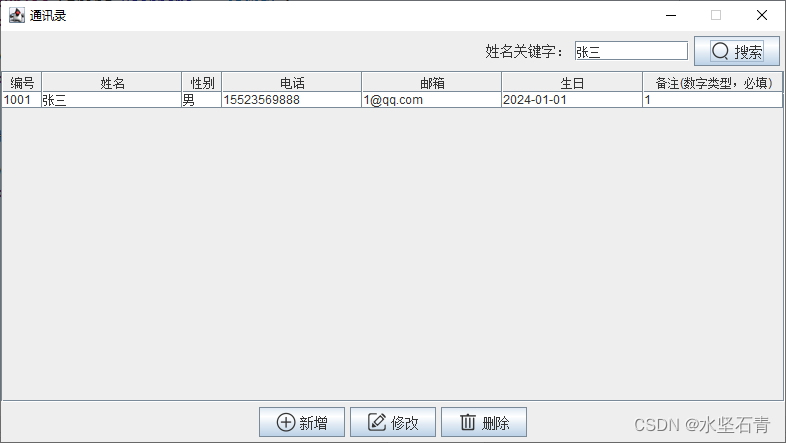
2.查看联系人
管理员可以查看搜索联系人信息。
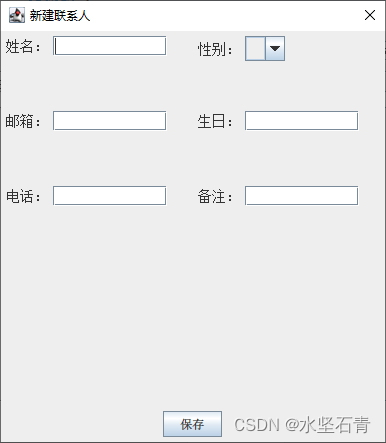
3.新增联系人
管理员可以新增联系人信息。
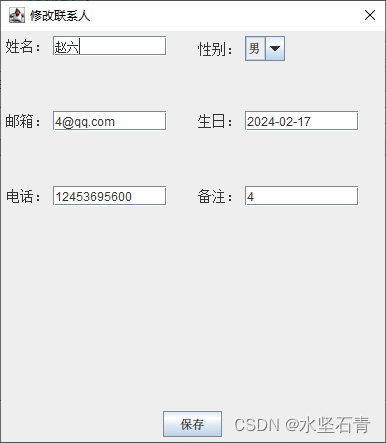
4.修改联系人
管理员可以修改联系人信息。
5.删除联系人
管理员可以删除联系人信息。
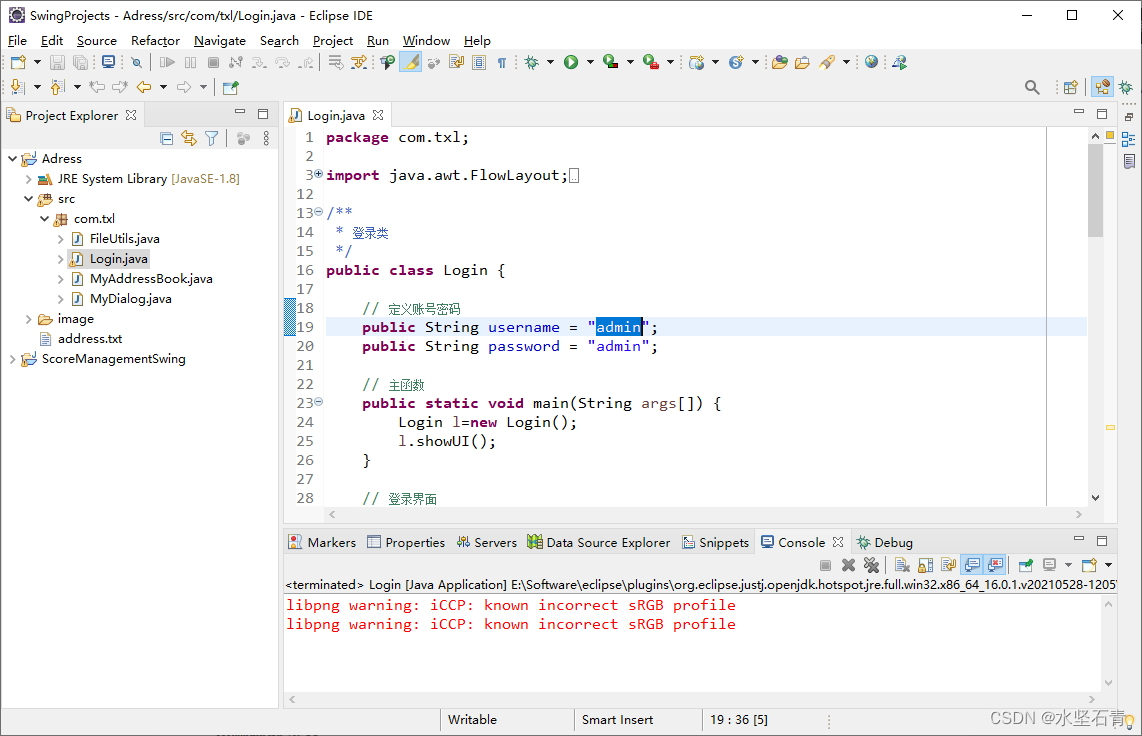
5.工程结构
二、系统展示
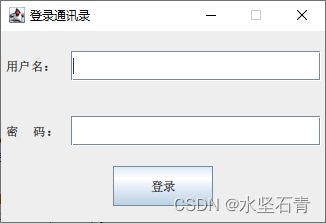
1.登录页面
2.主页面
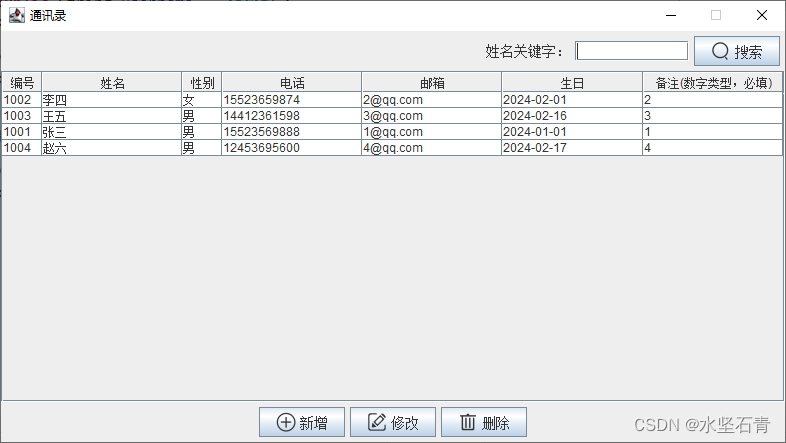
3.查看联系人
4.新增联系人
5.修改联系人
三、部分代码
Login
package com.txl;

import java.awt.FlowLayout;
import java.awt.event.MouseAdapter;
import java.awt.event.MouseEvent;
import javax.swing.JButton;
import javax.swing.JFrame;
import javax.swing.JLabel;
import javax.swing.JOptionPane;
import javax.swing.JTextField;
import javax.swing.JPasswordField;

/**
 * 登录类
 */
public class Login {

	// 定义账号密码
	public String username = "admin";
	public String password = "admin";

	// 主函数
	public static void main(String args[]) {
		Login l=new Login();
		l.showUI();
	}

	// 登录界面
	public void showUI() {

		// 创建窗体
		JFrame login=new JFrame();
		login.setTitle("登录通讯录");
		login.setSize(340,230);
		login.setDefaultCloseOperation(3);
		login.setLocationRelativeTo(null);
		login.setResizable(false);

		FlowLayout fl=new FlowLayout(FlowLayout.CENTER,5,5);
		login.setLayout(fl);

		JLabel labname=new JLabel();
		labname.setText("用户名:");
		labname.setPreferredSize(new java.awt.Dimension(60, 60));
		login.add(labname);

		JTextField textname=new JTextField();
		textname.setPreferredSize(new java.awt.Dimension(250, 30));
		login.add(textname);

		JLabel labpassword=new JLabel();
		labpassword.setText("密     码:");
		labpassword.setPreferredSize(new java.awt.Dimension(60, 60));
		login.add(labpassword);

		JPasswordField jp=new JPasswordField();
		jp.setPreferredSize(new java.awt.Dimension(250, 30));
		login.add(jp);

		JButton button=new JButton();
		button.setText("登录");
		button.setPreferredSize(new java.awt.Dimension(100, 40));
		login.add(button);
		login.setVisible(true);
		// 监听按钮
		button.addMouseListener(new MouseAdapter() {
			public void mouseClicked(MouseEvent e) {
				try {
					if (textname.getText().equals("admin")&&jp.getText().equals("admin")) {
						new MyAddressBook();
						login.dispose();
					}else{
						JOptionPane.showMessageDialog(null, "用户名或密码不正确!!!");
					}
				} catch (Exception e1) {
					e1.printStackTrace();
				}
			}
		});
	}
}
FileUtils
package com.txl;

import java.io.BufferedReader;
import java.io.File;
import java.io.FileInputStream;
import java.io.FileWriter;
import java.io.IOException;
import java.io.InputStreamReader;
import java.io.UnsupportedEncodingException;

/**
 * 文件操作工具类
 *
 */
public class FileUtils {
    /**
     * 生成文件
     *
     * @param fileName
     */
    public static boolean createFile(File file) {
        if (!file.exists()) {
            try {
                file.createNewFile();
            } catch (Exception e) {
                e.printStackTrace();
            }
        }
        return true;
    }

    /**
     * @description 读文件
     * @throws IOException
     */
    public static String readTxtFile(File file) throws IOException {
        FileInputStream fInputStream = new FileInputStream(file);
        InputStreamReader inputStreamReader = new InputStreamReader(fInputStream, "utf-8");
        BufferedReader in = new BufferedReader(inputStreamReader);

        String strTmp = "";
        StringBuffer sBuffer = new StringBuffer();
        while ((strTmp = in.readLine()) != null) {
            sBuffer.append(strTmp + "\r\n");
        }
        in.close();
        inputStreamReader.close();
        fInputStream.close();
        return sBuffer.toString();

    }

    /**
     * @description 写文件
     * @param args
     * @throws UnsupportedEncodingException
     * @throws IOException
     */
    public static boolean writeTxtFile(Object content, File file, boolean isappend)
            throws UnsupportedEncodingException, IOException {
        FileWriter fileWritter = new FileWriter(file, isappend);
        fileWritter.write(content.toString());
        fileWritter.flush();
        fileWritter.close();
        return true;
    }

}
四、其他
1.更多系统
Java+Swing系统系列实现
Java+JSP系统系列实现
Java+Servlet系统系列实现
Java+SSM系统系列实现
Java+SSH系统系列实现
Java+Springboot系统系列实现
Java+Springboot+H-ui+Maven实现营销管理系统
Java+Springboot+Bootstrap+Maven实现网上商城系统
Java+Springboot+Bootstrap+Maven实现景区旅游管理系统
1.更多JavaWeb系统请关注专栏。
https://blog.youkuaiyun.com/helongqiang/category_10020130.html
2.更多JavaSwing系统请关注专栏。
https://blog.youkuaiyun.com/helongqiang/category_6229101.html
2.源码下载
sql在sql文件夹下面,系统登录账号:admin 密码:admin;文件存储是address.txt。
3.运行项目
关注B站:水坚石青
后期有更多干货视频推出!!!
4.侵权事宜
如有侵权请联系我删除。
5.支持博主
如果您觉得此文对您有帮助,请点赞加关注加收藏。祝您生活愉快!








 扫一扫
扫一扫


 1611
1611

 被折叠的 条评论
为什么被折叠?
被折叠的 条评论
为什么被折叠?
 到【灌水乐园】发言





