




Pandas模块是Python用于数据导入及整理的模块,对数据挖掘前期数据的处理工作十分有用。
1.1、介绍
Pandas模块的数据结构主要有两:1、Series ;2、DataFrame ,下面将分别从这两方面介绍:
(1) Series结构介绍和操作示例:1.1、介绍
The Series is the primary building block of pandas and represents a one-dimensional labeled array based on the NumPy ndarray;
大概就是说Series结构是基于NumPy的ndarray结构,是一个一维的标签矩阵(感觉跟python里的字典结构有点像)
1.2、相关操作
# coding:utf-8

print "1/**************"
'''
创建
pd.Series([list],index=[list])//以list为参数,参数为一list;index为可选参数,若不填则默认index从0开始;
若添则index长度与value长度相等
'''
import pandas as pd
s=pd.Series([1,2,3,4,5], index=['a','b','c','f','e'])
print s
'''
1/**************
a    1
b    2
c    3
f    4
e    5
dtype: int64
'''
print "2/**************"
'''
创建
pd.Series({dict})//以一字典结构为参数
'''
import pandas as pd
s=pd.Series({'a':3,'b':4,'c':5,'f':6,'e':8})
print s
'''
2/**************
a    3
b    4
c    5
e    8
f    6
dtype: int64
'''
print "3/**************"
'''
取值
s[index] or s[[index的list]]
取值操作类似数组,当取不连续的多个值时可以以一list为参数
'''
import pandas as pd
import numpy as np

v=np.random.random_sample(50)
s=pd.Series(v)
s1=s[[3,7,33]]
s2=s[1:5]
s3=s[49]
print "s1\n",s1
print "s2\n",s2
print "s3\n",s3
'''
3/**************
s1
3     0.751252
7     0.608317
33    0.612134
dtype: float64
s2
1    0.079671
2    0.192029
3    0.751252
4    0.280966
dtype: float64
s3
0.273614509027
'''
print "4/**************"
'''
head(n);.tail(n)//取出头n行或尾n行,n为可选参数,若不填默认5
'''
import pandas as pd
import numpy as np

v=np.random.random_sample(50)
s=pd.Series(v)
print "s.head()\n",s.head()
print "s.head(1)\n",s.head(1)
print "s.tail(3)\n",s.tail(3)
'''
4/**************
s.head()
0    0.585155
1    0.938871
2    0.107134
3    0.479727
4    0.641377
dtype: float64
s.head(1)
0    0.585155
dtype: float64
s.tail(3)
47    0.527761
48    0.649811
49    0.499103
dtype: float64
'''

print "5/**************"
'''
.index; .values//取出index 与values ,返回list
Size、shape、uniqueness、counts of values
'''
import pandas as pd
import numpy as np

v=[10,3,2,2,np.nan]
v=pd.Series(v);
print "v.index",v.index
print "v.values",v.values
print "len():",len(v)  # Series长度,包括NaN
print "shape():",np.shape(v)  # 矩阵形状,(,)
print "count():",v.count()  # Series长度,不包括NaN
print "unique():",v.unique()  # 出现不重复values值
print "value_counts():\n",v.value_counts()  # 统计value值出现次数

'''
5/**************
v.index RangeIndex(start=0, stop=5, step=1)
v.values [ 10.   3.   2.   2.  nan]
len(): 5
shape(): (5,)
count(): 4
unique(): [ 10.   3.   2.  nan]
value_counts():
2.0     2
3.0     1
10.0    1
dtype: int64
'''

print "6/**************"
'''
加运算
相同index的value相加,若index并非共有的则该index对应value变为NaN
'''
import pandas as pd
s1=pd.Series([1,2,3,4],index=[1,2,3,4])
s2=pd.Series([1,1,1,1])
s3=s1+s2
print s3

'''
6/**************
0    NaN
1    2.0
2    3.0
3    4.0
4    NaN
dtype: float64
'''
2.1、介绍
DataFrame unifies two or more Series into a single data structure.Each Series then represents a named column of the DataFrame, and instead of each column having its own index, the DataFrame provides a single index and the data in all columns is aligned to the master index of the DataFrame.
这段话的意思是,DataFrame提供的是一个类似表的结构,由多个Series组成,而Series在DataFrame中叫columns。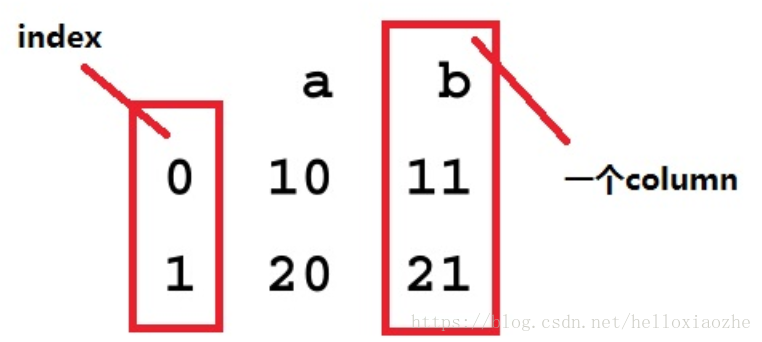
2.2、 相关操作
# coding:utf-8
'''
create
pd.DataFrame()
参数:
1、二维array;
2、Series 列表;
3、value为Series的字典
注:若创建使用的参数中,array、Series长度不一样时,对应index的value值若不存在则为NaN
'''
print "1/**************"
import pandas as pd
import numpy as np

s1=np.array([1,2,4])
s2=np.array([5,6,7,8])
print s1
print type(s1)
# 1、二维array;
df=pd.DataFrame([s1,s2])
print df
'''
1/**************
[1 2 4]
<type 'numpy.ndarray'>
   0  1  2    3
0  1  2  4  NaN
1  5  6  7  8.0
'''
print "2/**************"

import pandas as pd
import numpy as np

s1=pd.Series(np.array([1,2,3,4]))
s2=pd.Series(np.array([5,6,7,8]))
print s1
print type(s1)
# 2、Series 列表;
df=pd.DataFrame([s1,s2])
print df
print df.shape
'''
2/**************
0    1
1    2
2    3
3    4
dtype: int64
<class 'pandas.core.series.Series'>
   0  1  2  3
0  1  2  3  4
1  5  6  7  8
(2, 4)
'''
print "3/**************"

import pandas as pd
import numpy as np

s1=pd.Series(np.array([1,2,3,4]))
s2=pd.Series(np.array([5,6,7,8]))
# 3、value为Series的字典
df=pd.DataFrame({"a":s1,"b":s2});
print df
print df.shape
print df.head(2)
print df.tail(2)

print df.items
print df.keys()
print df.values
print "df['a']\n", df['a']

'''
3/**************
   a  b
0  1  5
1  2  6
2  3  7
3  4  8
(4, 2)
   a  b
0  1  5
1  2  6
   a  b
2  3  7
3  4  8
<bound method DataFrame.iteritems of    a  b
0  1  5
1  2  6
2  3  7
3  4  8>
Index([u'a', u'b'], dtype='object')
[[1 5]
 [2 6]
 [3 7]
 [4 8]]
df['a']
0    1
1    2
2    3
3    4
'''
'''
b.属性
b.1 .columns :每个columns对应的keys
b.2 .shape:形状,(a,b),index长度为a,columns数为b
b.3 .index;.values:返回index列表;返回value二维array
b.4 .head();.tail();
'''
print "4/**************"
'''
c.if-then 操作
c.1使用.ix[]
df.ix[条件,then操作区域]
'''
df=pd.DataFrame({"A":[1,2,3,4],"B":[5,6,7,8],"C":[1,1,1,1]})
print df
df.ix[df.A > 1,'B']= -1
print df
'''
4/**************
   A  B  C
0  1  5  1
1  2  6  1
2  3  7  1
3  4  8  1
   A  B  C
0  1  5  1
1  2 -1  1
2  3 -1  1
3  4 -1  1
'''
print "5/**************"
'''
c.2使用numpy.where
np.where(条件,then,else)
'''
df=pd.DataFrame({"A":[1,2,3,4],"B":[5,6,7,8],"C":[1,1,1,1]})
print df
print df.keys()
df["then"]=np.where(df.A<3, 1, 0)
print df
print df.keys()
'''
5/**************
   A  B  C
0  1  5  1
1  2  6  1
2  3  7  1
3  4  8  1
Index([u'A', u'B', u'C'], dtype='object')
   A  B  C  then
0  1  5  1     1
1  2  6  1     1
2  3  7  1     0
3  4  8  1     0
Index([u'A', u'B', u'C', u'then'], dtype='object')
'''

'''
d.根据条件选择取DataFrame
'''
print "6/**************"
#d.1 直接取值df.[]

df=pd.DataFrame({"A":[1,2,3,4],"B":[5,6,7,8],"C":[1,1,1,1]})
df=df[df.A>=3]
print df
'''
6/**************
   A  B  C
2  3  7  1
3  4  8  1

'''

print "7/**************"
# d.2 使用.loc[]
df=pd.DataFrame({"A":[1,2,3,4],"B":[5,6,7,8],"C":[1,1,1,1]})
df=df.loc[df.A>2]
print df

'''
7/**************
   A  B  C
2  3  7  1
3  4  8  1
'''

'''
e.Grouping
'''
print "8/**************"
# e.1 groupby 形成group
df = pd.DataFrame({'animal': 'cat dog cat fish dog cat cat'.split(),
                  'size': list('SSMMMLL'),
                  'weight': [8, 10, 11, 1, 20, 12, 12],
                  'adult' : [False] * 5 + [True] * 2});
print df

# 列出动物中weight最大的对应size
group=df.groupby("animal").apply(lambda subf: subf['size'][subf['weight'].idxmax()])
print group
'''
8/**************
   adult animal size  weight
0  False    cat    S       8
1  False    dog    S      10
2  False    cat    M      11
3  False   fish    M       1
4  False    dog    M      20
5   True    cat    L      12
6   True    cat    L      12
animal
cat     L
dog     M
fish    M
dtype: object
'''
print "9/**************"
# e.2 使用get_group 取出其中一分组
df = pd.DataFrame({'animal': 'cat dog cat fish dog cat cat'.split(),
                  'size': list('SSMMMLL'),
                  'weight': [8, 10, 11, 1, 20, 12, 12],
                  'adult' : [False] * 5 + [True] * 2});

group=df.groupby("animal")
cat=group.get_group("cat")
print cat
'''
9/**************
   adult animal size  weight
0  False    cat    S       8
2  False    cat    M      11
5   True    cat    L      12
6   True    cat    L      12
'''
其他具体操作请参考CookBook
http://pandas.pydata.org/pandas-docs/stable/cookbook.html
参考:# https://blog.youkuaiyun.com/u014607457/article/details/51290582






 扫一扫
扫一扫


 1227
1227

 被折叠的 条评论
为什么被折叠?
被折叠的 条评论
为什么被折叠?
 到【灌水乐园】发言





