


 本文通过部署Nginx和Apache服务,并使用HAProxy实现负载均衡,详细介绍了如何在Kubernetes中进行负载均衡配置。通过创建资源清单文件并利用Deployment及Service资源类型,实现了不同服务间的流量分发。
kubernetes资源清单定义haproxy实现负载均衡
nginx
#yml文件
[root@master haproxy]# cat nginx.yml
apiVersion: apps/v1
kind: Deployment
metadata:
  name: nginx-1
  labels:
    app: nginx-1
  namespace: default
spec:
  replicas: 1
  selector:
    matchLabels:
      app: nginx-1
  template:
    metadata:
      labels:
        app: nginx-1
    spec:
      containers:
      - image: 1225514226/nginx:v0.3
        imagePullPolicy: Always
        name: nginx-1

---
apiVersion: v1
kind: Service
metadata:
  name: nginx-1
  labels:
    app: nginx-1
spec:
  ports:
  - port: 80
    targetPort: 80
  selector:
    app: nginx-1
  clusterIP: 10.102.0.11

#创建
[root@master haproxy]# kubectl create -f nginx.yml
deployment.apps/nginx-1 created
service/nginx-1 created

#查看
[root@master haproxy]# kubectl get pod,svc
NAME                          READY   STATUS    RESTARTS   AGE
pod/nginx-1-6cd2ab594f-t3bag   1/1     Running   0          26s

NAME                 TYPE        CLUSTER-IP   EXTERNAL-IP   PORT(S)   AGE
service/kubernetes   ClusterIP   10.96.0.1    <none>        443/TCP   74m
service/nginx-1       ClusterIP   10.102.0.11   <none>        80/TCP    26s
apache
#yml文件
[root@master haproxy]# cat apache.yml
apiVersion: apps/v1
kind: Deployment
metadata:
  name: httpd-1
  labels:
    app: httpd-1
  namespace: default
spec:
  replicas: 1
  selector:
    matchLabels:
      app: httpd-1
  template:
    metadata:
      labels:
        app: httpd-1
    spec:
      containers:
      - image: 1226614226/httpd
        imagePullPolicy: Always
        name: httpd-1

---
apiVersion: v1
kind: Service
metadata:
  name: httpd-1
  labels:
    app: httpd-1
spec:
  ports:
  - port: 80
    targetPort: 80
  selector:
    app: httpd-1
  clusterIP: 10.108.0.11

#创建
[root@master haproxy]# kubectl create -f apache.yml
deployment.apps/httpd-1 created
service/httpd-1 created

#查看
[root@master haproxy]# kubectl get pod,svc
NAME                          READY   STATUS    RESTARTS   AGE
pod/httpd-1-24b36gf7cb-y846h   1/1     Running   0          28s
pod/nginx-1-6cd2ab594f-t3bag   1/1     Running   0          112s

NAME                 TYPE        CLUSTER-IP   EXTERNAL-IP   PORT(S)   AGE
service/httpd-1       ClusterIP   10.108.0.11   <none>        80/TCP    28s
service/kubernetes   ClusterIP   10.96.0.1    <none>        443/TCP   75m
service/nginx-1       ClusterIP   10.102.0.11   <none>        80/TCP    112s
haproxy
#yml文件
[root@master haproxy]# cat haproxy.yml
---
apiVersion: apps/v1
kind: Deployment
metadata:
  name: haproxy
  namespace: default
spec:
  replicas: 1
  selector:
    matchLabels:
      app: haproxy
  template:
    metadata:
      labels:
        app: haproxy
    spec:
      containers:
      - image: 93quan/haproxy:v1-alpine
        imagePullPolicy: Always
        env:
        - name: RSIP
          value: "10.108.0.11 10.102.0.11"
        name: haproxy
        ports:
        - containerPort: 80
          hostPort: 80
---
apiVersion: v1
kind: Service
metadata:
  name: haproxy
  namespace: default
spec:
  ports:
  - port: 80
    protocol: TCP
    targetPort: 80
  selector:
    app: haproxy
  type: NodePort

#创建
[root@master haproxy]# kubectl create -f haproxy.yml
deployment.apps/haproxy created
service/haproxy created

#查看是否创建成功
[root@master haproxy]# kubectl get pod,svc
NAME                           READY   STATUS    RESTARTS   AGE
pod/haproxy-7565dc6587-h8sdg    1/1     Running   0          18s
pod/httpd-1-24b36gf7cb-y846h    1/1     Running   0          81s
pod/nginx-1-6cd2ab594f-t3bag    1/1     Running   0          2m45s

NAME                 TYPE        CLUSTER-IP     EXTERNAL-IP   PORT(S)        AGE
service/haproxy      NodePort    10.99.52.161     <none>        80:30212/TCP   18s
service/httpd-1       ClusterIP   10.108.0.11     <none>        80/TCP         81s
service/kubernetes    ClusterIP   10.96.0.1       <none>        443/TCP        76m
service/nginx-1       ClusterIP   10.102.0.11     <none>        80/TCP         2m45s
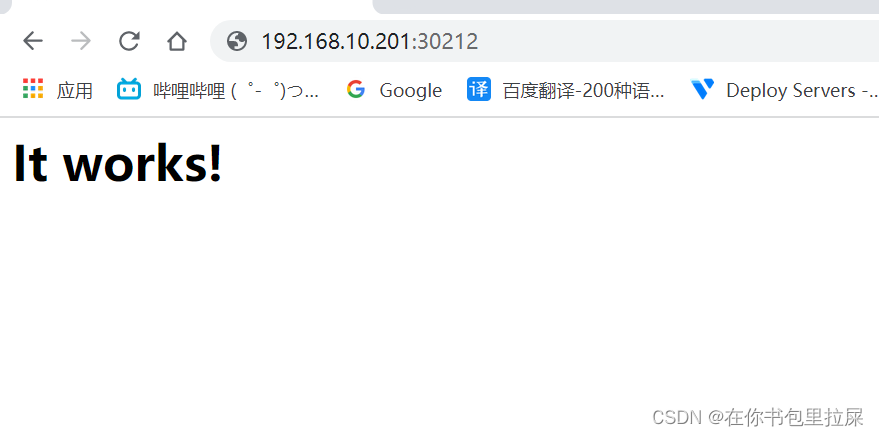
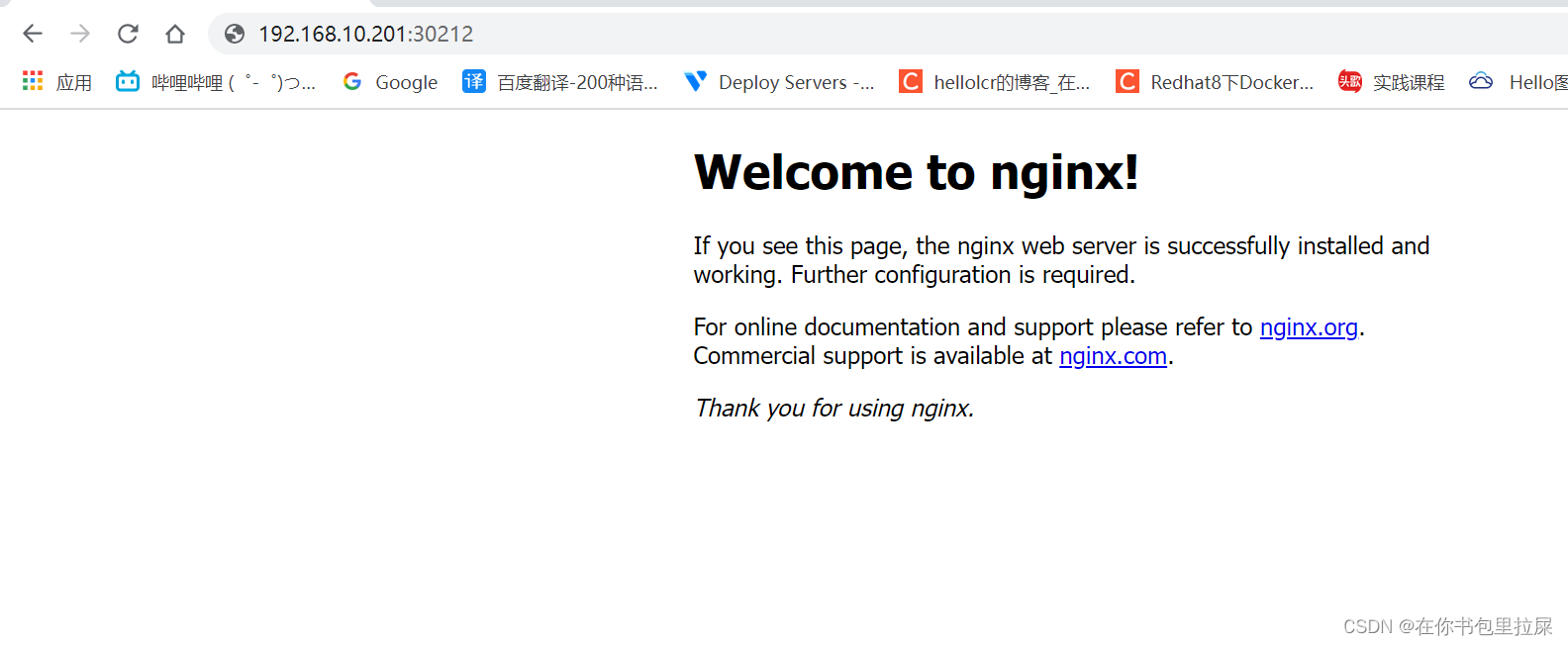
访问测试
[root@master haproxy]# curl 192.168.240.30:30212
<html><body><h1>It works!</h1></body></html>

[root@master haproxy]# curl 192.168.240.30:30212
<!DOCTYPE html>
<html>
<head>
<title>Welcome to nginx!</title>
<style>
    body {
        width: 35em;
        margin: 0 auto;
        font-family: Tahoma, Verdana, Arial, sans-serif;
    }
</style>
</head>
<body>
<h1>Welcome to nginx!</h1>
<p>If you see this page, the nginx web server is successfully installed and
working. Further configuration is required.</p>

<p>For online documentation and support please refer to
<a href="http://nginx.org/">nginx.org</a>.<br/>
Commercial support is available at
<a href="http://nginx.com/">nginx.com</a>.</p>

<p><em>Thank you for using nginx.</em></p>
</body>
</html>





 扫一扫
扫一扫


 676
676

 被折叠的 条评论
为什么被折叠?
被折叠的 条评论
为什么被折叠?
 到【灌水乐园】发言





