



 本文介绍如何在Android应用中使用代码方式调整EditText控件的提示文本(Hint)字体大小,提供了使用SpannableString和HTML标签两种实现方法。
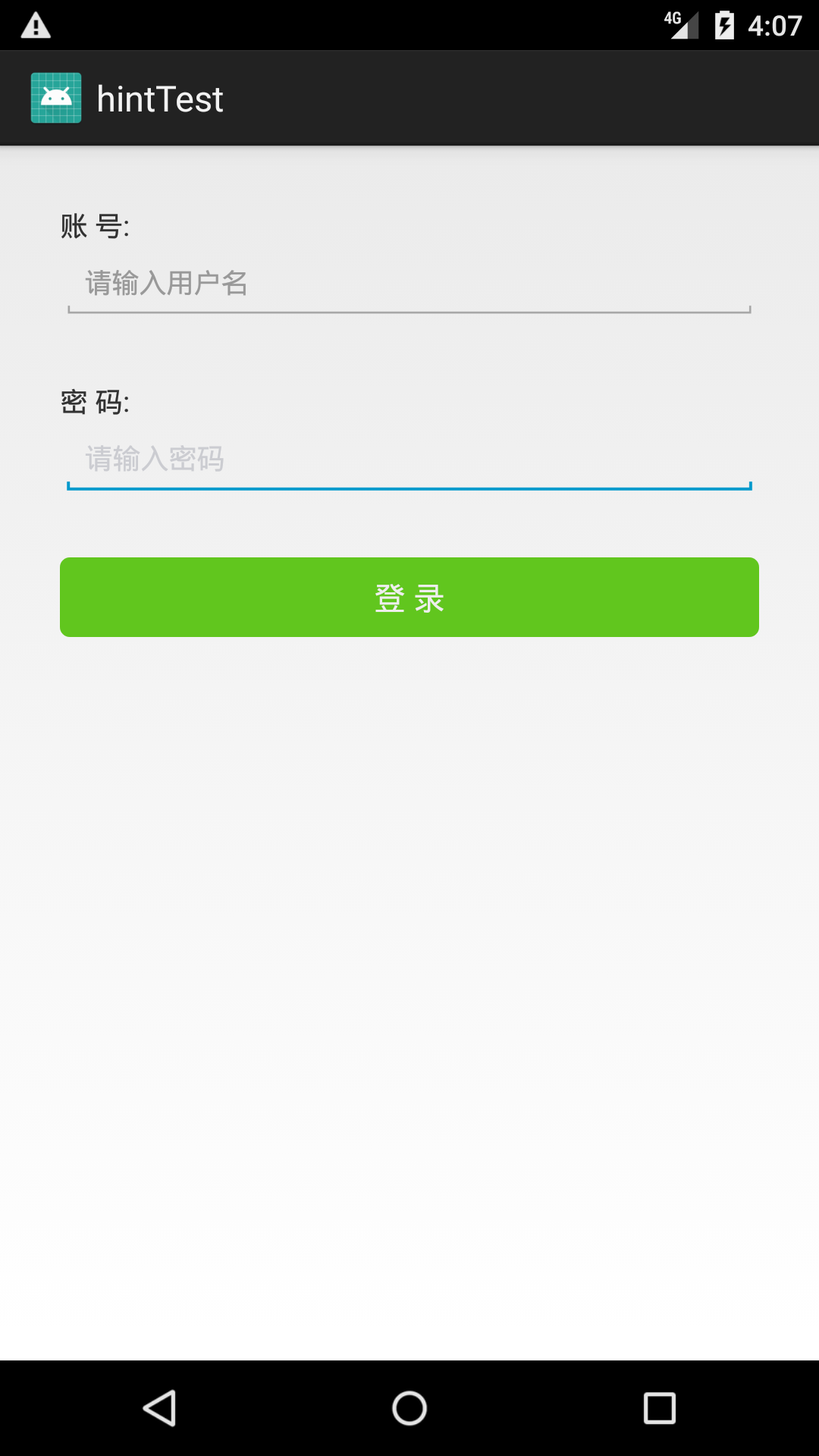
在Android的布局xml文件中,并没有直接可以设置hint字体大小的属性。一般来说,提示文字的大小,不希望跟正常字体的大小一样,如果需要改变hint的字体大小,就只能通过代码的方式来进行处理。下面是示例代码,提供两种方式:
package com.yzbt.hinttest;

import android.app.Activity;
import android.os.Bundle;
import android.text.Html;
import android.text.SpannableString;
import android.text.Spanned;
import android.text.style.AbsoluteSizeSpan;
import android.widget.EditText;

public class MainActivity extends Activity {

    @Override
    protected void onCreate(Bundle savedInstanceState) {
        super.onCreate(savedInstanceState);
        setContentView(R.layout.activity_main);

        //设置"用户名"提示文字的大小
        EditText etUserName = (EditText)findViewById(R.id.et_usernanme);
        SpannableString s = new SpannableString("请输入用户名");
        AbsoluteSizeSpan textSize = new AbsoluteSizeSpan(14,true);
        s.setSpan(textSize,0,s.length(), Spanned.SPAN_EXCLUSIVE_EXCLUSIVE);
        etUserName.setHint(s);

        //设置"密码"提示文字的大小
        EditText etPassword = (EditText)findViewById(R.id.et_password);
        //用html的方式来设置这个属性,毕竟都是String
        etPassword.setHint(Html.fromHtml("<font color=\"#cbccd1\"><small>请输入密码</small></font>"));
        //etPassword.setHint(Html.fromHtml("<font color=\"#cbccd1\"><small><small>请输入密码</small></small></font>"));
    }
}
布局文件:
<?xml version="1.0" encoding="utf-8"?>
<LinearLayout xmlns:android="http://schemas.android.com/apk/res/android"
    xmlns:app="http://schemas.android.com/apk/res-auto"
    xmlns:tools="http://schemas.android.com/tools"
    android:layout_width="match_parent"
    android:layout_height="match_parent"
    tools:context="com.yzbt.hinttest.MainActivity">

    <LinearLayout
        android:layout_width="match_parent"
        android:layout_height="match_parent"
        android:padding="30dp"
        android:orientation="vertical">

        <TextView
            android:layout_width="wrap_content"
            android:layout_height="wrap_content"
            android:text="账 号:" />

        <EditText
            android:id="@+id/et_usernanme"
            android:layout_width="match_parent"
            android:layout_height="wrap_content"
            android:ems="10"
            android:inputType="textPersonName"
            android:text=""
            android:hint="Please input user name"
            android:textColorHint="@color/colorGray"/>

        <TextView
            android:layout_width="wrap_content"
            android:layout_height="wrap_content"
            android:layout_marginTop="30dp"
            android:text="密 码:" />

        <EditText
            android:id="@+id/et_password"
            android:layout_width="match_parent"
            android:layout_height="wrap_content"
            android:ems="10"
            android:inputType="textPassword"
            android:text=""
            android:hint="Please input password"
            android:textColorHint="@color/colorGray"/>

        <Button
            android:id="@+id/butt_Login"
            android:layout_width="match_parent"
            android:layout_height="40dp"
            android:layout_marginTop="30dp"
            android:background="@drawable/selector_button_green_solid"
            android:textSize="16sp"
            android:textColor="#EEEEEE"
            android:text="登 录" />
    </LinearLayout>

</LinearLayout>
登录按钮用到的 selector_button_green_solid.xml 内容:
<?xml version="1.0" encoding="utf-8"?>
<selector xmlns:android="http://schemas.android.com/apk/res/android">
    <item android:state_pressed="false">
        <shape>
            <corners android:radius="5dp" />
            <solid android:color="#61C61E" />
        </shape>
    </item>

    <item android:state_pressed="true">
        <shape>
            <corners android:radius="5dp" />
            <solid android:color="#81e63E" />
        </shape>
    </item>
</selector>
示例的效果图:
欢迎童鞋们访问并收藏我的博客小程序:






 扫一扫
扫一扫


 7868
7868


 到【灌水乐园】发言



