const db = wx.cloud.database();
const _ = db.command;
const dbHelper = require('../../../utils/dbHelper');
const handleDatabaseError = dbHelper.handleDatabaseError;
Page({
data: {
folderId: '',
folderInfo: {},
lists: [],
showImportModal: false,
importText: '',
pageNum: 0,
pageSize: 20, // 修正:调整每页大小为合理值
hasMore: true,
searchText: '',
filteredLists: [],
isDataLoaded: false,
isDataLoading: false,
newListName: '' // 修复:添加缺失的newListName数据项
},
onLoad: function(options) {
this.setData({
folderId: options.id
});
this.loadFolderInfo();
this.loadAllLists(); // 使用优化的加载方法
},
onShow: function() {
if (!this.data.isDataLoaded) {
this.loadAllLists();
}
},
// 搜索文本输入
onSearchInput: function(e) {
const searchText = e.detail.value;
this.setData({ searchText });
this.filterLists(searchText);
},
// 过滤名单
filterLists: function(searchText) {
if (!searchText.trim()) {
this.setData({ filteredLists: this.data.lists });
} else {
const filtered = this.data.lists.filter(item =>
item.name && item.name.toLowerCase().includes(searchText.toLowerCase())
);
this.setData({ filteredLists: filtered });
}
},
// 加载文件夹信息(修复:添加错误处理)
loadFolderInfo: function() {
db.collection('threeOneFolders')
.doc(this.data.folderId)
.get()
.then(res => {
this.setData({ folderInfo: res.data });
})
.catch(err => {
handleDatabaseError(err, '加载文件夹信息失败');
wx.showToast({ title: '加载文件夹失败', icon: 'none' });
});
},
// 优化后的分批加载方法(修复:使用异步循环替代递归)
async loadAllLists() {
if (this.data.isDataLoading) return;
this.setData({
isDataLoading: true,
lists: [],
filteredLists: [],
isDataLoaded: false
});
wx.showLoading({ title: '加载中' });
try {
let allLists = [];
const MAX_BATCHES = 15;
const BATCH_SIZE = 20;
// 使用循环分批加载(避免递归深度问题)
for (let page = 0; page < MAX_BATCHES; page++) {
const skip = page * BATCH_SIZE;
const res = await db.collection('threeOneLists')
.where({ folderId: this.data.folderId })
.orderBy('createTime', 'desc')
.skip(skip)
.limit(BATCH_SIZE)
.get();
if (!res.data || res.data.length === 0) break;
allLists = [...allLists, ...res.data];
// 提前停止条件
if (res.data.length < BATCH_SIZE || allLists.length >= 300) break;
}
// 获取照片数量统计(修复:空数组处理)
let photoCounts = {};
if (allLists.length > 0) {
const listIds = allLists.map(item => item._id);
photoCounts = await this.getPhotoCounts(listIds);
}
// 合并照片数量信息
const listsWithCount = allLists.map(item => ({
...item,
photoCount: photoCounts[item._id] || 0
}));
this.setData({
lists: listsWithCount,
filteredLists: listsWithCount,
hasMore: false,
pageNum: 1,
isDataLoaded: true
});
} catch (err) {
console.error('加载名单失败', err);
wx.showToast({ title: '加载失败', icon: 'none' });
} finally {
this.setData({ isDataLoading: false });
wx.hideLoading();
}
},
// 获取照片数量统计(修复:优化错误处理)
async getPhotoCounts(listIds) {
if (!listIds || listIds.length === 0) return {};
try {
// 使用云函数批量获取照片数量
const res = await wx.cloud.callFunction({
name: 'getPhotoCounts',
data: { listIds, type: 'threeOne' }
});
return res.result?.counts || {};
} catch (err) {
console.warn('批量获取照片数量失败,使用降级方案', err);
return this.getPhotoCountsFallback(listIds);
}
},
// 导入名单(修复:重置导入文本)
importLists: function() {
this.setData({
showImportModal: true,
importText: ''
});
},
// 确认导入名单(修复:完善错误处理)
async confirmImport() {
const importText = this.data.importText.trim();
if (!importText) {
wx.showToast({ title: '请输入名单', icon: 'none' });
return;
}
const names = [...new Set(importText.split('\n').map(n => n.trim()).filter(n => n))];
if (names.length === 0) {
wx.showToast({ title: '请输入有效名单', icon: 'none' });
return;
}
wx.showLoading({ title: `导入中(0/${names.length})` });
try {
const batchSize = 20;
const totalBatches = Math.ceil(names.length / batchSize);
for (let i = 0; i < totalBatches; i++) {
const batch = names.slice(i * batchSize, (i + 1) * batchSize);
const batchPromises = batch.map(name =>
db.collection('threeOneLists').add({
data: {
folderId: this.data.folderId,
name,
createTime: db.serverDate()
}
})
);
await Promise.all(batchPromises);
wx.showLoading({ title: `导入中(${Math.min((i+1)*batchSize, names.length)}/${names.length})` });
}
wx.showToast({ title: `导入${names.length}个名单成功`, icon: 'success' });
this.closeImportModal();
this.loadAllLists(); // 刷新列表
} catch (err) {
console.error('导入失败', err);
wx.showToast({ title: '导入失败', icon: 'none' });
} finally {
wx.hideLoading();
}
},
// 添加名单(修复:使用newListName)
async addList() {
const name = this.data.newListName.trim();
if (!name) {
wx.showToast({ title: '请输入名单名称', icon: 'none' });
return;
}
try {
// 检查重复名称
const checkRes = await db.collection('threeOneLists')
.where({ folderId: this.data.folderId, name })
.count();
if (checkRes.total > 0) {
wx.showToast({ title: '名称已存在', icon: 'none' });
return;
}
wx.showLoading({ title: '添加中' });
await db.collection('threeOneLists').add({
data: {
folderId: this.data.folderId,
name,
createTime: db.serverDate()
}
});
wx.showToast({ title: '添加成功', icon: 'success' });
this.setData({ newListName: '' });
this.loadAllLists(); // 刷新列表
} catch (err) {
handleDatabaseError(err, '添加名单失败');
} finally {
wx.hideLoading();
}
},
// 导出文件夹(修复:完全兼容云函数返回格式)
exportFolder() {
wx.showLoading({ title: '准备导出' });
// 简化实现,避免复杂的Promise链和嵌套回调
// 1. 先获取文件夹名称
const folderName = this.data.folderInfo?.name || '未命名文件夹';
const timestamp = new Date().getTime();
const exportFolderName = `${folderName.replace(/[^\w]/g, '_')}_${timestamp}`;
// 2. 调用云函数(使用回调方式而非async/await)
wx.cloud.callFunction({
name: 'exportData',
data: {
folderId: this.data.folderId,
type: 'threeOne',
folderName: exportFolderName
},
success: (res) => {
wx.hideLoading();
// 超详细的日志记录,帮助调试
console.log('云函数调用成功,res对象类型:', typeof res);
console.log('云函数返回完整结果:', res);
console.log('res.result:', res.result);
// 非常宽松的结果处理逻辑
if (!res || !res.result) {
console.error('导出失败: 云函数返回空结果', res);
wx.showToast({ title: '导出失败: 服务器无响应', icon: 'none' });
return;
}
// 检查是否是失败结果
if (res.result.success === false) {
console.error('导出失败: 云函数处理失败', res.result.error);
wx.showToast({ title: `导出失败: ${res.result.error || '处理失败'}`, icon: 'none' });
return;
}
// 提取fileIDs,处理各种可能的格式
let fileIDs = [];
// 首先检查标准的fileIDs数组
if (Array.isArray(res.result.fileIDs)) {
fileIDs = res.result.fileIDs;
console.log('找到标准fileIDs数组:', fileIDs.length, '个文件');
}
// 检查是否有单个fileID
else if (res.result.fileID) {
fileIDs = [res.result.fileID];
console.log('找到单个fileID');
}
// 检查是否有其他可能的下载链接字段
else if (res.result.downloadUrls && Array.isArray(res.result.downloadUrls)) {
// 如果直接有downloadUrls,直接使用
console.log('找到downloadUrls数组:', res.result.downloadUrls.length, '个链接');
// 这里我们需要调整后续处理逻辑,但先继续检查
}
// 无论是否有success字段,只要有fileIDs就继续
if (fileIDs.length > 0) {
console.log('开始处理文件ID:', fileIDs);
try {
// 尝试使用wx.cloud.getTempFileURL获取临时下载链接
wx.cloud.getTempFileURL({
fileList: fileIDs,
success: (res) => {
try {
console.log('获取临时下载链接结果:', res);
// 过滤成功的链接
const validFileList = (res.fileList || []).filter(file => file && file.tempFileURL);
if (validFileList.length > 0) {
// 显示操作菜单
try {
wx.showActionSheet({
itemList: ['下载文件', '复制下载链接'],
success: (actionRes) => {
try {
if (actionRes.tapIndex === 0) {
// 下载文件
this.downloadAndOpenFile(validFileList[0].tempFileURL);
} else if (actionRes.tapIndex === 1) {
// 复制链接
wx.setClipboardData({
data: validFileList[0].tempFileURL,
success: () => {
wx.showToast({ title: '链接已复制', icon: 'success' });
},
fail: (err) => {
console.error('复制链接失败:', err);
wx.showToast({ title: '复制链接失败', icon: 'none' });
}
});
}
} catch (e) {
console.error('操作菜单处理错误:', e);
wx.showToast({ title: '操作处理失败', icon: 'none' });
}
},
fail: (err) => {
console.error('显示操作菜单失败:', err);
// 用户取消操作不显示错误提示
if (err.errMsg !== 'showActionSheet:fail cancel') {
wx.showToast({ title: '显示菜单失败', icon: 'none' });
}
}
});
} catch (e) {
console.error('显示操作菜单异常:', e);
wx.showToast({ title: '显示菜单异常', icon: 'none' });
}
} else {
console.error('未获取到有效下载链接');
wx.showToast({ title: '获取下载链接失败', icon: 'none' });
}
} catch (e) {
console.error('处理下载链接时出错:', e);
wx.showToast({ title: '处理下载链接失败', icon: 'none' });
}
},
fail: (err) => {
console.error('获取临时下载链接失败:', err);
wx.showToast({ title: '获取下载链接失败', icon: 'none' });
}
});
} catch (e) {
console.error('云函数返回处理异常:', e);
wx.showToast({ title: '云函数返回处理失败', icon: 'none' });
}
} else {
console.log('未找到任何文件ID,导出成功但无文件');
wx.showToast({ title: '导出成功,无文件', icon: 'none' });
return;
}
// 4. 获取第一个文件的临时URL(简化为只处理第一个文件)
wx.cloud.getTempFileURL({
fileList: [fileIDs[0]],
success: (urlRes) => {
if (urlRes && urlRes.fileList && urlRes.fileList[0] && urlRes.fileList[0].tempFileURL) {
const tempFileURL = urlRes.fileList[0].tempFileURL;
// 5. 显示操作选项
wx.showActionSheet({
itemList: ['下载文件', '复制链接'],
success: (actionRes) => {
if (actionRes.tapIndex === 0) {
// 下载文件
this.downloadAndOpenFile(tempFileURL);
} else if (actionRes.tapIndex === 1) {
// 复制链接
wx.setClipboardData({
data: tempFileURL,
success: () => {
wx.showToast({ title: '链接已复制', icon: 'success' });
},
fail: (err) => {
console.error('复制链接失败', err);
wx.showToast({ title: '复制失败', icon: 'none' });
}
});
}
},
fail: (err) => {
console.error('操作菜单失败', err);
// 用户取消不提示
}
});
} else {
wx.showToast({ title: '获取下载链接失败', icon: 'none' });
}
},
fail: (err) => {
console.error('获取临时URL失败', err);
wx.showToast({ title: '获取链接失败', icon: 'none' });
}
});
},
fail: (err) => {
wx.hideLoading();
console.error('调用云函数失败', err);
wx.showToast({ title: '导出失败', icon: 'none' });
}
});
},
// 下载并打开文件(完全防御性编程版本)
downloadAndOpenFile(downloadUrl) {
// 1. 严格检查输入参数
if (!downloadUrl || typeof downloadUrl !== 'string' || downloadUrl.trim() === '') {
console.error('文件URL为空或无效:', downloadUrl);
wx.showToast({ title: '文件链接无效', icon: 'none' });
return;
}
// 2. 确保wx对象存在
if (!wx || typeof wx !== 'object') {
console.error('微信API不可用');
return;
}
try {
wx.showLoading({ title: '下载中...' });
} catch (e) {
console.error('显示加载提示失败:', e);
}
try {
// 3. 检查downloadFile方法是否存在
if (typeof wx.downloadFile !== 'function') {
console.error('wx.downloadFile方法不存在');
wx.showToast({ title: '功能暂不可用', icon: 'none' });
try {
wx.hideLoading();
} catch (e) {}
return;
}
wx.downloadFile({
url: downloadUrl,
// 添加超时设置
timeout: 60000,
success: (res) => {
try {
if (res && res.statusCode === 200 && res.tempFilePath) {
// 4. 检查saveFile方法是否存在
if (typeof wx.saveFile !== 'function') {
console.error('wx.saveFile方法不存在');
wx.showToast({ title: '保存功能不可用', icon: 'none' });
try {
wx.hideLoading();
} catch (e) {}
return;
}
wx.saveFile({
tempFilePath: res.tempFilePath,
success: (saveRes) => {
try {
if (saveRes && saveRes.savedFilePath) {
// 5. 检查openDocument方法是否存在
if (typeof wx.openDocument !== 'function') {
console.error('wx.openDocument方法不存在');
wx.showToast({ title: '打开文件功能不可用', icon: 'none' });
try {
wx.hideLoading();
} catch (e) {}
return;
}
wx.openDocument({
filePath: saveRes.savedFilePath,
showMenu: true,
success: () => {
console.log('打开文件成功');
},
fail: (err) => {
console.error('打开文件失败:', err);
wx.showToast({ title: '打开文件失败', icon: 'none' });
},
complete: () => {
try {
wx.hideLoading();
} catch (e) {}
}
});
} else {
console.error('保存文件返回无效路径:', saveRes);
wx.showToast({ title: '保存文件失败', icon: 'none' });
try {
wx.hideLoading();
} catch (e) {}
}
} catch (e) {
console.error('保存文件回调异常:', e);
wx.showToast({ title: '保存文件处理失败', icon: 'none' });
try {
wx.hideLoading();
} catch (e) {}
}
},
fail: (err) => {
console.error('保存文件失败:', err);
wx.showToast({ title: '保存文件失败', icon: 'none' });
try {
wx.hideLoading();
} catch (e) {}
},
complete: () => {
// 确保在success和fail中都调用了hideLoading
}
});
} else {
console.error('下载文件失败,状态码:', res?.statusCode || '未知');
wx.showToast({
title: '下载失败,请重试',
icon: 'none',
duration: 2000
});
try {
wx.hideLoading();
} catch (e) {}
}
} catch (e) {
console.error('下载文件回调异常:', e);
wx.showToast({ title: '下载处理失败', icon: 'none' });
try {
wx.hideLoading();
} catch (e) {}
}
},
fail: (err) => {
console.error('下载文件失败:', err);
wx.showToast({ title: '网络请求失败', icon: 'none' });
try {
wx.hideLoading();
} catch (e) {}
},
complete: () => {
// 作为最后的保障,再次尝试隐藏加载提示
setTimeout(() => {
try {
wx.hideLoading();
} catch (e) {}
}, 100);
}
});
} catch (e) {
console.error('下载文件操作异常:', e);
try {
wx.showToast({ title: '操作异常', icon: 'none' });
wx.hideLoading();
} catch (e) {}
}
},
// 查看名单详情
viewListDetail(e) {
const listId = e.currentTarget.dataset.id;
wx.navigateTo({
url: `/pages/threeOne/listDetail/listDetail?id=${listId}`
});
},
// 长按名单项
onListLongPress(e) {
const listId = e.currentTarget.dataset.id;
const list = this.data.lists.find(item => item._id === listId);
wx.showActionSheet({
itemList: ['编辑名称', '删除名单'],
success: (res) => {
if (res.tapIndex === 0) {
// 编辑名称
this.editListName(listId, list.name);
} else if (res.tapIndex === 1) {
// 删除名单
this.deleteList(listId);
}
}
});
},
// 关闭导入弹窗
closeImportModal() {
this.setData({ showImportModal: false });
},
// 处理导入文本输入
onImportTextInput(e) {
this.setData({ importText: e.detail.value });
},
// 编辑名单名称
editListName(listId, currentName) {
wx.showModal({
title: '编辑名称',
editable: true,
placeholderText: '请输入新名称',
content: currentName,
success: async (res) => {
if (res.confirm && res.content) {
const newName = res.content.trim();
if (!newName) {
wx.showToast({ title: '名称不能为空', icon: 'none' });
return;
}
try {
// 检查重名
const checkRes = await db.collection('threeOneLists')
.where(_.and([
{ folderId: this.data.folderId },
{ name: newName },
{ _id: _.neq(listId) }
]))
.count();
if (checkRes.total > 0) {
wx.showToast({ title: '名称已存在', icon: 'none' });
return;
}
await db.collection('threeOneLists').doc(listId).update({
data: { name: newName }
});
wx.showToast({ title: '修改成功', icon: 'success' });
this.loadAllLists(); // 刷新列表
} catch (err) {
handleDatabaseError(err, '修改名单名称失败');
}
}
}
});
},
// 删除名单
async deleteList(listId) {
wx.showModal({
title: '确认删除',
content: '删除后数据不可恢复,是否确认删除?',
success: async (res) => {
if (res.confirm) {
try {
wx.showLoading({ title: '删除中' });
// 先检查是否有照片
const photoCheck = await db.collection('threeOnePhotos')
.where({ listId })
.count();
if (photoCheck.total > 0) {
// 如果有照片,先删除照片记录
const photoBatch = db.collection('threeOnePhotos').where({ listId }).get();
const photoList = (await photoBatch).data;
// 批量删除照片记录
const MAX_DELETE_BATCH = 20;
for (let i = 0; i < photoList.length; i += MAX_DELETE_BATCH) {
const batch = photoList.slice(i, i + MAX_DELETE_BATCH);
const deletePromises = batch.map(photo =>
db.collection('threeOnePhotos').doc(photo._id).remove()
);
await Promise.all(deletePromises);
}
}
// 删除名单
await db.collection('threeOneLists').doc(listId).remove();
wx.showToast({ title: '删除成功', icon: 'success' });
this.loadAllLists(); // 刷新列表
} catch (err) {
handleDatabaseError(err, '删除名单失败');
} finally {
wx.hideLoading();
}
}
}
});
}
});
运行的时候报错,什么问题
最新发布



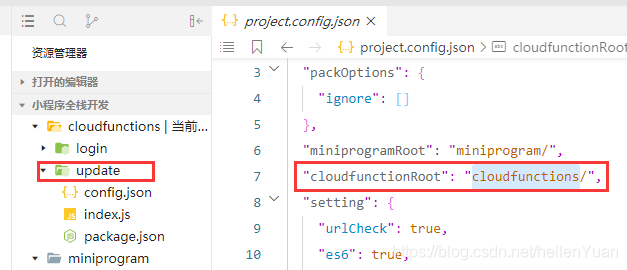
 博客主要讲述了修改文件中指定目录的相关内容,涉及信息技术领域操作。
 1万+
1万+

 被折叠的 条评论
为什么被折叠?
被折叠的 条评论
为什么被折叠?
 到【灌水乐园】发言








 扫一扫
扫一扫


