



目录
零、建表
1、学生表
SET NAMES utf8mb4;
SET FOREIGN_KEY_CHECKS = 0;

-- ----------------------------
-- Table structure for student
-- ----------------------------
DROP TABLE IF EXISTS `student`;
CREATE TABLE `student`  (
  `id` int(11) NOT NULL AUTO_INCREMENT,
  `Sname` varchar(255) CHARACTER SET utf8 COLLATE utf8_general_ci DEFAULT NULL,
  `sex` varchar(255) CHARACTER SET utf8 COLLATE utf8_general_ci DEFAULT NULL,
  `age` int(11) DEFAULT NULL,
  `t_id` int(11) DEFAULT NULL,
  PRIMARY KEY (`id`) USING BTREE
) ENGINE = InnoDB AUTO_INCREMENT = 11 CHARACTER SET = utf8 COLLATE = utf8_general_ci ROW_FORMAT = Compact;

-- ----------------------------
-- Records of student
-- ----------------------------
INSERT INTO `student` VALUES (1, '张三', '男', 18, 1);
INSERT INTO `student` VALUES (2, '李四', '女', 18, 1);
INSERT INTO `student` VALUES (3, '王五', '男', 18, 1);
INSERT INTO `student` VALUES (4, '小白', '女', 18, 1);
INSERT INTO `student` VALUES (5, '小黑', '男', 18, 1);
INSERT INTO `student` VALUES (6, '小红', '女', 20, 2);
INSERT INTO `student` VALUES (7, '小李', '男', 20, 2);
INSERT INTO `student` VALUES (8, '小张', '女', 20, 2);
INSERT INTO `student` VALUES (9, '小赵', '男', 20, 2);
INSERT INTO `student` VALUES (10, '小王', '女', 20, 2);

SET FOREIGN_KEY_CHECKS = 1;
2、老师表
SET NAMES utf8mb4;
SET FOREIGN_KEY_CHECKS = 0;

-- ----------------------------
-- Table structure for teacher
-- ----------------------------
DROP TABLE IF EXISTS `teacher`;
CREATE TABLE `teacher`  (
  `id` int(11) NOT NULL AUTO_INCREMENT,
  `Tname` varchar(255) CHARACTER SET utf8 COLLATE utf8_general_ci DEFAULT NULL,
  PRIMARY KEY (`id`) USING BTREE
) ENGINE = InnoDB AUTO_INCREMENT = 3 CHARACTER SET = utf8 COLLATE = utf8_general_ci ROW_FORMAT = Compact;

-- ----------------------------
-- Records of teacher
-- ----------------------------
INSERT INTO `teacher` VALUES (1, '张老师');
INSERT INTO `teacher` VALUES (2, '李老师');

SET FOREIGN_KEY_CHECKS = 1;
一、多对一的关联映射
1、实体类、接口、mapper
Teacher类
package com.qcby.entity;

public class Teacher {
    private Integer id;
    private String  Tname;


}
Student类
public class Student {

    private Integer id;
    private String Sname;
    private String sex;
    private Integer age;
    private Integer t_id;

    //这个是重点
    private Teacher teacher;
}
注意哈,Student类里有一个Teacher类
接口
public interface StudentDao
{
    public List<Student> getStudentAndTeacher1();
    public List<Student> getStudentAndTeacher2();

}
Test
package com.qcby;

import com.qcby.dao.StudentDao;
import org.apache.ibatis.io.Resources;
import org.apache.ibatis.session.SqlSession;
import org.apache.ibatis.session.SqlSessionFactory;
import org.apache.ibatis.session.SqlSessionFactoryBuilder;
import org.junit.After;
import org.junit.Before;
import org.junit.Test;

import java.io.IOException;
import java.io.InputStream;

public class StudentTest {
    private InputStream in = null;//输入流
    private SqlSession session = null;//数据库会话
    private StudentDao mapper = null;//mapper-->映射

    @Before  //前置通知, 在方法执行之前执行
    public void init() throws IOException {
        //加载主配置文件,目的是为了构建SqlSessionFactory对象
        in = Resources.getResourceAsStream("SqlMapConfig.xml");
        //创建SqlSessionFactory对象
        SqlSessionFactory factory = new SqlSessionFactoryBuilder().build(in);
        //通过SqlSessionFactory工厂对象创建SqlSesssion对象
        session = factory.openSession();
        //通过Session创建UserDao接口代理对象
        mapper = session.getMapper(StudentDao.class);
    }

    @After  //@After: 后置通知, 在方法执行之后执行 。
    public void destory() throws IOException {
        //释放资源
        session.close();
        in.close();
    }


   @Test
    public void getStudentAndTeacher1(){
        mapper.getStudentAndTeacher1();

    }

    @Test
    public void getStudentAndTeacher2(){
        mapper.getStudentAndTeacher2();
}
2、连表查询 注意看下column不同情况下作用
首先认识一下子标签:
resultMap与resultType只能存在一个,而resultmap是映射
在select写完后,下面写resultmap的标签 id要与select中的一致。
type映射类型
result返回标签,
property实体类的对象
columnn查询数据库所返回的标签
当在association里的时候是向下传参的意思
association用于处理特殊类型如实体类,集合的标签
collection处理集合
javaType java类后面是包名
上代码:
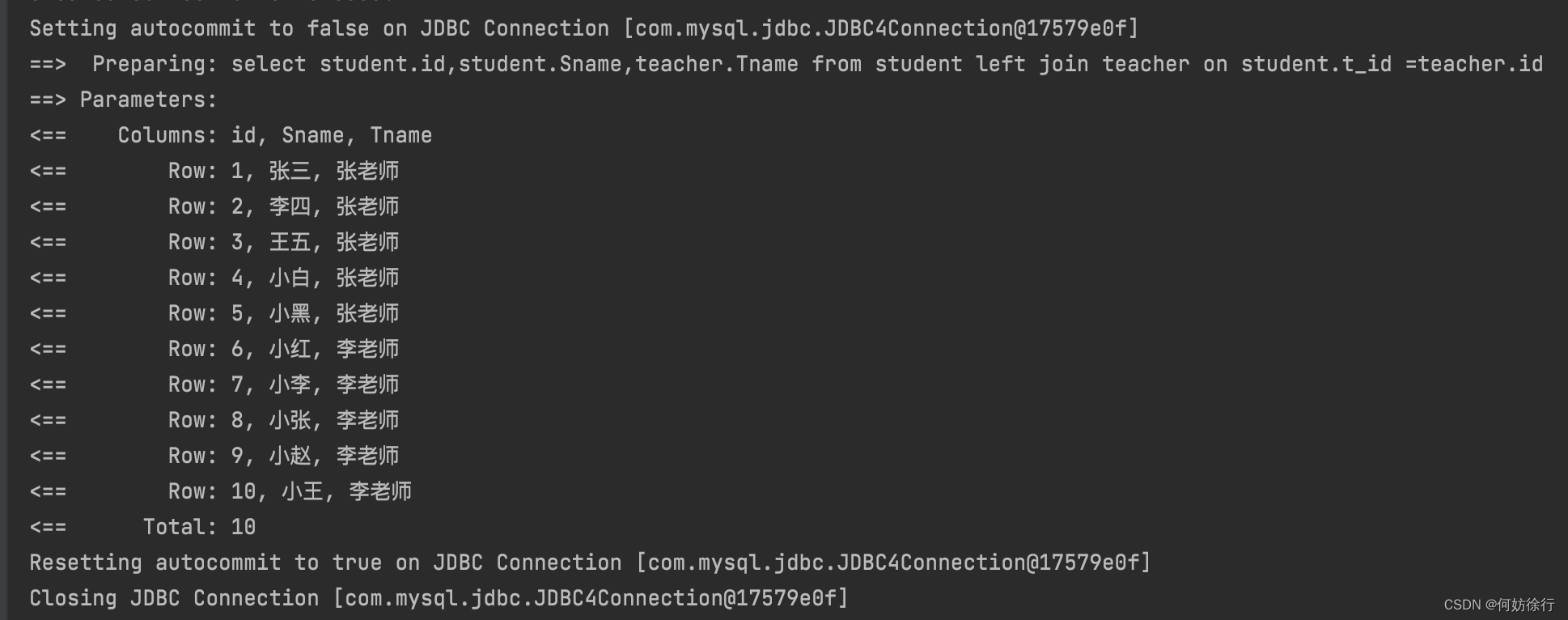
    <select id="getStudentAndTeacher1" resultMap="StudentTeacher1">
        select student.id,student.Sname,teacher.Tname
        from student left join teacher
        on student.t_id =teacher.id
    </select>
    <resultMap id="StudentTeacher1" type="com.qcby.entity.Student">
<!--        column:数据库查询返回的字段-->
        <result property="id" column="id"/>
        <result property="Sname" column="Sname"/>
        <result property="sex" column="sex"/>
        <result property="age" column="age"/>
        <result property="t_id" column="t_id"/>
        <association property="teacher" javaType="com.qcby.entity.Teacher">
            <result property="id" column="id"/>
            <result property="Tname" column="Tname"/>
        </association>
    </resultMap>
<!--    复杂属性 对象:association   集合:collection -->
    <!-- property="teacher" student类当中的关联字段 -->
    <!-- javaType="com.javen.model.Teacher" 为复杂属性设置类类型-->
<!--    此处的column向下传参-->
我们为什么要在association下有两个result呢?这是为了查询到sql语句中的teacher表的内容
3、分步查询
<select id="getStudentAndTeacher2" resultMap="st">
       select * from student
   </select>
    <resultMap id="st" type="com.qcby.entity.Student">
        <result property="id" column="id"/>
        <result property="Sname" column="Sname"/>
        <result property="sex" column="sex"/>
        <result property="age" column="age"/>
        <result property="t_id" column="t_id"/>
        <association property="teacher" column="t_id" select="chaxun" javaType="com.qcby.entity.Teacher">
        </association>
    </resultMap>
    <select id="chaxun" resultType="com.qcby.entity.Teacher">
        select * from teacher where id =#{suibian};
    </select>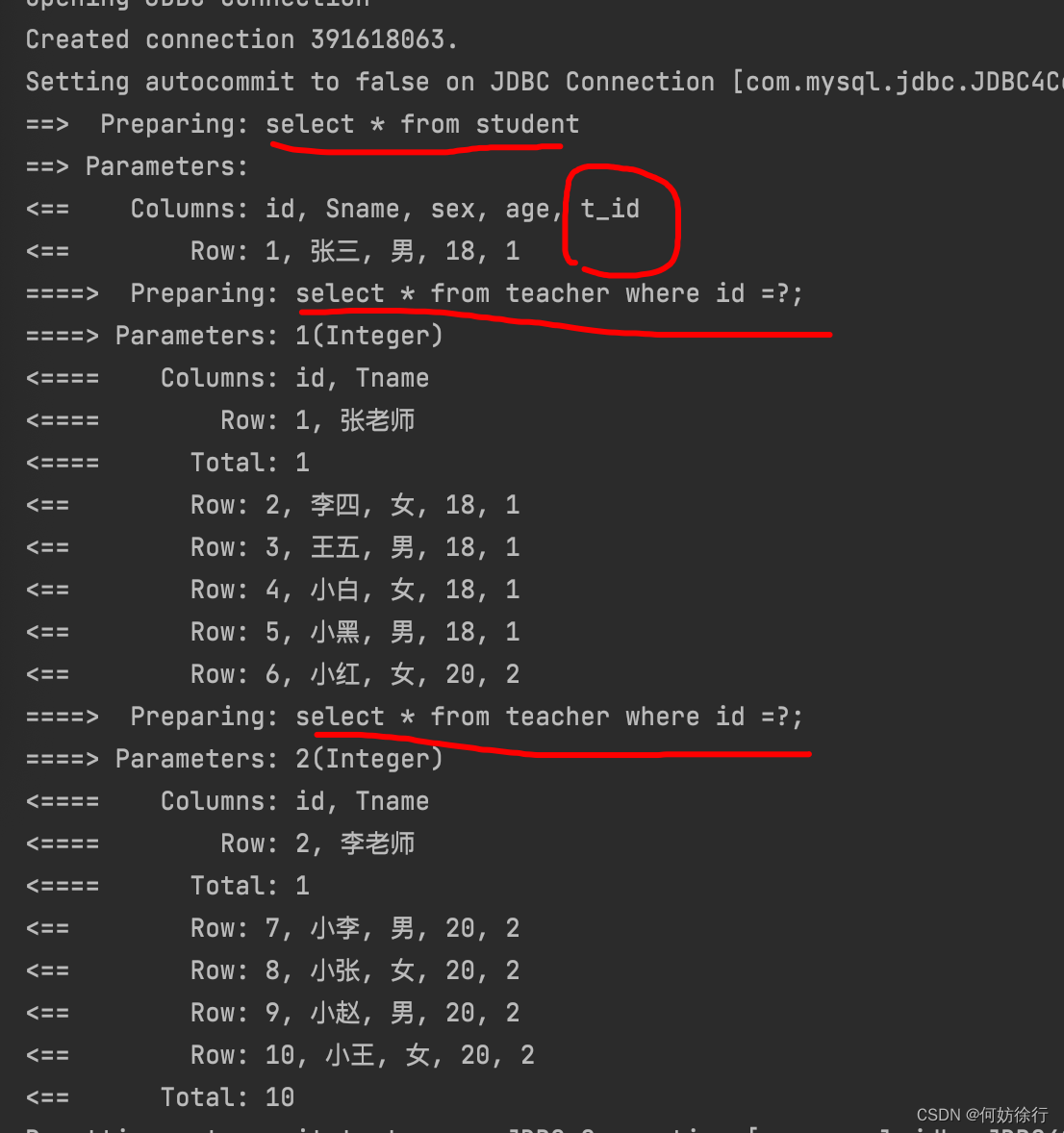
对比一下分布查询和连表查询代码的区别。
运行流程:查表往下走直到teacher类,调用select,把t_id传到下面的select,select#{}随便填。反正是接受上面的内容
如果对向下传参有疑惑,那就把t_id改为id
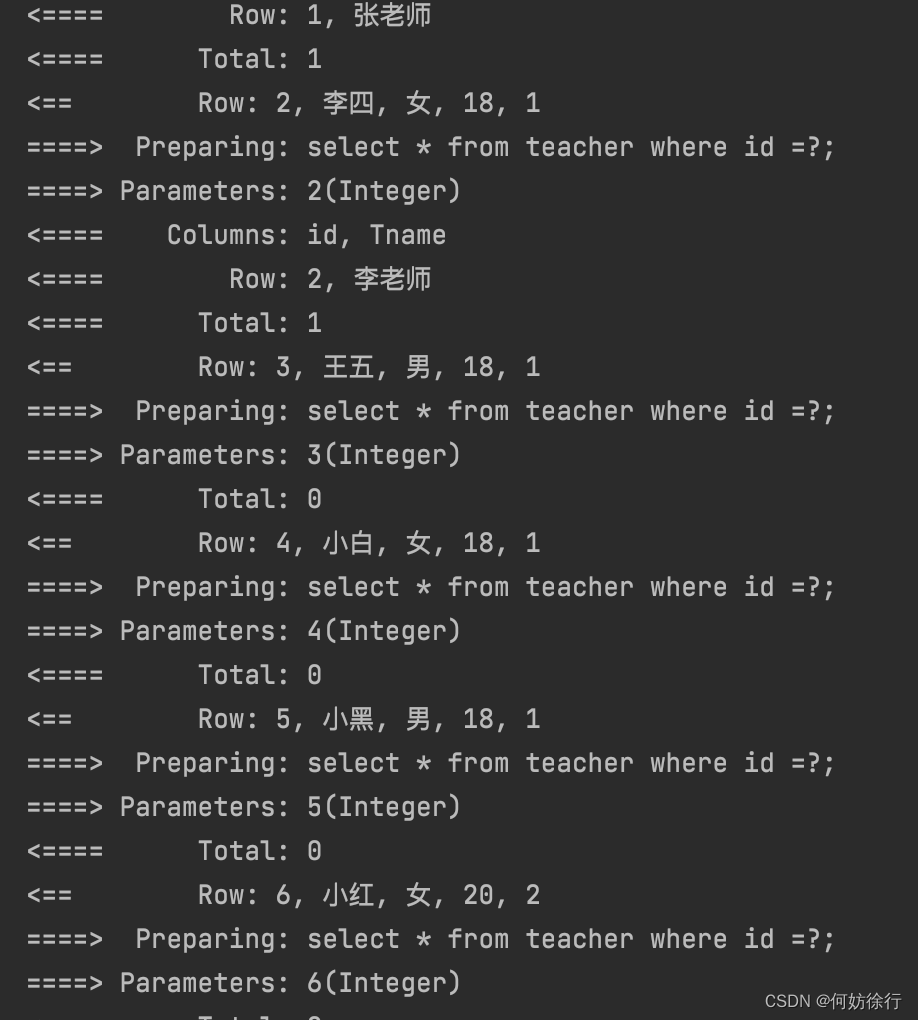
现在懂了吧。
二、一对多的关联映射
1、实体类、接口、mapper
Student
public class Student {

    private Integer id;
    private String Sname;
    private String sex;
    private Integer age;
    private Integer t_id;

}
Teacher
public class Teacher {
    private Integer id;
    private String Tname;
    private List<Student> students;
}
我们删除了Student类的Teacher而是在Teacher中加一个Student集合
每个类有自己该有的。
2、连表查询
<!--按照结果进行查询-->
<select id="getTeacher" resultMap="TeacherStudent">
    SELECT  teacher.id,teacher.Tname,student.Sname FROM teacher
        LEFT JOIN student  on student.t_id = teacher.id
 </select>
<resultMap id="TeacherStudent" type="com.qcby.entity.Teacher">
    <result property="id" column="id"/>
    <result property="Tname" column="Tname"/>
    <!-- 复杂的属性我么需要单独去处理 对象:association   集合:collection
      在集合中的泛型信息,我们使用ofType获取
      -->
    <collection property="students" ofType="com.qcby.entity.Student">
        <result property="Sname" column="Sname"/>
    </collection>
</resultMap>
因为是集合类型,所以不用association而是用collection 类型是ofType类型
注意这点即可。
3、分步查询
<!--按照查询嵌套处理-->
<select id="getTeacher" resultMap="TeacherStudent2">
    select * from teacher
</select>
<resultMap id="TeacherStudent2" type="com.qcby.entity.Teacher">
    <collection property="students" column="id" javaType="ArrayList"
                ofType="com.qcby.entity.Student" select="getStudentByTeacherId" />
</resultMap>
<select id="getStudentByTeacherId" resultType="com.qcby.entity.Student">
    select * from student where t_id = #{t_id}
</select>
上面懂了 这个也就懂了。
三、真正的分布查询
不知道你有没有注意到分布查询查询teahcer的语句放入student类里,查询student同理。
这样其实还不算分布查询
我们应该讲查询老师的语句放在老师的mapper里。
现在我们来修改下多对一的
studentDao.xml
<select id = "getStudent"  resultMap="StudentTeacher">
    select * from student;
</select>
<resultMap id="StudentTeacher"  type="com.qcby.entity.Student">
    <result property="id" column="id"/>
    <result property="Sname" column="Sname"/>
    <result property="sex" column="sex"/>
    <result property="age" column="age"/>
    <result property="t_id" column="t_id"/>
    <association property="teacher" column="t_id" javaType="com.qcby.entity.Teacher"
                 select="com.qcby.dao.TeacherDao.getTeacher" />
</resultMap>
TeacherDao.xml
<select id="getTeacher" resultType="com.qcby.entity.Teacher" parameterType="java.lang.Integer">
    select  * from  teacher where id = #{t_id};
</select>
TeacherDao
Teacher getTeacher(Integer id);
可能出现的错误:
主配置文件没有对应mapper

调用select方法名与select的id不一致
自己完成真正的一对多的分布查询知之后,可以接着这个学习延迟加载
MyBatis延迟加载策略(看了就会)_何妨徐行的博客-优快云博客
之后你就会了解我们为什么要使用分布查询以及如何设置延迟加载





 扫一扫
扫一扫


 895
895

 被折叠的 条评论
为什么被折叠?
被折叠的 条评论
为什么被折叠?
 到【灌水乐园】发言





