
Spring Boot+Mybatis+DM数据库

达梦数据库(DM Database)是武汉达梦数据库股份有限公司研发的新一代大型通用关系型国产数据库,全面支持 SQL 标准和主流编程语言接口/开发框架。行列融合存储技术,在兼顾 OLAP 和 OLTP 的同时,满足 HTAP 混合应用场景。


在公司项目开发过程中,项目要求使用dm数据库,在用spring boot集成mytatis+dm数据库时,遇到了一些问题,现将成功的示例分享给大家,望大家少走一些弯路。

示例包架构如下图所示
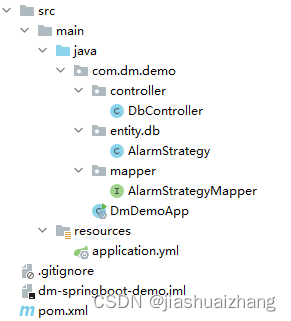
controller:示例接口

db:实体

mapper:数据库交互接口

DmDemoApp:项目启动类

maven引入相关jar包
<dependencies>
    <!-- 引入 springboot start -->
    <dependency>
        <groupId>org.springframework.boot</groupId>
        <artifactId>spring-boot-starter</artifactId>
    </dependency>
    <!-- 引入web支持 -->
    <dependency>
        <groupId>org.s
搭建Spring Boot项目并集成MyBatis和达梦(DM数据库的一般步骤如下: 1. **环境准备**: - 安装Java Development Kit (JDK) - 安装Spring Boot IDE(如IntelliJ IDEA、Eclipse等) - 下载并安装达梦数据库管理工具,例如DM Administrator 2. **创建Spring Boot项目**: - 使用IDEA创建一个新的Spring Boot Maven或Gradle项目。 3. **添加依赖**: - 在pom.xml 或 build.gradle 中添加以下依赖: ```xml <!-- Spring Data JPA --> <dependency> <groupId>org.springframework.boot</groupId> <artifactId>spring-boot-starter-data-jpa</artifactId> </dependency> <!-- MyBatis Starter --> <dependency> <groupId>org.mybatis.spring.boot</groupId> <artifactId>mybatis-spring-boot-starter</artifactId> <version>2.x.x</version> <!-- 更新到最新的稳定版本 --> </dependency> <!-- 达梦数据库驱动 --> <dependency> <groupId>com.damengyun</groupId> <artifactId>dmsql-client</artifactId> <version>xx.x.x</version> <!-- 更新到达梦官方提供的适配库版本 --> </dependency> ``` 4. **配置数据源**: - 在application.properties或application.yml文件中设置数据库连接信息,例如: ```properties spring.datasource.url=jdbc:dms://localhost:xxxx;databaseName=testdb spring.datasource.username=your_username spring.datasource.password=your_password ``` 或者使用YAML格式: ```yaml data-source: url: jdbc:dms://localhost:xxxx;databaseName=testdb username: your_username password: your_password ``` 5. **创建实体类**: - 根据达梦数据库表结构生成对应的Java实体类,通常使用MyBatis Generator工具。 6. **配置MyBatis**: - 创建`mybatis-config.xml`文件,并配置SqlSessionFactory以及Mapper扫描路径。 - 在application.properties或application.yml中添加MyBatis相关配置: ```properties mybatis.mapper-locations=classpath:mapper/*.xml ``` 7. **编写DAO接口和Mapper XML**: - DAO接口声明通用的方法,如`selectList`, `insert`, `update`, `delete`等。 - 在mapper XML文件中编写具体的SQL查询映射。 8. **注入服务层和控制层**: - 在Service层实现业务逻辑,将DAO注入。 - 在Controller层通过@Autowired注解注入Service,处理HTTP请求。 9. **运行应用**: - 启动应用,检查是否能成功连接到达梦数据库并执行操作。
评论
成就一亿技术人!
拼手气红包6.0元
还能输入1000个字符
 
红包 添加红包
表情包 插入表情
 条评论被折叠 查看
添加红包

请填写红包祝福语或标题

红包个数最小为10个

红包金额最低5元

当前余额3.43前往充值 >
需支付:10.00
成就一亿技术人!
领取后你会自动成为博主和红包主的粉丝 规则
hope_wisdom
发出的红包
实付
使用余额支付
点击重新获取
扫码支付
钱包余额 0

抵扣说明:

1.余额是钱包充值的虚拟货币,按照1:1的比例进行支付金额的抵扣。
2.余额无法直接购买下载,可以购买VIP、付费专栏及课程。

余额充值



