



 本文介绍了ListBox和ListBoxItem控件。ListBox包含可选项列表,其SelectionMode属性决定选择项数量,常与数据绑定使用。ListBoxItem表示ListBox中的可选项,可绑定数据并自定义外观。还阐述了自定义这两种控件的方法,以及给出了XAML和C#范例。
ListBox
包含可选项列表。
ListBox 为 ItemsControl ,这意味着它可以包含任何类型的对象的集合 (例如字符串、图像或面板) 。 有关更多信息,请参见 ItemsControl 类。
ListBox中的多个项 是可见的,不同于ComboBox ,只有选定项可见,除非 IsDropDownOpen 属性为 true 。 SelectionMode属性确定ListBox 中的多个项是否一次可选择。
SelectionMode属性确定用户一次可以选择多少项。 可以将属性设置为 Single (默认) 、 Multiple 或 Extended 。 下表描述了这些枚举值的行为。
| 值 | 说明 |
|---|---|
| Single | 用户一次只能选择一项。 |
| Multiple | 用户可以选择多个项而无需按下修改键。 |
| Extended | 通过按住 CTRL 键并单击这些项,用户可以选择多个连续项,同时按住 SHIFT 键或不连续项。 |
ListBox 控件通常与数据绑定一起使用。 有关详细信息,请参阅 数据绑定概述。
显示大量项可能会导致性能问题。 有关详细信息,请参阅 优化性能:控件 。
自定义 ListBox 控件
若要对多个ListBox控件应用相同的属性设置 ,请使用 Style 属性。 您可以修改 ControlTemplate默认值 ,为控件指定独特的外观。 有关创建 ControlTemplate的详细信息 ,请参阅 通过创建 System.windows.controls.controltemplate> 自定义现有控件的外观。 若要查看特定于 ListBox 的部分和状态,请参阅 ListBox 样式和模板。
此控件的依赖属性可能由控件的默认样式设置。 如果按默认样式设置属性,则当控件出现在应用程序中时,属性可能会更改为默认值。 默认样式取决于应用程序运行时使用的桌面主题。 有关详细信息,请参阅 默认的 WPF 主题。
只有视觉对象属性已存在于控件的默认模板中并且已使用 TemplateBinding 设置时,设置该属性才有效。 在通过创建 ControlTemplate 自定义现有控件的外观一文的更改控件的视觉结构部分可以找到视觉属性列表。
| 名称 | 备注 | 权限 |
|---|---|---|
| 标识 SelectedItems 依赖项属性 | public static readonly | |
| 标识 SelectionMode 依赖项属性。 | public static readonly |
| 名称 | 备注 | 权限 |
|---|---|---|
| 获取或设置当 SelectionMode 为 Extended 时,最初选择的项目。 | get; set; | |
| 获取一个值,该值指示 ListBox 是否支持滚动。 | get; | |
| 获取当前选定的项。 | get; | |
| 获取或设置 ListBox 的选择行为。 | get; set; |
| 名称 | 备注 | 权限 |
|---|---|---|
| 创建或标识用于显示指定项的元素。 | protected | |
确定指定项是否是(或者是否可以作为)自己的 ItemContainer。 | protected | |
| 提供 ListBoxAutomationPeer 此控件的适当实现,作为 WPF 自动化基础结构的一部分。 | protected | |
| 当 IsMouseCaptured 属性更改时调用。 | protected | |
| 响应 KeyDown 事件。 | protected | |
| 在 ListBox 报告鼠标移动时调用。 | protected | |
| 通过引发 SelectionChanged 事件来对列表框选择更改作出响应。 | protected | |
| 准备好指定的元素以显示指定的项。 | protected | |
| 使对象滚动到视图中。 | public | |
| 选择 ListBox 中的所有项。 | public | |
| 设置选定项的集合。 | protected | |
| 清除 ListBox 中的所有选择。 | public |
ListBoxItem
表示 ListBox 中的可选项。
ListBox包含对象的集合 ListBoxItem 。 若要选择 ListBox 中的 ListBoxItem,请将 IsSelected 属性设置为 true 。
通过将 ListBoxItem 的ItemsSource 属性绑定到数据源,将ListBoxItem绑定到数据。 有关详细信息,请参阅 如何:将 ListBox 绑定到数据。 可以 ListBoxItem 通过将的 ItemTemplate 属性设置 ListBox 为来自定义的外观 DataTemplate 。 有关详细信息,请参阅 数据模板化概述。
默认情况下, ListBoxItem 的 HorizontalAlignment设置为 Stretch 。 StackPanel 的默认水平位置是 Center 。 如果通过 StackPanel 设置 ListBoxItem的属性 Width,则将应用 StackPanel 的默认值,将项目居中。
ListBoxItem是 ContentControl ,这意味着它可以包含任何类型的单个对象 (例如字符串、图像或面板) 。 有关更多信息,请参见 ContentControl 类。
自定义 ListBoxItem 控件
若要对多个 ListBoxItem控件应用相同的属性设置 ,请使用 Style 属性。 您可以修改 ControlTemplate 默认值,为控件指定独特的外观。 有关创建 ControlTemplate 的详细信息,请参阅 通过创建 System.windows.controls.controltemplate> 自定义现有控件的外观。 若要查看特定于 ListBoxItem 的部分和状态,请参阅 ListBox 样式和模板。
此控件的依赖属性可能由控件的默认样式设置。 如果按默认样式设置属性,则当控件出现在应用程序中时,属性可能会更改为默认值。 默认样式取决于应用程序运行时使用的桌面主题。 有关详细信息,请参阅 默认的 WPF 主题。
只有视觉对象属性已存在于控件的默认模板中并且已使用 TemplateBinding 设置时,设置该属性才有效。 在通过创建 ControlTemplate 自定义现有控件的外观一文的更改控件的视觉结构部分可以找到视觉属性列表。
字段
| 名词 | 备注 | 权限 |
|---|---|---|
| IsSelectedProperty | 标识 IsSelected 依赖项属性 | public |
| SelectedEvent | 标识 Selected 路由事件 | public |
| UnselectedEvent | 标识 Unselected 路由事件 | public |
属性
| 名词 | 备注 | 权限 |
|---|---|---|
| 获取或设置一个指示是否选择 ListBoxItem 的值 | public |
方法
| 名词 | 备注 | 权限 |
|---|---|---|
| OnCreateAutomationPeer | 提供 ListBoxItemAutomationPeer 此控件的适当实现,作为 WPF 自动化基础结构的一部分 | protected |
| OnMouseEnter | 在鼠标进入 ListBoxItem 时调用 | protected |
| OnMouseLeave | 在鼠标离开 ListBoxItem 时调用 | protected |
| OnMouseLeftButtonDown | 当用户在 ListBoxItem 上按鼠标右键时调用 | protected |
| OnMouseRightButtonDown | 当用户在 ListBoxItem 上按鼠标右键时调用 | protected |
| OnSelected | 在选定 ListBoxItem 中的 ListBox 时调用 | protected |
| OnUnselected | 在取消选择 ListBoxItem 中的 ListBox 时调用 | protected |
| OnVisualParentChanged | 在列表框项的可视父级更改时调用 | protected |
事件
| 名词 | 备注 | 权限 |
|---|---|---|
| 在选择 ListBoxItem 时发生 | public | |
| 在取消选择 ListBoxItem 时发生 | public |
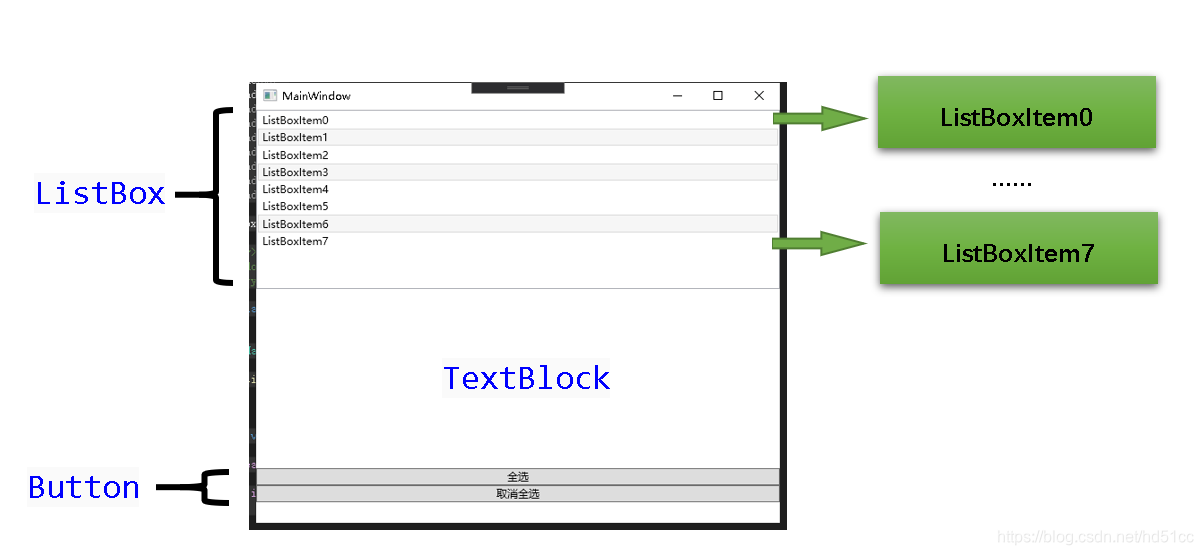
XAML范例
<Window x:Class="ListBoxDemo.MainWindow"
        xmlns="http://schemas.microsoft.com/winfx/2006/xaml/presentation"
        xmlns:x="http://schemas.microsoft.com/winfx/2006/xaml"
        xmlns:d="http://schemas.microsoft.com/expression/blend/2008"
        xmlns:mc="http://schemas.openxmlformats.org/markup-compatibility/2006"
        xmlns:local="clr-namespace:ListBoxDemo"
        mc:Ignorable="d"
        Title="MainWindow" Height="500" Width="600">
    <Grid>
        <StackPanel>
            <ListBox SelectionMode="Extended" Height="200" SelectionChanged="OnSelectionChanged">
                <ListBoxItem Content="ListBoxItem0"/>
                <ListBoxItem Content="ListBoxItem1" IsSelected="True"/>
                <ListBoxItem Content="ListBoxItem2"/>
                <ListBoxItem Content="ListBoxItem3" IsSelected="True"/>
                <ListBoxItem Content="ListBoxItem4"/>
                <ListBoxItem Content="ListBoxItem5"/>
                <ListBoxItem Content="ListBoxItem6" IsSelected="True"/>
                <ListBoxItem Content="ListBoxItem7"/>
            </ListBox>
            <TextBlock Height="200">
            </TextBlock>
            <Button Content="全选" Click="OnListBoxSelectAll"/>
            <Button Content="取消全选" Click="OnListBoxUnselectAll"/>
        </StackPanel>
    </Grid>
</Window>
using System;
using System.Collections.Generic;
using System.Linq;
using System.Text;
using System.Threading.Tasks;
using System.Windows;
using System.Windows.Controls;
using System.Windows.Data;
using System.Windows.Documents;
using System.Windows.Input;
using System.Windows.Media;
using System.Windows.Media.Imaging;
using System.Windows.Navigation;
using System.Windows.Shapes;

namespace ListBoxDemo
{
    /// <summary>
    /// MainWindow.xaml 的交互逻辑
    /// </summary>
    public partial class MainWindow : Window
    {
        public MainWindow()
        {
            InitializeComponent();
        }

        private void OnListBoxSelectAll(object sender, RoutedEventArgs e)
        {
            foreach (var item in ((sender as Button).Parent as StackPanel).Children)
            {
                if (item is ListBox) (item as ListBox).SelectAll();
            }
        }

        private void OnListBoxUnselectAll(object sender, RoutedEventArgs e)
        {
            foreach (var item in ((sender as Button).Parent as StackPanel).Children)
            {
                if (item is ListBox) (item as ListBox).UnselectAll();
            }
        }

        private void OnSelectionChanged(object sender, SelectionChangedEventArgs e)
        {
            string s = String.Empty;
            foreach (var item0 in (sender as ListBox).SelectedItems)
            {
                s +=(item0 as ListBoxItem).Content +"\n";
            }

            foreach (var item in ((sender as ListBox).Parent as StackPanel).Children)
            {
                if (item is TextBlock) (item as TextBlock).Text = s;
            }
        }
    }
}
C#范例
using System;
using System.Collections.Generic;
using System.Linq;
using System.Text;
using System.Threading.Tasks;
using System.Windows;
using System.Windows.Controls;
using System.Windows.Data;
using System.Windows.Documents;
using System.Windows.Input;
using System.Windows.Media;
using System.Windows.Media.Imaging;
using System.Windows.Navigation;
using System.Windows.Shapes;

namespace ListBoxDemo
{
    /// <summary>
    /// MainWindow.xaml 的交互逻辑
    /// </summary>
    public partial class MainWindow : Window
    {
        public MainWindow()
        {
            InitializeComponent();

            ListBox listBox = new ListBox();
            listBox.SelectionMode = System.Windows.Controls.SelectionMode.Extended;
            listBox.Height = 200;
            listBox.SelectionChanged += OnSelectionChanged;
            for (int i = 0; i < 8; i++)
            {
                listBox.Items.Add(new ListBoxItem { Content = "ListBoxItem" + i});
            }
             (listBox.Items[1] as ListBoxItem).IsSelected = true;
            (listBox.Items[3] as ListBoxItem).IsSelected = true;
            (listBox.Items[6] as ListBoxItem).IsSelected = true;

            TextBlock textBlock = new TextBlock { Height = 200 };
            Button button1 = new Button { Content = "全选" };
            button1.Click += OnListBoxSelectAll;
            Button button2 = new Button { Content = "取消全选" };
            button2.Click += OnListBoxUnselectAll;

            StackPanel mystackPanel = new StackPanel();
            mystackPanel.Children.Add(listBox);
            mystackPanel.Children.Add(textBlock);
            mystackPanel.Children.Add(button1);
            mystackPanel.Children.Add(button2);

            (this.Content as Grid).Children.Add(mystackPanel);

        }


        private void OnListBoxSelectAll(object sender, RoutedEventArgs e)
        {
            foreach (var item in ((sender as Button).Parent as StackPanel).Children)
            {
                if (item is ListBox) (item as ListBox).SelectAll();
            }
        }

        private void OnListBoxUnselectAll(object sender, RoutedEventArgs e)
        {
            foreach (var item in ((sender as Button).Parent as StackPanel).Children)
            {
                if (item is ListBox) (item as ListBox).UnselectAll();
            }
        }

        private void OnSelectionChanged(object sender, SelectionChangedEventArgs e)
        {
            string s = String.Empty;
            foreach (var item0 in (sender as ListBox).SelectedItems)
            {
                s +=(item0 as ListBoxItem).Content +"\n";
            }

            if((sender as ListBox).Parent !=null)
            {
                foreach (var item in ((sender as ListBox).Parent as StackPanel).Children)
                {
                    if (item is TextBlock) (item as TextBlock).Text = s;
                }
            }

        }
    }
}





 扫一扫
扫一扫


 5万+
5万+


 到【灌水乐园】发言



