


一、yum源概述
㈠ yum源的作用
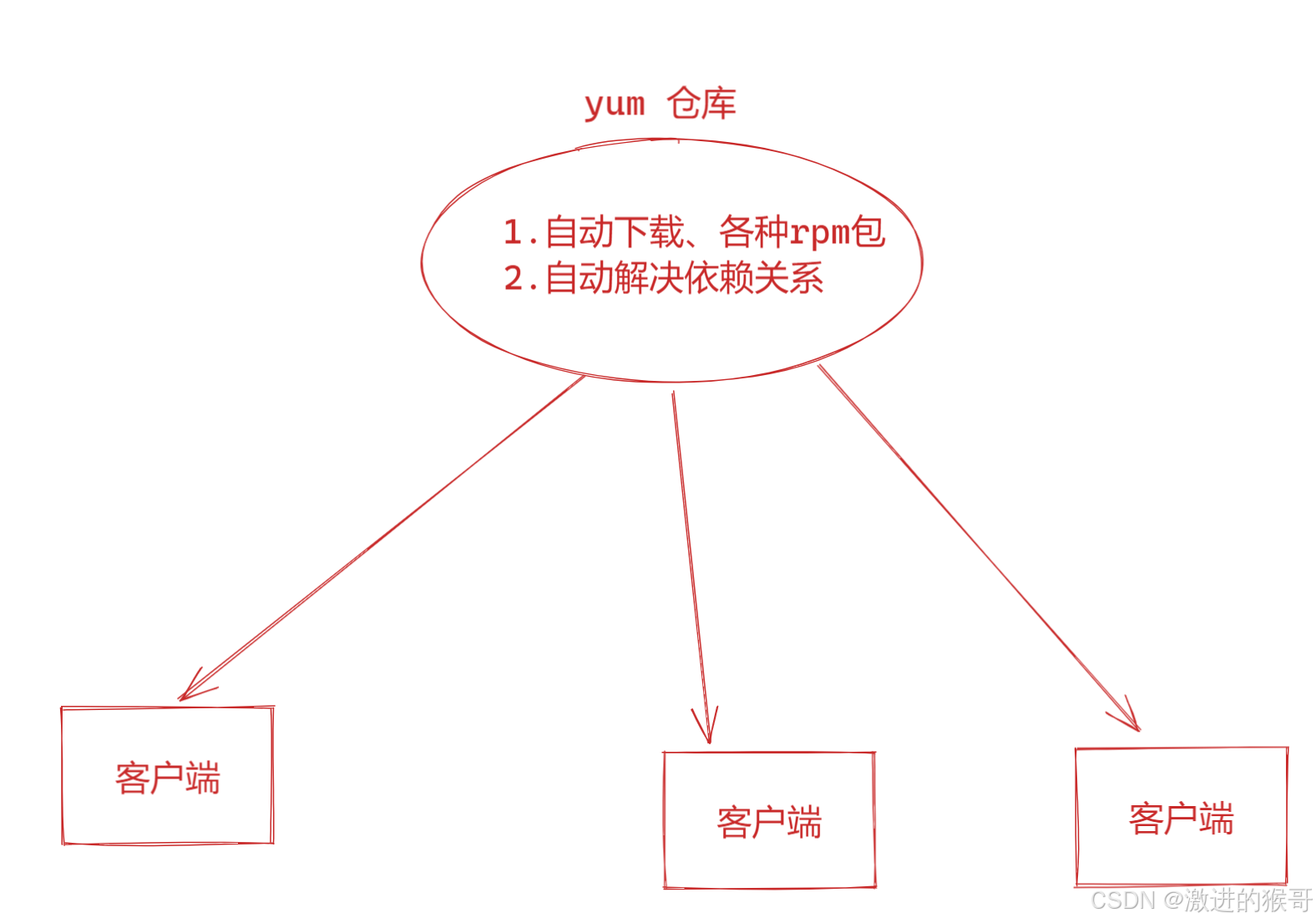
==软件包管理器==,类似360的软件管家
㈡ yum源的优点
能够==解决软件包之间的依赖关系==,提高运维人员的工作效率。
㈢ yum源的分类
1、本地yum源
yum仓库在==本地==(系统光盘/镜像文件)
2、网络yum源
yum仓库不在本地,在==远程==服务器
-
国内较知名的网络源(aliyun源,163源,sohu源,知名大学开源镜像等)
阿里源:阿里巴巴开源镜像站-OPSX镜像站-阿里云开发者社区
网易源:欢迎访问网易开源镜像站
搜狐源:Index of /
-
国外较知名的网络源(centos源、redhat源、扩展epel源等)
-
==特定软件==相关的网络源(Nginx、MySQL、Zabbix等)
二、yum源配置(重点)
㈠ 本地yum源配置
1、本地需要有仓库
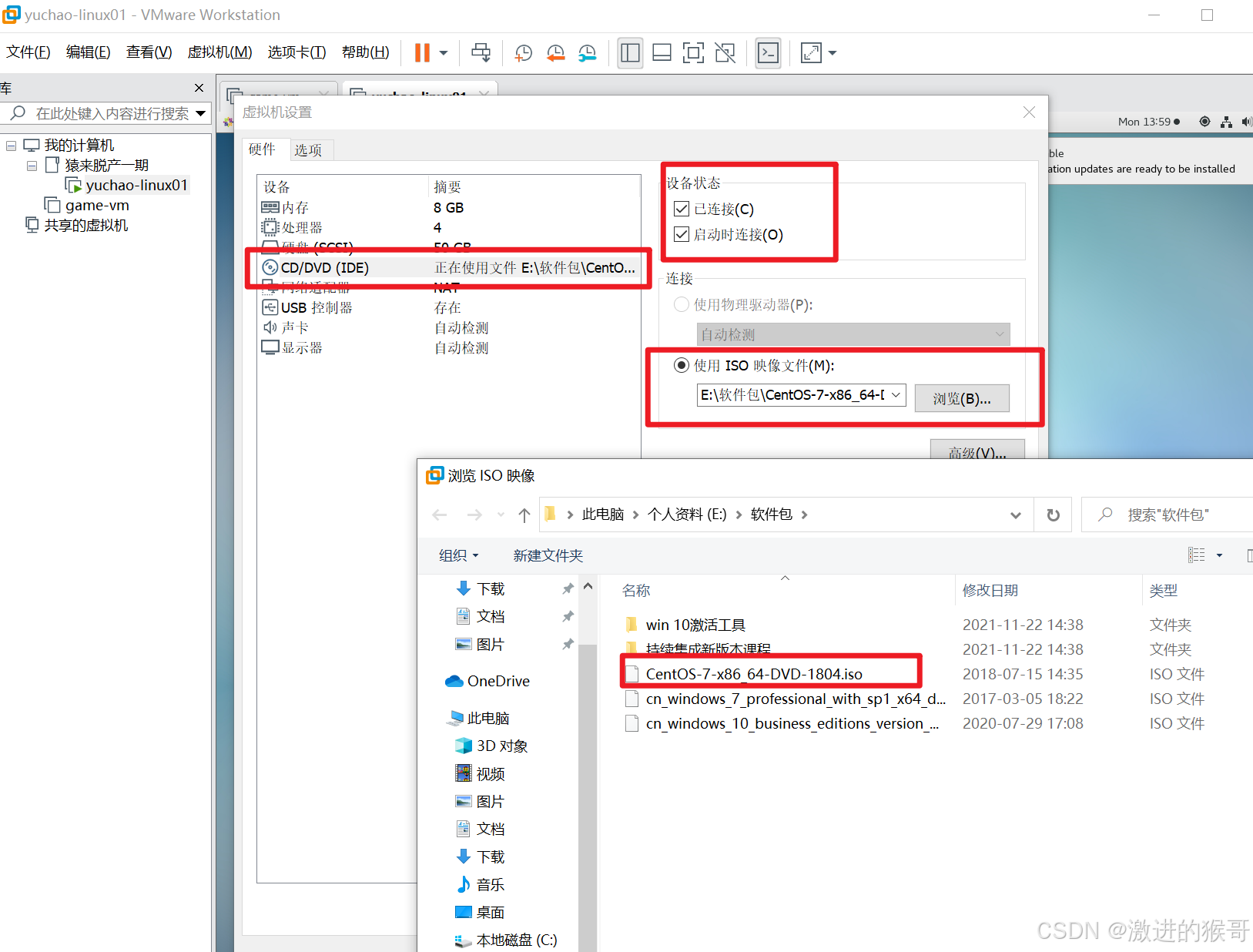
① 虚拟光驱装载镜像文件
② 将光盘挂载到本地目录
/mnt    操作系统默认的挂载点

mount [挂载选项] 需要挂载的设备  挂载点

手动挂载光盘到/mnt
lsblk        查看当前系统所有的设备文件


mount -o ro /dev/sr0 /mnt
注意:手动挂载后,系统重启需要再次手动挂载

# mount -o ro /dev/sr0 /mnt
选项说明:
-o :挂载方式,ro代表以readonly=>只读的方式进行挂载
              rw代表以read/write=>读写的方式进行挂载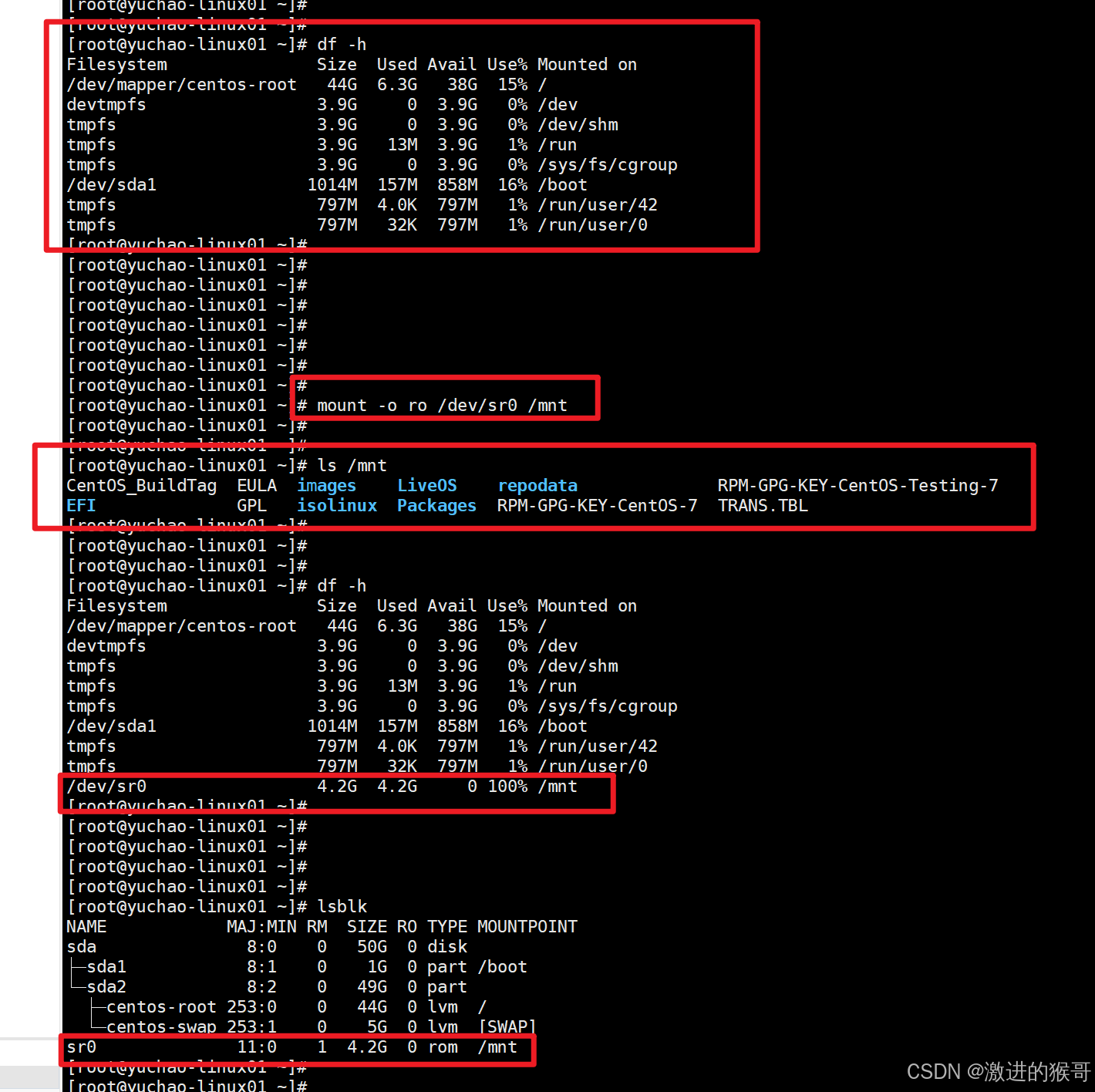
③ 开机自动挂载
/etc/rc.local,属于系统的开机启动文件。系统启动后,会自动加载并执行这个文件
修改/etc/rc.local文件

/etc/rc.local    操作系统开机最后读取的一个文件

写入一行配置信息到该文件
echo "mount -o ro /dev/sr0 /mnt" >> /etc/rc.local


如下
[root@yuchao-linux01 ~]# echo "mount -o ro /dev/sr0 /mnt" >> /etc/rc.local
[root@yuchao-linux01 ~]#
[root@yuchao-linux01 ~]#
[root@yuchao-linux01 ~]# cat /etc/rc.local
#!/bin/bash
# THIS FILE IS ADDED FOR COMPATIBILITY PURPOSES
#
# It is highly advisable to create own systemd services or udev rules
# to run scripts during boot instead of using this file.
#
# In contrast to previous versions due to parallel execution during boot
# this script will NOT be run after all other services.
#
# Please note that you must run 'chmod +x /etc/rc.d/rc.local' to ensure
# that this script will be executed during boot.

touch /var/lock/subsys/local
mount -o ro /dev/sr0 /mnt
[root@yuchao-linux01 ~]#
2、修改配置文件指向本地仓库
① 备份yum仓库文件
[root@yuchao-linux01 ~]# cd /etc/yum.repos.d/
[root@yuchao-linux01 yum.repos.d]# tar -zcf repo.tgz *.repo
[root@yuchao-linux01 yum.repos.d]#
[root@yuchao-linux01 yum.repos.d]# ls
CentOS-Base.repo      CentOS-Debuginfo.repo  CentOS-Sources.repo  epel-testing.repo  rpmorphan-1.14-1.noarch.rpm
CentOS-Base.repo.bak  CentOS-fasttrack.repo  CentOS-Vault.repo    local.repo
CentOS-CR.repo        CentOS-Media.repo      epel.repo            repo.tgz
[root@yuchao-linux01 yum.repos.d]#
[root@yuchao-linux01 yum.repos.d]# rm -rf *.repo
[root@yuchao-linux01 yum.repos.d]#
[root@yuchao-linux01 yum.repos.d]#
[root@yuchao-linux01 yum.repos.d]# ls
CentOS-Base.repo.bak  repo.tgz  rpmorphan-1.14-1.noarch.rpm
[root@yuchao-linux01 yum.repos.d]#
① 配置文件存放路径
[root@yuchao-linux01 ~]#
[root@yuchao-linux01 ~]# ls /etc/yum.repos.d/ -d
/etc/yum.repos.d/
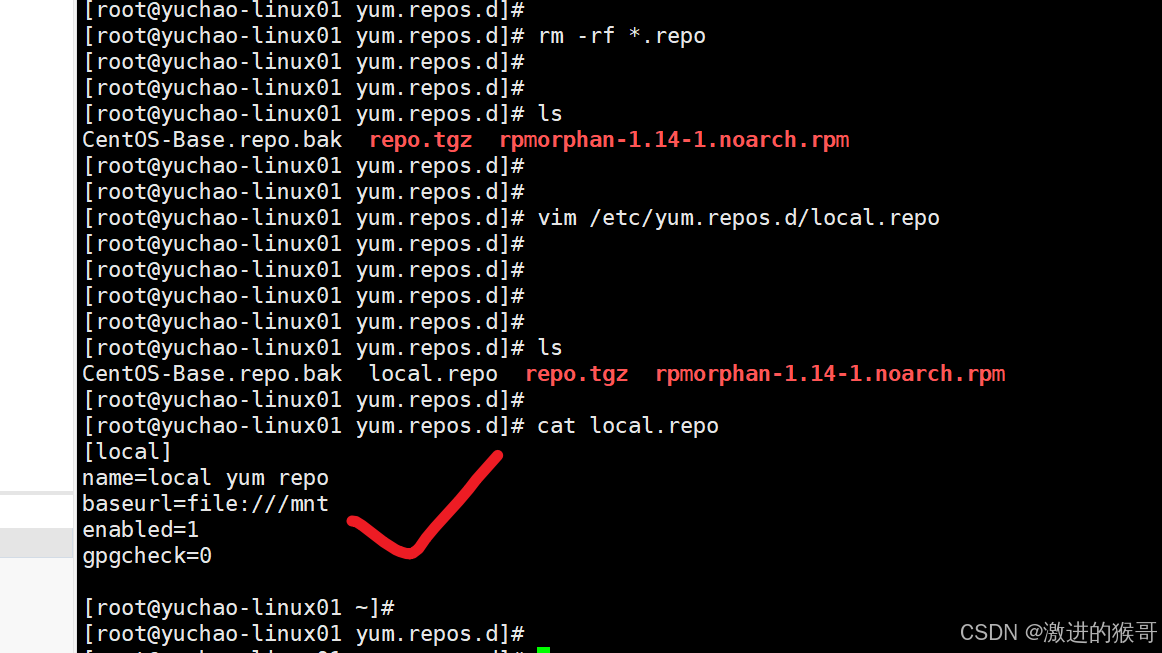
② 修改配置文件
[root@yuchao-linux01 ~]# ls /etc/yum.repos.d/ -d
/etc/yum.repos.d/
[root@yuchao-linux01 ~]# vim /etc/yum.repos.d/local.repo
[root@yuchao-linux01 ~]#
[root@yuchao-linux01 ~]#
[root@yuchao-linux01 ~]# cat  /etc/yum.repos.d/local.repo
[local]
name=local yum repo
baseurl=file:///mnt
enabled=1
gpgcheck=0

[root@yuchao-linux01 ~]# 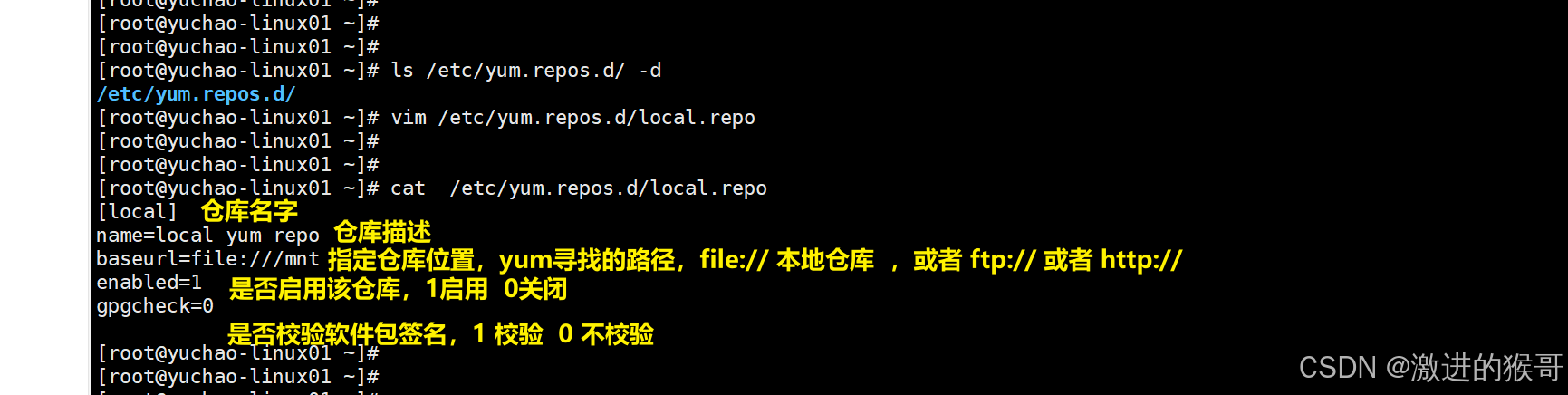
看看系统给的repo语法是什么
说明:
baseurl=http://nginx.org/packages/centos/7/$basearch/
$basearch表示当前系统cpu架构,如果系统是32位会找32位软件包;如果64位会找64位软件包
③验证本地yum源
[root@yuchao-linux01 yum.repos.d]#
[root@yuchao-linux01 yum.repos.d]# yum clean all
Loaded plugins: fastestmirror, langpacks
Bad id for repo: root@yuchao-linux01 ~, byte = @ 4
Cleaning repos: local
Cleaning up everything
Maybe you want: rm -rf /var/cache/yum, to also free up space taken by orphaned data from disabled or removed repos
Cleaning up list of fastest mirrors
[root@yuchao-linux 最低0.47元/天 解锁文章






 扫一扫
扫一扫


 605
605

 被折叠的 条评论
为什么被折叠?
被折叠的 条评论
为什么被折叠?
 到【灌水乐园】发言





