



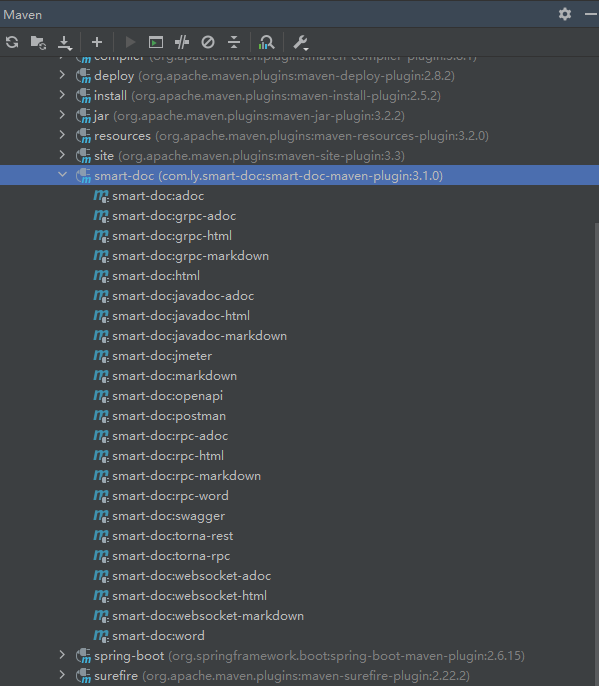
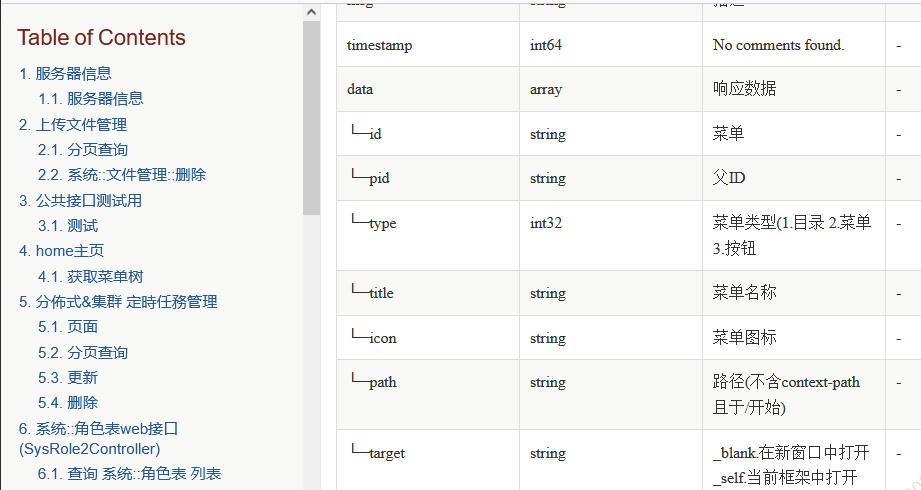
这个文档工具在目前我所经手的项目中广泛之使用,如图,需要的功能基本都有了🥰
smart-doc 有啥优点
- 由于仅有
plugin及一个json配置,无任何ApiModelProperty、ApiModel及Schema侵入性注解代码 - 可以生成诸如
html(单文件需要先走adoc后转html)、openapi、postman、jmeter、word等主流且前端用也可后端测试用之文档 - 文档定义更简单,仅需有限的注解及
Jakarta相关注解配合使用即可, 其他扩展文档见 smart-doc
如何使用
- 在项目中添加
plugin配置,这里仅以maven项目实例
<!--文档工具-->
<plugin>
  <groupId>com.ly.smart-doc</groupId>
  <artifactId>smart-doc-maven-plugin</artifactId>
  <version>3.1.0</version>
  <configuration>
    <!--配置文件位置-->
    <configFile>./src/main/resources/smart-doc.json</configFile>
    <!--<projectName>${application.name}</projectName>-->
    <!--<configFile>${application.name}</configFile>-->
  </configuration>
  <!--项目编译时执行生成html不需要可以去掉executions标签-->
  <executions>
    <execution>
      <!--打包的时候构建文档(install package)-->
      <phase>package</phase>
      <goals>
        <!--adoc文档,后续用asciidoc生成html单文档-->
        <goal>adoc</goal>
        <!--构建文档类型 -->
        <!--api只构建html文档-->
        <!--<goal>html</goal>-->
        <!--统一接口只构建adoc文档-->
        <!--<goal>rpc-adoc</goal>-->
      </goals>
    </execution>
  </executions>
</plugin>

<!--文档工具:用于将smart-doc生成的adoc文件转换为html文档-->
<plugin>
<groupId>org.asciidoctor</groupId>
<artifactId>asciidoctor-maven-plugin</artifactId>
<version>1.5.8</version>
<configuration>
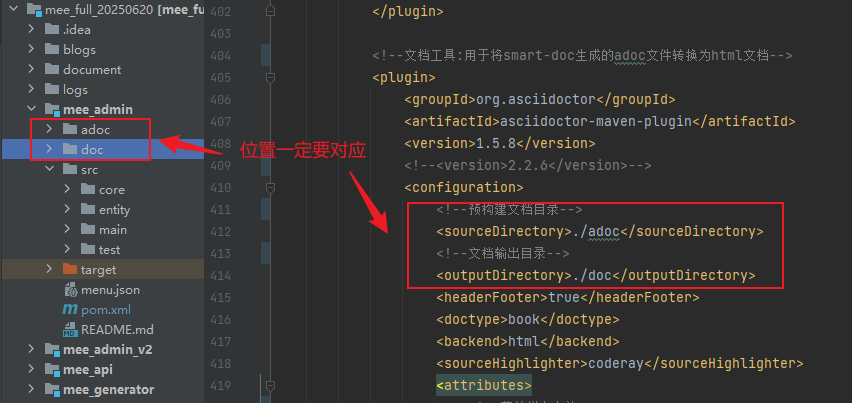
  <!--预构建文档目录-->
  <sourceDirectory>./adoc</sourceDirectory>
  <!--文档输出目录-->
  <outputDirectory>./doc</outputDirectory>
  <headerFooter>true</headerFooter>
  <doctype>book</doctype>
  <backend>html</backend>
  <sourceHighlighter>coderay</sourceHighlighter>
  <attributes>
    <!--菜单栏在左边-->
    <toc>left</toc>
    <!--多标题排列-->
    <toclevels>3</toclevels>
    <!--自动打数字序号-->
    <sectnums>true</sectnums>
  </attributes>
</configuration>
<executions>
  <execution>
    <phase>package</phase>
    <goals>
      <goal>process-asciidoc</goal>
    </goals>
  </execution>
</executions>
</plugin>
<!-- 文档工具结束-->plugin在多模块项目中表现为:
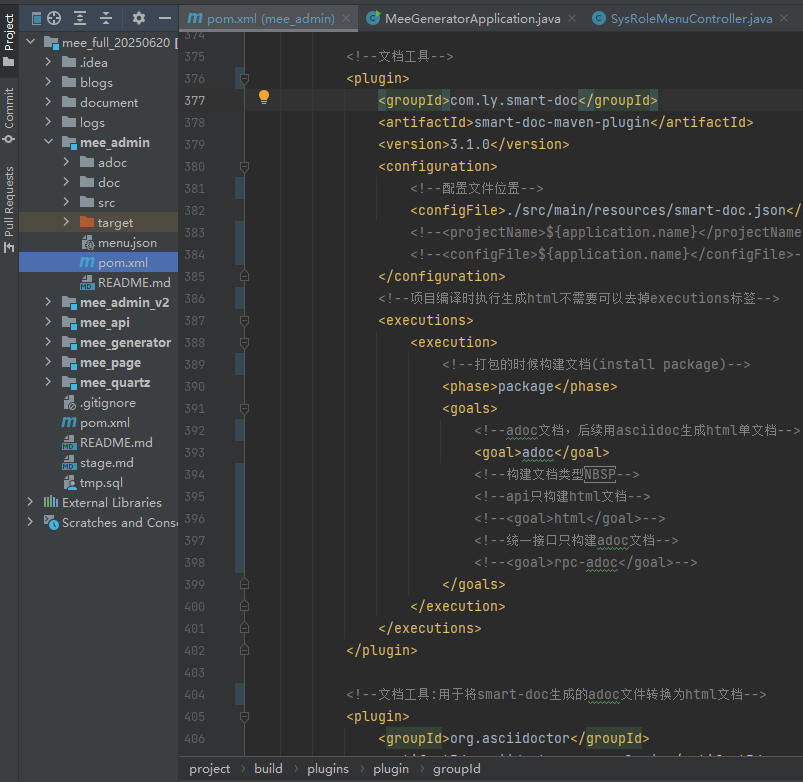
- 在项目中定义
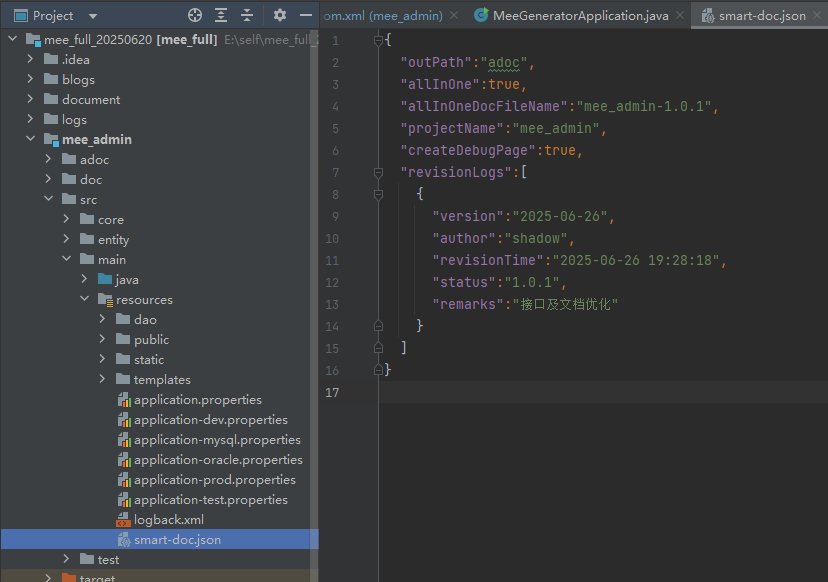
smart-doc.json配置文件,一般在resources目录下
  {
    "outPath":"adoc",
    "allInOne":true,
    "allInOneDocFileName":"mee_admin-1.0.1",
    "projectName":"mee_admin",
    "createDebugPage":true,
    "revisionLogs":[
      {
        "version":"2025-06-26",
        "author":"shadow",
        "revisionTime":"2025-06-26 19:28:18",
        "status":"1.0.1",
        "remarks":"接口及文档优化"
      }
    ]
  }
这个 smart-doc.json 在 plugin 中有引用,相对地址不要弄错了
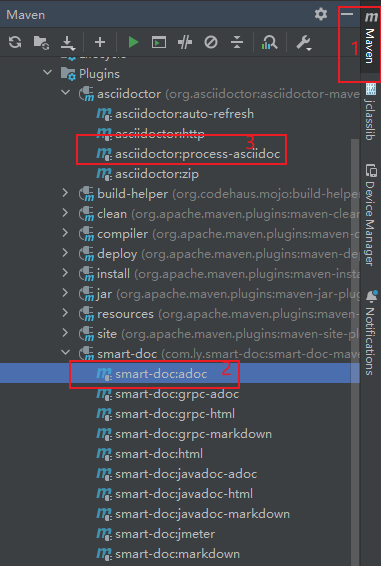
- 在
idea的maven面板依次操作=>生成单html文档文件
使用技巧及注意事项
- 字段的注释不可以含有竖杠(eg:
|), 可能造成文档出现偏移 -
// eg: /** * 菜单类型(1.目录 | 2.菜单 | 3.按钮) */ private Integer type; - 入口注释字段
@param的值不可为空, 可导致无法生成文档 -
   // eg:
    /**
     * 系统::文件管理::删除
     * @param status 状态
     * @param
     */
    @RequiresPermissions("sys:sys_file:delete")
    @DeleteMapping("/delete")
    @ResponseBody
    public MeeResult<Integer> deleteById(@RequestParam(required = true) String id,@RequestParam(required = true) String status){
      return sysFileService.deleteById(id,status);
    }
smart-doc强烈推荐使用3.1.x以上的版本,若使用3.1.x以下版本 多个@RequestHeader时生成的文档会出现行偏移
  // eg:
  @RequiresPermissions("sys:sys_file:delete")
  @DeleteMapping("/delete")
  @ResponseBody
  public MeeResult<Integer> deleteById(@RequestHeader String aa ,@RequestHeader String status){
      return sysFileService.deleteById(id,status);
  }
- 一定要注意
xml配置的目录或文件的位置 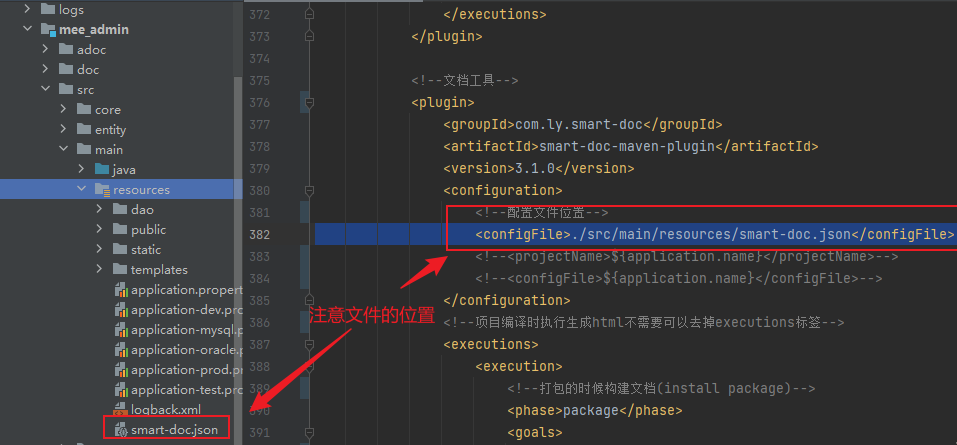
文档生成效果
- 单
html文档
02. showdoc
这东西看起来比较美观,非常适合外部人员接入之使用,当然缺点也很明显:
- 公开文档安全及私密性就差很多
- 也同样存在手动编写的问题,需要跟随代码同步维护
- 使用范围比较窄,虽方便接入人员用,测试及开发自测仍旧比较麻烦
- 导入导出似乎受限制,不知道现在有没改善😂
swagger,一开始觉得这东西蛮不错的,主要体现在:
- 不需要再写word或excel
- 定义文档接口的方式更贴合传统编码的方式
- 文档可生成在线网页doc的方式也可以通过跑代码生成
adoc文件+asciidoctor工具生成单html文档,这非常利于文档分发
东西虽好,但是缺点也是十分明显的:
- 代码耦合性太强了,
swagger依赖必须与代码一起部署(包括生产) - 在线文档十分便捷,但是由于
swagger可能的漏洞的存在,增加了系统风险的可能性(这个本人碰到过) - 能生成实用的``html文档,可似乎缺少了供测试使用的
jmeter及postman文档,测试人员依然需要手动构建测试接口 - 特别需要注意的是
swaggerv2及之后似乎缺少了html文档的生成途径(文档工具不能越做越返祖啊...)😂 swagger文档不论是在线的还是离线的文档 对于复杂的json需要逐级便利 (如果能平铺为一个table就好了) 😓





 扫一扫
扫一扫


 177
177

 被折叠的 条评论
为什么被折叠?
被折叠的 条评论
为什么被折叠?
 到【灌水乐园】发言





