


一、需求和实现逻辑
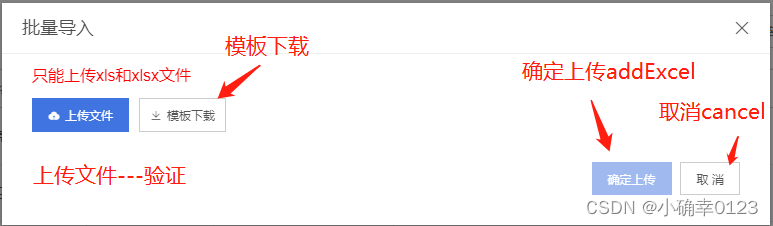
需求:做一个信息导入功能(用户根据下载的模板填写信息,后台识别后录入数据库)
实现逻辑:
1.点击出现弹窗
2.弹窗中有 模板下载 文件上传两个按钮
3.模板下载
4.文件上传验证
5.文件保存到数据库
 二、相关代码
1.点击出现弹框 :visible.sync="excelDialog"
点击信息导入按钮后 excelDialog变为true
<el-button type="primary" size="default" @click="excelDialog = true">批量导入</el-button>
2.弹框样式设置
<el-dialog
title="批量导入"
:visible.sync="excelDialog"
width="40%"
>
<h2 style="margin-bottom: 10px;font-size: 16px;margin-top: -20px;color: red; font-weight: normal;">
只能上传xls和xlsx文件
</h2>
<div style="float: left;margin:0px 10px 15px 0px">
<div>
<el-upload
class="upload"
action=""
:multiple="false"
:show-file-list="false"
:http-request="httpRequestExcel"
>
<el-button icon="el-icon-upload" type="primary" size="default">上传文件</el-button>
</el-upload>
</div>
</div>
<el-button
icon="el-icon-download"
size="medium"
@click="downloadTemplate"
>模板下载</el-button>
<!-- 下载模板a标签 -->
<a ref="downloadTemplate" style="display: none" href="./学生信息导入模板.xlsx" />
<!-- <el-button type="primary" size="default">模板下载</el-button>-->
<div v-if="isVisiable2">
<template>
<div style="line-height: 180%;font-size: 14px;">
<el-row>
<el-col :span="24">无错误信息,请点击确认上传。</el-col>
</el-row>
</div>
</template>
</div>
<div v-if="isVisiable">
<template>
<div style="line-height: 180%;font-size: 14px;">
<el-row>
<el-col :span="24" style="color: red">错误信息: </el-col>
<div v-for="item in excelError" :key="item.id"> {{ item }}</div>
</el-row>
</div>
<div style="line-height: 180%;font-size: 14px;">
<el-row>
<div v-for="item in excelRepeat" :key="item.id"> {{ item }}</div>
</el-row>
</div>
</template>
</div>
<span slot="footer" class="dialog-footer">
<el-button type="primary" size="default" :disabled="excelButton" @click="addExcel(excelInfo)">确定上传</el-button>
<el-button @click="excelDialog = false,cancel()">取 消</el-button>
</span>
</el-dialog>
3.模板下载
按钮设置:
<el-button
icon="el-icon-download"
size="medium"
@click="downloadTemplate"
>模板下载</el-button>
<a ref="downloadTemplate" style="display: none" href="./学生信息导入模板.xlsx" />
模板文件路径:public包下
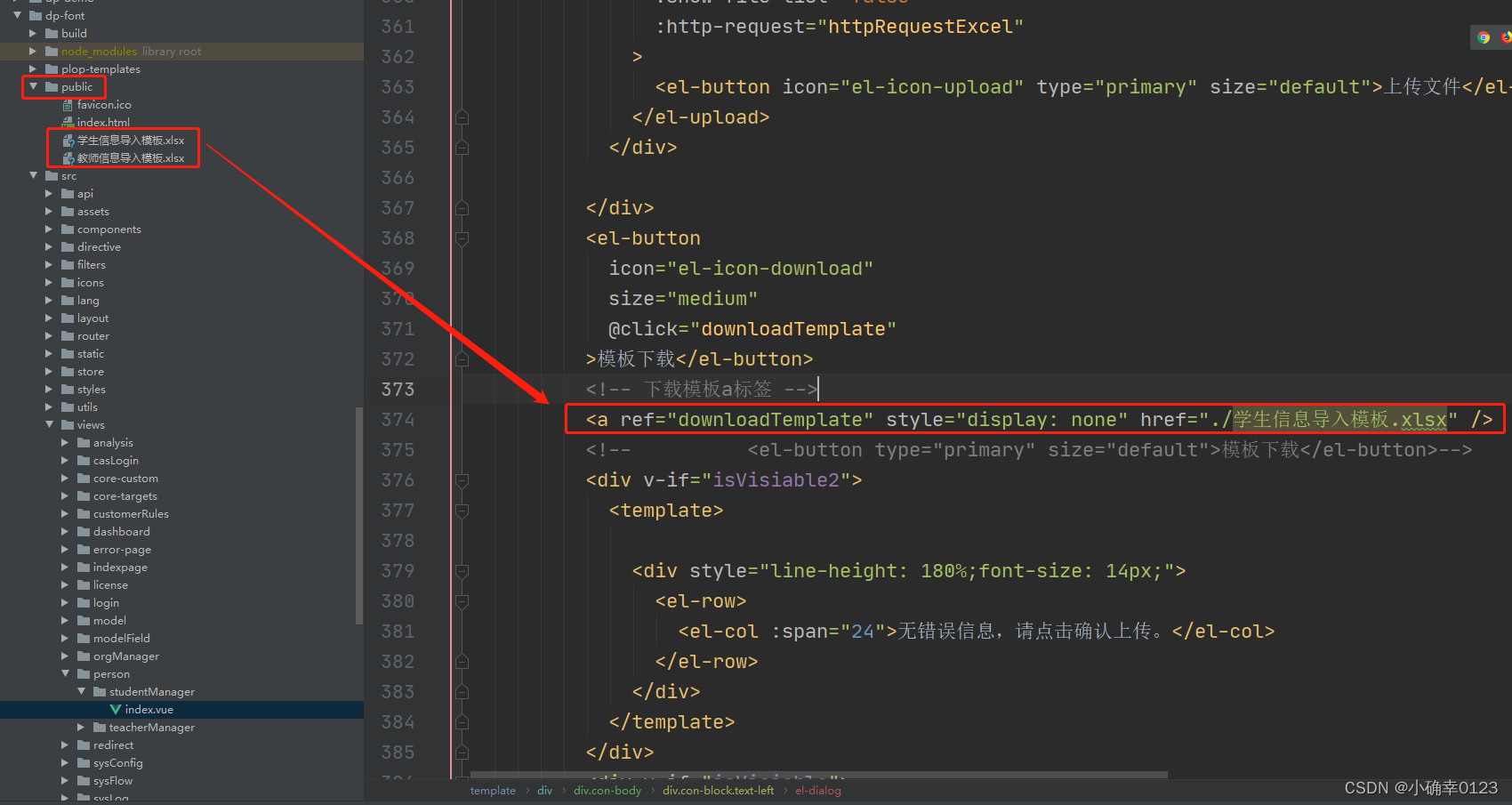
按钮绑定的方法:
methods:{
    downloadTemplate() {
      this.$refs.downloadTemplate.dispatchEvent(new MouseEvent('click'))
    },
}
4.文件上传验证
验证之前的准备工作:
①做一个excel模板
②做dto文件StudentDto
字段对应的就是模板
@ExcelProperty(value = "学号(必填)") value 就是excel表头
@Data
public class StudentDto2 {

    @ExcelProperty(value = "学号(必填)")
    private String code;

    @ExcelProperty(value = "姓名(必填)")
    private String name;

    @ExcelProperty(value = "身份证号(必填)")
    private String idCard;

    @ExcelProperty(value = "英文姓名")
    private String ywxm;

    @ExcelProperty(value = "曾用名")
    private String cym;


    @ExcelProperty(value = "性别")
    private String gender;

    @ExcelProperty(value = "籍贯")
    private String jg;

    @ExcelProperty(value = "民族")
    private String nationId;


    @ExcelProperty(value = "政治面貌")
    private String zzmm;

    @ExcelProperty(value = "健康状况")
    private String jkzkm;


}
③.写Listenner
@Component
@Scope("prototype")
@Transactional(propagation = Propagation.REQUIRED, rollbackFor = RuntimeException.class)
public class Studentistener extends AnalysisEventListener<StudentDto2> {
    private static final Logger LOGGER = LoggerFactory.getLogger(Studentistener.class);

    private List<String> errors;

    private Map<String, Object> result;

    private int repeat = 0;

    private int row = 1;

    private StudentService studentService;

    private String baseUrl;

    public Studentistener(Map<String, Object> result) {
        this.result = result;
        studentService = (StudentService) ApplicationContextHelper.getBean("studentService");
        coreChartBaseService = (CoreChartBaseService) ApplicationContextHelper.getBean("coreChartBaseService");
    }

    @Override
    public void invoke(StudentDto2 studentDto2, AnalysisContext analysisContext) {
        List<String> errors = new ArrayList<>(); //错误信息数据
        List<String> repeat = new ArrayList<>(); //重复数据

        if (LangUtils.isNotEmpty(result.get("errors"))) {
            errors = (List<String>) result.get("errors");
        }
        if (LangUtils.isNotEmpty(result.get("repeat"))) {
            repeat = (List<String>) result.get("repeat");
        }
        if (LangUtils.isNotEmpty(result.get("row"))) {
            row = (int) result.get("row");
        }
        if (LangUtils.isNotEmpty(result.get("baseUrl"))) {
            baseUrl = (String) result.get("baseUrl");
        }
        row++;


            if (Strings.isNullOrEmpty(studentDto2.getName())) {
                errors.add("第" + row + "行,学生姓名不能为空");
            }
            if(Strings.isNullOrEmpty(studentDto2.getIdCard())){
                errors.add("第" + row + "行,学生身份证不能为空");
            }
            if(Strings.isNullOrEmpty(studentDto2.getPhone())){
                errors.add("第" + row + "行,学生手机号不能为空");
            }
            if(Strings.isNullOrEmpty(studentDto2.getXq())){
                errors.add("第" + row + "行,学生校区不能为空");
            }
            if(Strings.isNullOrEmpty(studentDto2.getGrade2())){
                errors.add("第" + row + "行,学生学段不能为空");
            }
            if(Strings.isNullOrEmpty(studentDto2.getBj())){
                errors.add("第" + row + "行,学生班级不能为空");
            }
            if(Strings.isNullOrEmpty(studentDto2.getCode())){
                errors.add("第" + row + "行,学生学号不能为空");
            }
            if(!Strings.isNullOrEmpty(studentDto2.getIdCard())){
                QueryWrapper<StudentEntity> queryWrapper = new QueryWrapper();
                queryWrapper.eq("id_card",studentDto2.getIdCard());
                List<StudentEntity> sameDate = studentService.list(queryWrapper);
                if(sameDate.size() > 0){
                    repeat.add("第" + row + "行,学生身份证号重复");
                }
            }
            if(!Strings.isNullOrEmpty(studentDto2.getCode())){
                QueryWrapper<StudentEntity> queryWrapper = new QueryWrapper();
                queryWrapper.eq("code",studentDto2.getCode());
                List<StudentEntity> sameDate = studentService.list(queryWrapper);
                if(sameDate.size() > 0)
                repeat.add("第" + row + "行,学生学号重复");
            }
        result.put("errors", errors);
        result.put("row", row);
        result.put("repeat", repeat);
    }


    @Override
    public void doAfterAllAnalysed(AnalysisContext analysisContext) {
    }

    @Override
    public void onException(Exception exception, AnalysisContext context) throws Exception {

    }

    public void doCheckPhone(List<String> errors, List<Map<String, Object>> repeats, CustomerUpLoadDto customerUpLoadDto) {
        if (Strings.isNullOrEmpty(customerUpLoadDto.getMobile())) {
            errors.add("第" + row + "行,用户手机不能为空");
        } else {
            String regex = "^((13[0-9])|(14[5|7])|(15([0-3]|[5-9]))|(17[013678])|(18[0,5-9]))\\d{8}$";
            if (customerUpLoadDto.getMobile().length() != 11) {
                errors.add("第" + row + "行,用户手机长度错误");
            } else {
                Pattern p = Pattern.compile(regex);
                Matcher m = p.matcher(customerUpLoadDto.getMobile());
                boolean flag = m.matches();
                if (!flag) {
                    errors.add("第" + row + "行,用户手机格式错误");
                }
            }
        }
    }
}
④.写controller,供前端调用
   @RequestMapping(value = "/fileUpload",method = RequestMethod.POST)
    @ResponseBody
    public Map<String, Object> fileUploadByName(HttpServletRequest request, MultipartFile file) throws Exception {
        Map<String, Object> result = new HashMap<>(16);
        result.put("baseUrl", request.getScheme() + "://" + request.getLocalAddr() + ":" + request.getLocalPort() + "/dp-admin/");
        if (file.isEmpty()) {
            result.put("msg", "没有上传文件。");
            result.put("code", "-1");
            return result;
        }
        // 文件名
        String fileName = file.getOriginalFilename();

        if (!fileName.endsWith("xlsx") && !fileName.endsWith("xls")) {
            result.put("msg", "只能导入Excel文件。");
            result.put("code", "-1");
            return result;
        }

//        Map<String, Object> regionMap = teacherService.doGetCustomerRegion();
        List<StudentEntity> list = EasyExcel.read(file.getInputStream(), StudentDto2.class, new Studentistener(result)).sheet().doReadSync();
        result.put("fileName",fileName);
        result.put("list", list);
        result.put("code", "0");
        return result;
    }
最重要的:
List<StudentEntity> list = EasyExcel.read(file.getInputStream(), StudentDto2.class, new Studentistener(result)).sheet().doReadSync();
⑤.后端验证后,将错误信息传输到前端
el-dialog中上传按钮绑定的方法
        <div>
              <el-upload
                class="upload"
                action=""
                :multiple="false"
                :show-file-list="false"
                :http-request="httpRequestExcel"
              >
                <el-button icon="el-icon-upload" type="primary" size="default">上传文件</el-button>
              </el-upload>
            </div>
fileUpload(mf).then(res => {})
fileUpload是第④步controller 写的 到js 再import引用来的方法
methods:{
httpRequestExcel(item) {
      const file = item.file // 文件信息

      if (!file) { // 没有文件
        return false
      } else if (!/\.(xls|xlsx)$/.test(file.name.toLowerCase())) {
        // 格式根据自己需求定义
        this.$message.error('上传格式不正确,请上传xls或者xlsx格式')
        return false
      } else {
        const mf = new FormData()
        mf.append('file', item.file)
        fileUpload(mf).then(res => {
          console.log('fileUpload:文件加载后' + res)
          console.log('res.list' + res.list[0])
          console.log('res.code:' + res.code)
          console.log(res)
          if (res.code === '0') {
            if (res.repeat.length === 0 && res.errors.length === 0) {
              this.isVisiable2 = true
              this.excelButton = false
            } else {
              this.isVisiable = true
              this.excelButton = true
            }
            this.isImport = true
            console.log('res.code===0')
            this.excelDialog = true
            this.excelInfo = res.list
            this.excelError = res.errors
            this.excelRepeat = res.repeat
          } else {
            this.excelError = res.errors
            this.$message.error('上传文件失败,请重新上传')
          }
        }).catch(err => {
          console.log(err)
        })
      }
    },

}
5.文件保存到数据库
当验证表格无错误后 确认上传按钮启用
后端java Controller层
//表格文件批量添加
    @RequestMapping("/addExcel")
    public R addExcel(@RequestBody List<StudentDto2> list){
        System.out.println(list);
        System.out.println("表格文件添加");
        for (StudentDto2 temp : list) {
            studentService.addOneStudentByExcel(temp);
        }
        return R.ok();
    }
Service层
就是把dto中的数据(从表格获取到的数据)一个个存到Entity中
 @Override
    public R addOneStudentByExcel(StudentDto2 studentDto2) {
        StudentEntity studentEntity = new StudentEntity();
        studentEntity.setCode(studentDto2.getCode());
        studentEntity.setName(studentDto2.getName());
        studentEntity.setYwxm(studentDto2.getYwxm());
        studentEntity.setJg(studentDto2.getJg());
        //获取民族
        QueryWrapper<DictEntity> queryWrapper = new QueryWrapper();
        queryWrapper.eq("name",studentDto2.getNationId());
        List<DictEntity> list = dictService.list(queryWrapper);
        if(list.size() > 0){
            DictEntity dictEntity = list.get(0);
            studentEntity.setNationId(dictEntity.getId());
        }

        studentEntity.setIdCard(studentDto2.getIdCard());

        // 获取政治面貌
        QueryWrapper<DictEntity> queryWrapper2 = new QueryWrapper();
        queryWrapper2.eq("name",studentDto2.getZzmm());
        List<DictEntity> list2 = dictService.list(queryWrapper2);
        if(list2.size() > 0){
            studentEntity.setZzmm(String.valueOf(list2.get(0).getId()));
        }

        studentEntity.setDszybz(studentDto2.getDszybz());
        studentEntity.setXzz(studentDto2.getXzz());
        studentEntity.setHkxzm(studentDto2.getHkxzm());
        studentEntity.setHkszd(studentDto2.getHkszd());
        studentEntity.setTc(studentDto2.getTc());

        String str1 = studentDto2.getXq();
        String str2 = studentDto2.getGrade2();
        String str3 = studentDto2.getBj();

        String org = str1 + str2 + str3;
        System.out.println(org);

        //所属部门
        QueryWrapper<OrgEntity> query = new QueryWrapper<>();
        query.eq("full_name",org);
        List<OrgEntity> list0 = orgService.list(query);
        if(list0.size() > 0){
            studentEntity.setOrgId(list0.get(0).getId());
        }

        //获取状态
        String status = studentDto2.getStatus();
        System.out.println("状态:++++++++++++" + status);
        if(!com.google.common.base.Strings.isNullOrEmpty(status)){
            if(status.equals("在校")){
                studentEntity.setStatus("InSchool");
            }else if(status .equals("实习")){
                studentEntity.setStatus("Internship");
            }else if(status.equals("不在校")){
                studentEntity.setStatus("NotInSchool");
            }else if(status.equals("毕业")){
                studentEntity.setStatus("Graduate");
            }
        }

        studentEntity.setPhone(studentDto2.getPhone());
        studentEntity.setXjh(studentDto2.getXjh());
        studentEntity.setEntryDate(studentDto2.getEntryDate());
        studentEntity.setLeaveDate(studentDto2.getLeaveDate());
        studentEntity.setRemark(studentDto2.getRemark());
        studentEntity.setCym(studentDto2.getCym());

        //根据身份证号获取生日 性别
        String idCard = studentDto2.getIdCard();
        String year = idCard.substring(6, 10);// 截取年
        String month = idCard.substring(10, 12);// 截取月份
        String  day = idCard.substring(12, 14);// 截取天
        String gender = idCard.substring(16, 17);// 获取性别
        String birth = year + "-" + month + "-" + day;
        if(Integer.parseInt(gender) % 2 == 0 ){
            studentEntity.setGender("女");
        } else {
            studentEntity.setGender("男");
        }
        studentEntity.setBirthday(birth);


        return addOneStudent(studentEntity);


    }
前端Vue中的methods里面
methods:{
addExcel(data) {
      console.log('addExcel')
      const data2 = { pageSize: this.page.pageSize, currentPage: this.page.currentPage }
      addExcel(data).then(res => {
        this.isVisiable = false
        this.isVisiable2 = false
        if (res.msg === 'success') {
          this.excelDialog = false
          this.$message.success('上传成功')
        } else {
          this.$message.error('上传失败!' + res.msg)
        }
      })
      this.loadList(data2)
    },
}
三、其他细节
1.相关的逻辑性
显示错误信息和重复信息的div框 是根据用户操作的过程开决定是否显示
逻辑:用户点击批量上传 打开弹框(此时不显示) 上传文件后 后台验证后(此时显示此div框)
<div v-if="isVisiable">
<template>
<div style="line-height: 180%;font-size: 14px;">
<el-row>
<el-col :span="24" style="color: red">错误信息: </el-col>
<div v-for="item in excelError" :key="item.id"> {{ item }}</div>
</el-row>
</div>
<div style="line-height: 180%;font-size: 14px;">
<el-row>
<div v-for="item in excelRepeat" :key="item.id"> {{ item }}</div>
</el-row>
</div>
</template>
</div>
确认上传按钮是否启用
根据返回的错误信息和重复信息数组的长度 长度为0 无错误 确认按钮启用
否则不启用
if (res.repeat.length === 0 && res.errors.length === 0) {
this.isVisiable2 = true
this.excelButton = false
} else {
this.isVisiable = true
this.excelButton = true
}
这里用的是:disabled="excelButton" 其中:disabled false启用 true不启用
<el-button type="primary" size="default" :disabled="excelButton" @click="addExcel(excelInfo)">确定上传</el-button>





 扫一扫
扫一扫


 2689
2689

 被折叠的 条评论
为什么被折叠?
被折叠的 条评论
为什么被折叠?
 到【灌水乐园】发言





