


poi-tl 是一个基于Apache POI的Word模板引擎,也是一个免费开源的Java类库,
适用范围:
在线文档生成、合同签订、信息替换方面具有很大优势、采用 标签-替换的实现策略,简单易上手、避免实际业务中的重复开发. 业务与设计解藕.
开始操作
引入 poi-tl 项目
        <poi-version>5.4.0</poi-version>

        -- poi 项目依赖

        <dependency>
            <groupId>org.apache.poi</groupId>
            <artifactId>poi</artifactId>
            <version>${poi-version}</version>
        </dependency>

        <dependency>
            <groupId>org.apache.poi</groupId>
            <artifactId>poi-ooxml</artifactId>
            <version>${poi-version}</version>
        </dependency>

        -- poi-tl 项目依赖
        <dependency>
            <groupId>com.deepoove</groupId>
            <artifactId>poi-tl</artifactId>
            <version>1.12.2</version>
        </dependency>
本讲介绍模版生成(poi - tl支持无模版生成)
-
读取模版文件、并且定义结果输出
        XWPFTemplate
                .compile("模版文档.docx")
                .render(map)
.writeAndClose(new FileOutputStream("01.docx"));- XWPFTemplate : 模版操作类
- compile : 模版文档
- render : 数据
- writeAndClose : 结果输出
-
普通图文本替换 (文档内容 {{key}})
模版文件
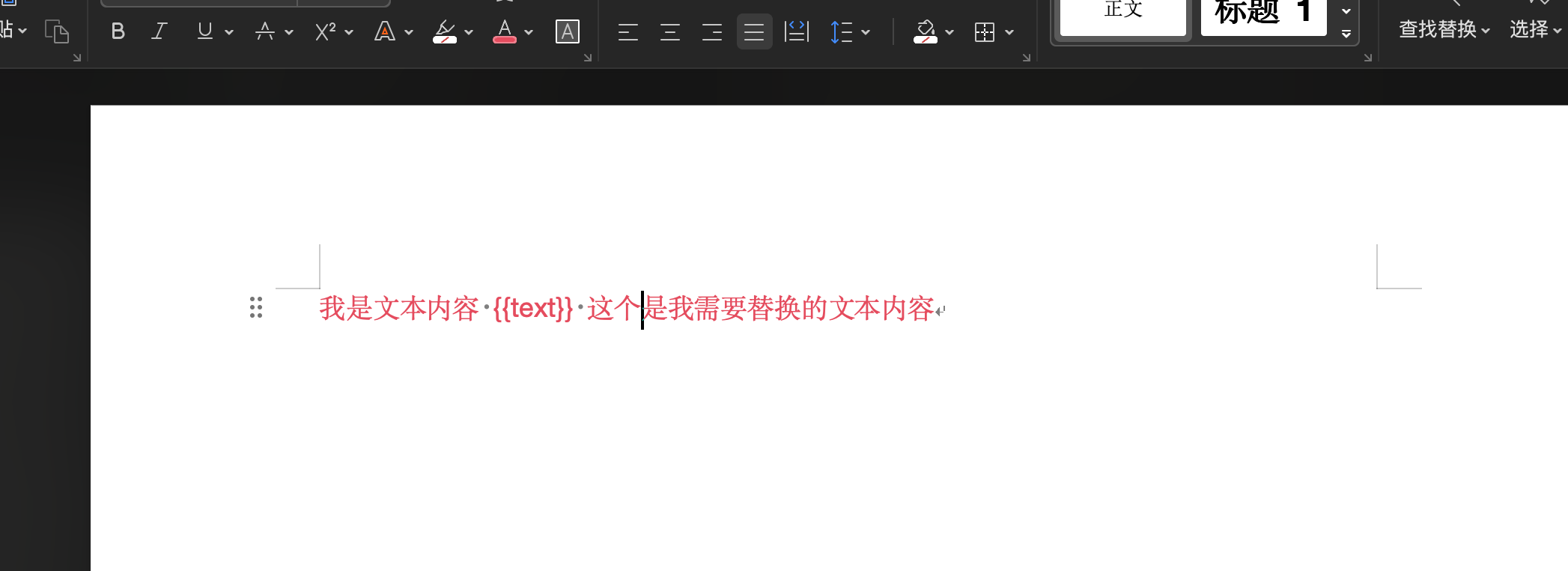
代码
        HashMap<String, Object> renderMap = new HashMap<>();

        renderMap.put("text","我是被替换的内容");


        XWPFTemplate
                .compile("空白文档.docx")
                .render(renderMap).
                writeAndClose(new FileOutputStream("01.docx"));
输出文件
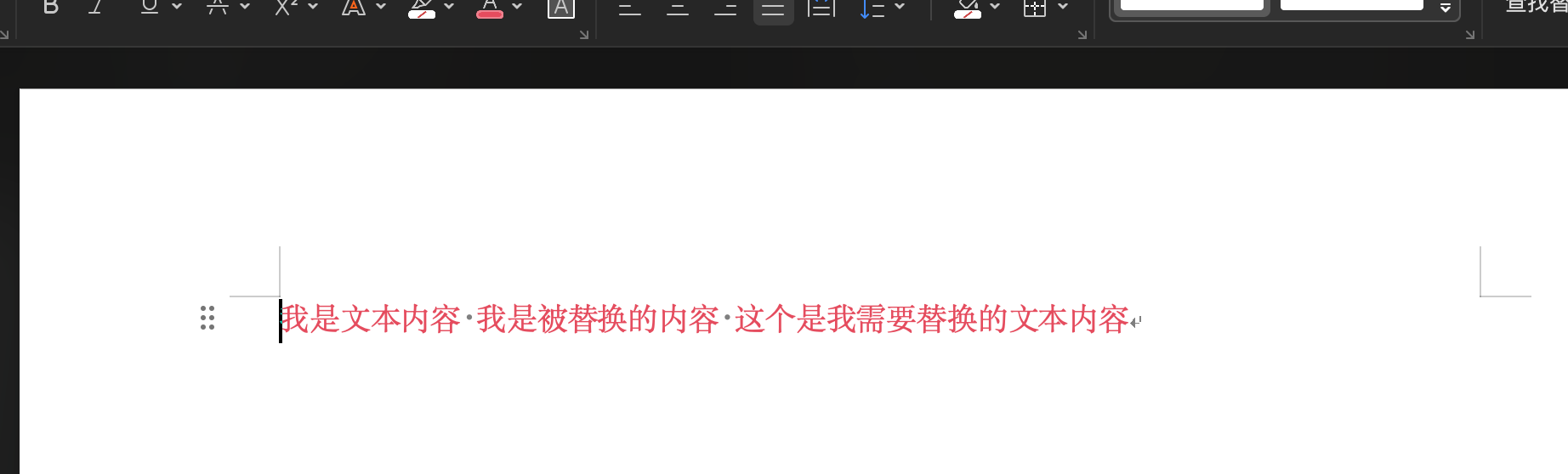
-
列表内容生成 {{#key}}
模版
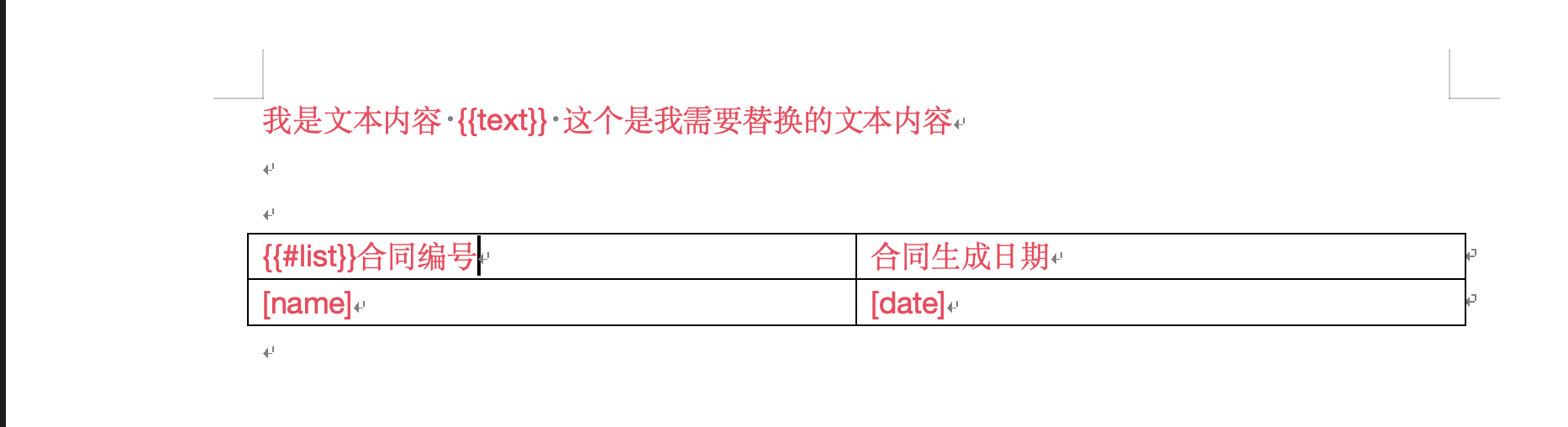
代码实现
        HashMap<String, Object> renderMap = new HashMap<>();

        renderMap.put("text", "我是被替换的内容");

        HashMap<String, Object> ones = new HashMap<>();

        ones.put("name", "981129-1");
        ones.put("date", new Date());

        ArrayList<Object> list = new ArrayList<>();
        list.add(ones);
        list.add(ones);
        list.add(ones);
        list.add(ones);

        renderMap.put("list", list);

        // 表格循环插件
        LoopRowTableRenderPolicy rowTableRenderPolicy = new LoopRowTableRenderPolicy();
        Configure configure = Configure.builder()
                .bind("list", rowTableRenderPolicy)
                .build();


        XWPFTemplate
                .compile("空白文档.docx", configure)
                .render(renderMap).
                writeAndClose(new FileOutputStream("01.docx"));
输出结果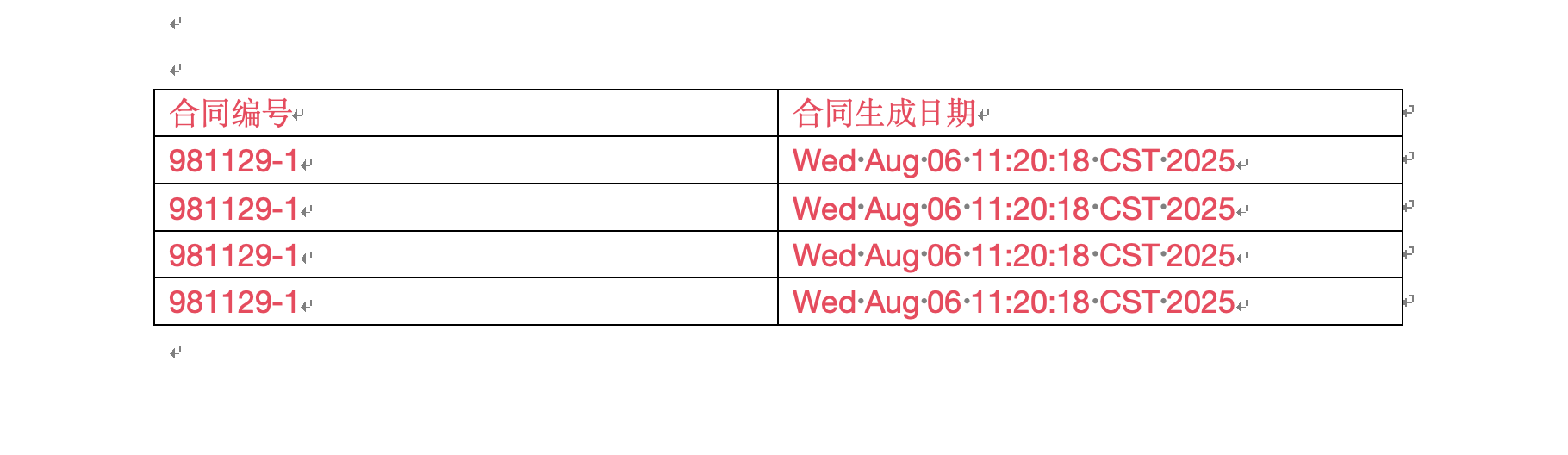
复杂结构列表内容生成 (循环生成普通文本 + 列表)
自定义实现(代码)
package com.bu.poi.world.plugns;

import com.bu.poi.world.VsEty;
import com.bu.poi.world.domain.DtEntity;
import com.bu.poi.world.domain.ObjEty;
import com.deepoove.poi.policy.AbstractRenderPolicy;
import com.deepoove.poi.render.RenderContext;
import com.deepoove.poi.template.run.RunTemplate;
import com.deepoove.poi.xwpf.BodyContainer;
import com.deepoove.poi.xwpf.BodyContainerFactory;
import com.deepoove.poi.xwpf.XWPFParagraphWrapper;
import org.apache.poi.xwpf.usermodel.*;

import java.util.List;

/**
 * @author haizhuangbu
 * @date 03 8月 2025 06:46
 * @mark CustomTableRenderPolicy
 */
public class CustomTableRenderPolicy extends AbstractRenderPolicy<VsEty> {

    @Override
    protected void afterRender(RenderContext<VsEty> context) {
        clearPlaceholder(context, true);
    }

    @Override
    public void doRender(RenderContext<VsEty> renderContext) {

        // 编辑行
        XWPFRun run = renderContext.getRun();


        RunTemplate runTemplate = (RunTemplate) renderContext.getEleTemplate();


        // 数据
        VsEty data = renderContext.getData();

        BodyContainer bodyContainer = BodyContainerFactory.getBodyContainer(run);


        List<DtEntity> list = data.getList();
        for (DtEntity dtEntity : list) {

            XWPFRun nvRun = createRun(runTemplate, (XWPFParagraph) run.getParent());

            nvRun.setText(dtEntity.getTitle() + "\n");

            bodyContainer.insertNewParagraph(nvRun);
            nvRun.addBreak();

            XWPFRun nvRun1 = createRun(runTemplate, (XWPFParagraph) nvRun.getParent());

            nvRun1.setText(dtEntity.getIdx() + "\n");
            bodyContainer.insertNewParagraph(nvRun1);
            nvRun1.addBreak();


            List<ObjEty> objEtyList = dtEntity.getList();

            for (ObjEty objEty : objEtyList) {
//                createRun(run);
//                XWPFRun tbRun = createRun(runTemplate, (XWPFParagraph) nvRun1.getParent());
                XWPFRun tbRun = createRun(run);
                XWPFTable table = bodyContainer.insertNewTable(tbRun, 0, 0);
                createRow(table, objEty);
                table.setWidth(8000);

            }


        }


    }

    private XWPFRun createRun(RunTemplate runTemplate, XWPFParagraph parent) {
        XWPFParagraphWrapper paragraphWrapper = new XWPFParagraphWrapper(parent);
        return paragraphWrapper.insertNewRun(runTemplate.getRunPos());

    }

    public void createRow(XWPFTable table, ObjEty objEty) {

        table.setInsideHBorder(XWPFTable.XWPFBorderType.SINGLE, 10, 2, "E8E8E8");
        table.setLeftBorder(XWPFTable.XWPFBorderType.SINGLE, 10, 2, "E8E8E8");
        table.setRightBorder(XWPFTable.XWPFBorderType.SINGLE, 10, 2, "E8E8E8");
        table.setTopBorder(XWPFTable.XWPFBorderType.SINGLE, 10, 2, "E8E8E8");
        table.setBottomBorder(XWPFTable.XWPFBorderType.SINGLE, 10, 2, "E8E8E8");
        XWPFTableRow r1 = table.getRow(0);


        XWPFTableCell left = r1.getCell(0);
        left.setText("姓名");


        XWPFTableCell right = r1.createCell();
        right.setText(objEty.getName());


        XWPFTableRow r2 = table.createRow();
        XWPFTableCell r2Left = r2.getCell(0);
        r2Left.setText("码值");
        XWPFTableCell r2Right = r2.getCell(1);
        r2Right.setText(objEty.getTCode());

        XWPFTableRow r3 = table.createRow();
        XWPFTableCell r3Left = r3.getCell(0);
        r3Left.setText("中文名");
        XWPFTableCell r3Right = r3.getCell(1);
        r3Right.setText(objEty.getTName());


    }


    public XWPFRun createRun(XWPFRun run) {
        XWPFDocument document = run.getDocument();
        XWPFParagraph paragraph = document.createParagraph();
        return paragraph.createRun();
    }


}
        VsEty vsEty = new VsEty();

        ArrayList<DtEntity> dtEntities = new ArrayList<>();


        DtEntity dtEntity = new DtEntity();
        dtEntity.setIdx("我是下标\n");
        dtEntity.setTitle("我是标题\n");

        List<ObjEty> objEties = new ArrayList<>();

        ObjEty objEty = new ObjEty();
        objEty.setName("name");
        objEty.setTName("name1");
        objEty.setTCode("code1");


        ObjEty objEty2 = new ObjEty();
        objEty2.setName("name");
        objEty2.setTName("name1");
        objEty2.setTCode("code1");

        objEties.add(objEty);
        objEties.add(objEty2);


        dtEntity.setList(objEties);

        dtEntities.add(dtEntity);


        vsEty.setList(dtEntities);

        renderMap.put("report", vsEty);

        CustomTableRenderPolicy customTableRenderPolicy = new CustomTableRenderPolicy();

        // 表格循环插件
        LoopRowTableRenderPolicy rowTableRenderPolicy = new LoopRowTableRenderPolicy();
        Configure configure = Configure.builder()
                .bind("list", rowTableRenderPolicy)
                .bind("report", customTableRenderPolicy)
                .build();


        XWPFTemplate
                .compile("空白文档.docx", configure)
                .render(renderMap).
                writeAndClose(new FileOutputStream("01.docx"));
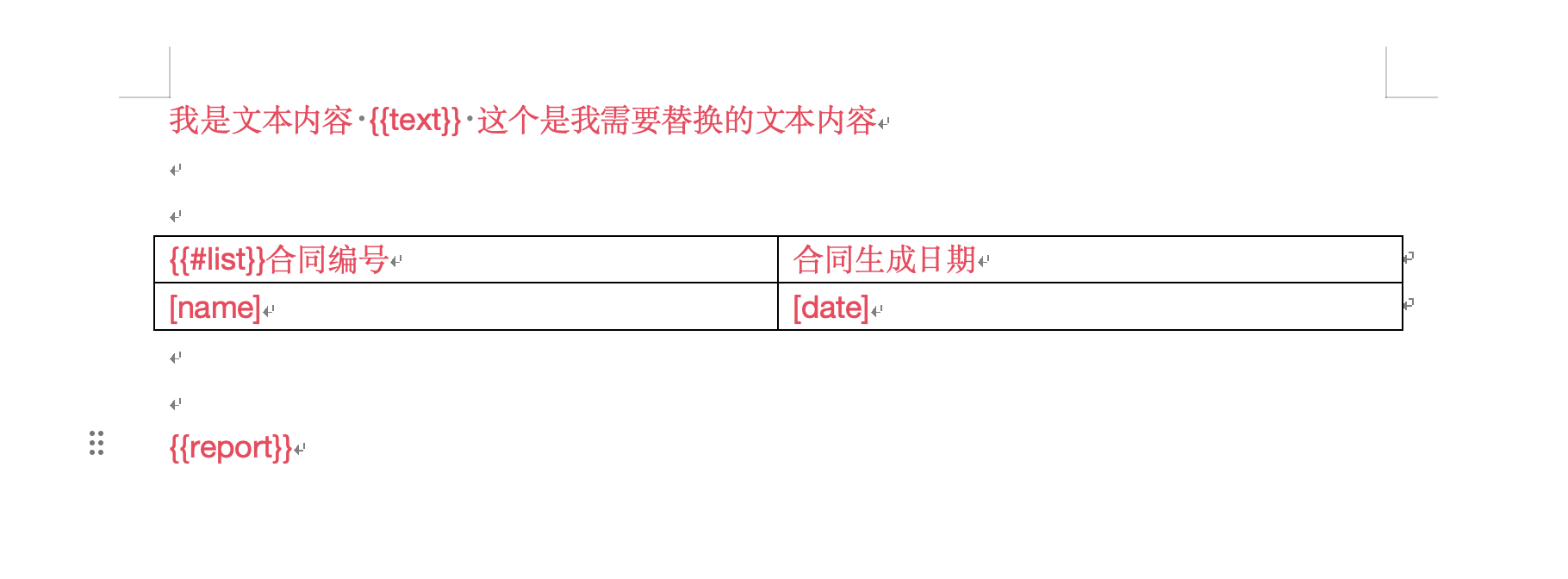
模版
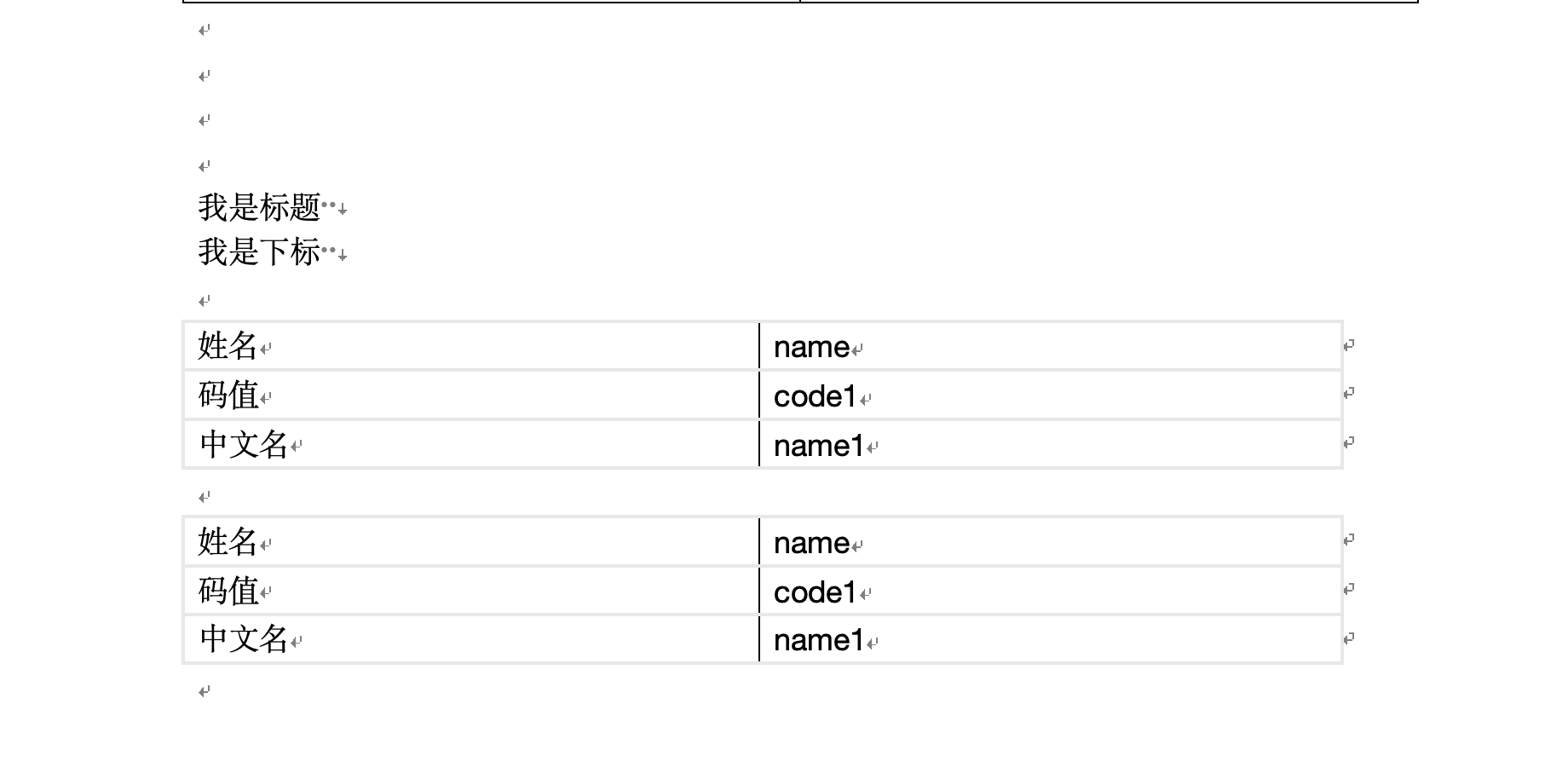
输出样式





 扫一扫
扫一扫


 被折叠的 条评论
为什么被折叠?
被折叠的 条评论
为什么被折叠?
 到【灌水乐园】发言





