





 本文详细介绍了如何在Eclipse中进行编辑器的基本设置,包括替换制表符为空格、设置Java、HTML、Ant等文件的代码风格,以及如何配置文件的默认编码和回车换行格式。
1.点击 window->preference-,依次选择 General->Editors->Text Editors,选中右侧的 insert space for tabs;如下图所示,保存,第一步完成;

2.点击 window->preference-,依次选择 java(或C++)->code style ->formatter,点击右侧的editor,选则左侧 tab policy的值为spaces only,确定,应用保存即可,如下图所示:


若出现应用Apply按钮为灰色的情况,需要回到上一步,点击new按钮,根据当前的样式重新生成一个新的样式并保存,重复第2步,编辑该样式即可,如下图:

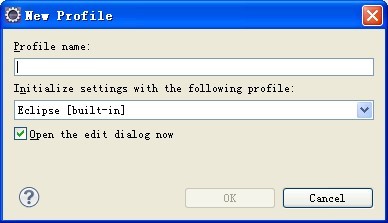
上面仅仅是针对Eclipse基本的Editor设置。对于Java/HTML/Ant等扩展编辑器,你还不得不单独去设定
* Preference:
1). For Java: sets java code style in eclipse
windows->preferences->java->Code style->Formatter
add a new profile , for more detail, test it in eclipse please
2). For Ant: sets build.xml in eclipse
windows->preferences->Ant>Editor->Formatter
uncheck [Use tab character instead of spaces] option.
3). For Html:
windows->preferences->Web and XML->HTML Files->HTML Source
select "Indent using tabs" and set space =2
4). For XML:
windows->preferences->Web and XML->XML Files->XML Source
select "Indent using tabs" and set space =2
5). For Properties
3). 如何配置jsp,properties等文件默认使用UTF-8编码创建或者阅读?
(Eclipse3.2+) Windows->General->Content Types下选择指定的扩展名,然后说明相应的编码,然后Update.
4). 转换存在文件的回车换行格式
我在xml中遇到这种问题,我改到的地方只是在windows->preferences->myeclipse->files and editors->xml->xml source 下面的formatting栏中将line width 设置成172 ,默认是72.
我想,可能是因为line width 过小,导至在fomat时自动把xml 标签split掉,然后又加了一些多余的空格,因而改变了xml 实际内容。





 扫一扫
扫一扫


 360
360

 被折叠的 条评论
为什么被折叠?
被折叠的 条评论
为什么被折叠?
 到【灌水乐园】发言





