



 本文介绍了使用SVG实现的双层上下自动对齐滑动的效果,通过具体的案例代码和分析,展示了如何设置合适的padding来达到理想的布局效果。
应用案例
案例效果
案例代码
提示:有【】都需要根据里面的内容进行替换,比如【图片高度】,实际图片高度是1137,整个就替换成1137。
<!DOCTYPE html>
<html>
<head>
    <meta charset="UTF-8" />
    <meta name="viewport" content="width=device-width,initial-scale=1.0,maximum-scale=1.0,user-scalable=0,viewport-fit=cover" />
    <title>上下自动对齐滑动</title>
    <style type="text/css">*{margin:0;padding:0;}.rich_media_content{overflow:hidden;color:#333;font-size:17px;word-wrap:break-word;-webkit-hyphens:auto;-ms-hyphens:auto;hyphens:auto;text-align:justify;position:relative;z-index:0;}.rich_media_content *{max-width:100%!important;box-sizing:border-box!important;-webkit-box-sizing:border-box!important;word-wrap:break-word!important;}</style>
</head>
<body>
    <div class="rich_media_content" style="visibility: visible;">
        <section style="overflow: hidden;pointer-events: painted;transform: scale(1);" data-wechat="dong_dian_jun">
            <section style="height: 0;">
                <section style="padding: 【滑动图片的顶部距离/蒙层图片的宽度】% 【滑动图片右边距离/蒙层图片的宽度% 【滑动图片底部距离/蒙层图片的宽度% 【滑动图片左侧距离/蒙层图片的宽度%;">
                    <section style="overflow: hidden scroll;scroll-snap-type: y mandatory;" data-wechat="dong_dian_jun">
                        <!-- 图片模块 -->
                        <section style="height: 0;font-size: 0;line-height: 0;" data-label="图片的宽高要跟撑开模块容器一致">
                            <section style="scroll-snap-align: center;" data-label="第1张图片">
                                <svg style="display: inline-block;width: 100%;background: url(【图片地址】) center center no-repeat;background-size: 100% 100%;vertical-align: top;weixin: dong_dian_jun;user-select: none;-webkit-tap-highlight-color: transparent;" viewBox="0 0 【图片宽度】 【图片高度】"></svg>
                            </section>
                            <section style="scroll-snap-align: center;" data-label="第2张图片">
                                <svg style="display: inline-block;width: 100%;background: url(【图片地址】) center center no-repeat;background-size: 100% 100%;vertical-align: top;weixin: dong_dian_jun;user-select: none;-webkit-tap-highlight-color: transparent;" viewBox="0 0 【图片宽度】 【图片高度】"></svg>
                            </section>
                            <section style="scroll-snap-align: center;" data-label="第3张图片">
                                <svg style="display: inline-block;width: 100%;background: url(【图片地址】) center center no-repeat;background-size: 100% 100%;vertical-align: top;weixin: dong_dian_jun;user-select: none;-webkit-tap-highlight-color: transparent;" viewBox="0 0 【图片宽度】 【图片高度】"></svg>
                            </section>
                            <section style="scroll-snap-align: center;" data-label="第4张图片">
                                <svg style="display: inline-block;width: 100%;background: url(【图片地址】) center center no-repeat;background-size: 100% 100%;vertical-align: top;weixin: dong_dian_jun;user-select: none;-webkit-tap-highlight-color: transparent;" viewBox="0 0 【图片宽度】 【图片高度】"></svg>
                            </section>
                        </section>
                        <!-- 撑开模块 -->
                        <section style="scroll-snap-align: center;" data-label="撑开模块是决定滑动容器的宽高">
                            <svg style="display: inline-block;width: 100%;vertical-align: top;weixin: dong_dian_jun;user-select: none;-webkit-tap-highlight-color: transparent;" viewBox="0 0 【图片宽度】 【图片高度】"></svg>
                        </section>
                    </section>
                </section>
            </section>
            <section style="transform: translateZ(0.02px);pointer-events: none;">
                <section style="pointer-events: none;transform: scale(1);">
                    <svg style="display: inline-block;width: 100%;background: url(【图片地址】) center center no-repeat;background-size: 100% 100%;vertical-align: top;weixin: dong_dian_jun;user-select: none;-webkit-tap-highlight-color: transparent;pointer-events: none;" viewBox="0 0 【图片宽度】 【图片高度】"></svg>
                </section>
            </section>
        </section>
    </div>
</body>
</html>
案例分析
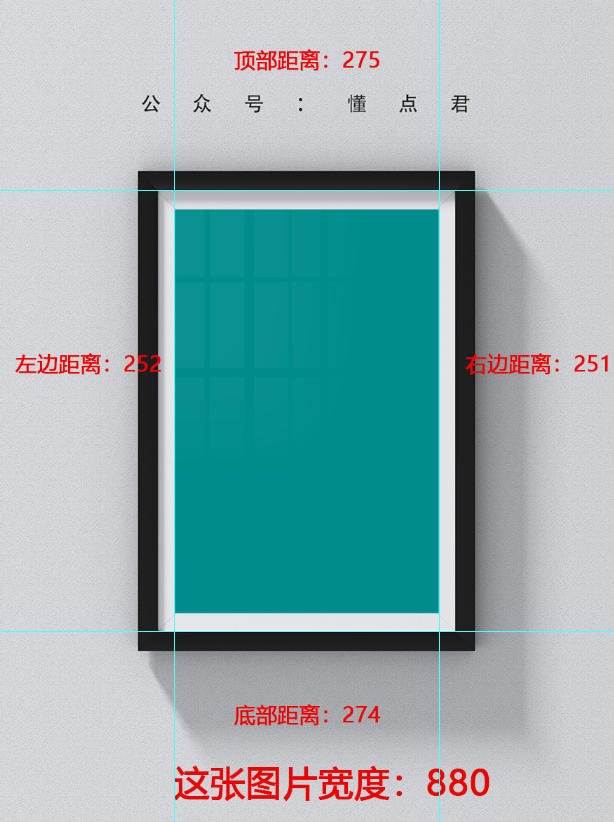
顶部距离:275 / 880 * 100% = 31.2%;
右边距离:251 / 880 * 100% = 28.5% ;
底部距离:274 / 880 * 100% = 31.1%;
左边距离:252 / 880 * 100% = 28.6% ;
因此可以得到:padding: 31.2% 28.5% 31.1% 28.6%;





 扫一扫
扫一扫


 1350
1350

 被折叠的 条评论
为什么被折叠?
被折叠的 条评论
为什么被折叠?
 到【灌水乐园】发言





