


Vetur和volar插件说明
Vetur是Vue自带的插件,但是随着ts在项目开发中占比更大,我们发现Vetur在规范ts代码是并不严格。而volar则是检测更加严格的代码插件。、
这个项目我们选用的是代码检测宽松的Vetur插件,首先我们需要配置相对路径路径path
更改vite.config.ts,取一个别名
import { defineConfig } from 'vite'
import vue from '@vitejs/plugin-vue'

// https://vite.dev/config/
export default defineConfig({
  plugins: [vue()],
  resolve:{
    alias:{
      '@':'/src'
    }

  }
})
再到tsconfig.json添加以下内容
// tsconfig.json
{
  "files": [],
  "references": [
    { "path": "./tsconfig.app.json" },
    { "path": "./tsconfig.node.json" }
  ],
  "compilerOptions": {
    "baseUrl": ".",
    "paths": {
      "@/*": ["src/*"],
    }
  }
}
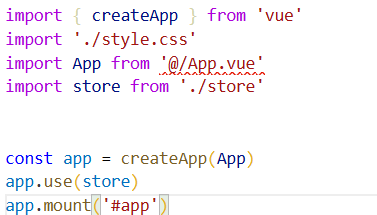
发现上面取了别名之后还是这样的,ts语法还是没有生效。
我们有检查以下代码,发现tsconfig.app.json的compilerOptions项,发现原来的配置被覆盖。解决方法如下:
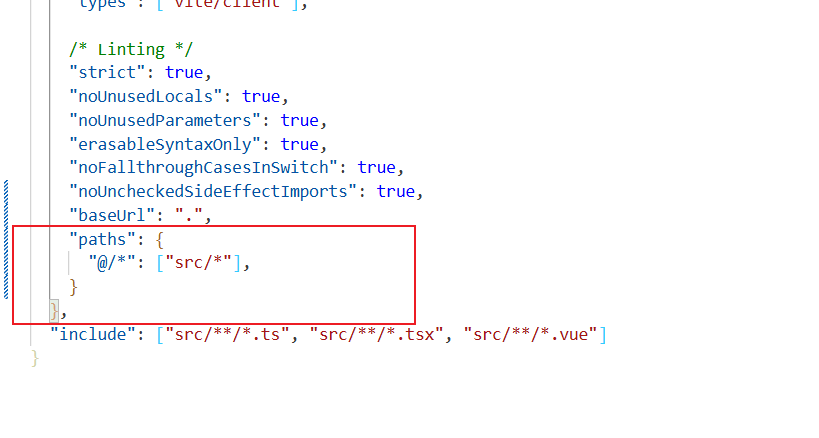
页面结构梳理
views
    login
        index.vue                       // 登录页
        serviceAgree.vue                // 服务协议
        privacyPolicy.vue               // 隐私政策
    task
        index.vue                       // 任务主页
        search.vue                      // 任务搜索
        details.vue                     // 任务详情
        companySource.vue               // 公司任务主页
    contract
        index.vue                       // 合约主页
        details.vue                     // 合约详情
        progress.vue                    // 合约进度
    message
        index.vue                       // 消息主页
        systemList.vue                  // 系统消息列表
        systemDetails.vue               // 系统消息详情
        talk.vue                        // 对话消息
    my
        index.vue                       // 我的主页
        user                            // 用户中心
            index.vue                   // 个人信息主页
            authReal.vue                // 实名认证
            certified.vue               // 已完成实名认证
            identitySwitch.vue          // 切换身份
        set                             // 我的设置
            index.vue                   // 设置主页
        feedback                        // 意见反馈
            index.vue                   // 反馈主页
        account                         // 我的账户
            index.vue                   // 账户主页
            advance.vue                 // 账户提现
            coinExplain.vue             // 无忧币说明
            depositExplain.vue          // 押金说明
        resume                          // 我的简历
            index.vue                   // 简历主页
            preview.vue                 // 简历预览
        collect                         // 我的收藏
            index.vue                   // 收藏主页
    talent
        index.vue                       // 人才主页
        details.vue                     // 人才详情
页面间的路由跳转设置
首先需要安装path
npm install --save-dev @types/node
然后配置vite.config.ts
import { defineConfig } from 'vite'
import vue from '@vitejs/plugin-vue'
import path from 'path'

// https://vite.dev/config/
export default defineConfig({
  plugins: [vue()],
  resolve:{
    alias:{
      '@': path.resolve(__dirname, './src')
    }

  }
})
然后安装vue-router插件
npm install vue-router@4 -D
创建src/router/index.ts文件
import { createRouter, createWebHistory,type RouteRecordRaw } from "vue-router"

const routes:Array<RouteRecordRaw> = [
    {
        path: '/login',
        component: () => import('@/views/login/index.vue')
    },
    {
        path: '/login/privacyPolicy',
        component: () => import('@/views/login/privacyPolicy.vue')
    },
   .............
]
const router =  createRouter({
    history: createWebHistory(),
    routes
})

export default router;
发现@报错,于是要创建src\shims-vue.d.ts,编写以下代码,才可以让ts识别.vue类型的文件
declare module '*.vue' {
  import type { DefineComponent } from 'vue'
  const component: DefineComponent<{}, {}, any>
  export default component
}
在main.ts文件中引入router,<router-view/>
import router from './router'

app.use(router)
在App.vue里面引入 路由管理
<template>
  <div>
    <router-view/>
  </div>
</template>

<script setup>

</script>

<style scoped lang=''>

</style>
API接口调用设计
首先我们需要安装axios
npm install axios
//src\utils\request.ts

import axios from "axios"
import { Toast } from "vant"

let baseURL = "/api"
const service = axios.create({
  baseURL,
  timeout: 10000
})

/**
 * 请求拦截
 */
service.interceptors.request.use(
  config => {
    const token = window.localStorage.getItem("token")
    if(token){
        config.params={
            'token':token
        }
    }
    return config
  },
  error => {
    return Promise.reject(error)
  }
)

/**
 * 响应拦截
 */
service.interceptors.response.use(
  response => {
    const res = response.data
    if (res.code !== 200) {
      return Promise.reject(new Error(res.success || 'Error'))
    } else {
      if(res.code === 200){
        return res.result
      }else{
        Toast.fail(res.success)
      }
    }
  },
  error => {
    return Promise.reject(error)
  }
)

export default service
为了解决跨域问题,我们需要配置一下代理对象
//vite.config.ts

import { defineConfig } from 'vite'
import vue from '@vitejs/plugin-vue'
import path from 'path'

// https://vite.dev/config/
export default defineConfig({
  plugins: [vue()],
  server:{
    port:8080,
    open:true,
    proxy:{
      '/api':'https://api.imooc.zcwytd.com'
    },
    cors:true
  },
  resolve:{
    alias:{
      '@': path.resolve(__dirname, './src')
    }

  }
})
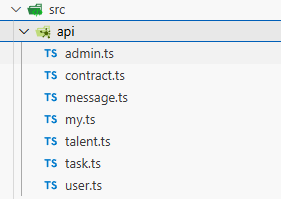
设计基础接口,进行api模块设计,以下是其中的一个案例
//src\api\user.ts

import request from '../utils/request'
// 获取验证码
export function getCode(data: any) {
    return request({
        url: '/login/code',
        method: 'post',
        data
    })
}
// 登录接口
export function login(data: any) {
    return request({
        url: '/login',
        method: 'post',
        data
    })
}
// 协议文件接口
export function getPolicy(data: any) {
    return request({
        url: 'policy_protocol/list',
        method: 'get',
        params: data
    })
}
静态UI资源与适配设计
首先我们需要在main.ts注册基本需要的组件
import { Button,NavBar,TabbarItem,Tabbar,Checkbox,Toast,Icon } from 'vant'

const app = createApp(App)
app.use(Button).use(NavBar).use(Tabbar).use(TabbarItem).use(Checkbox).use(Toast).use(Icon)
app.mount('#app')
移动端开发设计适配
//基准大小
const baseSize = 37.5
function setRem() {
  // 当前页面宽度相对于 1920宽的缩放比例,可根据自己需要修改。
  const scale = document.documentElement.clientWidth / 750
  // 设置页面根节点字体大小
  document.documentElement.style.fontSize = (baseSize * Math.min(scale, 1)) + 'px'
}

//初始化
setRem()
window.onresize = function () {
  setRem()
}
export default setRem
重新配置
import { createApp } from 'vue'
import 'vant/lib/index.css'
import './assets/css/style.css'
import App from '@/App.vue'
import store from '@/store'
import router from './router'
import { Button,NavBar,TabbarItem,Tabbar,Checkbox,Toast,Icon } from 'vant'
import './utils/rem.ts'

const app = createApp(App)
app.use(store)
app.use(router)
app.use(Button).use(NavBar).use(Tabbar).use(TabbarItem).use(Checkbox).use(Toast).use(Icon)
app.mount('#app')
项目公共组件
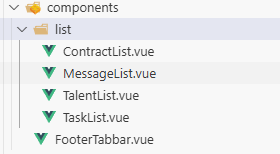
FooterTabbar底部导航组件
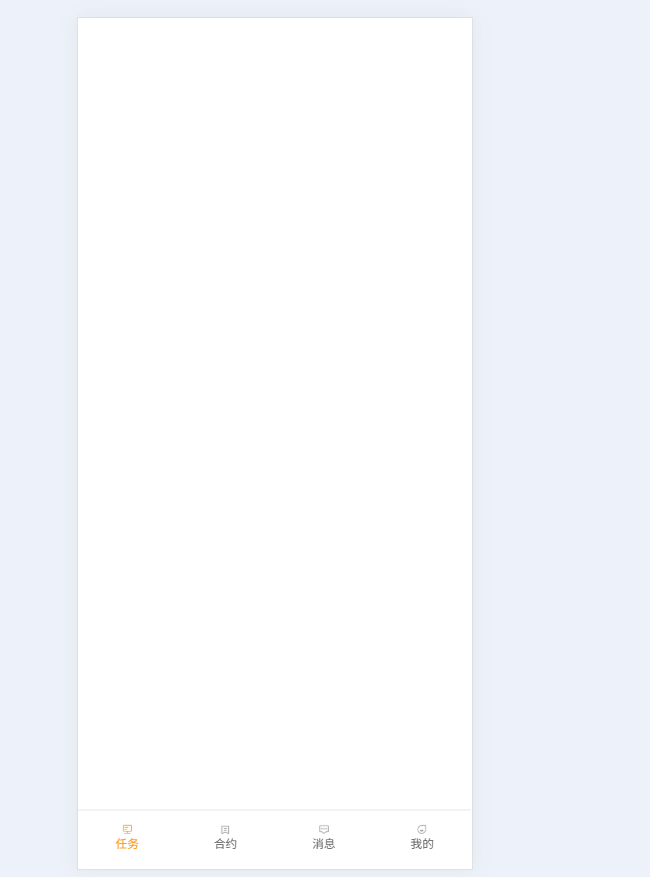
<template>
    <dl>
        <dt class="icon-task-bar" @click="gotoPage('/task')" :class="route.path === '/task' ? 'active' : ''">
            <i></i>
            <p>任务</p>
        </dt>
        <dt class="icon-contract-bar" @click="gotoPage('/contract')" :class="route.path === '/contract' ? 'active' : ''">
            <i></i>
            <p>合约</p>
        </dt>
        <dt class="icon-message-bar" @click="gotoPage('/message')" :class="route.path === '/message' ? 'active' : ''">
            <i></i>
            <p>消息</p>
        </dt>
        <dt class="icon-my-bar" @click="gotoPage('/my')" :class="route.path === '/my' ? 'active' : ''">
            <i></i>
            <p>我的</p>
        </dt>
    </dl>
</template>

<script setup>
import { useRoute, useRouter } from 'vue-router';

// 获取当前路由信息(路径等)
const route = useRoute();
// 获取路由实例(用于跳转)
const router = useRouter();

const gotoPage = (path) => {
    router.push(path);
};
</script>

<style scoped>
dl{
    display: flex;
    width: 100%;
    height: 3rem;
    position: fixed;
    bottom: 0;
    left: 0;
    border-top: 1px solid #dddddd;
}

dl dt {
    flex: 1;
    padding: 0.69rem 0;
    justify-content: center;
    text-align: center;
    font-size: 0.59rem;
    font-family: PingFang SC;
    font-weight: 400;
    color: #666666;
}

dl dt i {
    display: block;
    width: 0.59rem;
    height: 0.59rem;
    margin: 0 auto ;
}

.icon-task-bar i{
    background: url('../assets/img/icon/bar-task-link.png') no-repeat;
    background-size: 100% ;
}
.icon-task-bar.active i{
    background: url('../assets/img/icon/bar-task-active.png') no-repeat;
    background-size: 100% ;
}
.icon-contract-bar i{
    background: url('../assets/img/icon/bar-contract-link.png') no-repeat;
    background-size: 100% ;
}
.icon-contract-bar.active i{
    background: url('../assets/img/icon/bar-contract-active.png') no-repeat;
    background-size: 100% ;
}
.icon-message-bar i{
    background: url('../assets/img/icon/bar-message-link.png') no-repeat;
    background-size: 100% ;
}
.icon-message-bar.active i{
    background: url('../assets/img/icon/bar-message-active.png') no-repeat;
    background-size: 100% ;
}
.icon-my-bar i{
    background: url('../assets/img/icon/bar-my-link.png') no-repeat;
    background-size: 100% ;
}
.icon-my-bar.active i{
    background: url('../assets/img/icon/bar-my-active.png') no-repeat;
    background-size: 100% ;
}
dl dt.active p{
    color: #ff9415;
}
</style>
// 获取当前路由信息(路径等)
const route = useRoute();
// 获取路由实例(用于跳转)
const router = useRouter();
公共任务列表
<template>
    <div class="task-item" v-for="(item, index) in taskList" :key="index" @click="gotoDetail(item.task_id)">
        <div class="task-item-top">
            <h3>前端小程序开发</h3>
            <span v-if="item.is_emergency == 1">紧急</span>
        </div>
        <dl>
            <dt>
                <h5>任务预算</h5>
                <strong>¥1000</strong>
            </dt>
            <dt>
                <h5>任务周期</h5>
                <strong>{{item.task_cycle}}天</strong>
            </dt>
            <dt>
                <h5>服务方式</h5>
                <strong>90天</strong>
            </dt>
        </dl>
        <p>任务要求:无</p>
        <div class="task-item-bottom">
            <label>开发前端小程序</label>
            <span><van-icon name="location-o" />{{item.city}}</span>
        </div>
    </div>
</template>


<script setup >
    import {useRouter} from 'vue-router'
    const props = defineProps({
        taskList: {
            type: Array,
            default: () => []
        }
    })
    const router = useRouter()
    const gotoDetail = (id) =>{
        router.push('/task/details/'+id)
    }
</script>

<style scoped>
.task-item{
    background: #FFFFFF;
    border-radius: 0.53rem;
    margin:0 0 0.53rem;
    padding: 0.88rem 0.48rem 0.75rem;
    position: relative;
    font-size: 0.69rem;
    font-weight: 100;
    color: #666666;
}
.task-item-top{
    display: flex;
}
.task-item-top h3{
    font-size: 0.91rem;
    line-height: 0.91rem;
    font-weight: 400;
    color: #333333;
    margin-bottom: 1.01rem;
}
.task-item-top span{
    position: absolute;
    right: 0;
    width: 2.29rem;
    height: 1.08rem;
    line-height: 1.08rem;
    background: linear-gradient(90deg, #FEA829, #FE8F27);
    border-radius: 0.53rem 0 0 0.53rem;
    text-align: center;
    font-size: 0.59rem;
    color: #FFFFFF;
}
dl{
    display: flex;
    margin-bottom: 0.8rem;
}
dl dt{
    margin-right: 1.44rem;
}
dl dt h5{
    font-size: 0.69rem;
    line-height: 0.69rem;
    margin-bottom: 0.53rem;
    font-weight: 100;
    color: #999999;
}
dl dt strong{
    font-size: 0.64rem;
    line-height: 0.64rem;
    display: block;
    font-weight: 500;
    color: #333333;
}
.task-item p{
    color: #333333;
    overflow: hidden;
    text-overflow: ellipsis;
    display: -webkit-box;
    -webkit-line-clamp: 2;
    -webkit-box-orient: vertical;
}
.task-item-bottom{
    display: flex;
    border-top: 1px solid #f5f5f5;
    margin-top: 0.72rem;
    padding-top: 0.72rem;
    line-height: 0.69rem;
}
.task-item-bottom label{
    flex: 1;
}
.task-item-bottom span{
    text-align: right;
}
.task-item-bottom i{
    font-size: 0.8rem;
    font-weight: 600;
    margin-right: 0.1rem;
}
</style>
// src\views\task\index.vue
<template>
    <FooterTabbar></FooterTabbar>
    <TaskList :taskList="taskList"></TaskList>
</template>

<script setup>
import { reactive } from 'vue';
import FooterTabbar from '@/components/FooterTabbar.vue';
import TaskList from '@/components/list/TaskList.vue';

const taskList = reactive([
    {id:1},
    {id:2}
])
</script>

<style scoped>


</style>
合约列表
//src\views\contract\index.vue

<template>
    <dl v-for="(item,index) in contractList" :key="index" @click="gotoDetail(item.contract_id)">
        <dd>
            <h3>移动端小程序前端开发工程师</h3>
            <span>招聘中</span>
            <van-icon name="arrow" />
        </dd>
        <dt>
            <label>公司名称</label>
            <span>北京天下无敌公司</span>
        </dt>
        <dt>
            <label>合约类型</label>
            <span>技术服务</span>
        </dt>
        <dt>
            <label>合约周期</label>
            <span>{{item.start_cycle_time}}-{{item.end_cycle_time}}</span>
        </dt>
        <dt>
            <label>签约时间</label>
            <span>{{item.signing_time}}</span>
        </dt>
        <dt>
            <label>合约进度</label>
            <span></span>
        </dt>
    </dl>
</template>
<script setup >
    import {useRouter} from 'vue-router'
    const props = defineProps({
        contractList: {
            type: Array,
            default: () => []
        }
    })
    const router = useRouter()
    const gotoDetail = (id) =>{
        router.push('/contract/details/'+id)
    }
</script>

<style scoped>
dl{
    font-size: 0.64rem;
    color: #666666;
    padding: 1rem 0.7rem;
    border-bottom: 1px solid #eeeeee;
}
dl dd{
    display: flex;
    margin-bottom: 0.9rem;
    align-items: center;
}
dl dd h3{
    font-size: 0.8rem;
    font-weight: 500;
    color: #333333;
    flex: 1;
}
dl dd span{
    text-align: right;
    font-size: 0.75rem;
    color: #FF9415;
}
dl dd i{
    font-size: 0.75rem;
}
dl dt{
    display: flex;
    margin-bottom: 0.72rem;
}
dl dt:last-child{
    margin-bottom: 0;
}
dl dt label{
    flex: 1;
}
dl dt span{
    text-align: right;
}
</style>
<template>
    <FooterTabbar></FooterTabbar>
    <ContractList :contractList="contractList"></ContractList>
</template>

<script setup>
import { reactive } from 'vue';
import FooterTabbar from '@/components/FooterTabbar.vue';
import ContractList from '@/components/list/ContractList.vue';
const contractList = reactive([
    {id:1},
    {id:2}
])
</script>

<style scoped>
body {
    background-color: #f5f5f5;
}


</style>
消息列表
<template>
    <dl v-for="(item,index) in messageList" :key="index" @click="gotoDetail(item)">
        <dd>
            <img v-if="item.receive_is_read" :src="item.receive_is_read">
            <img v-else src="@/assets/img/icon/icon-message.png">
            <span v-if="item.is_show"></span>
        </dd>
        <dt>
            <h3>小张张<span>今天</span></h3>
            <p>小张说了一句爱我</p>
        </dt>
    </dl>
</template>

<script setup >
    import {useRouter} from 'vue-router'
    const props = defineProps({
        messageList: {
            type: Array,
            default: () => []
        },
        type: {
            type: String
        }
    })
    const router = useRouter()
    const gotoDetail = (item) =>{
        if(props.type === 'system'){
            router.push('/message/systemList')
        }
        if(props.type === 'talk' && item.things_type ===0){
            router.push('/message/talk/'+item.things_id +'/'+item.receive_id)
        }
        if(props.type === 'talk' && item.things_type ===1){
            router.push('/message/talent/'+item.things_id +'/'+item.send_id)
        }
        if(props.type === 'talent' && item.things_type ===0){
            router.push('/message/talk/'+item.things_id +'/'+item.send_id)
        }
        if(props.type === 'talent' && item.things_type ===1){
            router.push('/message/talent/'+item.things_id +'/'+item.receive_id)
        }
    }
</script>
<style scoped>
dl{
    font-size: 0.64rem;
    color: #666666;
    padding: 0.9rem 0;
    margin: 0 0.67rem;
    border-bottom: 1px solid #eeeeee;
    display: flex;
    align-items: center;
}
dl dd{
    position: relative;
    margin-right: 0.56rem;
}
dl dd img{
    width: 2.61rem;
    height: 2.61rem;
    border-radius: 50%;
}
dl dd span{
    position: absolute;
    top: 0;
    right:0;
    width: 0.32rem;
    height: 0.32rem;
    background: #FF0000;
    border-radius: 50%;
}
dl dt{
    flex: 1;
}
dl dt h3{
    font-size: 0.8rem;
    line-height: 0.8rem;
    font-weight: 500;
    color: #333333;
    margin-bottom: 0.43rem;
}
dl dt h3 span{
    float: right;
    color: #999999;
    font-size: 0.64rem;
    font-weight: 100;
}
dl dt p{
    font-size: 0.69rem;
    line-height: 0.69rem;
    overflow: hidden;
    text-overflow: ellipsis;
    display: -webkit-box;
    -webkit-line-clamp: 1;
    -webkit-box-orient: vertical;
}
</style>
// src\views\message\index.vue

<template>
    <FooterTabbar></FooterTabbar>
    <MessageList :messageList="messageList"></MessageList>
</template>

<script setup>
import { reactive } from 'vue';
import FooterTabbar from '@/components/FooterTabbar.vue';
import MessageList from '@/components/list/MessageList.vue';

const messageList = reactive([
    {id:1},
    {id:2}
])
</script>

<style scoped>
body {
    background-color: #f5f5f5;
}


</style>
人才公共列表
<template>
    <div class="talent-item" v-for="(item, index) in talentList" :key="index" @click="gotoDetail(item.resume_id || item.id)">
        <div class="talent-item-top">
            <div class="talent-item-pic">
                <img :src="item.it_head" />
            </div>
            <div class="talent-item-cont">
                <h3>{{item.user_name}}<span  v-for="(child, index) in arrayList(item.service_mode)" :key="index">{{child}}</span></h3>
                <p>{{item.position_name}} | {{item.work_year}} | {{item.highest_education}} | {{item.age}}</p>
                <dl>
                    <dt v-for="(child, index) in arrayList(item.skill_ids)" :key="index">{{child}}</dt>
                </dl>
            </div>
        </div>
        <div class="talent-item-bottom">
            <label>已做{{item.project_count}}个项目</label>
            <span><van-icon name="location-o" />{{item.city}}</span>
        </div>
    </div>
</template>
<script setup >
// 定义假数据
const talentList = [
  {
    it_head: 'https://example.com/avatar1.jpg',
    user_name: '张三',
    service_mode: '全职,兼职',
    position_name: '前端开发工程师',
    work_year: '3年',
    highest_education: '本科',
    age: '26岁',
    skill_ids: 'HTML,CSS,JavaScript,Vue',
    project_count: 5,
    city: '北京',
    id: 1,
  },
  {
    it_head: 'https://example.com/avatar2.jpg',
    user_name: '李四',
    service_mode: '全职',
    position_name: '后端开发工程师',
    work_year: '5年',
    highest_education: '硕士',
    age: '28岁',
    skill_ids: 'Java,SpringBoot,MySQL',
    project_count: 8,
    city: '上海',
    id: 2,
  },
  {
    it_head: 'https://example.com/avatar3.jpg',
    user_name: '王五',
    service_mode: '兼职,远程',
    position_name: 'UI设计师',
    work_year: '4年',
    highest_education: '本科',
    age: '27岁',
    skill_ids: 'Photoshop,Figma,AE',
    project_count: 6,
    city: '广州',
    id: 3,
  },
];


    import {useRouter} from 'vue-router'
    const props = defineProps({
        talentList: {
            type: Array,
            default: () => []
        }
    })
    const router = useRouter()
    const gotoDetail = (id) =>{
        router.push('/talent/details/'+id)
    }
    const arrayList = (str) => {
        if(str){
            return str.split(',')
        }else{
            return []
        }
    }
</script>
<style scoped>
.talent-item{
    margin: 0 0rem 0.53rem;
    padding: 0.77rem 0.64rem 0;
    background: #FFFFFF;
    border-radius: 0.53rem;
    font-size: 0.69rem;
}
.talent-item-top{
    display: flex;
    padding-bottom: 0.75rem;
    border-bottom: 1px solid #f5f5f5;
}
.talent-item-pic{
    width: 4rem;
    height: 4rem;
    border-radius: 0.27rem;
    overflow: hidden;
    margin-right: 0.85rem;
}
.talent-item-pic img{
    width: 100%;
    height: 100%;
}
.talent-item-cont{}
.talent-item-cont h3{
    font-size: 0.91rem;
    font-weight: 400;
    color: #333333;
    display: flex;
    align-items: center;
    margin-bottom: 0.64rem;
}
.talent-item-cont h3 span{
    width: 1.97rem;
    height: 0.85rem;
    line-height: 0.85rem;
    border-radius: 0.53rem;
    font-size: 0.59rem;
    font-weight: 300;
    color: #FFFFFF;
    margin-left: 0.2rem;
    text-align: center;
    padding: 0.1rem 0;
}
.talent-item-cont h3 span:nth-child(1){
    background: linear-gradient(90deg, #FEA829, #FE8F27);
}
.talent-item-cont h3 span:nth-child(2){
    background: linear-gradient(90deg, #55EDB9, #52DEA4);
}
.talent-item-cont h3 span:nth-child(3){
    background: linear-gradient(90deg, #42C3E8, #249AF6);
}
.talent-item-cont p{
    font-size: 0.69rem;
    line-height: 0.69rem;
    font-weight: 100;
    color: #666666;
    margin-bottom: 0.56rem;
}
dl{
    display: flex;
    flex-flow: wrap;
}
dl dt{
    padding: 0.3rem 0.5rem;
    font-size: 0.59rem;
    line-height: 0.59rem;
    font-weight: 300;
    color: #666666;
    margin-right: 0.27rem;
    background: #F6F7F8;
    border-radius: 0.16rem;
    margin-bottom: 0.3rem;
}
.talent-item-bottom{
    display: flex;
    padding: 0.72rem 0 0.72rem;
}
.talent-item-bottom label{
    flex: 1;
}
.talent-item-bottom span{
    text-align: right;
}
.talent-item-bottom i{
    font-size: 0.8rem;
    font-weight: 600;
    margin-right: 0.1rem;
}
</style>
登录页面开发
<template>
  <div>
    <van-icon class="icon-left" name="arrow-left" @click-left="onClickLeft" />
    <div class="login-form">
      <h3>验证码登录</h3>
      <div class="login-form-item">
        <i class="icon-phone"></i>
        <input placeholder="请输入手机号" v-model="state.accounts" type="text" />
      </div>
      <div class="login-form-item">
        <i class="icon-code"></i>
        <input placeholder="请输入验证码" v-model="state.code" type="text" />
        <span @click="getCodeChange">{{state.codeText}}</span>
      </div>
      <van-button type="primary" block @click="loginSubmit">登录</van-button>
      <div class="login-form-label">
        <van-checkbox v-model="state.checked">我已阅读</van-checkbox>
        <router-link to="/login/serviceAgree">《IT企业平台服务协议》</router-link>和
        <router-link to="/login/privacyPolicy">《隐私政策》</router-link>
      </div>
    </div>
  </div>
</template>

<script setup>
import { ref,reactive } from 'vue'
import { useRouter,useRoute } from 'vue-router'
import { getCode,login } from '@/api/user';
import { Toast } from 'vant';
import { userStore } from '@/store/user'

const store = userStore()
const state = reactive({
  checked: true,
  accounts: '',
  code: '',
  codeText: '获取验证码',
  time: 60,
  interTimeCode: null
})
const onClickLeft = () => history.back()
const getCodeChange = async () => {
  if(state.interTimeCode) return;
  const res = await getCode({
    accounts: state.accounts
  })
  if(res){
    // 验证码倒计时
    state.interTimeCode = setInterval(()=>{
      state.time--
      if(state.time<=0){
        clearInterval(state.interTimeCode)
        state.time = 60
        state.codeText = '获取验证码'
      }else{
        state.codeText = '重新发送('+state.time+'s)'
      }
    },1000)
    // 手机接收码采用接口返回
    state.code = res.code
  }
}
const router = useRouter()
const loginSubmit = async () => {
  if(!state.code) {
    Toast('请输入验证码')
    return
  }
  if(!state.checked){
    Toast('请勾选我已阅读')
    return
  }
  const res = await login({
    accounts: state.accounts,
    code: state.code
  })
  if(res.errCode === 200){
    // 登录成功后需要把登录返回的数据存到store
    store.setUserInfo(res.data)
    // 进入人才端
    if(store.role == 1){
      router.push('/task')
    }
    // 进入管理端
    if(store.role == 2){
      router.push('/admin/home')
    }
    // 进入企业端
    if(store.role == 3){
      router.push('/talent')
    }
  }else{
    Toast(res.msg)
  }
}
</script>

<style scoped>
.icon-left{
  font-size: 0.8rem;
  margin: 0.67rem 0 0 0.67rem;
}
.login-form{
  padding: 0 1.07rem;
}
.login-form h3{
  font-size: 1.39rem;
  line-height: 1.39rem;
  font-weight: 400;
  color: #333333;
  margin-top: 2.35rem;
  margin-bottom: 4rem;
  padding-left: 0.3rem;
}
.login-form-item{
  display: flex;
  font-size: 0.75rem;
  font-weight: 300;
  color: #9FA7AD;
  margin: 0 0.18rem 2rem;
  padding: 0.5rem 0;
  border-bottom: 1px solid #E7E7E7;
  align-items: center;
}
.icon-phone{
  background: url('@/assets/img/icon/icon-phone.png') no-repeat;
  background-size: 100%;
  width: 1.01rem;
  height: 1.01rem;
}
.icon-code{
  background: url('@/assets/img/icon/icon-code.png') no-repeat;
  background-size: 100%;
  width: 1.01rem;
  height: 1.01rem;
}
.login-form-item input{
  flex: 1;
  margin-left: 0.48rem;
}
.login-form-item span{
  font-size: 0.75rem;
  font-weight: 300;
  color: #FE9527;
  border-left: 1px solid #FE9527;
  line-height: 0.75rem;
  padding-left: 0.56rem;
}
.login-form-label{
  display: flex;
  justify-content: center;
  align-items: center;
  position: fixed;
  bottom: 1.5rem;
  left: 0;
  width: 100%;
}
</style>
import { defineStore } from 'pinia'

export const userStore = defineStore('user', {
    state: () => {
        return {
            token: localStorage.getItem('token') || '',
            role: localStorage.getItem('role') || '3',
            userInfo: {}
        }
    },
    actions: {
        setRole(type: string){
            this.role = type
        },
        setUserInfo(data: any){
            this.userInfo = data.user_info
            this.token = data.token
            this.role = data.user_info.role || '1'
            localStorage.setItem('token',this.token)
            localStorage.setItem('role',this.role)
        },
        logout(){
            this.token = ''
            this.userInfo = {}
            localStorage.removeItem('token')
            localStorage.removeItem('role')
        }
    }
})
登录测试数据
<script setup>
import { ref, reactive } from 'vue'
import { useRouter, useRoute } from 'vue-router'
import { userStore } from '@/store/user'
import { showToast } from 'vant';

const store = userStore()
const state = reactive({
  checked: true,
  accounts: '15079186192',
  code: '',
  codeText: '获取验证码',
  time: 60,
  interTimeCode: null
})
const onClickLeft = () => history.back()

// 定义三种角色的假数据
const talentData = {
  user_info: {
    id: 1001,
    name: "张三",
    role: 1,
    profession: "前端开发工程师",
    skillTags: ["Vue", "React", "JavaScript"],
    workExperience: "曾在某互联网公司担任前端开发,参与多个项目的前端页面开发与优化,有丰富的组件化开发经验。",
    education: "本科,计算机科学与技术专业"
  },
  token: "talent_token_123456789"
};

const managerData = {
  user_info: {
    id: 2001,
    name: "李四",
    role: 2,
    position: "项目管理经理",
    department: "研发部",
    managedProjects: ["企业官网重构项目", "内部管理系统开发项目"],
    teamMembers: ["王五(前端)", "赵六(后端)", "孙七(测试)"],
    managementExperience: "拥有5年项目管理经验,擅长跨部门协调与项目进度把控,曾成功交付多个大型项目。"
  },
  token: "manager_token_987654321"
};

const enterpriseData = {
  user_info: {
    id: 3001,
    name: "钱八",
    role: 3,
    companyName: "某科技有限公司",
    companyIndustry: "互联网",
    companySize: "100-500人",
    businessScope: "提供软件开发、技术咨询与技术服务",
    contactInfo: {
      phone: "13800138000",
      email: "contact@example.com"
    }
  },
  token: "enterprise_token_654321987"
};

const getCodeChange = () => {
  if (state.interTimeCode) return;
  showToast('测试模式:已自动填充验证码');
  state.code = '111111';
  state.interTimeCode = setInterval(() => {
    state.time--;
    if (state.time <= 0) {
      clearInterval(state.interTimeCode);
      state.time = 60;
      state.codeText = '获取验证码';
    } else {
      state.codeText = `重新发送(${state.time}s)`;
    }
  }, 1000);
}

const router = useRouter()
const loginSubmit = () => {
  if (!state.code) {
    showToast('请输入验证码')
    return
  }
  if (!state.checked) {
    showToast('请勾选我已阅读')
    return
  }
  showToast('登录成功');
  // 根据需要选择角色对应的假数据
  // 这里示例选择人才端(角色 1)的假数据,你可以根据测试需求切换
  store.setUserInfo(talentData)
  setTimeout(() => {
    if (store.role === 1) {
      router.push('/task')
    } else if (store.role === 2) {
      router.push('/admin/home')
    } else if (store.role === 3) {
      router.push('/talent')
    } else {
      router.push('/')
    }
  }, 1000);
}
</script>





 扫一扫
扫一扫


 被折叠的 条评论
为什么被折叠?
被折叠的 条评论
为什么被折叠?
 到【灌水乐园】发言





