 GCC内存管理与调试技巧


 本文介绍了GCC库中用于内存管理的功能,包括内存分配、调整和释放等实用函数。此外,还探讨了如何通过多种手段进行内存调试,如一致性检查和块跟踪,以帮助开发者定位和解决内存泄漏等问题。
Advanced Memory Allocation
May 01, 2003 By Gianluca Insolvibile
all some useful fuctions of the GNU C library to save precious memory and to find nasty bugs.
Dealing with dynamic memory traditionally has been one of the most awkward issues of C and C++ programming. It is not surprising that some supposedly easier languages, such as Java, have introduced garbage collection mechanisms that relieve programmers of this burden. But for hard-core C programmers, the GNU C library contains some tools that allow them to tune, check and track the usage of memory.
A process' memory usually is classified as either static, the size is predetermined at compile time, or dynamic, space is allocated as needed at runtime. The latter, in turn, is divided into heap space, where malloc()'d memory comes from, and stack, where functions' temporary work space is placed. As Figure 1 shows, heap space grows upward, whereas stack space grows downward.
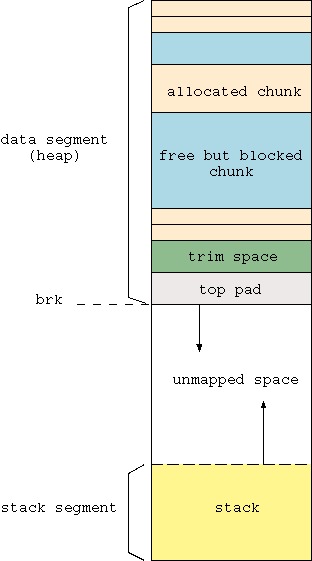
Figure 1. The heap and stack grow toward each other.
When a process needs memory, some room is created by moving the upper bound of the heap forward, using the brk() or sbrk() system calls. Because a system call is expensive in terms of CPU usage, a better strategy is to call brk() to grab a large chunk of memory and then split it as needed to get smaller chunks. This is exactly what malloc() does. It aggregates a lot of smaller malloc() requests into fewer large brk() calls. Doing so yields a significant performance improvement. The malloc() call itself is much less expensive than brk(), because it is a library call, not a system call. Symmetric behavior is adopted when memory is freed by the process. Memory blocks are not immediately returned to the system, which would require a new brk() call with a negative argument. Instead, the C library aggregates them until a sufficiently large, contiguous chunk can be freed at once.
For very large requests, malloc() uses the mmap() system call to find addressable memory space. This process helps reduce the negative effects of memory fragmentation when large blocks of memory are freed but locked by smaller, more recently allocated blocks lying between them and the end of the allocated space. In this case, in fact, had the block been allocated with brk(), it would have remained unusable by the system even if the process freed it.
Library functions that deal with dynamic memory are not limited to malloc() and free(), although these are by far the most-used calls. Other available functions include realloc(), to resize an already allocated block; calloc(), to allocate a cleared block; and memalign(), posix_memalign() and valloc(), to allocate an aligned block.
The strategy adopted by the C library memory management code is optimized for generic memory usage profiles. Although this strategy produces good performance in most cases, some programs might benefit from slightly different parameter tuning. First, check your memory usage statistics by using either the malloc_stats() or the mallinfo() library calls. The former prints as a standard error a brief summary of memory usage in the program. This summary includes how many bytes have been allocated from the system, gathered with brk(); how many are actually in use, found with malloc(); and how much memory has been claimed, using mmap(). Here is a sample output:
Arena 0:
system bytes     =     205892
in use bytes     =     101188
Total (incl. mmap):
system bytes     =     205892
in use bytes     =     101188
max mmap regions =          0
max mmap bytes   =          0
If you need to have more precise information and want to make more than a printout, mallinfo() is helpful. This function returns a struct mallinfo containing various memory-related status indicators; the most interesting are summarized in the Sidebar “Useful Parameters Provided by mallinfo”. For a complete description of the structure, take a look at /usr/include/malloc.h.
Useful Parameters Provided by mallinfo()
Another useful function provided by libc is malloc_usable_size(), which returns the number of bytes you actually can use in a previously allocated memory block. This value may be more than the amount you originally requested, due to alignment and minimum size constraints. For example, if you allocate 30 bytes, the usable size is actually 36. This means you could write up to 36 bytes to that memory block without overwriting other blocks. This is an extremely awful and version-dependent programming practice, however, so please don't do it. The most useful application of malloc_usable_size() probably is as a debug tool. For example, it can check the size of a memory block passed from outside before writing to it.
You can alter the behavior of the memory management functions by adjusting some of the parameters exposed by the mallopt() function (Listings 1 and 2).
Listing 1. Setting the Trim Threshold with mallopt()
Listing 2. A smaller trim threshold might save space.
The prototype of this function and a basic set of four parameters are part of the SVID/XPG/ANSI standard. The current GNU C library implementation (version 2.3.1 as of this writing) honors only one of them (M_MXFAST), leaving three out. On the other hand, the library provides four additional parameters not specified by the standard. Tunable parameters accepted by mallopt() are described in the Sidebar “Tunable Parameters for mallopt()”.
Tunable Paramenter for mallopt()
Allocation tuning is possible even without introducing mallopt() calls inside your program and recompiling it. This may be useful if you want to test values quickly or if you don't have the sources. All you have to do is set the appropriate environment variable before running the application. Table 1 shows the mapping between mallopt() parameters and environment variables, as well as some additional information. If you wish to set the trim threshold to 64KB, for example, you can run this program:
MALLOC_TRIM_THRESHOLD=65536 my_prog
Speaking of trimming, it is possible to trim the memory arena and give any unused memory back to the system by calling malloc_trim(pad). This function resizes the data segment, leaving at least pad bytes at the end of it and failing if less than one page worth of bytes can be freed. Segment size is always a multiple of one page, which is 4,096 bytes on i386. The size of the memory available to be trimmed is stored in the keepcost parameter of the struct returned by mallinfo(). Automatic trimming is done inside the free() function by calling memory_trim(), if the current value of keepcost is higher than the M_TRIM_THRESHOLD value, and by using the value of M_TOP_PAD as the argument.
Table 1. mallopt() Parameters Mapped to Environment Variables
Debugging memory is often one of the most time-consuming tasks when developing complex programs. The two basic aspects of this problem are checking memory corruption and tracing block allocation and release.
Memory corruption happens when writing to a location lying inside the legal data segment but outside the boundaries of the memory block you intended to use. An example is writing beyond an array's end. In fact, if you were to write outside the legal data segment, a segmentation fault would halt the program immediately or trigger the appropriate signal handler, allowing you to identify the misbehaving instruction. Memory corruption is thus more subtle, because it can pass unnoticed and cause a faulty behavior in a part of the program quite far from the offending part. For this reason, the sooner you detect it in the program, the higher your chances are of catching the bug.
Corruption may affect other memory blocks (messing with the application data) and the heap management structures. In the former case, the only symptom that something is going wrong comes from analyzing your own data structures. In the latter case, you can rely on some specific GNU libc consistency check mechanisms that alert you when something wrong is detected.
Memory checking in a program can be enabled as automatic or manual. The former is done by setting the environment variable MALLOC_CHECK_:
MALLOC_CHECK_=1 my_prog
This mechanism is able to catch a fair number of boundary overflows and, in some cases, to protect the program from crashing. The action undertaken when a fault is detected depends on the value of MALLOC_CHECK_: 1 prints a warning message to stderr but does not abort the program; 2 aborts the program without any output; and 3 combines the effects of 1 and 2.
Automatic checking takes place only when memory-related functions are invoked. That is, if you write beyond an array's end, it won't be noticed until the next malloc() or free() call. Also, not all the errors are caught, and the information you obtain is not always extremely useful. In the case of free(), you know which pointer was being freed when the error was detected, but that gives no hint whatsoever as to who trashed the heap. In the case of errors detected during an allocation, you merely receive a “heap corrupted” message.
The alternative is to place manual checkpoints here and there in the program. To do this, you must call the mcheck() function at the beginning of the program. This function allows you to install a custom memory fault handler that can be invoked each time heap corruption is detected. A default handler also is available if you don't provide your own. Once mcheck() has been called, all the consistency checks you get with MALLOC_CHECK_ are in place. Moreover, you can call the mprobe() function manually to force a check on a given memory pointer at any time. Values returned by mprobe() are summarized in the Sidebar “mprobe() Results”.
If you want to check the whole heap and not only one block, you can call mcheck_check_all() to walk through all the active blocks. You also can instruct the memory management routines to use mcheck_check_all(), instead of checking only the current block by initializing mcheck_pedantic() instead of mcheck(). Be aware, though, that this approach is rather time consuming.
A third way to enable memory checking is to link your program with libmcheck:
gcc myprog.c -o myprog -lmcheck
The mcheck() function is called automatically before the first memory allocation takes place—useful in those cases when some dynamic blocks are allocated before entering main().
Tracing the history of memory blocks helps in finding problems related to memory leaks and usage or release of already freed blocks. For this purpose, the GNU C library offers a tracing facility that is enabled by calling the mtrace() function. Once this call is made, every heap operation is logged to a file whose name must be specified in the environment variable MALLOC_TRACE. Analysis of the log file then can be performed off-line using a Perl script that is provided with the library and called, not surprisingly, mtrace. Logging can be stopped by calling muntrace(), but keep in mind that applying tracing to portions of your program may invalidate the result of post-processing. For example, false leaks may be detected if you allocate one block while tracing and then free it after muntrace().
Listing 3. Tracing with mtrace()
Here is a sample tracing session using the program in Listing 3:
$ gcc -g Listing_3.c -o Listing_3
$ MALLOC_TRACE="trace.log" ./Listing_3
$ mtrace trace.log
Memory not freed:
-----------------
   Address     Size     Caller
0x08049718      0xa  at malloc_debug/Listing_3.c:9
Memory tracing has nothing to do with protection from errors; calling mtrace() won't prevent the program from crashing. Even worse, if the program segfaults, the trace file is likely to be truncated and tracing may be inconsistent. To protect against this risk, it is always a good idea to install a SIGSEGV handler that calls muntrace(), because it closes the trace file before aborting (Listing 4). More information on memory tracing can be found on the libc info page.
Listing 4. Remember to call muntrace() in the SIGSEGV handler.
Sometimes the standard debugging facilities provided by the GNU C library may not be suited to the particular needs of your program. In this case, you can resort either to an external memory debugging tool (see Resources) or carve your own inside the library. Doing this is simply a matter of writing three functions and hooking them to these predefined variables:
-
__malloc_hook points to a function to be called when the user calls malloc(). You can do your own checks and accounting here, and then call the real malloc() to get the memory that was requested.
-
__free_hook points to a function called instead of the standard free().
-
__malloc_initialize_hook points to a function called when the memory management system is initialized. This allows you to perform some operations, say, setting the values of the previous hooks, before any memory-related operation takes place.
Hooks also are available for other memory-related calls, including realloc(), calloc() and so on. Be sure to save the previous values of the hooks and restore them before calling malloc() or free() inside your routines. If you fail to do so, infinite recursion prevents your code from working. Have a look at the example given in the libc info page for memory debugging to see all the nifty details.
As a final note, consider that these hooks also are used by the mcheck and mtrace systems. It's a good idea to be careful when using all of them combined.
The GNU C library offers several extensions that turn out to be quite useful when dealing with memory. If you want to fine-tune your application's memory usage or build a memory debugging solution tailored to your needs, you probably will find these tools helpful or, at least, a good starting point to develop your own mechanisms.





 扫一扫
扫一扫


 3372
3372

 被折叠的 条评论
为什么被折叠?
被折叠的 条评论
为什么被折叠?
 到【灌水乐园】发言





