




本文介绍如何解决3dsMax2018导出OBJ文件在Qt5中出现的错误,并分享了一种机械臂联动算法实现,包括旋转矩阵和四元数的使用。通过具体的函数代码,展示了各关节的旋转和平移操作。
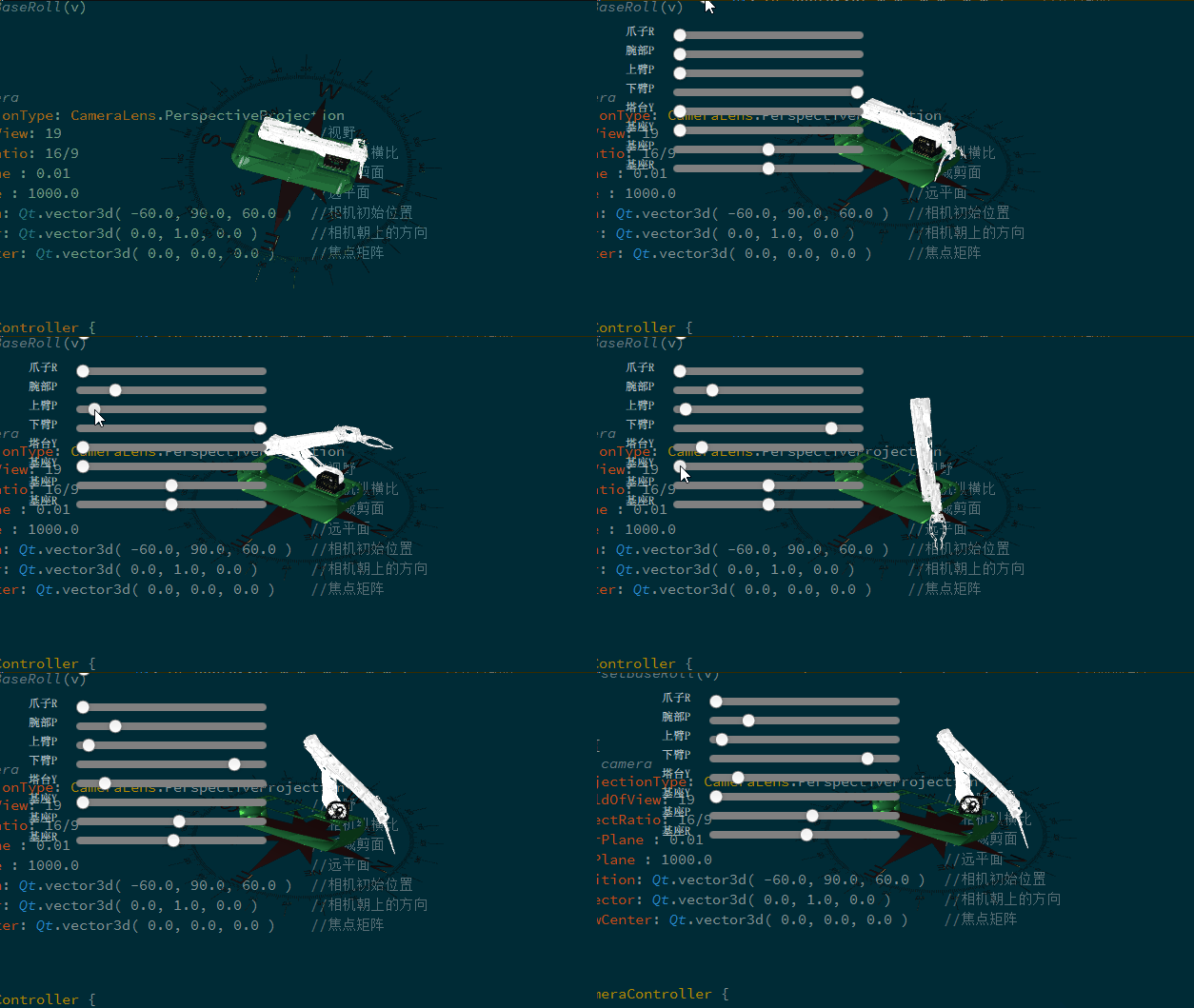
换成Qt5.11.2以上或者使用3ds max2014就可以了,还有一种可能是模型太大,导出的时候需要按比例缩小
机械臂联动的算法采用的是旋转矩阵和四元数.
   function clawOpenAndClose(){
        var a = clawOpenClose*Math.PI/180.0
        var m = Qt.matrix4x4(Math.cos(a),   -Math.sin(a),   0,  0,
                             Math.sin(a),   Math.cos(a),    0,  0,
                             0,             0,              1,  0,
                             0,             0,              0,  1)
        clawLeftTransform.matrix = backend.matrix4x4Multip(clawTransform.matrix,m)

        var n = Qt.matrix4x4(Math.cos(-a),   -Math.sin(-a),   0,  0,
                             Math.sin(-a),   Math.cos(-a),    0,  0,
                             0,              0,               1,  0,
                             0,              0,               0,  1)
        clawRightTransform.matrix = backend.matrix4x4Multip(clawTransform.matrix,n)
    }

    function clawTransformRotationY(){
        var a = clawLeftRight*Math.PI/180.0

        var m = Qt.matrix4x4(Math.cos(a),   0,  Math.sin(a),    0,
                             0,             1,  0,              -2.0173,
                             -Math.sin(a),  0,  Math.cos(a),    -0.151733,
                             0,             0,  0,              1)
        clawTransform.matrix = backend.matrix4x4Multip(wristClawTransform.matrix,m)
        clawOpenAndClose()
    }

    //腕部变换
    function wristClawTransformRotationX(){
        wristClawMatrix()
        clawTransformRotationY()
        clawOpenAndClose()
    }

    function wristClawMatrix(){
        var a = wristClawRota*Math.PI/180.0
//                              旋转x         旋转y     旋转z
        var m = Qt.matrix4x4(1,  0,           0,            -0.83,                      //平移x
                             0,  Math.cos(a), -Math.sin(a), 0.24856,                    //平移y
                             0,  Math.sin(a), Math.cos(a),  -10.0608,                   //平移z
                             0,  0,           0,            1)
        wristClawTransform.matrix = backend.matrix4x4Multip(upperArmTransform.matrix,m)
    }

    //上臂变换
    function upperArmTransformRotationX(){
        //上臂
        upperArmMatrix()
        wristClawMatrix()
        clawTransformRotationY()
        clawOpenAndClose()
    }


    function upperArmMatrix(){
        var a = upperArmRota*Math.PI/180.0
        var m = Qt.matrix4x4(1, 0,          0,              1.0032,
                             0,  Math.cos(a), -Math.sin(a), 1.63431,
                             0,  Math.sin(a), Math.cos(a), 7.84555,
                             0,            0,           0, 1)
        upperArmTransform.matrix = backend.matrix4x4Multip(lowerArmTransform.matrix,m)
        wristClawMatrix()
    }

    function lowerArmMatrix(){
        var a = lowerArmRota*Math.PI/180.0
        var m = Qt.matrix4x4(1,  0,           0,            0,
                             0,  Math.cos(a), -Math.sin(a), -0.33856,
                             0,  Math.sin(a), Math.cos(a),  0,
                             0,  0,           0,            1)
        lowerArmTransform.matrix = backend.matrix4x4Multip(turretTransform.matrix,m)
    }

    //下臂变换
    function lowerArmTransformRotationX(){
        //下臂
        lowerArmMatrix()
        upperArmMatrix()
        clawTransformRotationY()
        clawOpenAndClose()
    }


    function turretTransformFunction(){
        //下臂
        lowerArmMatrix()
        upperArmMatrix()
        clawTransformRotationY()
        clawOpenAndClose()
    }

    function turretTransformRotationY(){
        turretVect3d = backend.matrix4x4Index2(baseTransform.matrix)
        turretAngle = -turretRota - turretL

        turretTransform.rotation = backend.quaternionMultip(trans.rotation,turretBaseQuaternion)
        turretTransformFunction()
    }

    function baseTransformFunctionX(){
        var a = turretRota*Math.PI/180.0
        var m = Qt.matrix4x4(Math.cos(a),   0, Math.sin(a), 0,
                             0,             1, 0,           4.27978,
                             -Math.sin(a),  0, Math.cos(a), -4.50885,
                             0,             0, 0,           1)
        turretTransform.matrix = backend.matrix4x4Multip(baseTransform.matrix,m)
        turretL = turretRota
        turretTransformFunction()

    }

    function baseTransformFunctionY(){
        var a = turretRota*Math.PI/180.0
        var m = Qt.matrix4x4(Math.cos(a),   0, Math.sin(a), 0,
                             0,             1, 0,           4.27978,
                             -Math.sin(a),  0, Math.cos(a), -4.50885,
                             0,             0, 0,           1)
        turretTransform.matrix = backend.matrix4x4Multip(baseTransform.matrix,m)
        turretL = turretRota
        turretTransformFunction()

    }

    function baseTransformFunctionZ(){
        var a = turretRota*Math.PI/180.0
        var m = Qt.matrix4x4(Math.cos(a),   0, Math.sin(a), 0,
                             0,             1, 0,           4.27978,
                             -Math.sin(a),  0, Math.cos(a), -4.50885,
                             0,             0, 0,           1)
        turretTransform.matrix = backend.matrix4x4Multip(baseTransform.matrix,m)
        turretL = turretRota
        turretTransformFunction()

    }


    function baseTransformRotationZ(){
        baseTransform.rotationZ = basePitch

        baseTransformFunctionZ()
        turretBaseQuaternion = turretTransform.rotation

    }


    function baseTransformRotationY(){
        baseTransform.rotationY = baseHeading //角度

        baseTransformFunctionY()
        turretBaseQuaternion = turretTransform.rotation
    }


    function baseTransformRotationX(){
        baseTransform.rotationX = baseRoll

        baseTransformFunctionX()
        turretBaseQuaternion = turretTransform.rotation
    }


    function baseHeadingFunction(){
        return baseHeading
    }
    function baseRollFunction(){
        return baseRoll
    }
    function basePitchFunction(){
        return basePitch
    }
    function turretRotaFunction(){
        return turretRota
    }
    function lowerArmRotaFunction(){
        return lowerArmRota
    }
    function upperArmRotaFunction(){
        return upperArmRota
    }
    function wristClawRotaFunction(){
        return wristClawRota
    }
    function clawLeftRightFunction(){
        return clawLeftRight
    }
    function clawOpenCloseFunction(){
        return clawOpenClose
    }

    function setBaseHeading(delta){
        baseHeading = delta
        baseTransformRotationY()
    }
    function setBaseRoll(delta){
        baseRoll = delta
        baseTransformRotationX()
    }
    function setBasePitch(delta){
        basePitch = delta
        baseTransformRotationZ()
    }
    function setTurretRota(delta){
        turretRota = delta
        turretTransformRotationY()
    }
    function setLowerArmRota(delta){
        lowerArmRota = delta
        lowerArmTransformRotationX()
    }
    function setUpperArmRota(delta){
        upperArmRota = delta
        upperArmTransformRotationX()
    }
    function setWristClawRota(delta){
        wristClawRota = delta
        wristClawTransformRotationX()
    }
    function setClawLeftRight(delta){
        clawLeftRight = delta
        clawTransformRotationY()
    }
    function setClawOpenClose(delta){
        clawOpenClose = delta
        clawOpenAndClose()
        //console.info(delta)
    }
#include <Qt3DQuickExtras/qt3dquickwindow.h>
#include <QGuiApplication>
#include <QQuickView>
#include <QQmlEngine>
#include <QQmlApplicationEngine>
#include <QQmlContext>
#include <QQuickItem>
int main(int argc, char* argv[])
{
QGuiApplication app(argc, argv);
QQuickView view;
view.setFlags(Qt::FramelessWindowHint | Qt::WindowStaysOnTopHint);
view.setColor(QColor(Qt::transparent));
view.setSource(QUrl("qrc:/main.qml"));
view.show();
return app.exec();
}用于显示3d模型
import QtQuick 2.2 as QQ2
import QtQuick 2.0
import QtQuick.Scene3D 2.0
import Qt3D.Core 2.0
import Qt3D.Render 2.0
import Qt3D.Input 2.0
import Qt3D.Extras 2.0


Entity {
    id: sceneRoot
    property alias upperArmPos: upperArmTransform
    property alias wristClawPos: wristClawTransform

    property real wristClawRota: 0.0    //腕部旋转度数Y
    property real upperArmRota: 0.0     //上臂旋转度数Y
    property real lowerArmRota: 0.0     //下臂旋转度数Y
    property real turretRota: 0.0       //塔台旋转度数Y
    property real baseRotaY: 0.0        //基座旋转度数Y
    property real baseRotaZ: 0.0        //基座旋转度数Z

    Component.onCompleted:{
        var upperArmPos = upperArmTransform.translation
        var wristClawPos = wristClawTransform.translation
        //console.log(upperArmPos,wristClawPos)
    }

    components: [
        RenderSettings {
            activeFrameGraph: ForwardRenderer {
                camera: camera
                clearColor: "transparent"

            }
        },
        // Event Source will be set by the Qt3DQuickWindow
        InputSettings {
        }
    ]


    Camera {
        id: camera
        projectionType: CameraLens.PerspectiveProjection
        fieldOfView: 25
        aspectRatio: 16/9
        nearPlane : 0.01
        farPlane : 1000.0
        position: Qt.vector3d( 0.0, 10.0, -40.0 )
        upVector: Qt.vector3d( 0.0, 1.0, 0.0 )
        viewCenter: Qt.vector3d( 0.0, 0.0, 0.0 )

    }

    OrbitCameraController {
        camera: camera
    }

    FirstPersonCameraController { camera: camera }

    Entity {
        id: base

        Transform {
            id: baseTransform

            translation:Qt.vector3d(-4.01445,-5.87275,0.02425)
        }

        PhongMaterial {
            id: materialBase
            ambient: Qt.rgba( 0.1, 0.2, 0.3, 1 )            //环境光
            diffuse: Qt.rgba( 0.1, 0.1, 0.1, 1 )            //漫反射
            specular: Qt.rgba( 0.2, 0.2, 0.1, 1 )           //高光反射
            //                shininess: 0.6
            shininess: 10.0
        }

        Mesh {
            id: meshBase
            source: "qrc:/obj/obj/Base.obj"
        }

        components: [meshBase, materialBase,baseTransform]
    }
}
main.qml调用
import QtQuick 2.0
import QtQuick.Scene3D 2.0
import QtQuick.Controls 1.4

Rectangle {

    width: 600
    height: 400
    color: "transparent"
    focus: true


    Rectangle {
        id: scene
        anchors.fill: parent
        anchors.margins: 0
        color: "transparent"
        Scene3D {
            id: scene3d
            anchors.fill: parent
            anchors.margins: 0
            aspects: ["input", "logic"]
            cameraAspectRatioMode: Scene3D.AutomaticAspectRatio

            AnimatedEntity {
            id:unicorn
            }


        }


    }
}





 扫一扫
扫一扫


 1789
1789


 到【灌水乐园】发言



