


 本文详细介绍如何在CentOS/RHEL服务器上安装Apache Tomcat 7,包括检查Java版本、下载Tomcat 7归档文件、启动Tomcat服务器及浏览器访问等步骤。
Apache Tomcat is a opensource web server for Java applicaton of Apache Foundation like Apache HTTP server. It used for deploying Java Servlet and JSP applications. To deploy any application in Tomcat we can simply create a war file and deploy them. For more details about you can visit apache official site http://tomcat.apache.org/ .
This article will help you to install Tomcat 7 on CentOS/RHEL servers. We are using CentOS 7 and installing Apache tomcat 7.0.68. To read more about this release read Tomcat Release Notes.
Step 1: Check Java Version
JAVA is the first requirement for Tomcat 7 installation. Make sure you have JAVA SE 6 or Later version installed in your system. Use following command to check if you have java installed already on your system.
# java -version

java version "1.8.0_72"
Java(TM) SE Runtime Environment (build 1.8.0_72-b15)
Java HotSpot(TM) 64-Bit Server VM (build 25.72-b15, mixed mode)
If you do not have java installed, Use any article Install Java 7 or Install Java 8 in RHEL based systems.
Step 2: Download Tomcat 7 Archive
Download Apache Tomcat archive file from Apache tomcat official download page. You can use below wget command to download it.
# cd /tmp
# wget http://www.us.apache.org/dist/tomcat/tomcat-7/v7.0.68/bin/apache-tomcat-7.0.68.tar.gz
After competed download extract archive file in /tmp directory and move to proper location as per your need. We are placing this under /usr/local directory.
# tar xzf apache-tomcat-7.0.68.tar.gz
# mv apache-tomcat-7.0.68 /usr/local/tomcat7
Step 3: Starting Tomcat
Tomcat is very easy to use, There are no need to compile its source. You simple extract the archive and start the tomcat server. Tomcat by default start on port 8080, Make sure no other services are running on same port using ‘telnet localhost 8080’.
# cd /usr/local/tomcat7

# ./bin/startup.sh
Sample Output
Using CATALINA_BASE:   /usr/local/tomcat7
Using CATALINA_HOME:   /usr/local/tomcat7
Using CATALINA_TMPDIR: /usr/local/tomcat7/temp
Using JRE_HOME:        /opt/jdk1.8.0_72
Using CLASSPATH:       /usr/local/tomcat7/bin/bootstrap.jar:/usr/local/tomcat7/bin/tomcat-juli.jar
Tomcat started.
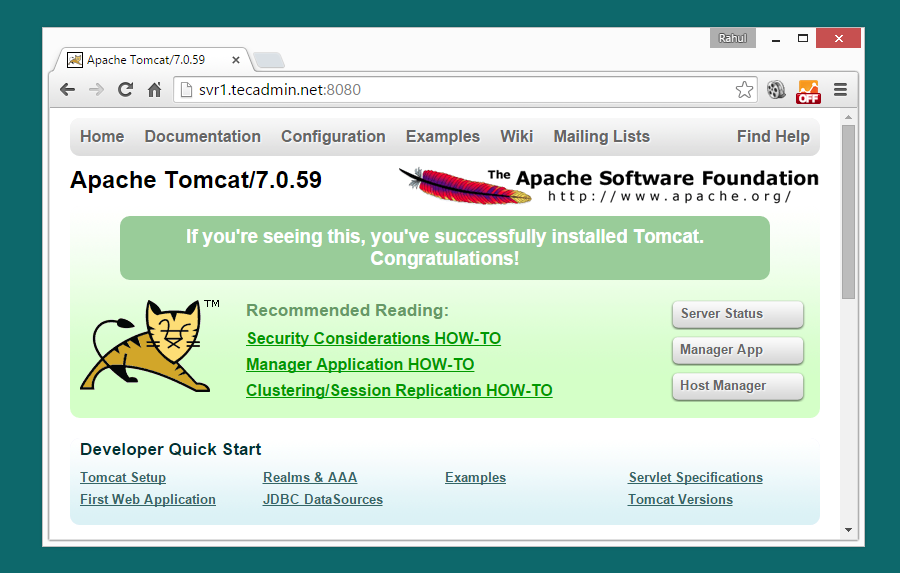
Step 4: Access Tomcat in Browser
Tomcat server works on port 8080 default. To access Tomcat on web browser by connecting your server on port 8080.
http://svr1.tecadmin.net:8080
Step 5: Setup User Accounts
Finally we need to create user accounts to secure and access admin/manager pages. Editconf/tomcat-users.xml file in your editor and paste inside <tomcat-users> </tomcat-users> tags.
<!-- user manager can access only manager section -->
<role rolename="manager-gui" />
<user username="manager" password="_SECRET_PASSWORD_" roles="manager-gui" />

<!-- user admin can access manager and admin section both -->
<role rolename="admin-gui" />
<user username="admin" password="_SECRET_PASSWORD_" roles="manager-gui,admin-gui" />
Step 6: Stop Tomcat
Finally if you feel that there are no need of Tomcat in your system, You can simply stop it using below command from tomcat home directory.
# ./bin/shutdown.sh
I hope above steps will help you to set up Tomcat 7 on your server. Read our next article toInstall Tomcat 7 on Ubuntu. Tomcat 8 stable release is also available to download. Read our next article to Install Tomcat 8 in Linux
Thanks





 扫一扫
扫一扫


 2580
2580

 被折叠的 条评论
为什么被折叠?
被折叠的 条评论
为什么被折叠?
 到【灌水乐园】发言





