


1. 背景与原理
在 RoCE (RDMA over Converged Ethernet) 网络中,节点的多个 RoCE 网卡端口(如 roce10、roce11、roce12、roce13)需要严格按照 IP 规划正确接入交换机。如果线缆接错交换机口,可能导致:
-
RDMA 无法通信
-
延迟升高 / 带宽下降
-
多路径冗余失效
LLDP (Link Layer Discovery Protocol) 可用于:
-
查看每个网卡的对端交换机信息(管理 IP、设备名、端口号)。
-
对比本地规划的网关 IP,快速验证线缆是否接对。
2. 环境准备
2.1 安装 LLDP 工具
sudo apt update
sudo apt install lldpd -y
2.2 启动并设置开机自启
sudo systemctl enable lldpd
sudo systemctl start lldpd
2.3 确认 RoCE 网卡处于 UP 状态
sudo ip link set roce10 up
sudo ip link set roce11 up
sudo ip link set roce12 up
sudo ip link set roce13 up
2.4 确认交换机 LLDP 已启用
-
H3C/Huawei:默认启用
-
Cisco/NVIDIA:需在交换机配置
lldp enable
3. 基础命令(逐个网口检查)
3.1 查看某个 RoCE 口的 LLDP 对端
lldpcli show neighbors ports roce11
输出示例:
Interface:    roce11
  Chassis:
    SysName:      NXXY_HPC_Cluster02_LEAF03
    MgmtIP:       10.23.130.254
  Port:
    PortID:       ifname TwoHundredGigE1/0/54:1
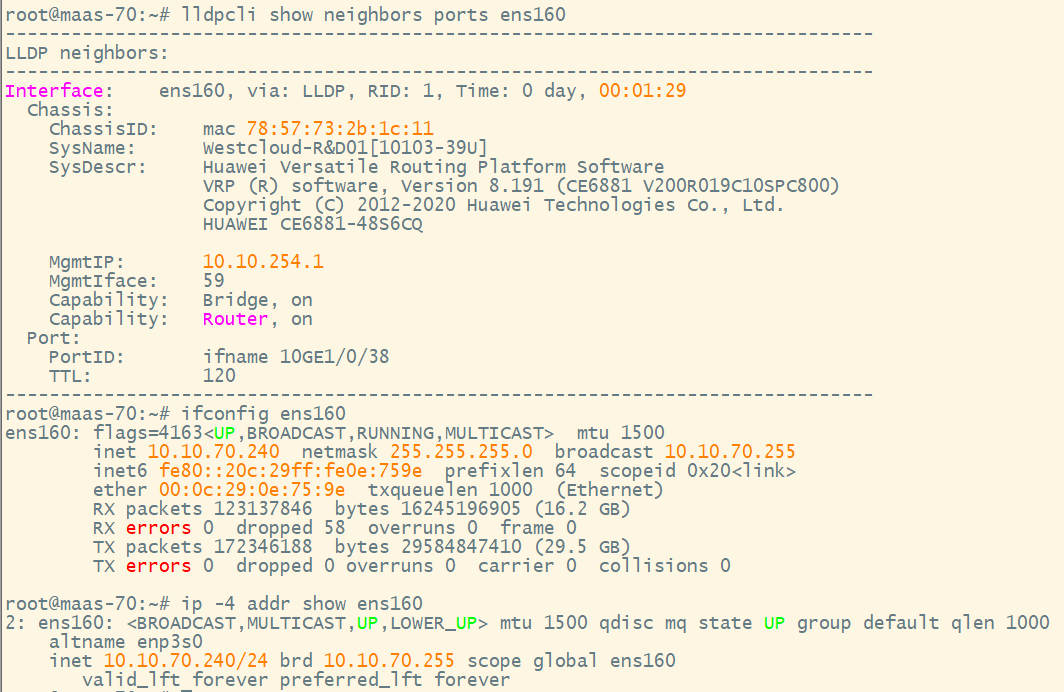
3.2 查看 RoCE 口的本地 IP
-
ifconfig 方式(需安装 net-tools)
ifconfig roce11 -
ip addr 方式(推荐,自带)
ip -4 addr show roce11
4. 表格化单行命令(自动检查所有口)
4.1 推荐(ip addr 版,无需安装 net-tools)
bash -c 'echo "Interface IP Address Gateway PeerMgmtIP Status"; echo "--------------------------------------------------------------------------"; for i in {10..13}; do ip=$(ip -4 addr show roce$i | awk "/inet /{print \$2}" | cut -d/ -f1); gw=$(echo $ip | awk -F. "{print \$1\".\"\$2\".\"\$3\".254\"}"); peer=$(lldpcli show neighbors ports roce$i | awk "/MgmtIP:/{print \$2}"); [ "$gw" = "$peer" ] && status="MATCH" || status="DIFF"; printf "%-10s %-15s %-15s %-15s %-6s\n" "roce$i" "$ip" "$gw" "$peer" "$status"; done'
4.2 备用(ifconfig 版,需要安装 net-tools)
bash -c 'echo "Interface IP Address Gateway PeerMgmtIP Status"; echo "--------------------------------------------------------------------------"; for i in {10..13}; do ip=$(ifconfig roce$i | awk "/inet /{print \$2}"); gw=$(echo $ip | awk -F. "{print \$1\".\"\$2\".\"\$3\".254\"}"); peer=$(lldpcli show neighbors ports roce$i | awk "/MgmtIP:/{print \$2}"); [ "$gw" = "$peer" ] && status="MATCH" || status="DIFF"; printf "%-10s %-15s %-15s %-15s %-6s\n" "roce$i" "$ip" "$gw" "$peer" "$status"; done'

5. 增强版(带交换机名 SysName & 端口 PortID)
5.1 ip addr 版(推荐)
bash -c 'echo "Interface IP Address Gateway PeerMgmtIP PeerSysName PeerPort Status"; echo "-------------------------------------------------------------------------------------------------------------------------"; for i in {10..13}; do ip=$(ip -4 addr show roce$i | awk "/inet /{print \$2}" | cut -d/ -f1); gw=$(echo $ip | awk -F. "{print \$1\".\"\$2\".\"\$3\".254\"}"); peer_mgmt=$(lldpcli show neighbors ports roce$i | awk "/MgmtIP:/{print \$2}"); peer_sys=$(lldpcli show neighbors ports roce$i | awk "/SysName:/{print substr(\$0,11)}"); peer_port=$(lldpcli show neighbors ports roce$i | awk "/PortID:/{print substr(\$0,15)}"); [ "$gw" = "$peer_mgmt" ] && status="MATCH" || status="DIFF"; printf "%-10s %-15s %-15s %-15s %-20s %-25s %-6s\n" "roce$i" "$ip" "$gw" "$peer_mgmt" "$peer_sys" "$peer_port" "$status"; done'
6. 示例输出
6.1 普通版
Interface   IP Address        Gateway          PeerMgmtIP       Status
--------------------------------------------------------------------------
roce10      10.23.128.11      10.23.128.254    10.23.128.254    MATCH
roce11      10.23.129.12      10.23.129.254    10.23.129.254    MATCH
roce12      10.23.130.13      10.23.130.254    10.23.131.254    DIFF
roce13      10.23.131.14      10.23.131.254    10.23.131.254    MATCH
6.2 增强版
Interface   IP Address        Gateway          PeerMgmtIP       PeerSysName           PeerPort                     Status
-------------------------------------------------------------------------------------------------------------------------
roce10      10.23.128.11      10.23.128.254    10.23.128.254    LEAF01                TwoHundredGigE1/0/48:1       MATCH
roce11      10.23.129.12      10.23.129.254    10.23.129.254    LEAF02                TwoHundredGigE1/0/49:1       MATCH
roce12      10.23.130.13      10.23.130.254    10.23.131.254    LEAF03                TwoHundredGigE1/0/50:1       DIFF
roce13      10.23.131.14      10.23.131.254    10.23.131.254    LEAF03                TwoHundredGigE1/0/51:1       MATCH
7. 判断规则
-
MATCH → 本地规划网关与 LLDP 对端管理 IP 一致,线缆正确。
-
DIFF → 不一致,说明线缆接错或交换机配置错误,需要检查。
8. 脚本版(长期使用推荐)
8.1 脚本内容
保存为 /usr/local/bin/check_roce_lldp.sh:
#!/bin/bash
echo "Interface   IP Address        Gateway          PeerMgmtIP       PeerSysName           PeerPort                     Status"
echo "-------------------------------------------------------------------------------------------------------------------------"

for i in {10..13}; do
    ip=$(ip -4 addr show roce$i | awk '/inet /{print $2}' | cut -d/ -f1)
    gw=$(echo $ip | awk -F. '{print $1"."$2"."$3".254"}')
    peer_mgmt=$(lldpcli show neighbors ports roce$i | awk '/MgmtIP:/{print $2}')
    peer_sys=$(lldpcli show neighbors ports roce$i | awk '/SysName:/{print substr($0,11)}')
    peer_port=$(lldpcli show neighbors ports roce$i | awk '/PortID:/{print substr($0,15)}')

    if [ "$gw" = "$peer_mgmt" ]; then
        status="MATCH"
    else
        status="DIFF"
    fi

    printf "%-10s %-15s %-15s %-15s %-20s %-25s %-6s\n" "roce$i" "$ip" "$gw" "$peer_mgmt" "$peer_sys" "$peer_port" "$status"
done
8.2 设置权限
sudo chmod +x /usr/local/bin/check_roce_lldp.sh
8.3 执行脚本
check_roce_lldp.sh
9. 常见问题与解决方法
-
ifconfig: command not found
→ 未安装net-tools,请使用ip addr版命令。 -
PeerMgmtIP为空
→ 交换机未上报管理 IP,可用SysName+PortID判断。 -
LLDP 无输出
-
确认 RoCE 网卡已
UP。 -
确认交换机已启用 LLDP。
-
等待 30 秒以上(LLDP 学习需要时间)。
-





 扫一扫
扫一扫


 1376
1376

 被折叠的 条评论
为什么被折叠?
被折叠的 条评论
为什么被折叠?
 到【灌水乐园】发言





