


常用框架集成方式:subModule、Carthage及CocoaPods
subModule:
基于Git管理、使用简单、功能较少,只能下载全部项目、debug方便
Carthage:
Swift语言、安装使用、去中心化管理,提供framework文件、debug不方便
CocoaPods:
基于Ruby、安装使用、去中心化管理,生成workspace、debug方便
CocoaPods
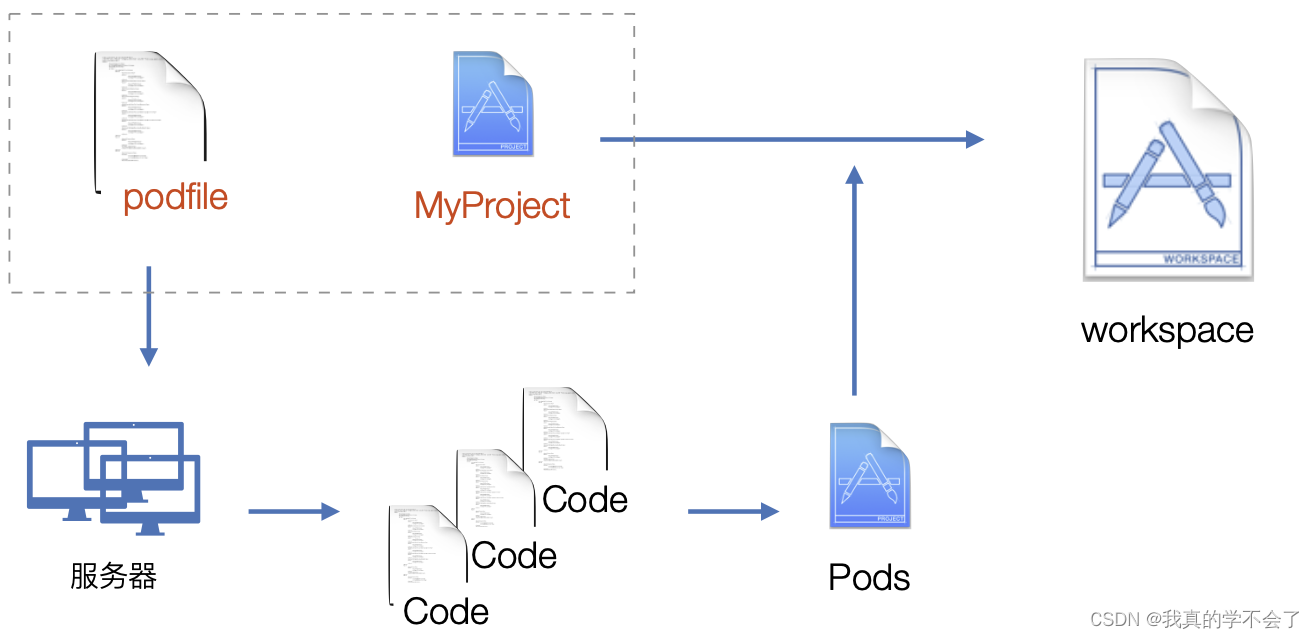
开源框架的使用(AFNetWroking)
·使用CocoaPods集成
/* Create a new file: podfile
target 'GSCApp1' do
	pod 'AFNetworking'
end
*/

// 安装 pod install
// 更新 pod update
·加载真实网络数据
// AFHTTPSessionManager
- (NSURLSessionDataTask *)GET:(NSString *)URLString
                   parameters:(nullable id)parameters
                      headers:(nullable NSDictionary <NSString *, NSString *> *)headers
                     progress:(nullable void (^)(NSProgress * _Nonnull))downloadProgress
                      success:(nullable void (^)(NSURLSessionDataTask * _Nonnull, id _Nullable))success
                      failure:(nullable void (^)(NSURLSessionDataTask * _Nullable, NSError * _Nonnull))failure
{

    NSURLSessionDataTask *dataTask = [self dataTaskWithHTTPMethod:@"GET"
                                                        URLString:URLString
                                                       parameters:parameters
                                                          headers:headers
                                                   uploadProgress:nil
                                                 downloadProgress:downloadProgress
                                                          success:success
                                                          failure:failure];

    [dataTask resume];

    return dataTask;
}

- (nullable NSURLSessionDataTask *)POST:(NSString *)URLString
                             parameters:(nullable id)parameters
                                headers:(nullable NSDictionary <NSString *, NSString *> *)headers
                               progress:(nullable void (^)(NSProgress *uploadProgress))uploadProgress
                                success:(nullable void (^)(NSURLSessionDataTask *task, id _Nullable responseObject))success
                                failure:(nullable void (^)(NSURLSessionDataTask * _Nullable task, NSError *error))failure
{
    NSURLSessionDataTask *dataTask = [self dataTaskWithHTTPMethod:@"POST" URLString:URLString parameters:parameters headers:headers uploadProgress:uploadProgress downloadProgress:nil success:success failure:failure];

    [dataTask resume];

    return dataTask;
}
二次封装&chromium

AFNetworking网络请求的简单使用
//
//  GSCListLoader.m
//  GSCApp1
//
//  Created by gsc on 2024/5/20.
//

#import "GSCListLoader.h"
#import "AFNetworking/AFNetworking.h"

@implementation GSCListLoader

-(void)loadListData{
    NSString *urlString        = @"http://v.juhe.cn/toutiao/index?type=top&key=97ad001bfcc2082e2eeaf798bad3d54e";
//    NSURL *listURL             = [NSURL URLWithString:urlString];

//    NSURLRequest *listRequest  = [NSURLRequest requestWithURL:listURL];

    AFHTTPSessionManager *manager = [AFHTTPSessionManager manager];

    [manager GET:urlString parameters:nil headers:nil progress:^(NSProgress * _Nonnull downloadProgress) {

    } success:^(NSURLSessionDataTask * _Nonnull task, id  _Nullable responseObject) {

    } failure:^(NSURLSessionDataTask * _Nullable task, NSError * _Nonnull error) {

    }];

//    NSURLSession *session      = [NSURLSession sharedSession];
//
//    NSURLSessionTask *dataTask = [session dataTaskWithURL:listURL completionHandler:^(NSData * _Nullable data, NSURLResponse * _Nullable response, NSError * _Nullable error) {
//    }];
//
//    [dataTask resume];
}

@end
IOS中的JSON解析
JSON:轻量级,可读性高,纯文本形式的数据交互格式
基本数据格式:Number, Boolean, String, Null, Array, Object(Dictionary)
其他数据格式:protobuf(内容不具有可读性,但是高性能)
NSJSONSerialization:提供JSON数据和系统对象之间的转换
+ (nullable NSData *)dataWithJSONObject:(id)obj options:(NSJSONWritingOptions)opt error:(NSError **)error;

+ (nullable id)JSONObjectWithData:(NSData *)data options:(NSJSONReadingOptions)opt error:(NSError **)error;

// Options
typedef NS_OPTIONS(NSUInteger, NSJSONReadingOptions) {    // 是否可变类型数据&外层数据格式
    NSJSONReadingMutableContainers = (1UL << 0),
    NSJSONReadingMutableLeaves = (1UL << 1),
    NSJSONReadingFragmentsAllowed = (1UL << 2),

#if !0
    NSJSONReadingJSON5Allowed API_AVAILABLE(macos(12.0), ios(15.0), watchos(8.0), tvos(15.0)) = (1UL << 3),
#endif
    NSJSONReadingTopLevelDictionaryAssumed API_AVAILABLE(macos(12.0), ios(15.0), watchos(8.0), tvos(15.0)) = (1UL << 4),

    NSJSONReadingAllowFragments API_DEPRECATED_WITH_REPLACEMENT("NSJSONReadingFragmentsAllowed", macos(10.7, API_TO_BE_DEPRECATED), ios(5.0, API_TO_BE_DEPRECATED), watchos(2.0, API_TO_BE_DEPRECATED), tvos(9.0, API_TO_BE_DEPRECATED)) = NSJSONReadingFragmentsAllowed,
} API_AVAILABLE(macos(10.7), ios(5.0), watchos(2.0), tvos(9.0));

typedef NS_OPTIONS(NSUInteger, NSJSONWritingOptions) {    // 缩进 & 单行
    NSJSONWritingPrettyPrinted = (1UL << 0),

    /* Sorts dictionary keys for output using [NSLocale systemLocale]. Keys are compared using NSNumericSearch. The specific sorting method used is subject to change.
     */
    NSJSONWritingSortedKeys API_AVAILABLE(macos(10.13), ios(11.0), watchos(4.0), tvos(11.0)) = (1UL << 1),
    NSJSONWritingFragmentsAllowed = (1UL << 2),
    NSJSONWritingWithoutEscapingSlashes API_AVAILABLE(macos(10.15), ios(13.0), watchos(6.0), tvos(13.0)) = (1UL << 3),
} API_AVAILABLE(macos(10.7), ios(5.0), watchos(2.0), tvos(9.0));
使用结构化的数据进行解析和展示
读取JSON得到的数据属性:
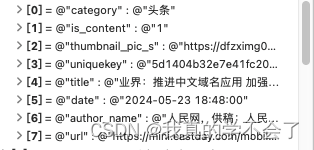
//
//  GSCListItem.h
//  GSCApp1
//
//  Created by gsc on 2024/5/23.
//

#import <Foundation/Foundation.h>

NS_ASSUME_NONNULL_BEGIN


/*
 列表结构化属性
 */

@interface GSCListItem : NSObject

@property (nonatomic, copy, readwrite)  NSString * category;
//@property (nonatomic, copy, readwrite)  NSString * isContent;
@property (nonatomic, copy, readwrite)  NSString * picUrl;
@property (nonatomic, copy, readwrite)  NSString * uniquekey;
@property (nonatomic, copy, readwrite)  NSString * title;
@property (nonatomic, copy, readwrite)  NSString * date;
@property (nonatomic, copy, readwrite)  NSString * authorName;
@property (nonatomic, copy, readwrite)  NSString * articleUrl;

-(void) configWithDictionary:(NSDictionary *) dictionary;

@end

NS_ASSUME_NONNULL_END


//
//  GSCListItem.m
//  GSCApp1
//
//  Created by gsc on 2024/5/23.
//

#import "GSCListItem.h"

@implementation GSCListItem

- (void)configWithDictionary:(NSDictionary *)dictionary {
    self.category = [dictionary objectForKey:@"category"];
    self.picUrl = [dictionary objectForKey:@"thumbnail_pic_s"];
    self.uniquekey = [dictionary objectForKey:@"uniquekey"];
    self.title = [dictionary objectForKey:@"title"];
    self.date = [dictionary objectForKey:@"date"];
    self.authorName = [dictionary objectForKey:@"author_name"];
    self.articleUrl = [dictionary objectForKey:@"url"];
}

@end


//
//  GSCListLoader.m
//  GSCApp1
//
//  Created by gsc on 2024/5/20.
//

#import "GSCListLoader.h"
#import "AFNetworking/AFNetworking.h"
#import "GSCListItem.h"

@implementation GSCListLoader

-(void)loadListData{
    NSString *urlString        = @"http://v.juhe.cn/toutiao/index?type=top&key=97ad001bfcc2082e2eeaf798bad3d54e";
    NSURL *listURL             = [NSURL URLWithString:urlString];


    NSURLSession *session      = [NSURLSession sharedSession];
    NSURLSessionTask *dataTask = [session dataTaskWithURL:listURL completionHandler:^(NSData * _Nullable data, NSURLResponse * _Nullable response, NSError * _Nullable error) {

        NSError *jsonError;
        id jsonObj = [NSJSONSerialization JSONObjectWithData:data options:0 error:&jsonError];

        NSArray *dataArray = [((NSDictionary *)[((NSDictionary *) jsonObj) objectForKey:@"result"]) objectForKey:@"data"];
        NSMutableArray *listItemArray = @[].mutableCopy;
        for (NSDictionary * info in dataArray){
            GSCListItem *listItem = [[GSCListItem alloc] init];
            [listItem configWithDictionary:info];
            [listItemArray addObject:listItem];
        }
        NSLog(@"");
    }];

    [dataTask resume];


}

@end
JSON Model开源项目
1.简化NSData -- JSON -- Model流程
2.避免类型转换错误 / 属性和对象不一致
3.相互转换
常用开源项目:YYModel / Mantle / MJExtension
完整列表加载流程:
1.通过网络接口加载数据
2.使用NSJsonSerialization解析处理网络请求
3.数据Model化
4.列表加载Model数组






 扫一扫
扫一扫


 3660
3660

 被折叠的 条评论
为什么被折叠?
被折叠的 条评论
为什么被折叠?
 到【灌水乐园】发言





