


HTML:
<div class="box">Border Gradient</div>
1. 使用 border-image
CSS:
.box {
    width: 400px;
    height: 240px;
    line-height: 240px;
    text-align: center;
    color: #fff;
    background-color: #2d2a2a;
    font-size: 25px;
    border: 8px solid;
    border-image: linear-gradient(to right, #8f41e9, #578aef) 1; /*important*/
}
效果图:
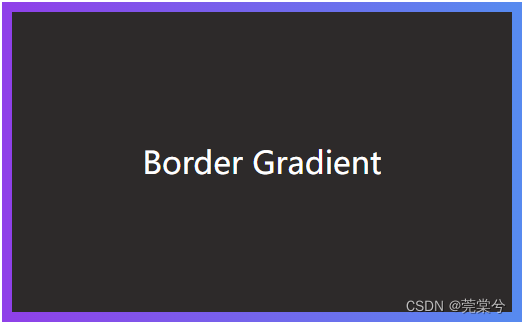
缺点 : 添加 border-image 这个属性后,不支持设置边框圆角
2. 使用伪元素,配合background-clip、background-image
CSS:
.box {
    width: 400px;
    height: 240px;
    line-height: 240px;
    text-align: center;
    color: #fff;
    font-size: 25px;
    border: 8px solid transparent;
    border-radius: 16px;
    position: relative;
    background-color: #2d2a2a;
    background-clip: padding-box; /*important*/
}
.box::before {
    content: '';
    position: absolute;
    top: 0;
    right: 0;
    left: 0;
    bottom: 0;
    z-index: -1;
    margin: -8px;
    border-radius: inherit;
    background-image: linear-gradient(to right, #8F41E9, #578AEF); /*important*/
}
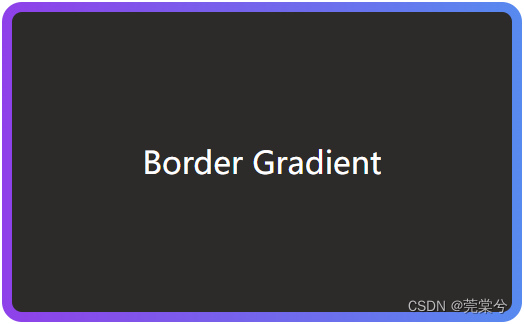
效果图:
3. 使用单层元素,配合background-clip、background-origin、background-image
这种方法就是在盒子上分别设置 background-clip、background-origin、background-image 这三个属性,每个属性设置两组值,第一组用于设置border内的单色背景,第二组用于设置border上的渐变色。
CSS:
.box {
   width: 400px;
   height: 240px;
   line-height: 240px;
   text-align: center;
   color: #fff;
   font-size: 25px;
   border: 8px solid transparent;
   border-radius: 16px;
   /*important*/
   background-clip: padding-box, border-box;
   background-origin: padding-box, border-box;
   background-image: linear-gradient(to right, #2d2a2a, #2d2a2a), linear-gradient(90deg, #8F41E9, #578AEF);
}
效果图:





 扫一扫
扫一扫


 3万+
3万+

 被折叠的 条评论
为什么被折叠?
被折叠的 条评论
为什么被折叠?
 到【灌水乐园】发言





