



 IntelliJ IDEA 15 EAP 版本引入了实时检测重复代码的功能,通过消除代码中的重复部分,使代码更加简洁稳定。此功能默认启用,并提供了快速修复选项来帮助开发者导航到重复项或将它们显示在工具窗口中。
It’s been a while since we added the Analyze → Locate Duplicates feature. If you’ve had a chance to use it, you know how helpful it is: by eliminating duplicates in your code, you make it more concise and stable. If you’ve never used it, you definitely should; it’s truly surprising how many duplicates an average codebase usually contains.
The fresh IntelliJ IDEA 15 EAP build released today takes the duplicates analysis to an entirely new level by allowing you to spot them on-the-fly. Now, if you stumble upon an existing duplicate, or somehow create one either by writing or pasting code, you will know it instantly:
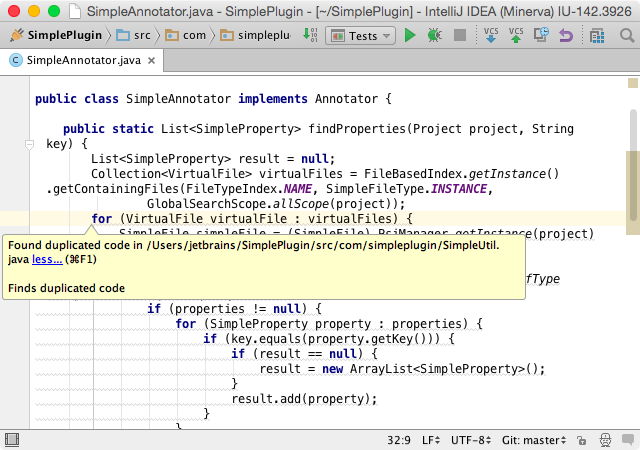
The analysis comes with quick-fixes, so you can navigate to duplicates or have them shown in a tool window:
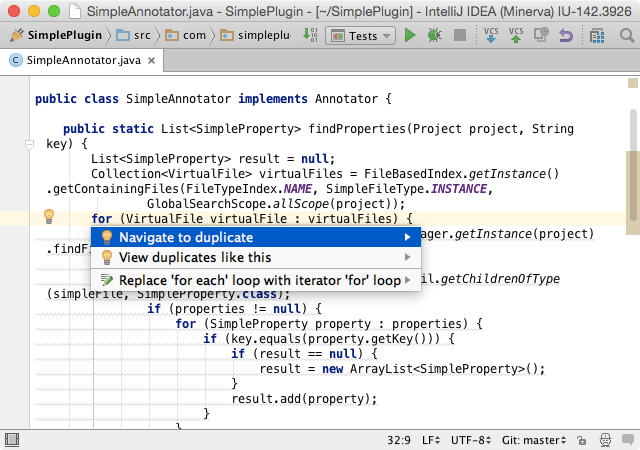
The new inspection is called Duplicated Code and is enabled by default. To toggle it, go toSettings → Editor → Inspections. And, of course, you can run it on the entire project (or a custom scope) any time via Run Inspection by Name.just found the setting, it’s in File –>Settings –> Editor –> Inspections Once the Inspections menu opens, it’s under General –> Duplicated Code
Note that this feature is currently available only for Java. As the work is still in progress, rare false positives are possible. Don’t forget to report them as well as any other bugs to our tracker.
You’re welcome to download IntelliJ IDEA 15 EAP right away, give this new feature a try, and share your feedback.
Among other enhancements, you’ll find fixes for:
- Big and blurry fonts and icons in the Editor on Linux
- Not working Terminal on Windows 10
Develop with Pleasure!





 扫一扫
扫一扫


 48万+
48万+

 被折叠的 条评论
为什么被折叠?
被折叠的 条评论
为什么被折叠?
 到【灌水乐园】发言





