APACHE-ATLAS-2.1.0 - 【编译打包】- 在WINDOWS下使用命令行编译打包报错:无法下载win32-x64-72_binding.node文件

win32-x64-72-binding.node 适配文件下载与Node-Sass安装解决方案 Node-Sass 是 Sass 样式语言在 Node.js 环境下的高性能绑定实现,基于 LibSass 引擎,通过 C++ 扩展模块(.node文件)实现.scss到 CSS 的快速编译。其依赖 V8 与 Node.js 深度集成,广泛用于 Webpack、Gulp 等构建工具链中。Node.js 虽然基于 JavaScript 构建,但其核心模块大量依赖 C/C++ 实现。为了允许第三方开发者扩展功能,Node.js 提供了一套原生插件开发接口,称为。 阅读详情

错误内容

[INFO] --- frontend-maven-plugin:1.4:npm (npm install) @ atlas-dashboardv2 ---
[INFO] Running 'npm install' in D:\02-▒▒▒▒▒ռ▒\06-▒▒▒▒ռ▒\03-github\atlas-2.1.0-rc3\dashboardv2\target
[INFO]
[INFO] > node-sass@4.13.1 install D:\02-工作空间\06-代码空间\03-github\atlas-2.1.0-rc3\dashboardv2\target\node_modules\node-sass
[INFO] > node scripts/install.js
[INFO]
[INFO] Downloading binary from https://github.com/sass/node-sass/releases/download/v4.13.1/win32-x64-72_binding.node
[ERROR] Cannot download "https://github.com/sass/node-sass/releases/download/v4.13.1/win32-x64-72_binding.node":
[ERROR]
[ERROR] tunneling socket could not be established, cause=connect ECONNREFUSED 127.0.0.1:8087
[ERROR]
[ERROR] Hint: If github.com is not accessible in your location
[ERROR]       try setting a proxy via HTTP_PROXY, e.g.
[ERROR]
[ERROR]       export HTTP_PROXY=http://example.com:1234
[ERROR]
[ERROR] or configure npm proxy via
[ERROR]
[ERROR]       npm config set proxy http://example.com:8080
[INFO]
[INFO] > core-js@2.6.11 postinstall D:\02-工作空间\06-代码空间\03-github\atlas-2.1.0-rc3\dashboardv2\target\node_modules\core-js
[INFO] > node -e "try{require('./postinstall')}catch(e){}"
[INFO]
[INFO] Thank you for using core-js ( https://github.com/zloirock/core-js ) for polyfilling JavaScript standard library!
[INFO]
[INFO] The project needs your help! Please consider supporting of core-js on Open Collective or Patreon:
[INFO] > https://opencollective.com/core-js
[INFO] > https://www.patreon.com/zloirock
[INFO]
[INFO] Also, the author of core-js ( https://github.com/zloirock ) is looking for a good job -)
[INFO]
[INFO]
[INFO] > node-sass@4.13.1 postinstall D:\02-工作空间\06-代码空间\03-github\atlas-2.1.0-rc3\dashboardv2\target\node_modules\node-sass
[INFO] > node scripts/build.js
[INFO]
[INFO] Building: D:\02-工作空间\06-代码空间\03-github\atlas-2.1.0-rc3\dashboardv2\target\node\node.exe D:\02-工作空间\06-代码空间\03-github\atlas-2.1.0-rc3\dashboardv2\target\node_modules\node-gyp\bin\node-gyp.js rebuild --verbose --libsass_ext= --libsass_cflags= --libsass_ldflags= --libsass_library=
[ERROR] gyp info it worked if it ends with ok
[ERROR] gyp verb cli [
[ERROR] gyp verb cli   'D:\\02-工作空间\\06-代码空间\\03-github\\atlas-2.1.0-rc3\\dashboardv2\\target\\node\\node.exe',
[ERROR] gyp verb cli   'D:\\02-工作空间\\06-代码空间\\03-github\\atlas-2.1.0-rc3\\dashboardv2\\target\\node_modules\\node-gyp\\bin\\node-gyp.js',
[ERROR] gyp verb cli   'rebuild',
[ERROR] gyp verb cli   '--verbose',
[ERROR] gyp verb cli   '--libsass_ext=',
[ERROR] gyp verb cli   '--libsass_cflags=',
[ERROR] gyp verb cli   '--libsass_ldflags=',
[ERROR] gyp verb cli   '--libsass_library='
[ERROR] gyp verb cli ]
[ERROR] gyp info using node-gyp@3.8.0
[ERROR] gyp info using node@12.16.0 | win32 | x64
[ERROR] gyp verb command rebuild []
[ERROR] gyp verb command clean []
[ERROR] gyp verb clean removing "build" directory
[ERROR] gyp verb command configure []
[ERROR] gyp verb check python checking for Python executable "python2" in the PATH
[ERROR] gyp verb `which` failed Error: not found: python2
[ERROR] gyp verb `which` failed     at getNotFoundError (D:\02-工作空间\06-代码空间\03-github\atlas-2.1.0-rc3\dashboardv2\target\node_modules\which\which.js:13:12)
[ERROR] gyp verb `which` failed     at F (D:\02-工作空间\06-代码空间\03-github\atlas-2.1.0-rc3\dashboardv2\target\node_modules\which\which.js:68:19)
[ERROR] gyp verb `which` failed     at E (D:\02-工作空间\06-代码空间\03-github\atlas-2.1.0-rc3\dashboardv2\target\node_modules\which\which.js:80:29)
[ERROR] gyp verb `which` failed     at D:\02-工作空间\06-代码空间\03-github\atlas-2.1.0-rc3\dashboardv2\target\node_modules\which\which.js:89:16
[ERROR] gyp verb `which` failed     at D:\02-工作空间\06-代码空间\03-github\atlas-2.1.0-rc3\dashboardv2\target\node_modules\isexe\index.js:42:5
[ERROR] gyp verb `which` failed     at D:\02-工作空间\06-代码空间\03-github\atlas-2.1.0-rc3\dashboardv2\target\node_modules\isexe\windows.js:36:5
[ERROR] gyp verb `which` failed     at FSReqCallback.oncomplete (fs.js:166:21)
[ERROR] gyp verb `which` failed  python2 Error: not found: python2
[ERROR] gyp verb `which` failed     at getNotFoundError (D:\02-工作空间\06-代码空间\03-github\atlas-2.1.0-rc3\dashboardv2\target\node_modules\which\which.js:13:12)
[ERROR] gyp verb `which` failed     at F (D:\02-工作空间\06-代码空间\03-github\atlas-2.1.0-rc3\dashboardv2\target\node_modules\which\which.js:68:19)
[ERROR] gyp verb `which` failed     at E (D:\02-工作空间\06-代码空间\03-github\atlas-2.1.0-rc3\dashboardv2\target\node_modules\which\which.js:80:29)
[ERROR] gyp verb `which` failed     at D:\02-工作空间\06-代码空间\03-github\atlas-2.1.0-rc3\dashboardv2\target\node_modules\which\which.js:89:16
[ERROR] gyp verb `which` failed     at D:\02-工作空间\06-代码空间\03-github\atlas-2.1.0-rc3\dashboardv2\target\node_modules\isexe\index.js:42:5
[ERROR] gyp verb `which` failed     at D:\02-工作空间\06-代码空间\03-github\atlas-2.1.0-rc3\dashboardv2\target\node_modules\isexe\windows.js:36:5
[ERROR] gyp verb `which` failed     at FSReqCallback.oncomplete (fs.js:166:21) {
[ERROR] gyp verb `which` failed   stack: 'Error: not found: python2\n' +
[ERROR] gyp verb `which` failed     '    at getNotFoundError (D:\\02-工作空间\\06-代码空间\\03-github\\atlas-2.1.0-rc3\\dashboardv2\\target\\node_modules\\which\\which.js:13:12)\n' +
[ERROR] gyp verb `which` failed     '    at F (D:\\02-工作空间\\06-代码空间\\03-github\\atlas-2.1.0-rc3\\dashboardv2\\target\\node_modules\\which\\which.js:68:19)\n' +
[ERROR] gyp verb `which` failed     '    at E (D:\\02-工作空间\\06-代码空间\\03-github\\atlas-2.1.0-rc3\\dashboardv2\\target\\node_modules\\which\\which.js:80:29)\n' +
[ERROR] gyp verb `which` failed     '    at D:\\02-工作空间\\06-代码空间\\03-github\\atlas-2.1.0-rc3\\dashboardv2\\target\\node_modules\\which\\which.js:89:16\n' +
[ERROR] gyp verb `which` failed     '    at D:\\02-工作空间\\06-代码空间\\03-github\\atlas-2.1.0-rc3\\dashboardv2\\target\\node_modules\\isexe\\index.js:42:5\n' +
[ERROR] gyp verb `which` failed     '    at D:\\02-工作空间\\06-代码空间\\03-github\\atlas-2.1.0-rc3\\dashboardv2\\target\\node_modules\\isexe\\windows.js:36:5\n' +
[ERROR] gyp verb `which` failed     '    at FSReqCallback.oncomplete (fs.js:166:21)',
[ERROR] gyp verb `which` failed   code: 'ENOENT'
[ERROR] gyp verb `which` failed }
[ERROR] gyp verb check python checking for Python executable "python" in the PATH
[ERROR] gyp verb `which` failed Error: not found: python
[ERROR] gyp verb `which` failed     at getNotFoundError (D:\02-工作空间\06-代码空间\03-github\atlas-2.1.0-rc3\dashboardv2\target\node_modules\which\which.js:13:12)
[ERROR] gyp verb `which` failed     at F (D:\02-工作空间\06-代码空间\03-github\atlas-2.1.0-rc3\dashboardv2\target\node_modules\which\which.js:68:19)
[ERROR] gyp verb `which` failed     at E (D:\02-工作空间\06-代码空间\03-github\atlas-2.1.0-rc3\dashboardv2\target\node_modules\which\which.js:80:29)
[ERROR] gyp verb `which` failed     at D:\02-工作空间\06-代码空间\03-github\atlas-2.1.0-rc3\dashboardv2\target\node_modules\which\which.js:89:16
[ERROR] gyp verb `which` failed     at D:\02-工作空间\06-代码空间\03-github\atlas-2.1.0-rc3\dashboardv2\target\node_modules\isexe\index.js:42:5
[ERROR] gyp verb `which` failed     at D:\02-工作空间\06-代码空间\03-github\atlas-2.1.0-rc3\dashboardv2\target\node_modules\isexe\windows.js:36:5
[ERROR] gyp verb `which` failed     at FSReqCallback.oncomplete (fs.js:166:21)
[ERROR] gyp verb `which` failed  python Error: not found: python
[ERROR] gyp verb `which` failed     at getNotFoundError (D:\02-工作空间\06-代码空间\03-github\atlas-2.1.0-rc3\dashboardv2\target\node_modules\which\which.js:13:12)
[ERROR] gyp verb `which` failed     at F (D:\02-工作空间\06-代码空间\03-github\atlas-2.1.0-rc3\dashboardv2\target\node_modules\which\which.js:68:19)
[ERROR] gyp verb `which` failed     at E (D:\02-工作空间\06-代码空间\03-github\atlas-2.1.0-rc3\dashboardv2\target\node_modules\which\which.js:80:29)
[ERROR] gyp verb `which` failed     at D:\02-工作空间\06-代码空间\03-github\atlas-2.1.0-rc3\dashboardv2\target\node_modules\which\which.js:89:16
[ERROR] gyp verb `which` failed     at D:\02-工作空间\06-代码空间\03-github\atlas-2.1.0-rc3\dashboardv2\target\node_modules\isexe\index.js:42:5
[ERROR] gyp verb `which` failed     at D:\02-工作空间\06-代码空间\03-github\atlas-2.1.0-rc3\dashboardv2\target\node_modules\isexe\windows.js:36:5
[ERROR] gyp verb `which` failed     at FSReqCallback.oncomplete (fs.js:166:21) {
[ERROR] gyp verb `which` failed   stack: 'Error: not found: python\n' +
[ERROR] gyp verb `which` failed     '    at getNotFoundError (D:\\02-工作空间\\06-代码空间\\03-github\\atlas-2.1.0-rc3\\dashboardv2\\target\\node_modules\\which\\which.js:13:12)\n' +
[ERROR] gyp verb `which` failed     '    at F (D:\\02-工作空间\\06-代码空间\\03-github\\atlas-2.1.0-rc3\\dashboardv2\\target\\node_modules\\which\\which.js:68:19)\n' +
[ERROR] gyp verb `which` failed     '    at E (D:\\02-工作空间\\06-代码空间\\03-github\\atlas-2.1.0-rc3\\dashboardv2\\target\\node_modules\\which\\which.js:80:29)\n' +
[ERROR] gyp verb `which` failed     '    at D:\\02-工作空间\\06-代码空间\\03-github\\atlas-2.1.0-rc3\\dashboardv2\\target\\node_modules\\which\\which.js:89:16\n' +
[ERROR] gyp verb `which` failed     '    at D:\\02-工作空间\\06-代码空间\\03-github\\atlas-2.1.0-rc3\\dashboardv2\\target\\node_modules\\isexe\\index.js:42:5\n' +
[ERROR] gyp verb `which` failed     '    at D:\\02-工作空间\\06-代码空间\\03-github\\atlas-2.1.0-rc3\\dashboardv2\\target\\node_modules\\isexe\\windows.js:36:5\n' +
[ERROR] gyp verb `which` failed     '    at FSReqCallback.oncomplete (fs.js:166:21)',
[ERROR] gyp verb `which` failed   code: 'ENOENT'
[ERROR] gyp verb `which` failed }
[ERROR] gyp verb could not find "python". checking python launcher
[ERROR] gyp verb could not find "python". guessing location
[ERROR] gyp verb ensuring that file exists: C:\Python27\python.exe
[ERROR] gyp ERR! configure error
[ERROR] gyp ERR! stack Error: Can't find Python executable "python", you can set the PYTHON env variable.
[ERROR] gyp ERR! stack     at PythonFinder.failNoPython (D:\02-工作空间\06-代码空间\03-github\atlas-2.1.0-rc3\dashboardv2\target\node_modules\node-gyp\lib\configure.js:484:19)
[ERROR] gyp ERR! stack     at PythonFinder.<anonymous> (D:\02-工作空间\06-代码空间\03-github\atlas-2.1.0-rc3\dashboardv2\target\node_modules\node-gyp\lib\configure.js:509:16)
[ERROR] gyp ERR! stack     at callback (D:\02-工作空间\06-代码空间\03-github\atlas-2.1.0-rc3\dashboardv2\target\node_modules\graceful-fs\polyfills.js:295:20)
[ERROR] gyp ERR! stack     at FSReqCallback.oncomplete (fs.js:166:21)
[ERROR] gyp ERR! System Windows_NT 10.0.19044
[ERROR] gyp ERR! command "D:\\02-工作空间\\06-代码空间\\03-github\\atlas-2.1.0-rc3\\dashboardv2\\target\\node\\node.exe" "D:\\02-工作空间\\06-代码空间\\03-github\\atlas-2.1.0-rc3\\dashboardv2\\target\\node_modules\\node-gyp\\bin\\node-gyp.js" "rebuild" "--verbose" "--libsass_ext=" "--libsass_cflags=" "--libsass_ldflags=" "--libsass_library="
[ERROR] gyp ERR! cwd D:\02-工作空间\06-代码空间\03-github\atlas-2.1.0-rc3\dashboardv2\target\node_modules\node-sass
[ERROR] gyp ERR! node -v v12.16.0
[ERROR] gyp ERR! node-gyp -v v3.8.0
[ERROR] gyp ERR! not ok
[ERROR] Build failed with error code: 1
[ERROR] npm ERR! code ELIFECYCLE
[ERROR] npm ERR! errno 1
[ERROR] npm ERR! node-sass@4.13.1 postinstall: `node scripts/build.js`
[ERROR] npm ERR! Exit status 1
[ERROR] npm ERR!
[ERROR] npm ERR! Failed at the node-sass@4.13.1 postinstall script.
[ERROR] npm ERR! This is probably not a problem with npm. There is likely additional logging output above.
[ERROR]
[ERROR] npm ERR! A complete log of this run can be found in:
[ERROR] npm ERR!     C:\Users\ROCKY\AppData\Roaming\npm-cache\_logs\2023-05-16T07_05_35_474Z-debug.log

报错原因

因为网络的问题,无法下载导致安装node-sass报错:
https://github.com/sass/node-sass/releases/download/v4.13.0/win32-x64-72_binding.node

解决方案(亲测可行)

①. 先手动下载
②. 再复制文件到指定目录
将下载下来的文件win32-x64-72_binding.node复制到:
C:\Users\ROCKY\AppData\Roaming\npm-cache\node-sass\4.13.1 目录下.
③. 执行安装
执行指令:npm i node-sass
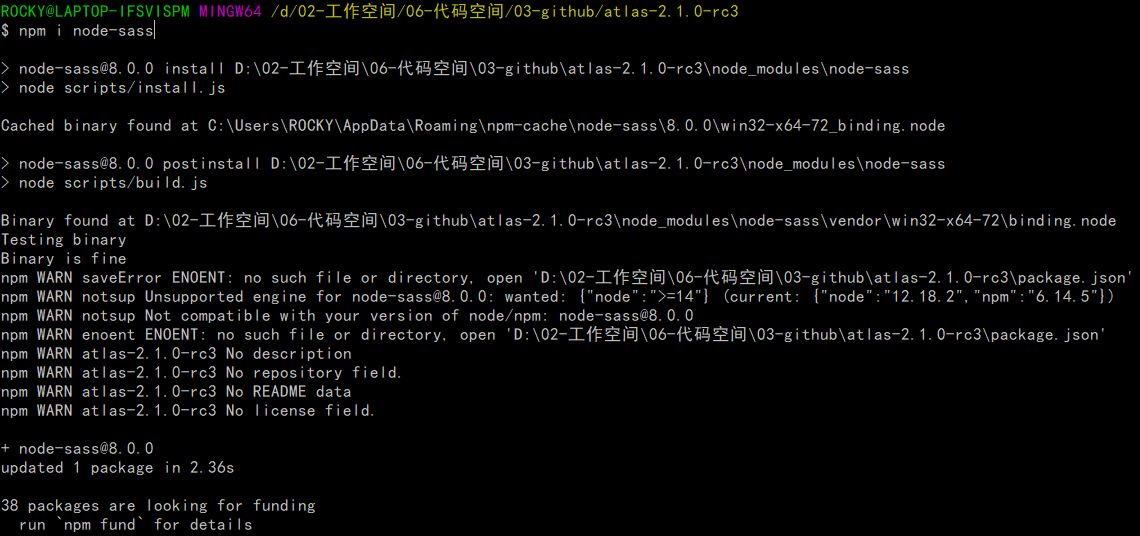
在这里插入图片描述

ATLAS的打包命令如下:在这里插入图片描述

win32-x64-72_binding.node vue开发中安装node-sass是报错,无法下载win32-x64-72_binding.node,因为没有镜像文件,而github下载时无代理无法下载 立即下载

相关推荐

win32-x64-72_binding.node.txt

win32-x64-72_binding.node 下载node-sass报错问题。去掉.txt后缀即可使用

npm 无法下载 win32-x64-72_binding.node

使用npm安装node-sass时,其依赖了win32-x64-72_binding.node,但是一直提示“cannot download http://xxx/win32-x64-72_binding.node”,所以只能手动下载安装。

u013992330的博客 1414

win32-x64-72-binding.node

npm安装node-sass报错 1. 下载本资源 2. 放到指定路径,一般情况下C:\Users\xxx\AppData\Roaming\npm-cache\node-sass\

node-sass不能下载的问题

在开发中,我们经常会发现node-sass不能正常下载,尤其是部分公司,内外网分离的情况下,node-sass更是不能直接下载。

listener_life的博客 2738

win32-x64-64_binding.node下载

Angular新手报错解答一点帮助,让我们这些菜鸟,再跳过一个坑。希望大家彼此互相帮助,请关注我的优快云:sinat_38849643

win32-x64-72_binding.zip

npm install node-sass 安装失败所需要在文件 安装npm install环境的时候我遇到一个问题就是 缺少node-sass文件。因为这个没有镜像文件,只能通过国外下载。

【uni-app】uni-app安装scss/sass后报错:win32-x64-64_binding.node is not a valid Win32 application

当我们下载HbuilderX编辑器,安装scss/sass编译插件时,报错: 现象: 这段信息告诉我们,我当时开发环境安装的node-sass中win32-ia32-72目录下binding.node这个文件丢失,需要下载补充 或: \HBuilderX\plugins\compile-node-sass\node_modules\node-sass-china\vendor\win32-ia32-72\binding.node is not a valid Win32 application. 这段信

节省钱的博客 5234

node-sass_win&linux_x64-72_binding.node.zip

Cannot download linux-x64-72_binding.node/win32-x64-72_binding.node

前端——npm安装遇到win32-x64-72_binding.node无法下载的问题

这里写自定义目录标题问题记录解决方法 问题记录 npm安装过程由于公司对安全性要求较高,屏蔽国外网站链接,且不能使用镜像TT,所以在执行npm install时出现无法下载win32-x64-72_binding.node的问题。 具体信息为: Cannot download https//github.com/sass/node-sass/releases/download/v4.13.0/win32-x64-72_binding.node .... 而且输出的错误信息具有误导性,其提示的错误信息是:M

sinat_36227086的博客 5269

AWS 小白书 [1] 全球架构

小白应该知道的 AWS 知识

boshansolo的博客 707

矢量量化的基本原理:高效数据压缩与信息检索的关键矢量量化(Vector Quantization,简称VQ)是一种数据压缩和信

此外,在矢量量化过程中,可能会引入一定的信息损失,对一些精细特征的表示可能存在一定的误差。它通过将高维数据映射到低维码本空间中,并将相似的数据映射到相同的码本向量中,实现对数据的高效表示和存储。最重要的是,矢量量化可以用于数据的检索和分析,提供了高效的数据查询和处理手段。通过使用码本索引,我们可以高效地存储和检索大量的数据。在图像处理中,矢量量化可以用于图像压缩,将复杂的图像数据转化为较少的码字,实现图像的存储和传输。矢量量化通过将连续的高维数据分割并映射到有限的码本集合中,实现数据的离散表示和压缩。

m0_70886513的博客 1374

node-sass gulp-sass安装出现win32-x64-72_binding.node 这类问题解决方式

安装npm install gulp-sass环境的时候我遇到一个问题:缺少node-sass文件 首先我们要了解 -gulp-sass依赖于node-sass -安装gulp-sass时会自动先安装node-sass 所以出现了win32-x64-72_binding.node 这种问题,当下载到这一步的时候,就不动了 我的解决方式有两个: 1.换源 -利用nrm换npm的下载源 -使用国内镜像...

weixin_45131389的博客 1640

计算机组成原理课程设计_微程序控制的简单模型机设计

微程序控制的简单模型机设计 要求 基本要求 完成一个简单主机的设计,模型机应具备如下能力:在自行设计的指令集基础上,运行自行编写的简单用户程序,实现特定运算功能。 弹性要求 在此基础上,完成必要的扩展,实现模型机的功能扩展设计,包括:实现多种运算功能(指令集的扩充)、支持更为丰富的寻址方式、有更为完善的微程序设计等。 实验软件和硬件环境 QuartusII, FPGA计算机组...

sailist的记录站 3万+

dubbo-admin-ui: Could not download Node.js: Got error code 404 from the server.

dubbo-admin-ui: Could not download Node.js: Got error code 404 from the server.

Rextaoz的博客 834

VFIO框架源码分析(一)- 从初始化到设备访问

本文深入剖析了Linux内核中的VFIO(Virtual Function I/O)框架,详细解读了其从初始化到设备访问的全过程。VFIO通过Container->Group->Device的层次化设计,利用IOMMU提供安全隔离,允许用户空间直接访问物理设备。文章基于Linux v5.15版本,重点分析了vfio_init模块入口、Container创建与配置、Group关联以及最终设备访问等关键环节,揭示了VFIO如何通过逐层授权机制构建安全可靠的设备直通模型,为虚拟化技术提供核心支持。

qq_36071928的博客 380

从GitHub到海浪模拟:手把手教你配置WAVEWATCHⅢ 6.07.0的完整开发与测试环境

本文详细指导如何在Ubuntu系统中配置WAVEWATCHⅢ 6.07.0的开发与测试环境,涵盖虚拟机设置、依赖安装、源码编译及案例验证的全流程。通过步骤化教程,帮助科研人员快速搭建高效的海浪模拟平台,提升海洋数值模拟的研究效率。

weixin_42568801的博客 326

node-sass win32-x64-72-binding.zip 手动下载解决方案

node-sass win32-x64-72-binding.zip 手动下载解决方案 【下载地址】node-sasswin32-x64-72-binding.zip手动下载解决方案 在部分环境下,使用npm安装node-sass时,可能会遇到无法自动获取win32平台依赖的问题。本仓库提供了解决方案,包含node-sa...

gitblog_06754的博客 500

Prompt Learning 简介

• Prompt Learning 可以将所有的任务归一化预训练语言模型的任务• 避免了预训练和fine-tuning 之间的gap,几乎所有 NLP 任务都可以直接使用,不需要训练数据。• 在少样本的数据集上,能取得超过fine-tuning的效果。• 使得所有的任务在方法上变得一致。

jxsdq的博客 1万+

node-sasswin32-x64-72-binding.zip手动下载解决方案:解决安装难题,优化开发流程

node-sasswin32-x64-72-binding.zip手动下载解决方案:解决安装难题,优化开发流程 【下载地址】node-sasswin32-x64-72-binding.zip手动下载解决方案 在部分环境下,使用npm安装node-sass时,可能会遇到无法自动获取win32平台依赖的问题。本仓库提供了解决...

gitblog_06768的博客 471

【智能座舱】- 智能座舱研究报告合集

智能座舱研究报告合集

零点壹客的博客 1306

lammps教程:实例讲解npt、nvt系综的选择

对于lammps新手来说,系综的选择令人困惑,到底是应该用nvt系综还是npt系综? 我在初学lammps时就被这个问题困扰了很久。如果去问别人,可能会告诉你一个答案:根据模拟需要确定。 其实和没说一样。 到底如何确定系综,确实不是一句两句能够说清楚的,不同的体系、不同的模拟目的要选择不同的系综。 前几天遇到的一个合金的模拟案例,比较有代表性,分享出来供大家参考。 建模方法和之前介绍过的高熵合金建模方法类似,先建立单晶模型,然后使用替换原子的命令获得合金结构。 建模完成后,按照常规,先上nvt系综进行驰豫

lammps_jiayou的博客 9769

node-sass 安装失败 win32-x64-72_binding.node

解决方法:node-sass安装链接releases 可以在该博客参考链接 注意 下载的链接路径必须准确

WarrenLee的博客 1943

C# WinForm 基于DirectShow.dll编写的程序,可边预览边保存视频,音频和图片

基于微软的DirectShow.dll的二次开发1.自动识别连接的摄像头跟麦克风且可以对其进行选择(默认选中第一个)2.可录制wmv和avi两种格式的视频并且都带有音频,avi可以录制的分辨率和帧数进行选择,wmv默认进行了淸晰度优化如不喜欢可去除代码中有相关提示3.可在预览点开之后进行拍照,也可边录制视频边拍照4.添加了视频和音频的压缩功能(酌情使用)这次二次开发发现C#对DirectShow的相关信息太少,这次做完也不敢藏私共享出来,还望大家指正

解决node-sass安装报错问题

解决node-sass安装出现的问题,node-sass@4.14.1 postinstall: `node scripts/build.js`

b2538720288的博客 1291

老版QQ原生表情gif动态

这是老版的QQ表情,不过全是动态的的,Windows照片查看器是不会动的,可以右击用浏览器打开查看,再说一遍是老版的,只是分享给宁愿用老版也要动态的人。

深度学习工具包 DeepLearningToolbox

深度学习工具包Deprecation notice.-----This toolbox is outdated and no longer maintained.There are much better tools available for deep learning than this toolbox, e.g. [Theano](http://deeplearning.net/software/theano/), [torch](http://torch.ch/) or [tensorflow](http://www.tensorflow.org/)I would suggest you use one of the tools mentioned above rather than use this toolbox.Best, Rasmus.DeepLearnToolbox================A Matlab toolbox for Deep Learning.Deep Learning is a new subfield of machine learning that focuses on learning deep hierarchical models of data.It is inspired by the human brain's apparent deep (layered, hierarchical) architecture.A good overview of the theory of Deep Learning theory is[Learning Deep Architectures for AI](http://www.iro.umontreal.ca/~bengioy/papers/ftml_book.pdf)For a more informal introduction, see the following videos by Geoffrey Hinton and Andrew Ng.* [The Next Generation of Neural Networks](http://www.youtube.com/watch?v=AyzOUbkUf3M) (Hinton, 2007)* [Recent Developments in Deep Learning](http://www.youtube.com/watch?v=VdIURAu1-aU) (Hinton, 2010)* [Unsupervised Feature Learning and Deep Learning](http://www.youtube.com/watch?v=ZmNOAtZIgIk) (Ng, 2011)If you use this toolbox in your research please cite [Prediction as a candidate for learning deep hierarchical models of data](http://www2.imm.dtu.dk/pubdb/views/publication_details.php?id=6284)```@MASTERSTHESIS\{IMM2012-06284, author = "R. B. Palm", title = "Prediction as a candidate for learning deep hierarchical models of data", year = "2012",}```Contact: rasmusbergpalm at gmail dot comDirectories included in the toolbox-----------------------------------`NN/` - A library for Feedforward Backpropagation Neural Networks`CNN/` - A library for Convolutional Neural Networks`DBN/` - A library for Deep Belief Networks`SAE/` - A library for Stacked Auto-Encoders`CAE/` - A library for Convolutional Auto-Encoders`util/` - Utility functions used by the libraries`data/` - Data used by the examples`tests/` - unit tests to verify toolbox is workingFor references on each library check REFS.mdSetup-----1. Download.2. addpath(genpath('DeepLearnToolbox'));Example: Deep Belief Network---------------------```matlabfunction test_example_DBNload mnist_uint8;train_x = double(train_x) / 255;test_x = double(test_x) / 255;train_y = double(train_y);test_y = double(test_y);%% ex1 train a 100 hidden unit RBM and visualize its weightsrand('state',0)dbn.sizes = [100];opts.numepochs = 1;opts.batchsize = 100;opts.momentum = 0;opts.alpha = 1;dbn = dbnsetup(dbn, train_x, opts);dbn = dbntrain(dbn, train_x, opts);figure; visualize(dbn.rbm{1}.W'); % Visualize the RBM weights%% ex2 train a 100-100 hidden unit DBN and use its weights to initialize a NNrand('state',0)%train dbndbn.sizes = [100 100];opts.numepochs = 1;opts.batchsize = 100;opts.momentum = 0;opts.alpha = 1;dbn = dbnsetup(dbn, train_x, opts);dbn = dbntrain(dbn, train_x, opts);%unfold dbn to nnnn = dbnunfoldtonn(dbn, 10);nn.activation_function = 'sigm';%train nnopts.numepochs = 1;opts.batchsize = 100;nn = nntrain(nn, train_x, train_y, opts);[er, bad] = nntest(nn, test_x, test_y);assert(er < 0.10, 'Too big error');```Example: Stacked Auto-Encoders---------------------```matlabfunction test_example_SAEload mnist_uint8;train_x = double(train_x)/255;test_x = double(test_x)/255;train_y = double(train_y);test_y = double(test_y);%% ex1 train a 100 hidden unit SDAE and use it to initialize a FFNN% Setup and train a stacked denoising autoencoder (SDAE)rand('state',0)sae = saesetup([784 100]);sae.ae{1}.activation_function = 'sigm';sae.ae{1}.learningRate = 1;sae.ae{1}.inputZeroMaskedFraction = 0.5;opts.numepochs = 1;opts.batchsize = 100;sae = saetrain(sae, train_x, opts);visualize(sae.ae{1}.W{1}(:,2:end)')% Use the SDAE to initialize a FFNNnn = nnsetup([784 100 10]);nn.activation_function = 'sigm';nn.learningRate = 1;nn.W{1} = sae.ae{1}.W{1};% Train the FFNNopts.numepochs = 1;opts.batchsize = 100;nn = nntrain(nn, train_x, train_y, opts);[er, bad] = nntest(nn, test_x, test_y);assert(er < 0.16, 'Too big error');```Example: Convolutional Neural Nets---------------------```matlabfunction test_example_CNNload mnist_uint8;train_x = double(reshape(train_x',28,28,60000))/255;test_x = double(reshape(test_x',28,28,10000))/255;train_y = double(train_y');test_y = double(test_y');%% ex1 Train a 6c-2s-12c-2s Convolutional neural network %will run 1 epoch in about 200 second and get around 11% error. %With 100 epochs you'll get around 1.2% errorrand('state',0)cnn.layers = { struct('type', 'i') %input layer struct('type', 'c', 'outputmaps', 6, 'kernelsize', 5) %convolution layer struct('type', 's', 'scale', 2) %sub sampling layer struct('type', 'c', 'outputmaps', 12, 'kernelsize', 5) %convolution layer struct('type', 's', 'scale', 2) %subsampling layer};cnn = cnnsetup(cnn, train_x, train_y);opts.alpha = 1;opts.batchsize = 50;opts.numepochs = 1;cnn = cnntrain(cnn, train_x, train_y, opts);[er, bad] = cnntest(cnn, test_x, test_y);%plot mean squared errorfigure; plot(cnn.rL);assert(er<0.12, 'Too big error');```Example: Neural Networks---------------------```matlabfunction test_example_NNload mnist_uint8;train_x = double(train_x) / 255;test_x = double(test_x) / 255;train_y = double(train_y);test_y = double(test_y);% normalize[train_x, mu, sigma] = zscore(train_x);test_x = normalize(test_x, mu, sigma);%% ex1 vanilla neural netrand('state',0)nn = nnsetup([784 100 10]);opts.numepochs = 1; % Number of full sweeps through dataopts.batchsize = 100; % Take a mean gradient step over this many samples[nn, L] = nntrain(nn, train_x, train_y, opts);[er, bad] = nntest(nn, test_x, test_y);assert(er < 0.08, 'Too big error');%% ex2 neural net with L2 weight decayrand('state',0)nn = nnsetup([784 100 10]);nn.weightPenaltyL2 = 1e-4; % L2 weight decayopts.numepochs = 1; % Number of full sweeps through dataopts.batchsize = 100; % Take a mean gradient step over this many samplesnn = nntrain(nn, train_x, train_y, opts);[er, bad] = nntest(nn, test_x, test_y);assert(er < 0.1, 'Too big error');%% ex3 neural net with dropoutrand('state',0)nn = nnsetup([784 100 10]);nn.dropoutFraction = 0.5; % Dropout fraction opts.numepochs = 1; % Number of full sweeps through dataopts.batchsize = 100; % Take a mean gradient step over this many samplesnn = nntrain(nn, train_x, train_y, opts);[er, bad] = nntest(nn, test_x, test_y);assert(er < 0.1, 'Too big error');%% ex4 neural net with sigmoid activation functionrand('state',0)nn = nnsetup([784 100 10]);nn.activation_function = 'sigm'; % Sigmoid activation functionnn.learningRate = 1; % Sigm require a lower learning rateopts.numepochs = 1; % Number of full sweeps through dataopts.batchsize = 100; % Take a mean gradient step over this many samplesnn = nntrain(nn, train_x, train_y, opts);[er, bad] = nntest(nn, test_x, test_y);assert(er < 0.1, 'Too big error');%% ex5 plotting functionalityrand('state',0)nn = nnsetup([784 20 10]);opts.numepochs = 5; % Number of full sweeps through datann.output = 'softmax'; % use softmax outputopts.batchsize = 1000; % Take a mean gradient step over this many samplesopts.plot = 1; % enable plottingnn = nntrain(nn, train_x, train_y, opts);[er, bad] = nntest(nn, test_x, test_y);assert(er < 0.1, 'Too big error');%% ex6 neural net with sigmoid activation and plotting of validation and training error% split training data into training and validation datavx = train_x(1:10000,:);tx = train_x(10001:end,:);vy = train_y(1:10000,:);ty = train_y(10001:end,:);rand('state',0)nn = nnsetup([784 20 10]); nn.output = 'softmax'; % use softmax outputopts.numepochs = 5; % Number of full sweeps through dataopts.batchsize = 1000; % Take a mean gradient step over this many samplesopts.plot = 1; % enable plottingnn = nntrain(nn, tx, ty, opts, vx, vy); % nntrain takes validation set as last two arguments (optionally)[er, bad] = nntest(nn, test_x, test_y);assert(er < 0.1, 'Too big error');```[![Bitdeli Badge](https://d2weczhvl823v0.cloudfront.net/rasmusbergpalm/deeplearntoolbox/trend.png)](https://bitdeli.com/free "Bitdeli Badge")

上一篇: IDEA相关 - IDE和IDEA的区别是什么?
下一篇: APACHE-ATLAS-2.1.0 - 【编译打包】- 在WINDOWS下使用命令行编译打包报错:MAVEN强制插件设置的规则,检查项未通过
cloneme01
博客等级 码龄20年 2万+粉丝 248原创
评论
成就一亿技术人!
拼手气红包6.0元
还能输入1000个字符
 
 条评论被折叠 查看
添加红包

请填写红包祝福语或标题

个

红包个数最小为10个

元

红包金额最低5元

当前余额3.43元 前往充值 >
需支付:10.00元
成就一亿技术人!
领取后你会自动成为博主和红包主的粉丝 规则
hope_wisdom
发出的红包

打赏作者

cloneme01

谢谢您的支持与鼓励!

¥1 ¥2 ¥4 ¥6 ¥10 ¥20
扫码支付:¥1
获取中
扫码支付

您的余额不足,请更换扫码支付或充值

打赏作者

实付元
使用余额支付
点击重新获取
扫码支付
钱包余额 0

抵扣说明:

1.余额是钱包充值的虚拟货币,按照1:1的比例进行支付金额的抵扣。
2.余额无法直接购买下载,可以购买VIP、付费专栏及课程。

余额充值