


官网
APACHE-ATLAS官网地址
APACHE-ATLAS安装指南
说明
官网说明使用:bin/atlas_start.py 即可启动HBASE、SOLR和ATLAS,实际验证不是的;
需要分别启动HBASE、SOLR和ATLAS,见下面的操作步骤;
HBASE启动时,同时也启动了内置的ZK,由于SOLR也依赖ZK, 所以需要先启动HBASE。
安装准备
A. 关闭防火墙
systemctl stop firewalld
systemctl disable firewalld
systemctl status firewalld
B. 禁用Selinux(安全权限管理模块)
vi /etc/sysconfig/selinux
设置如下:
SELINUX=disabled
操作步骤
使用内嵌sorl和hbase方式进行编译和安装:
解压:tar -xzvf apache-atlas-2.1.0-server.tar.gz
进入:cd apache-atlas-2.1.0
启动:
1-HBASE:hbase/bin/start-hbase.sh
2-SOLR:solr/bin/solr start -c -z localhost:2181 -p 8983 -force
第一次启动成功后需要执行以下,用来创建solr collection:
# 点索引
solr/bin/solr  create -c vertex_index -force -d conf/solr/

# 线索引
solr/bin/solr  create -c edge_index -force -d conf/solr/

# 全文索引
solr/bin/solr  create -c fulltext_index -force -d conf/solr/


3-ATLAS:bin/atlas_start.py
验证:curl -u admin:admin http://localhost:21000/api/atlas/admin/version
如果返回以下内容说明启动成功:
{
	"Description": "Metadata Management and Data Governance Platform over Hadoop",
	"Revision": "release",
	"Version": "2.1.0",
	"Name": "apache-atlas"
}

4-导入示例数据:bin/quick_start.py

[root@hm apache-atlas-2.1.0]# bin/quick_start.py
Enter username for atlas :- admin
Enter password for atlas :-

Creating sample types:
Created type [DB]
Created type [Table]
Created type [StorageDesc]
Created type [Column]
Created type [LoadProcess]
Created type [LoadProcessExecution]
Created type [View]
Created type [JdbcAccess]
Created type [ETL]
Created type [Metric]
Created type [PII]
Created type [Fact]
Created type [Dimension]
Created type [Log Data]
Created type [Table_DB]
Created type [View_DB]
Created type [View_Tables]
Created type [Table_Columns]
Created type [Table_StorageDesc]

Creating sample entities:
Created entity of type [DB], guid: 4633f6b8-b60d-487f-b458-ad20115fd1a6
Created entity of type [DB], guid: 0f4b75ea-28c1-4c0c-bfea-c9243ca27313
Created entity of type [DB], guid: 6984b2c8-7d88-4410-a590-19930ce76000
Created entity of type [Table], guid: 2fc09c49-3e9f-4ce6-b90a-28d1ad28b3e4
Created entity of type [Table], guid: 2af85999-783d-4b9d-abd6-cbde83b6cdff
Created entity of type [Table], guid: e228021c-8110-4b30-997f-8f8b8419678b
Created entity of type [Table], guid: 4d84cdae-1498-4004-94cf-81ed73dca745
Created entity of type [Table], guid: 6a8e40f7-ae2f-4291-8284-cd6e405fecdb
Created entity of type [Table], guid: 5983d508-5f78-4a21-ae7a-0095f50cfcaf
Created entity of type [Table], guid: 4992f76c-9626-413d-9635-fd52bf3af7ff
Created entity of type [Table], guid: 1ca2f7f5-2fe3-4e0c-87ba-621d4abbcd5f
Created entity of type [View], guid: b6faa4ef-6708-4ba4-9cb7-a1b0510036c0
Created entity of type [View], guid: b5907d82-035f-4aba-a1d0-4e2937d45bb9
Created entity of type [LoadProcess], guid: 378fc0bd-d208-4989-b9f6-f7bdc4d4900e
Created entity of type [LoadProcessExecution], guid: f0f5fb14-aa45-4430-ba58-089a94020fb2
Created entity of type [LoadProcessExecution], guid: 66dc91e6-f32d-4105-b12a-ba5e504c0486
Created entity of type [LoadProcess], guid: bf1a574e-88f6-4f5f-9559-3596ced76e5f
Created entity of type [LoadProcessExecution], guid: 55d5dd58-c1e9-44a5-aadd-7b4a6a3f18fc
Created entity of type [LoadProcessExecution], guid: 5f3e0fbe-3372-48ca-959f-8a9e72081e9c
Created entity of type [LoadProcess], guid: 3484f4c1-40e9-4354-a019-06136d03a67c
Created entity of type [LoadProcessExecution], guid: a7535499-aa19-4c3e-a942-83d218439091
Created entity of type [LoadProcessExecution], guid: 72fb5e9f-f2a0-411f-bb0d-5a8bc3436caf

Sample DSL Queries:
query [from DB] returned [3] rows.
query [DB] returned [3] rows.
query [DB where name=%22Reporting%22] returned [1] rows.
query [DB where name=%22encode_db_name%22] returned [ 0 ] rows.
query [Table where name=%2522sales_fact%2522] returned [1] rows.
query [DB where name="Reporting"] returned [1] rows.
query [DB where DB.name="Reporting"] returned [1] rows.
query [DB name = "Reporting"] returned [1] rows.
query [DB DB.name = "Reporting"] returned [1] rows.
query [DB where name="Reporting" select name, owner] returned [1] rows.
query [DB where DB.name="Reporting" select name, owner] returned [1] rows.
query [DB has name] returned [3] rows.
query [DB where DB has name] returned [3] rows.
query [DB is JdbcAccess] returned [ 0 ] rows.
query [from Table] returned [8] rows.
query [Table] returned [8] rows.
query [Table is Dimension] returned [5] rows.
query [Column where Column isa PII] returned [3] rows.
query [View is Dimension] returned [2] rows.
query [Column select Column.name] returned [10] rows.
query [Column select name] returned [9] rows.
query [Column where Column.name="customer_id"] returned [1] rows.
query [from Table select Table.name] returned [8] rows.
query [DB where (name = "Reporting")] returned [1] rows.
query [DB where DB is JdbcAccess] returned [ 0 ] rows.
query [DB where DB has name] returned [3] rows.
query [DB as db1 Table where (db1.name = "Reporting")] returned [ 0 ] rows.
query [Dimension] returned [9] rows.
query [JdbcAccess] returned [2] rows.
query [ETL] returned [10] rows.
query [Metric] returned [4] rows.
query [PII] returned [3] rows.
query [`Log Data`] returned [4] rows.
query [Table where name="sales_fact", columns] returned [4] rows.
query [Table where name="sales_fact", columns as column select column.name, column.dataType, column.comment] returned [4] rows.
query [from DataSet] returned [10] rows.
query [from Process] returned [3] rows.

Sample Lineage Info:
time_dim(Table) -> loadSalesDaily(LoadProcess)
loadSalesDaily(LoadProcess) -> sales_fact_daily_mv(Table)
loadSalesMonthly(LoadProcess) -> sales_fact_monthly_mv(Table)
sales_fact_daily_mv(Table) -> loadSalesMonthly(LoadProcess)
sales_fact(Table) -> loadSalesDaily(LoadProcess)
Sample data added to Apache Atlas Server.

[root@hm apache-atlas-2.1.0]#
运维相关
停止ATLAS:bin/atlas_stop.py
查看ATLAS的日志:cat logs/application.log
检查ZK端口: netstat -tunlp|grep 2181


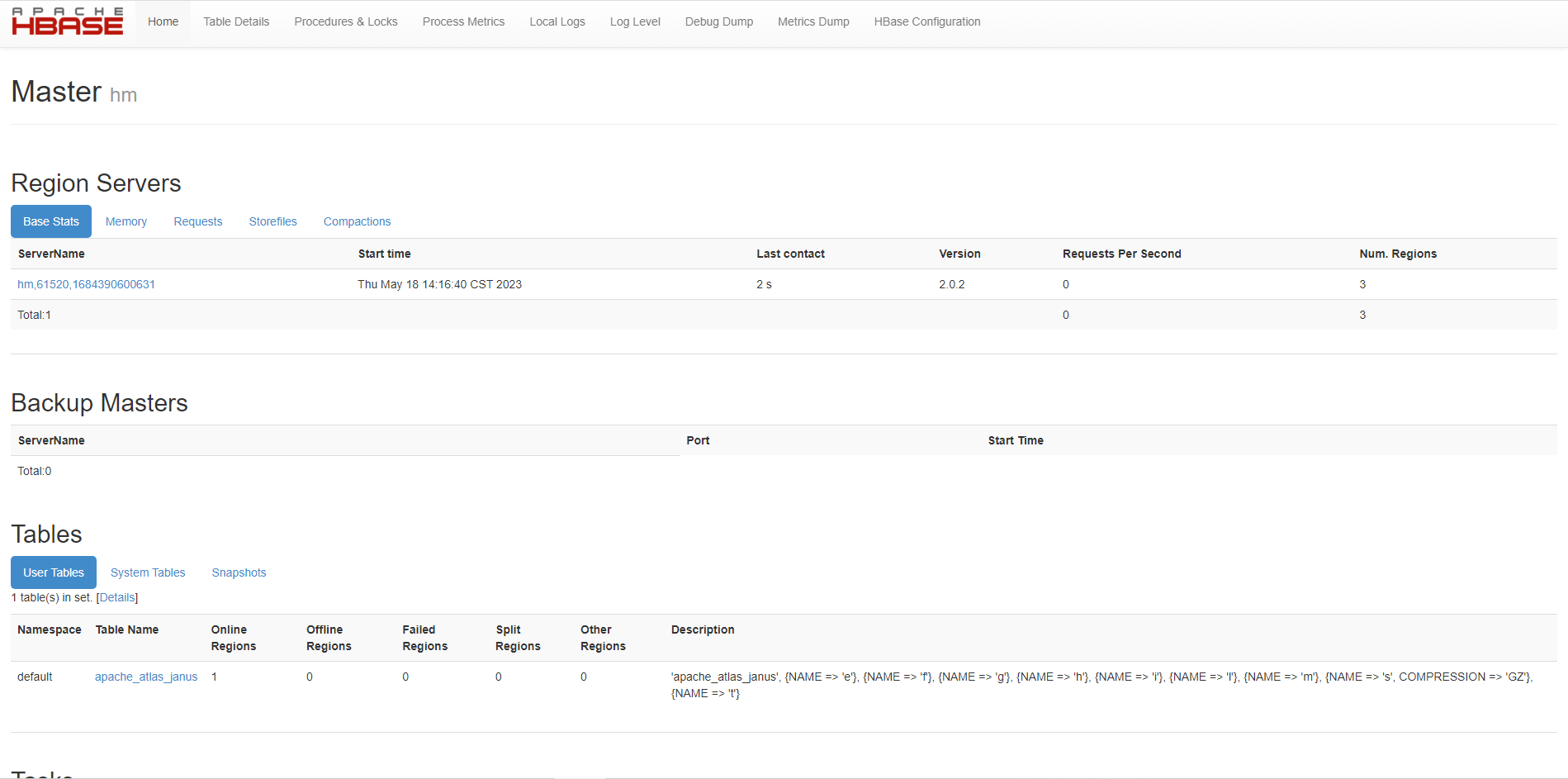
HBASE-UI(需要先查看HBASE的UI): http://192.168.139.200:16010/master-status
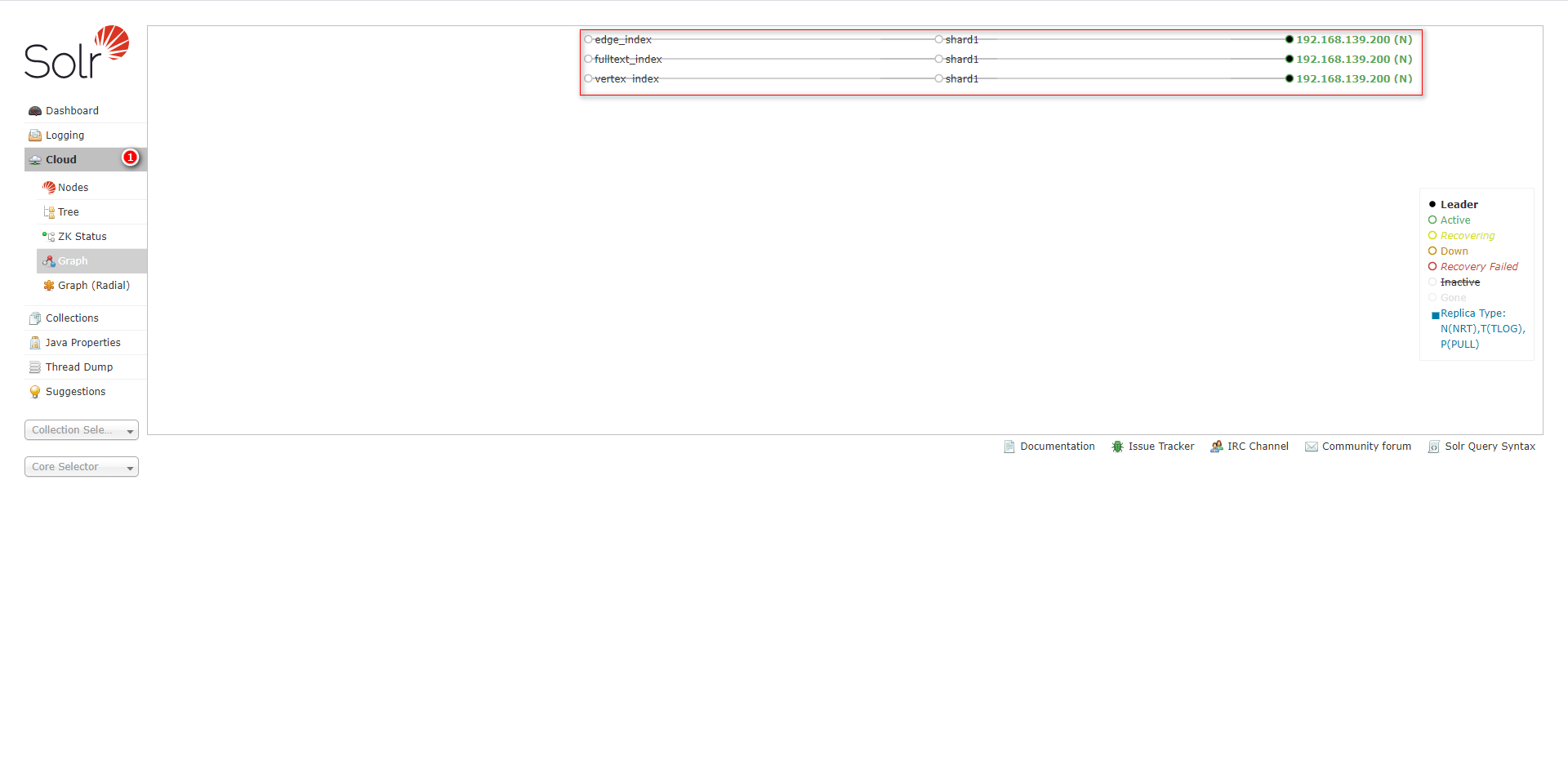
SOLR-UI:  http://192.168.139.200:8983/
ATLAS-UI: http://192.168.139.200:21000/
口令:admin/admin
HBASE-UI:
SOLR-UI:
ATLAS-UI: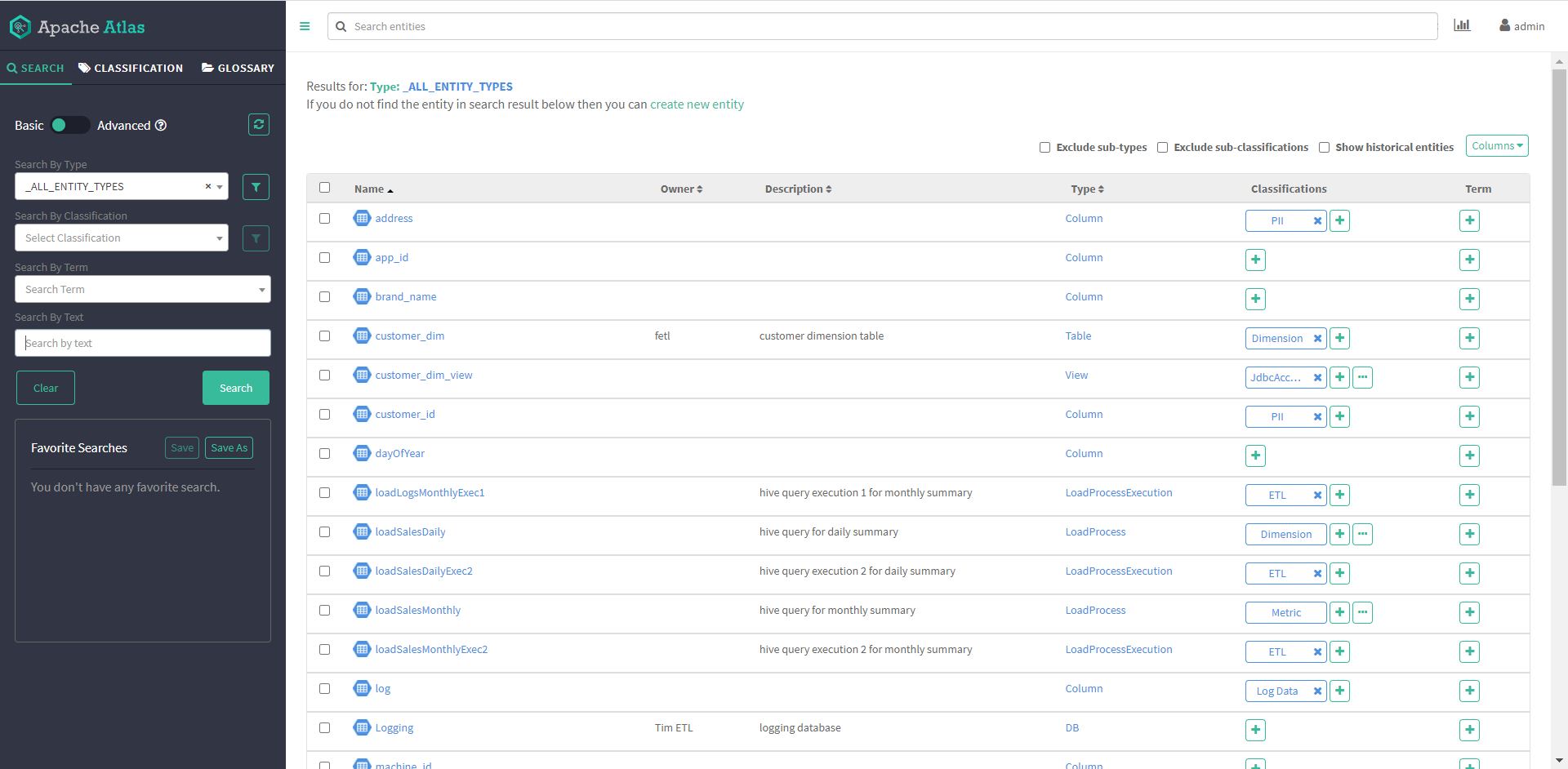

apache_atlas_janus:图数据存储在该表中
apache_atlas_entity_audit:实体审计数据存储在该表中
ATLAS配置文件说明
vim conf/atlas-application.properties
#########  Graph Database Configs  #########

# Graph Database 图数据库默认使用的是:JanusGraph

#Configures the graph database to use.  Defaults to JanusGraph
#atlas.graphdb.backend=org.apache.atlas.repository.graphdb.janus.AtlasJanusGraphDatabase

# Graph Storage 图数据可以存储在hbase、cassandra、embeddedcassandra和berkeleyje中,当前存储在hbase中
# Set atlas.graph.storage.backend to the correct value for your desired storage
# backend. Possible values:
#
# hbase
# cassandra
# embeddedcassandra - Should only be set by building Atlas with  -Pdist,embedded-cassandra-solr
# berkeleyje
#
# See the configuration documentation for more information about configuring the various  storage backends.
#
atlas.graph.storage.backend=hbase2
atlas.graph.storage.hbase.table=apache_atlas_janus

#Hbase
#For standalone mode , specify localhost
#for distributed mode, specify zookeeper quorum here
atlas.graph.storage.hostname=localhost
atlas.graph.storage.hbase.regions-per-server=1
atlas.graph.storage.lock.wait-time=10000

# Gremlin Query Optimizer
#
# Enables rewriting gremlin queries to maximize performance. This flag is provided as
# a possible way to work around any defects that are found in the optimizer until they
# are resolved.
#atlas.query.gremlinOptimizerEnabled=true

# Delete handler
#
# This allows the default behavior of doing "soft" deletes to be changed.
#
# Allowed Values:
# org.apache.atlas.repository.store.graph.v1.SoftDeleteHandlerV1 - all deletes are "soft" deletes
# org.apache.atlas.repository.store.graph.v1.HardDeleteHandlerV1 - all deletes are "hard" deletes
#
#atlas.DeleteHandlerV1.impl=org.apache.atlas.repository.store.graph.v1.SoftDeleteHandlerV1

# Entity audit repository
#
# This allows the default behavior of logging entity changes to hbase to be changed.
#
# Allowed Values:
# org.apache.atlas.repository.audit.HBaseBasedAuditRepository - log entity changes to hbase
# org.apache.atlas.repository.audit.CassandraBasedAuditRepository - log entity changes to cassandra
# org.apache.atlas.repository.audit.NoopEntityAuditRepository - disable the audit repository
#
atlas.EntityAuditRepository.impl=org.apache.atlas.repository.audit.HBaseBasedAuditRepository

# if Cassandra is used as a backend for audit from the above property, uncomment and set the following
# properties appropriately. If using the embedded cassandra profile, these properties can remain
# commented out.
# atlas.EntityAuditRepository.keyspace=atlas_audit
# atlas.EntityAuditRepository.replicationFactor=1


# Graph Search Index 使用SOLR创建索引
atlas.graph.index.search.backend=solr

#Solr
#Solr cloud mode properties
atlas.graph.index.search.solr.mode=cloud
atlas.graph.index.search.solr.zookeeper-url=localhost:2181
atlas.graph.index.search.solr.zookeeper-connect-timeout=60000
atlas.graph.index.search.solr.zookeeper-session-timeout=60000
atlas.graph.index.search.solr.wait-searcher=true

#Solr http mode properties
#atlas.graph.index.search.solr.mode=http
#atlas.graph.index.search.solr.http-urls=http://localhost:8983/solr

# Solr-specific configuration property
atlas.graph.index.search.max-result-set-size=150

#########  Import Configs  #########
#atlas.import.temp.directory=/temp/import

#########  Notification Configs  #########
atlas.notification.embedded=true
atlas.kafka.data=${sys:atlas.home}/data/kafka
atlas.kafka.zookeeper.connect=localhost:9026
atlas.kafka.bootstrap.servers=localhost:9027
atlas.kafka.zookeeper.session.timeout.ms=400
atlas.kafka.zookeeper.connection.timeout.ms=200
atlas.kafka.zookeeper.sync.time.ms=20
atlas.kafka.auto.commit.interval.ms=1000
atlas.kafka.hook.group.id=atlas

atlas.kafka.enable.auto.commit=false
atlas.kafka.auto.offset.reset=earliest
atlas.kafka.session.timeout.ms=30000
atlas.kafka.offsets.topic.replication.factor=1
atlas.kafka.poll.timeout.ms=1000

atlas.notification.create.topics=true
atlas.notification.replicas=1
atlas.notification.topics=ATLAS_HOOK,ATLAS_ENTITIES
atlas.notification.log.failed.messages=true
atlas.notification.consumer.retry.interval=500
atlas.notification.hook.retry.interval=1000
# Enable for Kerberized Kafka clusters
#atlas.notification.kafka.service.principal=kafka/_HOST@EXAMPLE.COM
#atlas.notification.kafka.keytab.location=/etc/security/keytabs/kafka.service.keytab

## Server port configuration
#atlas.server.http.port=21000
#atlas.server.https.port=21443

#########  Security Properties  #########

# SSL config
atlas.enableTLS=false

#truststore.file=/path/to/truststore.jks
#cert.stores.credential.provider.path=jceks://file/path/to/credentialstore.jceks

#following only required for 2-way SSL
#keystore.file=/path/to/keystore.jks

# Authentication config

atlas.authentication.method.kerberos=false
atlas.authentication.method.file=true

#### ldap.type= LDAP or AD
atlas.authentication.method.ldap.type=none

#### user credentials file
atlas.authentication.method.file.filename=${sys:atlas.home}/conf/users-credentials.properties

### groups from UGI
#atlas.authentication.method.ldap.ugi-groups=true

######## LDAP properties #########
#atlas.authentication.method.ldap.url=ldap://<ldap server url>:389
#atlas.authentication.method.ldap.userDNpattern=uid={0},ou=People,dc=example,dc=com
#atlas.authentication.method.ldap.groupSearchBase=dc=example,dc=com
#atlas.authentication.method.ldap.groupSearchFilter=(member=uid={0},ou=Users,dc=example,dc=com)
#atlas.authentication.method.ldap.groupRoleAttribute=cn
#atlas.authentication.method.ldap.base.dn=dc=example,dc=com
#atlas.authentication.method.ldap.bind.dn=cn=Manager,dc=example,dc=com
#atlas.authentication.method.ldap.bind.password=<password>
#atlas.authentication.method.ldap.referral=ignore
#atlas.authentication.method.ldap.user.searchfilter=(uid={0})
#atlas.authentication.method.ldap.default.role=<default role>


######### Active directory properties #######
#atlas.authentication.method.ldap.ad.domain=example.com
#atlas.authentication.method.ldap.ad.url=ldap://<AD server url>:389
#atlas.authentication.method.ldap.ad.base.dn=(sAMAccountName={0})
#atlas.authentication.method.ldap.ad.bind.dn=CN=team,CN=Users,DC=example,DC=com
#atlas.authentication.method.ldap.ad.bind.password=<password>
#atlas.authentication.method.ldap.ad.referral=ignore
#atlas.authentication.method.ldap.ad.user.searchfilter=(sAMAccountName={0})
#atlas.authentication.method.ldap.ad.default.role=<default role>

#########  JAAS Configuration ########

#atlas.jaas.KafkaClient.loginModuleName = com.sun.security.auth.module.Krb5LoginModule
#atlas.jaas.KafkaClient.loginModuleControlFlag = required
#atlas.jaas.KafkaClient.option.useKeyTab = true
#atlas.jaas.KafkaClient.option.storeKey = true
#atlas.jaas.KafkaClient.option.serviceName = kafka
#atlas.jaas.KafkaClient.option.keyTab = /etc/security/keytabs/atlas.service.keytab
#atlas.jaas.KafkaClient.option.principal = atlas/_HOST@EXAMPLE.COM

#########  Server Properties  #########
atlas.rest.address=http://localhost:21000
# If enabled and set to true, this will run setup steps when the server starts
#atlas.server.run.setup.on.start=false

#########  Entity Audit Configs  #########
atlas.audit.hbase.tablename=apache_atlas_entity_audit
atlas.audit.zookeeper.session.timeout.ms=1000
atlas.audit.hbase.zookeeper.quorum=localhost:2181

#########  High Availability Configuration ########
atlas.server.ha.enabled=false
#### Enabled the configs below as per need if HA is enabled #####
#atlas.server.ids=id1
#atlas.server.address.id1=localhost:21000
#atlas.server.ha.zookeeper.connect=localhost:2181
#atlas.server.ha.zookeeper.retry.sleeptime.ms=1000
#atlas.server.ha.zookeeper.num.retries=3
#atlas.server.ha.zookeeper.session.timeout.ms=20000
## if ACLs need to be set on the created nodes, uncomment these lines and set the values ##
#atlas.server.ha.zookeeper.acl=<scheme>:<id>
#atlas.server.ha.zookeeper.auth=<scheme>:<authinfo>


######### Atlas Authorization #########
atlas.authorizer.impl=simple
atlas.authorizer.simple.authz.policy.file=atlas-simple-authz-policy.json

#########  Type Cache Implementation ########
# A type cache class which implements
# org.apache.atlas.typesystem.types.cache.TypeCache.
# The default implementation is org.apache.atlas.typesystem.types.cache.DefaultTypeCache which is a local in-memory type cache.
#atlas.TypeCache.impl=

#########  Performance Configs  #########
#atlas.graph.storage.lock.retries=10
#atlas.graph.storage.cache.db-cache-time=120000

#########  CSRF Configs  #########
atlas.rest-csrf.enabled=true
atlas.rest-csrf.browser-useragents-regex=^Mozilla.*,^Opera.*,^Chrome.*
atlas.rest-csrf.methods-to-ignore=GET,OPTIONS,HEAD,TRACE
atlas.rest-csrf.custom-header=X-XSRF-HEADER

############ KNOX Configs ################
#atlas.sso.knox.browser.useragent=Mozilla,Chrome,Opera
#atlas.sso.knox.enabled=true
#atlas.sso.knox.providerurl=https://<knox gateway ip>:8443/gateway/knoxsso/api/v1/websso
#atlas.sso.knox.publicKey=

############ Atlas Metric/Stats configs ################
# Format: atlas.metric.query.<key>.<name>
atlas.metric.query.cache.ttlInSecs=900
#atlas.metric.query.general.typeCount=
#atlas.metric.query.general.typeUnusedCount=
#atlas.metric.query.general.entityCount=
#atlas.metric.query.general.tagCount=
#atlas.metric.query.general.entityDeleted=
#
#atlas.metric.query.entity.typeEntities=
#atlas.metric.query.entity.entityTagged=
#
#atlas.metric.query.tags.entityTags=

#########  Compiled Query Cache Configuration  #########

# The size of the compiled query cache.  Older queries will be evicted from the cache
# when we reach the capacity.

#atlas.CompiledQueryCache.capacity=1000

# Allows notifications when items are evicted from the compiled query
# cache because it has become full.  A warning will be issued when
# the specified number of evictions have occurred.  If the eviction
# warning threshold <= 0, no eviction warnings will be issued.

#atlas.CompiledQueryCache.evictionWarningThrottle=0


#########  Full Text Search Configuration  #########

#Set to false to disable full text search.
#atlas.search.fulltext.enable=true

#########  Gremlin Search Configuration  #########

#Set to false to disable gremlin search.
atlas.search.gremlin.enable=false


########## Add http headers ###########

#atlas.headers.Access-Control-Allow-Origin=*
#atlas.headers.Access-Control-Allow-Methods=GET,OPTIONS,HEAD,PUT,POST
#atlas.headers.<headerName>=<headerValue>


#########  UI Configuration ########

atlas.ui.default.version=v1
ATLAS输出DEBUG日志
需要修改apache-atlas-2.1.0/conf/atlas-log4j.xml三个地方,将这三处的"info" 修改为:“debug”。
<!-- appender-ref元素,引用一个已定义的appender元素的名字,为logger对象增加一个appender -->
<logger name="org.apache.atlas" additivity="false">
    <level value="debug"/>
    <appender-ref ref="FILE"/>
</logger>

<logger name="org.janusgraph" additivity="false">
    <level value="debug"/>
    <appender-ref ref="FILE"/>
</logger>
<!-- 根logger的设置-->
<root>
    <priority value="debug"/>
    <appender-ref ref="FILE"/>
</root>
安装错误
①. Your open file limit is currently 1024.
错误描述如下:
  *** [WARN] *** Your open file limit is currently 1024.
   It should be set to 65000 to avoid operational disruption.
   If you no longer wish to see this warning, set SOLR_ULIMIT_CHECKS to false in your profile or solr.in.sh
  *** [WARN] ***  Your Max Processes Limit is currently 31117.
   It should be set to 65000 to avoid operational disruption.
   If you no longer wish to see this warning, set SOLR_ULIMIT_CHECKS to false in your profile or solr.in.sh
  WARNING: Starting Solr as the root user is a security risk and not considered best practice. Exiting.
           Please consult the Reference Guide. To override this check, start with argument '-force'
解决方案如下:
sudo vim /etc/security/limits.conf
增加以下内容(有前面的*号):
* hard nofile 65535
* soft nofile 65535
* hard nproc 65535
* soft nproc 65535
②. Java HotSpot™ 64-Bit Server VM warning: INFO: os::commit_memory(0x0000000560800000, 10737418240, 0) failed; error=‘Cannot allocate memory’ (errno=12)
表示服务器上物理内存太小,需要调大内存。
③. Failed to obtain graph instance on attempt 1 of 3
一般情况是由于HBASE和SOLR未启动导致,应该分别手动执行: HBASE、SOLR和ATLAS的启动脚本启动对应的服务。
④. ATLAS UI页面出现503错误
一般情况是由于HBASE和SOLR未启动导致,首先:可以先看看SOLR的UI是否可以访问,如果能够访问,需要查看SOLR页面,cloud模式是否有vertex_index、edge_index、fulltext_index这三个collection;然后检查HBASE是否有ATLAS的信息表,可在HBASE的节点上执行hbase shell,然后list查看一下是否有相应的表。
如何查看内置HBASE的WEB的端口?
切换到日志目录下:
cd /opt/software/apache-atlas-2.1.0/hbase/logs
执行查看端口的指令:
grep 'Jetty' *

启动ATLAS时为什么一直报连不上ZK?
注意:当ATLAS没有完全启动的话,会报一直连不上ZK,由于电脑配置太低,所以一直ATLAS的启动相当慢,等了10分钟才启动完毕。
2023-05-19 01:04:15,055 WARN  - [main-SendThread(localhost:9026):] ~ Session 0x0 for server null, unexpected error, closing socket connection and attempting reconnect (ClientCnxn$SendThread:1102)
java.net.ConnectException: 拒绝连接
        at sun.nio.ch.SocketChannelImpl.checkConnect(Native Method)
        at sun.nio.ch.SocketChannelImpl.finishConnect(SocketChannelImpl.java:717)
        at org.apache.zookeeper.ClientCnxnSocketNIO.doTransport(ClientCnxnSocketNIO.java:361)
        at org.apache.zookeeper.ClientCnxn$SendThread.run(ClientCnxn.java:1081)
2023-05-19 01:04:16,155 WARN  - [main-SendThread(localhost:9026):] ~ Session 0x0 for server null, unexpected error, closing socket connection and attempting reconnect (ClientCnxn$SendThread:1102)
java.net.ConnectException: 拒绝连接
        at sun.nio.ch.SocketChannelImpl.checkConnect(Native Method)
        at sun.nio.ch.SocketChannelImpl.finishConnect(SocketChannelImpl.java:717)
        at org.apache.zookeeper.ClientCnxnSocketNIO.doTransport(ClientCnxnSocketNIO.java:361)
        at org.apache.zookeeper.ClientCnxn$SendThread.run(ClientCnxn.java:1081)
2023-05-19 01:04:17,257 WARN  - [main-SendThread(localhost:9026):] ~ Session 0x0 for server null, unexpected error, closing socket connection and attempting reconnect (ClientCnxn$SendThread:1102)
java.net.ConnectException: 拒绝连接
        at sun.nio.ch.SocketChannelImpl.checkConnect(Native Method)
        at sun.nio.ch.SocketChannelImpl.finishConnect(SocketChannelImpl.java:717)
        at org.apache.zookeeper.ClientCnxnSocketNIO.doTransport(ClientCnxnSocketNIO.java:361)
        at org.apache.zookeeper.ClientCnxn$SendThread.run(ClientCnxn.java:1081)
2023-05-19 01:04:18,358 WARN  - [main-SendThread(localhost:9026):] ~ Session 0x0 for server null, unexpected error, closing socket connection and attempting reconnect (ClientCnxn$SendThread:1102)
java.net.ConnectException: 拒绝连接
        at sun.nio.ch.SocketChannelImpl.checkConnect(Native Method)
        at sun.nio.ch.SocketChannelImpl.finishConnect(SocketChannelImpl.java:717)
        at org.apache.zookeeper.ClientCnxnSocketNIO.doTransport(ClientCnxnSocketNIO.java:361)
        at org.apache.zookeeper.ClientCnxn$SendThread.run(ClientCnxn.java:1081)
2023-05-19 01:04:19,459 WARN  - [main-SendThread(localhost:9026):] ~ Session 0x0 for server null, unexpected error, closing socket connection and attempting reconnect (ClientCnxn$SendThread:1102)
java.net.ConnectException: 拒绝连接
        at sun.nio.ch.SocketChannelImpl.checkConnect(Native Method)
        at sun.nio.ch.SocketChannelImpl.finishConnect(SocketChannelImpl.java:717)
        at org.apache.zookeeper.ClientCnxnSocketNIO.doTransport(ClientCnxnSocketNIO.java:361)
        at org.apache.zookeeper.ClientCnxn$SendThread.run(ClientCnxn.java:1081)

 515


 扫一扫


 被折叠的 条评论
为什么被折叠?
 到【灌水乐园】发言


