



Presto – Distributed SQL Query Engine for Big Data
目录
- 1 Presto 概述
- 2 概念
- 3 整体架构
- 4 Presto 安装
- 4.1 条件
- 4.2 安装包的获取
- 4.3 规划
- 4.4 Presto Server部署
- 4.4.1 修改 node.properties 配置文件
- 4.4.2 修改 config.properties 配置文件
- 4.4.3 修改 jvm.config 配置文件
- 4.4.4 修改 log.properties 配置文件
- 4.4.5 修改 Catalog 配置文件
- (1) MySQL
- (2) Hive
- (3) Kudu
- (4) MongoDB
- (5) Kafka
- 4.4.6 Presto Worker 配置
- 4.4.7 Presto服务的启停
- 4.5 Presto Client部署
- 5 网页客户端工具
- 5.1 Gradle安装
- 5.2 Node.js安装
- 5.3 下载源码并编译
- 5.4 修改yanagishima的配置文件
- 5.5 yanagishima的启停
- 5.6 yanagishima的使用
- 6 Presto 使用
- 6.1 Presto CLI
- 6.1.1 MySQL
- 6.1.2 Hive
- 6.1.3 Kudu
- 6.1.4 Kafka
- 6.2 JDBC 代码示例
- 6.2.1 编写Presto jdbc代码
- 6.2.2 Kerberos下Trino jdbc查询示例代码
- 6.3 Kafka Connector
- 6.3.1 基本查询
- 6.3.2 添加表定义文件
- 6.3.3 将 message 中所有的值映射到不同列
- 6.4 使用实时数据
- 6.4.1 在Kafka集群上创建一个Topic
- 6.4.2 编写一个Kafka生产者
- 6.4.3 在Presto中创建表
- 6.4.4 重启Presto,进行如下查询数据
- 6.1 Presto CLI
1 Presto 概述
Presto 是一个在 Facebook 主持下运营的开源项目(2012年秋启动,2013年冬开源)。Presto是一种旨在使用分布式查询有效查询大量数据的工具,Presto是专门为大数据实时查询计算而设计和开发的产品,其为基于 Java 开发的,对使用者和开发者而言易于学习。 Presto有时被社区的许多成员称为数据库,官方也强调 Presto 不是通用关系数据库,它不是 MySQL,PostgreSQL 或 Oracle 等数据库的替代品,Presto 不是为处理在线事务处理(OLTP)而设计的。
如果您使用太字节或数PB的数据,您可能会使用与 Hadoop 和 HDFS 交互的工具。Presto 被设计为使用 MapReduce 作业(如Hive或Pig)管道查询 HDFS 的工具的替代方案,但 Presto不限于访问HDFS。 Presto 已经可以扩展到在不同类型的数据源上运行,包括传统的关系数据库和其它数据源(如Cassandra)。Presto旨在处理数据仓库和分析:数据分析、合大量数据和生成报告。这些工作负载通常归类为在线分析处理(OLAP)。
2 概念
2.1 服务进程
(1). Coordinator
Presto coordinator(协调器)是负责解析语句、查询计划和管理 Presto Worker 节点的服务进程。它是 Presto 安装的“大脑”,也是客户端连接以提交语句并提供执行的节点。 每个 Presto 安装必须有一个 Presto Coordinator 和一个或多个 Presto Worker。出于开发或测试目的,可以将单个 Presto 实例配置作为这两个角色。 Coordinator跟踪每个 Worker 的活动并协调查询的执行。Coordinator 创建一个涉及一系列阶段的查询的逻辑模型,然后将其转换为在 Presto 工作集群上运行的一系列连接任务。 Coordinator 使用 REST API 与 Worker 和客户进行通信。
(2). Worker
Presto worker 是 Presto 安装中的负责执行任务和处理数据服务进程。Worker 从Connector获取数据并相互交换中间数据。Coordinator 负责从Worker那里获取结果并将最终结果返回给客户端。当Presto Worker进程启动时,它会将自己通告给 Coordinator,接下来Presto Coordinator就可以执行任务。 Worker 使用 REST API 与其他 Worker 和 Presto Coordinator 进行通信。
2.2 数据源
(1). Connector
Connector 将 Presto 适配到数据源,如Hive或关系数据库。您可以将 Connector 视为与数据库驱动程序相同的方式,这是 Presto SPI 的一种实现,它允许 Presto 使用标准 API 与资源进行交互。 Presto 包含几个内置连接器:JMX 的连接器 ,它是一个提供对内置系统表访问的系统连接器;Hive连接器和一个用于提供 TPC-H 基准数据的TPCH连接器。 许多第三方开发人员都提供了连接器,以便 Presto 可以访问各种数据源中的数据。每个 Catalog 都与特定 Connector 相关联,如果检查 Catalog 配置文件,您将看到每个都包含强制属性 connector.name, Catalog 使用该属性为给定的 catalog 创建 Connector。可以让多个 Catalog 使用相同的 Connector 来访问类似数据库的两个不同实例。例如,如果您有两个Hive集群,则可以在单个 Presto 集群中配置两个 Catalog, 这两个 Catalog 都使用 Hive Connector,允许您查询来自两个 Hive 集群的数据(即使在同一SQL查询中)。
(2). Catalog
Presto Catalog 包含 Schemas,并通过 Connector 引用数据源。例如,您可以配置 JMX catalog 以通过 JMX Connector 来提供对 JMX 信息的访问。 在 Presto 中运行 SQL 语句时,您将针对一个或多个 Catalog 运行它。Catalog 的其它示例包括用于连接到 Hive 数据源的 Hive Catalog。 当在 Presto 中寻址一个表时,全限定的表名始终以 Catalog 为根。例如,一个全限定的表名称hive.test_data.test 将引用 Hive catalog中 test_data库中 test表。 Catalog的定义存储在 Presto 配置目录中的属性文件中。
(3). Schema
Schema 是组织表的一种方式。Schema 和 Catalog 一起定义了一组可以查询的表。使用 Presto 访问 Hive 或 MySQL 等关系数据库时,Schema 会转换为目标数据库中的相同概念。 其他类型的 Connector 可以选择以对底层数据源有意义的方式将表组织成 Schema。
(4). Table
表是一组被组织成具有类型的列名的无序行。这与任一关系数据库中的定义相同。从源数据到表的映射由 Connector 定义。
2.3 查询执行模型
(1). Statement
Presto 执行与 ANSI 兼容的 SQL 语句。当 Presto 文档引用一个语句时,它指的是 ANSI SQL 标准中定义的语句,该语句(Statment)由子句(Clauses)、表达式(Expression)和断言(Predicate)组成。 Presto 为什么将语句和查询(Query)概念分开呢?这是必要的,因为在 Presto 中,Statment 只是引用 SQL 语句的文本表示。执行语句时,Presto 会创建一个查询(Query)以及一个查询计划,然后该查询计划将分布在一系列 Presto Worker 进程中。
(2). Query
当 Presto 解析语句时,它将转换为查询(Query)并创建一个分布式查询计划,然后将其实现为在 Presto Worker 进程上运行的一系列相互关联的阶段。在 Presto 中检索有关查询的信息时,您会收到生成结果集以响应语句所涉及的每个组件的快照。 语句和查询之间的区别很简单。语句可以被认为是传递给 Presto 的 SQL 文本,而查询是指为实现该语句而实例化的配置和组件。查询包含 stages、tasks、splits、connectors以及其它组件和数据源,它们协同工作以生成结果。
(3). Stage
当Presto 执行查询时,它通过将执行分解为具有层级关系的多个 Stage。例如,如果 Presto 需要从Hive 中存储的10亿行数据进行聚合,则可以通过创建根State来聚合其它几个State的输出,所有这些State都旨在实现分布式查询计划的不同部分。包含查询的层级关系结构类似于树,每个查询都有一个根Stage,负责聚合其它 Stage 的输出。State是 Coordinator 用于分布式查询计划建模的工具,但State本身并不在 Presto Worker 进程上运行。
(4). Task
如Stage部分所述,Stage 对分布式查询计划的特定部分进行建模,但 Stage 本身不在 Presto Worker 进程上执行。要了解 Stage 的执行方式,您需要了解 Stage 是作为一系列任务分散在Presto Worker 网络上实施的。 Task是 Presto 架构中的“役马”(work horse),因为分布式查询计划被分解为一系列 Stage,然后将这些 Stage 转换为Task对其进行处理或者split。Presto Task具有输入和输出,正如一个 Stage 可以通过一系列Task并行执行一样,Task与一系列驱动程序并行执行。
(5). Split
Task对Split进行操作,Split是较大数据集的一部分。分布式查询计划的最低级别的 Stage 通过 Connector 的拆分检索数据,而分布式查询计划的更高级别的中间Stage从其它Stage检索数据。 当 Presto 计划查询时,Coordinator 将查询 Connector 以获取表中所有可用于Split的列表。Coordinator 跟踪哪些机器正在运行哪些Task以及哪些Task正在处理哪些Split。
(6). Driver
Task包含一个或多个并行 Driver。Driver 对数据进行操作并组合运算符以产生输出,然后将输出交由一个Task聚合,然后在另一个 Stage 中传递给另外一个Task。 Driver 是一系列操作符实例,或者您可以将 Driver 视为内存中的一组物理运算符。它是 Presto 架构中最低级别的并行度。Driver 具有一个输入和一个输出。
(7). Operator
Operator消费、转换和生成数据。例如,表扫描从 Connector 获取数据并生成可由其它Operator使用的数据,并且过滤器Operator通过在输入数据上应用Predicate 来消费数据并生成子集。
(8). Exchange
Presto 的Stage通过Exchange来连接另一个Stage,Exchange用于完成有上下游关系的Stage之间的数据交换。Task将数据产生到输出缓冲区中,并使用Exchange客户端消费其它Task的数据。
2.4 查询模型详解
Trino会根据Query生成执行计划、划分Stage,如下图所示:

其中的每个Stage包含多个相同功能的Task,每个Task会被调度到不同的Worker上执行(如下图所示):

Task的输入输出是Split(数据分片),每个Task可以处理多个Split(如下图所示):

在Task内部,由Driver负责Split的处理,可以同时有多个Driver并行处理。Driver是多个Operator的集合(可以理解为连成一串的算子:tablescan->aggregate->orderby→output),Split按照Operator的顺序依次被处理:

3 整体架构
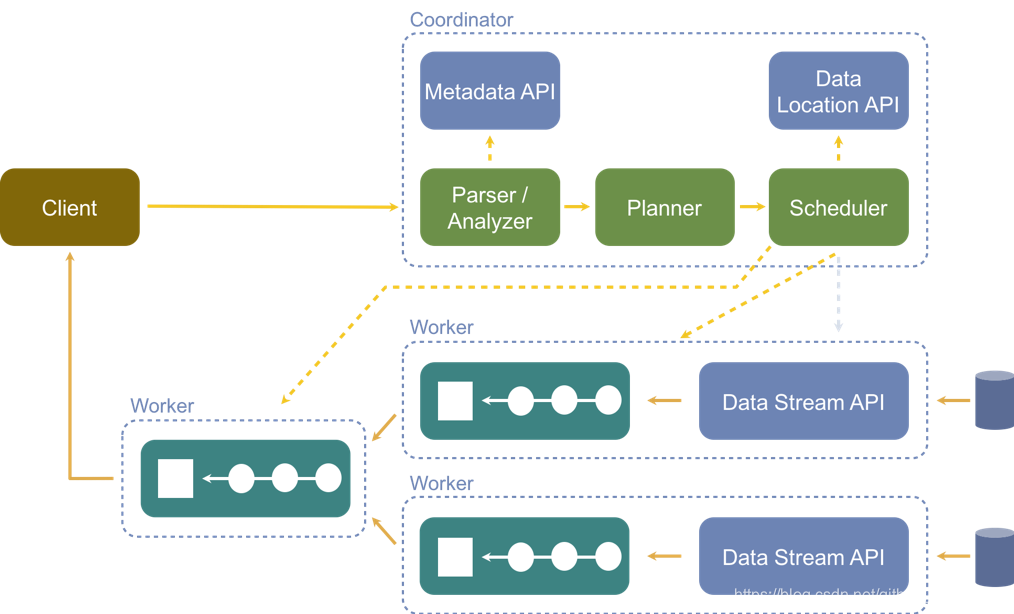
从前面的概念部分我们知道Presto中有两类进程:Coordinator和Worker,在一个Presto集群中是由一个Coordinator和多个Worker进程服务组成的。Coordinator负责接收(admitting)、解析(parsing)、计划(planning)、优化查询(optimizing queries)、查询编排(query orchestration),Worker节点负责查询处理,这是一个典型的Master-Slave的拓扑结构。
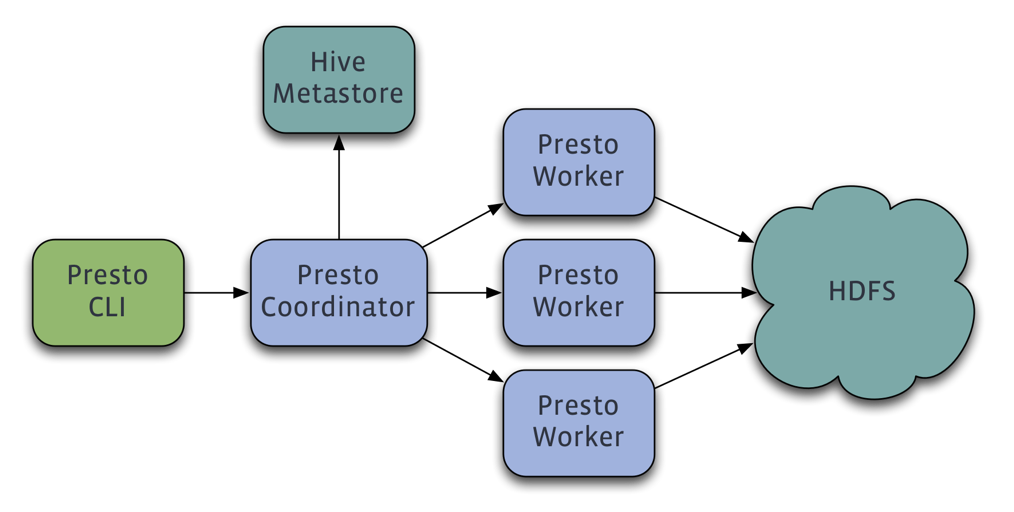
- 客户端通过HTTP协议发送一个包含SQL语句的HTTP请求给Presto 集群的Coordinator;
- Coordinator通过Discovery Service 发现当前集群可用的Worker;
- Coordinator将客户端发送过来的查询语句进行解析,生成查询计划,并根据查询计划执行计划,依次生成SqlQueryExecution、SqlStageExecution、HttpRemoteTask, HttpRemoteTask是根据数据本地性生成的;
- Coordinator将每一个Task部分发到其所需要处理的数据所在的Worker上进行执行。这个过程是通过HttpRemoteTask中的HttpClient将创建或者更新Task的请求发送给数据所在的节点上TaskResource所提供的RestFul接口,TaskResource接收到请求之后最终会在对应的Worker上启动一个SqlTaskExecution对象或者更新应用的SqlTaskExecution对象需要处理的Split;
- 执行处于上游的Source Stage中的Task,这些Task通过各种Connector从相应的数据源中读取需要的数据;
- 处于下游Stage中的Task会读取上游Stage产生的输出结果,并在改Stage每个Task所在的Worker的内存中运行后续的计算和处理;
- Coordinator从分发Task之后,就会一直持续不断地从Single Stage中的Task获取计算结果,并将计算结果缓存到Buffer中,一直到所有的计算结束;
- Client从提交查询语句之后,就会不停地从Coordinator中获取本次查询的计算结果,直到获取了所有的计算结果。并不知道等到所有的查询结果都产生完毕之后一次全部显示出来,而是每产生一部分,就会显示一部分,直到所有的查询结果都显示完毕。
3 整体架构
4 Presto 安装
可参考官方文档:2.1. Deploying Presto
4.1 条件
安装前准备:
- 保证集群各节点已经建立了 SSH 信任
- 安装 Java (JDK 1.8以上)
- 主节点:
- Git: 可以访问 https://mirrors.edge.kernel.org/pub/software/scm/git/ 下载安装。
- Maven
- 必要的数据源库:例如 Mysql、Postgresql、Elasticsearch、Redis、MongoDB、Hive、Kafka、Kudu、Cassandra 等
4.2 安装包的获取
可以直接下载官网提供编译好的包进行安装 presto-server-0.190.tar.gz。
本次以编译源码的方式获取需要安装的文件:
以源码编译方式安装,访问 presto-releases,现在需要的版本的源码包。
通过下载release版源码包编译会出现问题,原因是这种方式缺少 .git目录和文件
[INFO] BUILD FAILURE
[INFO] ------------------------------------------------------------------------
[INFO] Total time:  02:19 min (Wall Clock)
[INFO] Finished at: 2019-05-12T02:57:56+08:00
[INFO] ------------------------------------------------------------------------
Downloaded from nexus-aliyun: http://maven.aliyun.com/nexus/content/groups/public/io/airlift/units/1.3/units-1.3.jar (18 kB at 129 kB/s)
Downloading from nexus-aliyun: http://maven.aliyun.com/nexus/content/groups/public/org/apache/commons/commons-lang3/3.4/commons-lang3-3.4.jar
[ERROR] Failed to execute goal pl.project13.maven:git-commit-id-plugin:2.1.13:revision (default) on project presto-matching: .git directory could not be found! Please specify a valid [dotGitDirectory] in your pom.xml -> [Help 1]
[ERROR]
[ERROR] To see the full stack trace of the errors, re-run Maven with the -e switch.
[ERROR] Re-run Maven using the -X switch to enable full debug logging.
[ERROR]
[ERROR] For more information about the errors and possible solutions, please read the following articles:
[ERROR] [Help 1] http://cwiki.apache.org/confluence/display/MAVEN/MojoExecutionException
[ERROR]
[ERROR] After correcting the problems, you can resume the build with the command
[ERROR]   mvn <goals> -rf :presto-matching
[root@cdh6 presto-0.219]#
问题解决。原因很简单,就是下载的release源码包中每个.git文件夹,但是git-commit-id-plugin插件又是需要这个目录的,我们在父模块的pom.xml中却并没有发现引用这个插件,其实这是airbase中依赖了git-commit-id-plugin插件,因此在父模块的pom.xml文件中引入如下插件,并跳过此插件的配置的,大概在1335行左右,在<pluginManagement>标签中的<plugins>中添加就行。
<plugin>
	<groupId>pl.project13.maven</groupId>
	<artifactId>git-commit-id-plugin</artifactId>
	<configuration>
	<skip>true</skip>
	</configuration>
</plugin>
如果不想改动源码,可以直接 clone 源码方式安装,这种方式可以切换标签,编译官方发布的任意我们需要的版本。
git clone https://github.com/prestodb/presto.git
git tag
# 可以看到不同的版本,找到最新的 0.219
git checkout tags/0.219
# 可以看到已经切换到此分支了
git branch

# 编译
mvn -T2C install -DskipTests
等待一段时间后,显示如下内容则表示编译成功
[INFO] ------------------------------------------------------------------------
[INFO] Reactor Summary for presto-root 0.219:
[INFO]
[INFO] presto-root ........................................ SUCCESS [ 11.575 s]
[INFO] presto-spi ......................................... SUCCESS [ 30.813 s]
[INFO] presto-plugin-toolkit .............................. SUCCESS [  3.953 s]
[INFO] presto-client ...................................... SUCCESS [  8.612 s]
[INFO] presto-parser ...................................... SUCCESS [ 29.083 s]
[INFO] presto-geospatial-toolkit .......................... SUCCESS [ 28.109 s]
[INFO] presto-array ....................................... SUCCESS [  2.433 s]
[INFO] presto-matching .................................... SUCCESS [ 24.025 s]
[INFO] presto-memory-context .............................. SUCCESS [ 24.019 s]
[INFO] presto-tpch ........................................ SUCCESS [  9.667 s]
[INFO] presto-main ........................................ SUCCESS [01:36 min]
[INFO] presto-resource-group-managers ..................... SUCCESS [ 42.605 s]
[INFO] presto-tests ....................................... SUCCESS [ 23.371 s]
[INFO] presto-atop ........................................ SUCCESS [01:03 min]
[INFO] presto-jmx ......................................... SUCCESS [01:03 min]
[INFO] presto-record-decoder .............................. SUCCESS [ 33.159 s]
[INFO] presto-kafka ....................................... SUCCESS [01:13 min]
[INFO] presto-redis ....................................... SUCCESS [01:03 min]
[INFO] presto-accumulo .................................... SUCCESS [01:13 min]
[INFO] presto-cassandra ................................... SUCCESS [01:13 min]
[INFO] presto-blackhole ................................... SUCCESS [01:02 min]
[INFO] presto-memory ...................................... SUCCESS [01:02 min]
[INFO] presto-orc ......................................... SUCCESS [01:03 min]
[INFO] presto-benchmark ................................... SUCCESS [ 14.930 s]
[INFO] presto-parquet ..................................... SUCCESS [  5.787 s]
[INFO] presto-rcfile ...................................... SUCCESS [ 42.634 s]
[INFO] presto-hive ........................................ SUCCESS [ 21.288 s]
[INFO] presto-hive-hadoop2 ................................ SUCCESS [  8.084 s]
[INFO] presto-teradata-functions .......................... SUCCESS [ 47.924 s]
[INFO] presto-example-http ................................ SUCCESS [ 33.494 s]
[INFO] presto-local-file .................................. SUCCESS [ 33.505 s]
[INFO] presto-tpcds ....................................... SUCCESS [01:03 min]
[INFO] presto-raptor ...................................... SUCCESS [ 12.072 s]
[INFO] presto-base-jdbc ................................... SUCCESS [  4.513 s]
[INFO] presto-mysql ....................................... SUCCESS [ 25.919 s]
[INFO] presto-postgresql .................................. SUCCESS [ 15.107 s]
[INFO] presto-redshift .................................... SUCCESS [ 15.102 s]
[INFO] presto-sqlserver ................................... SUCCESS [ 15.086 s]
[INFO] presto-mongodb ..................................... SUCCESS [01:02 min]
[INFO] presto-ml .......................................... SUCCESS [01:02 min]
[INFO] presto-geospatial .................................. SUCCESS [  5.922 s]
[INFO] presto-jdbc ........................................ SUCCESS [ 22.349 s]
[INFO] presto-cli ......................................... SUCCESS [  9.009 s]
[INFO] presto-product-tests ............................... SUCCESS [01:04 min]
[INFO] presto-benchmark-driver ............................ SUCCESS [ 10.863 s]
[INFO] presto-password-authenticators ..................... SUCCESS [ 10.366 s]
[INFO] presto-session-property-managers ................... SUCCESS [ 10.463 s]
[INFO] presto-kudu ........................................ SUCCESS [01:13 min]
[INFO] presto-thrift-connector-api ........................ SUCCESS [ 34.061 s]
[INFO] presto-thrift-testing-server ....................... SUCCESS [01:21 min]
[INFO] presto-thrift-connector ............................ SUCCESS [  3.641 s]
[INFO] presto-elasticsearch ............................... SUCCESS [01:09 min]
[INFO] presto-server ...................................... SUCCESS [ 53.982 s]
[INFO] presto-server-rpm .................................. SUCCESS [01:08 min]
[INFO] presto-docs ........................................ SUCCESS [01:54 min]
[INFO] presto-verifier .................................... SUCCESS [ 31.352 s]
[INFO] presto-testing-server-launcher ..................... SUCCESS [ 25.514 s]
[INFO] presto-benchto-benchmarks .......................... SUCCESS [ 42.340 s]
[INFO] presto-proxy ....................................... SUCCESS [  6.275 s]
[INFO] ------------------------------------------------------------------------
[INFO] BUILD SUCCESS
[INFO] ------------------------------------------------------------------------
[INFO] Total time:  07:32 min (Wall Clock)
[INFO] Finished at: 2019-05-11T13:40:14+08:00
[INFO] ------------------------------------------------------------------------
在 presto 目录下 presto/presto-server/target 可看到刚编译好的 presto-server-0.219.tar.gz,后续会使用这个包部署 Presto 集群。
4.3 规划
Presto 集群部署分为三个部分:
- ①Presto Server端部署;
- ②Presto Worker端部署;
- ③Presto Client端部署
Presto集群的规划如下,这里以3个节点为例。
| Host名 | Coordinator | Worker |
|---|---|---|
| cdh1 | ✔️ | |
| cdh2 | ✔️ | ✔️ |
| cdh3 | ✔️ |
4.4 Presto Server部署
我们编译后的presto-0.219/presto-server/target目录下可以看到presto-server-0.219.tar.gz,我们使用这个包来部署,如果没有编译,也可以官方编译好的Presto Server包presto-server-0.226.tar.gz来部署,这个包大概有577MB,推荐使用编译方式获取。
我们首先需要将presto-server-0.219.tar.gz包发送到一个服务节点(这里是cdh2节点)的 /opt/presto-0.219目录下,然后解压,执行如下命令。
cd /opt/presto-0.219
# 解压
tar -zxvf presto-server-0.219.tar.gz

# 进到解压的目录下
cd presto-server-0.219
# 查看文件,可以看到:bin  lib  NOTICE  plugin  README.txt。
# 在这里可以看到并没有配置文件的地方,这个需要自己手动创建Presto的配置文件的文件夹
ls

# 配置文件我们可以拷贝一份源码中的,在下载的Presto源码的根目录下执行如下命令
scp -r presto-main/etc root@cdh2:/opt/presto-0.219/presto-server-0.219
scp presto-server-rpm/src/main/resources/dist/config/node.properties root@cdh2:/opt/presto-0.219/presto-server-0.219/etc

# 务必删除一些我们不需要的配置文件(否则启动时会加载监测配置文件)
rm -rf /opt/presto-0.219/presto-server-0.219/etc/catalog/blackhole.properties
rm -rf /opt/presto-0.219/presto-server-0.219/etc/catalog/example.properties
rm -rf /opt/presto-0.219/presto-server-0.219/etc/catalog/localfile.properties
rm -rf /opt/presto-0.219/presto-server-0.219/etc/catalog/postgresql.properties
rm -rf /opt/presto-0.219/presto-server-0.219/etc/catalog/raptor.properties
rm -rf /opt/presto-0.219/presto-server-0.219/etc/catalog/sqlserver.properties
rm -rf /opt/presto-0.219/presto-server-0.219/etc/catalog/tpcds.properties
rm -rf /opt/presto-0.219/presto-server-0.219/etc/catalog/tpch.properties

# 此时的presto-server-0.219目录结构如下
├───────┬  presto-server-0.219
[文件夹] │ ├── bin
[文件夹] │ ├─┬ etc
[文件夹] │ │ ├─┬ catalog
[文件名] │ │ │ ├── hive.properties
[文件名] │ │ │ ├── jmx.properties
[文件名] │ │ │ ├── kafka.properties    	# 后面进行配置
[文件名] │ │ │ ├── kudu.properties
[文件名] │ │ │ ├── memory.properties
[文件名] │ │ │ ├── mongodb.properties
[文件名] │ │ │ └── mysql.properties
[文件夹] │ │ ├── kafka
[文件名] │ │ ├── config.properties
[文件名] │ │ ├── jvm.config
[文件名] │ │ ├── log.properties
[文件名] │ │ └── node.properties    		# 包含特定于每个节点的配置
[文件夹] │ ├── lib
[文件名] │ ├── NOTICE
[文件夹] │ ├── plugin
[文件名] │ └── README.txt
4.4.1 修改 node.properties 配置文件
进行如下配置,注意路径。
node.environment=test
node.id=db519624-18e8-4ee5-af30-a6545d10fcdb
node.data-dir=/opt/presto/data
catalog.config-dir=/opt/presto-server-0.219/etc/catalog
plugin.dir=/opt/presto-server-0.219/plugin
node.server-log-file=/var/log/presto/server.log
node.launcher-log-file=/var/log/presto/launcher.log
node.environment: Presto运行环境名称。属于同一个Prosto集群的节点必须有相同的环境名称。
node.id: Presto集群中的每个node的唯一标识。属于同一个Presto集群的各个Presto的node节点标识必须不同,可以以uuid的值指定属于该属性的值,linux可以用uuidgen生成。
node.data-dir: 在每个Presto Node所在服务器的操作系统中的路径,Presto会在该路径下存放日志和其他的Presto数据。
catalog.config-dir :Presto 的Catalog的路径,这里我们把它配置到Presto配置文件目录下。
4.4.2 修改 config.properties 配置文件
该配置文件的配置项应用于每个Presto的服务进程,每个Presto服务进程既可作为Conrdinator,也可作为Worker。
# Conrdinator & Wroker
coordinator=true
# 这个节点即为Coordinator,又为Worker
node-scheduler.include-coordinator=true
http-server.http.port=8080
query.max-memory=3GB
query.max-memory-per-node=2GB
query.max-total-memory-per-node=2GB
discovery-server.enabled=true
discovery.uri=http://cdh26:8080

exchange.http-client.connect-timeout=1m
exchange.http-client.idle-timeout=1m
exchange.http-client.max-connections=1000
exchange.http-client.max-connections-per-server=1000
#scheduler.http-client.max-connections=1000
#scheduler.http-client.max-connections-per-server=1000
#scheduler.http-client.connect-timeout=1m
#scheduler.http-client.idle-timeout=1m
query.client.timeout=5m
query.min-expire-age=30m
presto.version=presto-0.219
## You may also wish to set the following properties:
# Specifies the port for the JMX RMI registry. JMX clients should connect to this port.
#jmx.rmiregistry.port:
# Specifies the port for the JMX RMI server. Presto exports many metrics that are useful for monitoring via JMX.
#jmx.rmiserver.port:

distributed-index-joins-enabled=true
exchange.client-threads=8
optimizer.optimize-hash-generation=true
query.hash-partition-count=2
coordinator: Presto集群中的当前节点是否作为Coordinator,即当前节点可以接受来自客户端的查询请求,并且管理查询的执行过程。
node-scheduler.include-coordinator: 是否允许在Coordinator上执行计算任务,若允许计算计算任务,则Coordinator节点除了接受客户端的查询请求、管理查询的执行过程,还需要执行普通的计算任务。
http-server.http.port: 指定HTTP Server的端口号,Presot通过HTTP协议进行所有的内部和外部通信。
query.max-memory: 一个单独的计算任务使用的最大内存数。内存的大小直接限制了可以运行Order By 计算的行数。该配置应该基于查询复杂度、查询的数据量,以及查询的并发数进行设置。
query.max-memory-per-node: 查询可在任何一台计算机上使用的最大用户内存量。
query.max-total-memory-per-node: 查询可在任何一台计算机上使用的最大用户和系统内存量,其中系统内存是读取器、写入程序和网络缓冲区等执行期间使用的内存。
discovery-server.enabled: Presto使用Discover服务来查找集群中的所有节点,每个Presto实例都会在启动时使用Discovery服务注册自己。为了简化部署可以在Coordinator节点启动的时候启动Discover服务。
discovery.uri: Discovery服务器的URI。因为我们已经将Discovery嵌入了Presto Coordinator服务中,因此它应该是Presto Coordinator的URI。注意,改URI不要以/结尾。
4.4.3 修改 jvm.config 配置文件
Presto是Java语言开发的,每个Presto服务进程都是运行在JVM之上的,因此需要在配置文件中指定Presto服务进程的Java运行环境。改配置文件中包含了一系列启动Java虚拟机时所需要的命令行参数。 在集群中Coordinator和Worker上的JVM配置文件是一样的。
#
# WARNING
# ^^^^^^^
# This configuration file is for development only and should NOT be used be
# used in production. For example configuration, see the Presto documentation.
#
-server
# 设置能够使用的最大内存
-Xmx16G
-XX:+UseG1GC
-XX:+ExplicitGCInvokesConcurrent
-XX:+AggressiveOpts
-XX:+HeapDumpOnOutOfMemoryError
-XX:OnOutOfMemoryError=kill -9 %p
-XX:InitiatingHeapOccupancyPercent=75
-XX:MaxGCPauseMillis=600
-XX:G1HeapRegionSize=32M
-XX:+UseGCOverheadLimit
-XX:+ExitOnOutOfMemoryError
4.4.4 修改 log.properties 配置文件
在改配置文件中设置Logger的最小日志级别。我这里采用默认,如果要用于调试,可以改为DEBUG等级。
com.facebook.presto=INFO
com.sun.jersey.guice.spi.container.GuiceComponentProviderFactory=WARN
com.ning.http.client=WARN
com.facebook.presto.server.PluginManager=DEBUG
4.4.5 修改 Catalog 配置文件
Presto通过 Connector 来访问数据,一种类型的数据源与一种而类型的Connector对应。
在Presto实际使用过程中,会根据实际的业务需要建立一个或者多个Catalog,而每种Catalog都有一个特定类型的Connector与之对应。
更多的Connector可以访问 Connectors
以先配置几种常用的Connector ,根据自己使用Connector进行配置即可。
(1) MySQL
Mysql配置presto-server-0.219/etc/catalog/mysql.properties ,配置如下。MySQL Connector 官方文档
connector.name=mysql
connection-url=jdbc:mysql://mysql:13306
connection-user=root
connection-password=swarm
(2) Hive
配置 Hive,修改 presto-server-0.219/etc/catalog/hive.properties 配置文件,如下配置。Hive Connector 官方文档
connector.name=hive-hadoop2
# Hive Metastore 服务器端口
hive.metastore.uri=thrift://cdh3:9083
hive.config.resources=/etc/hadoop/conf/core-site.xml,/etc/hadoop/conf/hdfs-site.xml,/etc/hadoop/conf/mapred-site.xml
# 是否允许在Presto中删除Hive中的表
hive.allow-drop-table=true
# 是否允许在Presto中重命名Hive中的表
hive.allow-rename-table=true
(3) Kudu
Kudu Connector 官方文档
修改 presto-server-0.219/etc/catalog/kudu.properties 配置文件,如下配置
connector.name=kudu

## List of Kudu master addresses, at least one is needed (comma separated)
## Supported formats: example.com, example.com:7051, 192.0.2.1, 192.0.2.1:7051,
##                    [2001:db8::1], [2001:db8::1]:7051, 2001:db8::1
kudu.client.master-addresses=cdh3:7051

## Kudu does not support schemas, but the connector can emulate them optionally.
## By default, this feature is disabled, and all tables belong to the default schema.
## For more details see connector documentation.
#kudu.schema-emulation.enabled=false

## Prefix to use for schema emulation (only relevant if `kudu.schema-emulation.enabled=true`)
## The standard prefix is `presto::`. Empty prefix is also supported.
## For more details see connector documentation.
#kudu.schema-emulation.prefix=

#######################
### Advanced Kudu Java client configuration
#######################

## Default timeout used for administrative operations (e.g. createTable, deleteTable, etc.)
kudu.client.default-admin-operation-timeout = 30s

## Default timeout used for user operations
kudu.client.default-operation-timeout = 30s

## Default timeout to use when waiting on data from a socket
kudu.client.default-socket-read-timeout = 10s

## Disable Kudu client's collection of statistics.
#kudu.client.disable-statistics = false
(4) MongoDB
MongoDB Connector官方文档
MongoDB版本官方强烈建议使用3.0或者更高版本,但也支持2.6+版本。
修改 presto-server-0.219/etc/catalog/mongodb.properties 配置文件,如下配置
connector.name=mongodb
## List of all mongod servers
mongodb.seeds=host:27017
## The maximum wait time
mongodb.max-wait-time=30
(5) Kafka
连接器允许将Apache Kafka主题用作Presto中的表。每条消息在Presto中显示为一行。支持Apache Kafka 0.8+,但强烈建议使用0.8.1或更高版本。
在 etc/catalog/ 下新建配置文件kafka.properties,如下配置
connector.name=kafka
kafka.default-schema=default
kafka.table-names=canal,spin,spout
kafka.nodes=cdh1:9092,cdh2:9092,cdh3:9092
# d(天)、h(小时)、m(分钟)、s(秒)、ms(毫秒)、us(微秒)、ns(纳秒)、
kafka.connect-timeout=10s
4.4.6 Presto Worker 配置
将配置好的/opt/presto-0.219/presto-server-0.219发送到Presto其它节点(这里是cdh1和cdh2)。
# scp发送到其它worker节点
scp -r /opt/presto-0.219/presto-server-0.219 root@cdh1:/opt/presto-0.219
scp -r /opt/presto-0.219/presto-server-0.219 root@cdh3:/opt/presto-0.219
然后修改各个Worker节点的/opt/presto-0.219/presto-server-0.219/etc/config.properties配置文件,使其只作为Worker节点。
# Conrdinator & Worker
coordinator=false
#node-scheduler.include-coordinator=true
http-server.http.port=8080
# 下面的内存配置的越大越好。
query.max-memory=3GB
query.max-memory-per-node=1GB
query.max-total-memory-per-node=2GB
#discovery-server.enabled=true
discovery.uri=http://cdh2:8080
修改各个Worker节点的/opt/presto-0.219/presto-server-0.219/etc/node.properties配置文件,使得每个节点的node.id不一样,可以在linux系统下使用uuidgen生成一个。
[root@cdh3 ~]# uuidgen
e0bb6be6-b35a-4a04-8967-93ad4f632a46
[root@cdh3 ~]# vim /opt/presto-0.219/presto-server-0.219/etc/node.properties

# 将node.id修改为刚生成的uuid
node.id=e0bb6be6-b35a-4a04-8967-93ad4f632a46

# 其它节点同样方式修改即可,例如cdh1节点
4.4.7 Presto服务的启停
到每个节点,通过运行以下命令将Presto作为守护程序启动:
# 启动Presto服务
/opt/presto-0.219/presto-server-0.219/bin/launcher start
Started as 30065

#查看Presto服务运行状态
/opt/presto-0.219/presto-server-0.219/bin/launcher status

#查看Java进程。会看到 PrestoServer 进程
[root@cdh2 presto-server-0.219]# jps

#一起启动其它Worker节点的服务

#停止Presto。关闭每个节点
/opt/presto-0.219/presto-server-0.219/bin/launcher stop
查看日志,进入到node.properties配置的node.data-dir目录下(/opt/presto-0.219/data/var/log)找到server.log查看日志,如下日志信息表示启动成功。
2019-05-18T21:41:04.405+0800    INFO    main    com.facebook.presto.security.AccessControlManager       -- Loaded system access control allow-all --
2019-05-18T21:41:04.503+0800    INFO    main    com.facebook.presto.server.PrestoServer ======== SERVER STARTED ========
4.5 Presto Client部署
到这一步我们的Presto已经安装成功,但是我们现在还没有一个客户端,暂时没法将SQL提交到Presto集群执行,因此我们为了更加方便的使用,还得安装一个Presto Client。这个安装比较简单,直接获取一个presto-cli-0.219-executable.jar包即可。
这里又两种方式,第一种直接下载官方编译好的客户端执行工具包 presto-cli-0.219-executable.jar,这个包大概有13.8MB。第二种方法直接将我们编译成功的包发送到Presto的任一节点即可(如果在每个节点都可执行,那么就每个节点都放一份),复制presto-0.219/presto-cli/target/presto-cli-0.219-executable.jar。
# scp到cdh2节点
scp presto-0.219/presto-cli/target/presto-cli-0.219-executable.jar root@cdh2:/opt/presto-0.219

# 进入到cdh2节点
# 重命名presto-cli-0.219-executable.jar 包为presto
mv /opt/presto-0.219/presto-cli-0.219-executable.jar /opt/presto-0.219/presto
# 赋予执行的权限
chmod +x /opt/presto-0.219/presto

# 为了方便使用,可以将其配置到环境变量中。注意一定是 >> ,单个会清除原有内容再添加
echo "export PATH=$PATH:/opt/presto-0.226/">>/etc/profile
source /etc/profile

# 测试,获取presto-cli 的帮助信息
presto --help
5 网页客户端工具
Airpal是来自于Airbnb(爱彼迎)的一个基于Web的查询工具,它建立在Facebook的PrestoDB(Presto)之上,它提供了查找表、查看元数据、浏览抽样行、编写和编辑查询,然后在Web见面中提交查询的功能。查询运行后,用户可以跟踪查询进度,完成后,可以通过浏览器以CSV格式返回结果。查询结果可用于生成新的Hive表已进行后续分析,并且Airpal维护该工具中运行的所有查询的可搜索历史记录。
因为这个项目许久未更新,编译和使用的时候回出现许多问题,基本无法使用,所以这个不推荐使用,如果想尝试安装的,可以参考网上的博客 Airpal安装部署 自己构建和安装。这里我们推荐使用yanagishima,它是适用于Presto和Hive的Web UI,而且后很多的特性,是一个相对比较好用的Web工具。因为yanagishima是Gradle构建的项目,因此我们需要办证环境中已经安装配置了Gradle。
5.1 Gradle安装
在前面编译的那个机器(安装有Maven的)上安装Gradle。
# 下载Gradle
wget http://services.gradle.org/distributions/gradle-5.6.2-bin.zip
mv gradle-5.6.2-bin.zip /usr/local

# 解压
unzip /usr/local/gradle-5.6.2-bin.zip
mv /usr/local/gradle-5.6.2 /usr/local/gradle

# 配置到环境变量。将下面的两行插入到 /etc/profile。记得:source /etc/profile
export GRADLE_HOME=/usr/local/gradle
export PATH=$PATH:$GRADLE_HOME/bin

# 查看是否生效
gradle -v
5.2 Node.js安装
# 1下载Node.js包
wget https://nodejs.org/dist/v10.16.3/node-v10.16.3-linux-x64.tar.xz

# 2 解压
tar -xf node-v10.16.3-linux-x64.tar.xz -C /usr/local
# 3 重命名
mv /usr/local/node-v10.16.3-linux-x64 /usr/local/nodejs

# 4 修改属组
chown -R root:root /usr/local/nodejs

# 5 执行node命令,查看版本
/usr/local/nodejs/bin/node -v

# 6 创建软连接
ln -s /usr/local/nodejs/bin/node /usr/local/bin
ln -s /usr/local/nodejs/bin/npm  /usr/local/bin

# 7 安装node-sass。Install from mirror in China。
# 详细说明访问:https://github.com/sass/node-sass#install-from-mirror-in-china
# 注意:如果报文件权限不够,就赋予 774 权限。如果没有文件就手动创建。
npm install -g mirror-config-china --registry=http://registry.npm.taobao.org
npm install node-sass
5.3 下载源码并编译
# 1克隆 yanagishima
git clone https://github.com/yanagishima/yanagishima.git
cd yanagishima/

# 2 编译
# 2.1 查看当前的可供选择的tag
git tag
# 2.2 切换到对应的分支上。这里选择20.0版本,因为之后的对jdk要求是 Java 11,我们使用Java 8的来编译
git checkout -b 20.0 refs/tags/20.0
# 2.3 查看当前所在的分支
git branch
# 2.4 编译打包。如果重新编译,
# ./gradlew clean
./gradlew distZip
#……
#> Task :compileJava
#Note: Some input files use unchecked or unsafe operations.
#Note: Recompile with -Xlint:unchecked for details.
#BUILD SUCCESSFUL in 7m 30s
#11 actionable tasks: 11 executed

# 3 将编译好的包发送的安装节点
scp  build/distributions/yanagishima-20.0.zip root@node2:/opt/presto-0.219

# 4 到node2节点,解压配置
cd /opt/presto-0.219/
unzip yanagishima-20.0.zip
5.4 修改yanagishima的配置文件
我们主要修改/opt/presto-0.219/yanagishima-20.0/conf/yanagishima.properties配置文件。为了防止端口冲突(lsof -i:8080),可以修改为其它端口号,这里我修改为 38080。
# yanagishima web port
jetty.port=38080
# 30 minutes. If presto query exceeds this time, yanagishima cancel the query.
presto.query.max-run-time-seconds=1800
# 1GB. If presto query result file size exceeds this value, yanagishima cancel the query.
presto.max-result-file-byte-size=1073741824
# you can specify freely. But you need to specify same name to presto.coordinator.server.[...] and presto.redirect.server.[...] and catalog.[...] and schema.[...]
presto.datasources=my-presto
auth.my-presto=false
# presto coordinator url
presto.coordinator.server.my-presto=http://cdh2:8080
# almost same as presto coordinator url. If you use reverse proxy, specify it
presto.redirect.server.my-presto=http://cdh2:8080
# presto catalog name
catalog.my-presto=hive
# presto schema name
schema.my-presto=default
# if query result exceeds this limit, to show rest of result is skipped
select.limit=500
# http header name for audit log
audit.http.header.name=some.auth.header
use.audit.http.header.name=false
# limit to convert from tsv to values query
to.values.query.limit=500
# authorization feature
check.datasource=false
hive.jdbc.url.your-hive=jdbc:hive2://cdh3:10000/default
hive.jdbc.user.your-hive=hive
hive.jdbc.password.your-hive=hive
hive.query.max-run-time-seconds=3600
hive.query.max-run-time-seconds.your-hive=3600
resource.manager.url.your-hive=http://cdh3:8088
sql.query.engines=presto,hive
hive.datasources=your-hive
hive.disallowed.keywords.your-hive=insert,drop
# 1GB. If hive query result file size exceeds this value, yanagishima cancel the query.
hive.max-result-file-byte-size=1073741824
# 注意一定要在这个目录下新建一个空的hive_setup_query_your-hive文件
hive.setup.query.path.your-hive=/opt/presto-0.219/yanagishima-20.0/conf/hive_setup_query_your-hive
cors.enabled=false
5.5 yanagishima的启停
# 启动。注意:务必进入到yanagishima-20.0目录下启动,否则页面会报 404
cd /opt/presto-0.219/yanagishima-20.0/
nohup bin/yanagishima-start.sh >y.log 2>&1 &

# 停止
/opt/presto-0.219/yanagishima-20.0/bin/yanagishima-shutdown.sh
查看日志,显示如下表示启动成功。
2019/05/20 15:51:26.515 +0800 INFO [YanagishimaServer] [Yanagishima] Loading yanagishima settings file from bin/../conf
2019/05/20 15:51:26.517 +0800 INFO [YanagishimaServer] [Yanagishima] Loading yanagishima properties file
2019/05/20 15:51:27.345 +0800 INFO [log] [Yanagishima] Logging initialized @2485ms
2019/05/20 15:51:27.430 +0800 INFO [YanagishimaServer] [Yanagishima] Yanagishima Server started...
2019/05/20 15:51:27.433 +0800 INFO [Server] [Yanagishima] jetty-9.3.7.v20160115
2019/05/20 15:51:27.753 +0800 INFO [ContextHandler] [Yanagishima] Started o.e.j.s.ServletContextHandler@65987993{/,file:///opt/presto-0.226/yanagishima-20.0/web/,AVAILABLE}
2019/05/20 15:51:27.779 +0800 [ServerConnector] [Yanagishima] Started ServerConnector@5b38c1ec{HTTP/1.1,[http/1.1]}{0.0.0.0:38080}
2019/05/20 15:51:27.779 +0800 INFO [Server] [Yanagishima] Started @2933ms
2019/05/20 15:51:27.780 +0800 INFO [YanagishimaServer] [Yanagishima] Yanagishima Server running port 38080.
5.6 yanagishima的使用
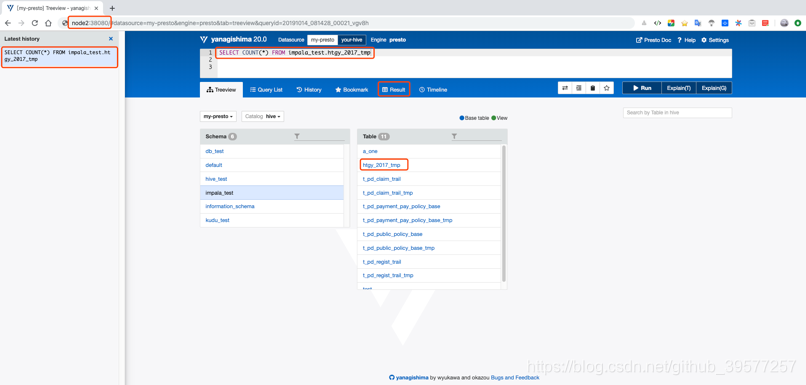
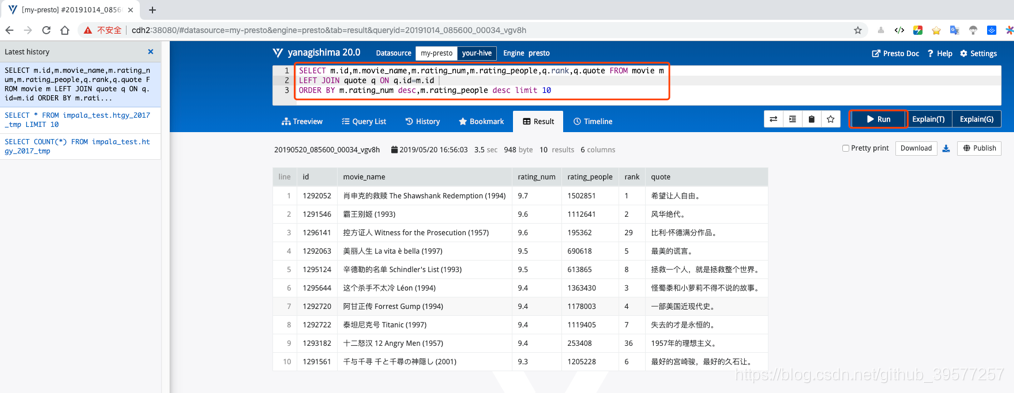
如果上一步启动没有问题,我们可以浏览器访问:http://cdh2:38080 ,可以看到如下页面,这个是Presto的页面。
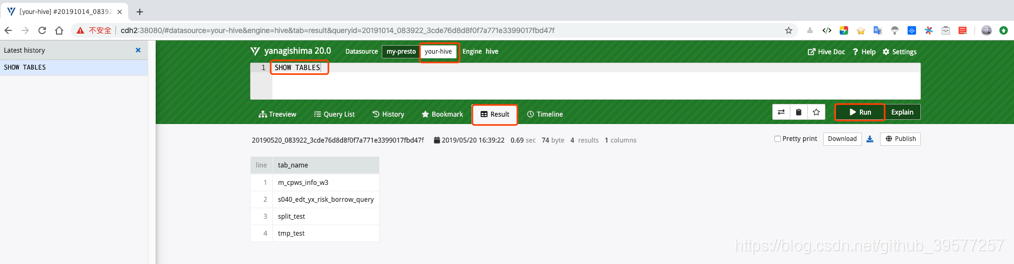
我们也可以只直接操作Hive,页面如下。注意在写SQL时一定不要加分号作为结束。
我们现在Presto中执行如下SQL,结果如下图所示。
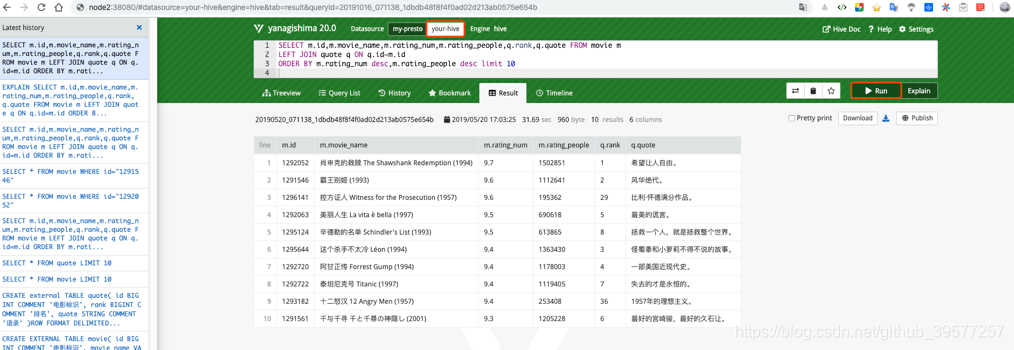
我们同样的方式通过页面在Hive中直接执行上面的SQL,结果如下图所示。
SELECT m.id,m.movie_name,m.rating_num,m.rating_people,q.rank,q.quote FROM movie m
LEFT JOIN quote q ON q.id=m.id
ORDER BY m.rating_num desc,m.rating_people desc limit 10
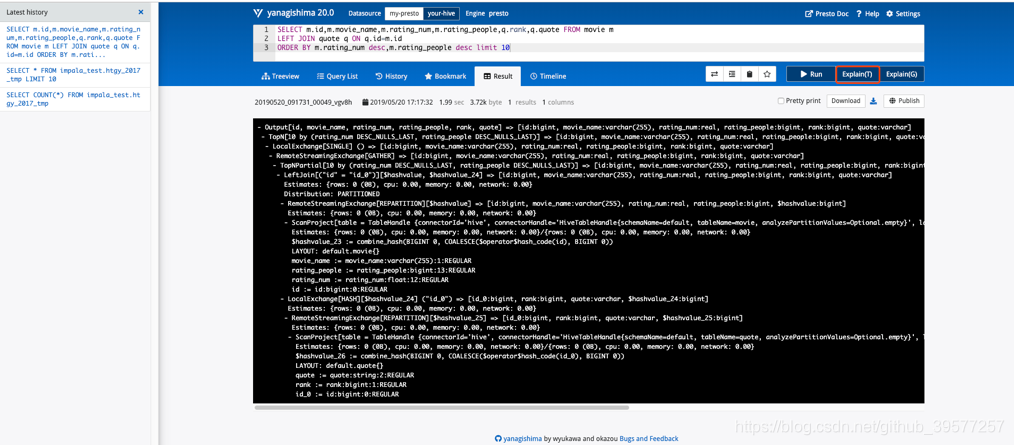
同时我们还可以看到这个SQL的执行计划的信息,如下图所示。
6 Presto 使用
6.1 Presto CLI
# Hive
presto --server cdh2:8080 --catalog hive --schema 库名
# Mysql
presto --server cdh2:8080 --catalog mysql --schema 库名
# Kafka
presto --server cdh2:8080 --catalog kafka --schema test
# Kudu
presto --server cdh2:8080 --catalog kudu --schema default
# MongoDB
presto --catalog mongodb --schema Mongo库名
6.1.1 MySQL
我们先登录MySQL,简单的查看一下数据,可以看到2千万条数据大概花了26.56秒。
-- 选择库
mysql> use flink_test;

-- count一下表vote_recordss_memory的数据条数
mysql>  SELECT count(*) FROM vote_recordss_memory;
+----------+
| count(*) |
+----------+
| 19999998 |
+----------+
1 row in set (26.56 sec)
接下来我们使用Presto,Catalog使用mysql,操作同一份数据看下执行情况。和MySQL的时间基本差不多,甚至稍快些,在多次查询同一份数据(高并发)时Presto的时间会更快些。从这里可以看到,Presto数据的获取会花费一部分时间,数据的处理可以充分的发挥大数据的分布式计算的优势,进行快速数据分析。
# 1 登录
[root@cdh2 ~]# presto  --server cdh2:8080 --catalog mysql --schema flink_test

# 2 查看库下的表
presto:flink_test> show tables;
         Table
------------------------
# …… 已省去其它表
vote_recordss_memory
(18 rows)
Query 20191015_012019_00002_fxstp, FINISHED, 2 nodes
Splits: 36 total, 36 done (100.00%)
0:01 [18 rows, 547B] [12 rows/s, 378B/s]

# 3统计 vote_recordss_memory 表的数据。注意不要加反单引号。
presto:flink_test> SELECT count(*) FROM vote_recordss_memory;
  _col0
----------
 19999998
(1 row)
Query 20191015_012537_00007_fxstp, FINISHED, 1 node
Splits: 18 total, 18 done (100.00%)
0:21 [20M rows, 0B] [952K rows/s, 0B/s]
6.1.2 Hive
在hvie中 default 库下执行如下查询
--获取评分最高且评论人数最多的电影评语。order by 和 sort by
0: jdbc:hive2://node-a.test.com:10000> SELECT m.id,m.movie_name,m.rating_num,m.rating_people,q.rank,q.quote FROM movie m LEFT JOIN quote q ON q.id=m.id ORDER BY m.rating_num desc,m.rating_people desc limit 10;

+----------+------------------------------------------+---------------+------------------+---------+------------------+
|   m.id   |               m.movie_name               | m.rating_num  | m.rating_people  | q.rank  |     q.quote      |
+----------+------------------------------------------+---------------+------------------+---------+------------------+
| 1292052  | 肖申克的救赎 The Shawshank Redemption (1994)  | 9.7           | 1502851          | 1       | 希望让人自由。          |
| 1291546  | 霸王别姬 (1993)                              | 9.6           | 1112641          | 2       | 风华绝代。            |
| 1296141  | 控方证人 Witness for the Prosecution (1957)  | 9.6           | 195362           | 29      | 比利·怀德满分作品。       |
| 1292063  | 美丽人生 La vita è bella (1997)             | 9.5           | 690618           | 5       | 最美的谎言。           |
| 1295124  | 辛德勒的名单 Schindler's List (1993)        | 9.5           | 613865           | 8       | 拯救一个人,就是拯救整个世界。  |
| 1295644  | 这个杀手不太冷 Léon (1994)                    | 9.4           | 1363430          | 3       | 怪蜀黍和小萝莉不得不说的故事。  |
| 1292720  | 阿甘正传 Forrest Gump (1994)                 | 9.4           | 1178003          | 4       | 一部美国近现代史。        |
| 1292722  | 泰坦尼克号 Titanic (1997)                     | 9.4           | 1119405          | 7       | 失去的才是永恒的。        |
| 1293182  | 十二怒汉 12 Angry Men (1957)                 | 9.4           | 253408           | 36      | 1957年的理想主义。      |
| 1291561  | 千与千寻 千と千尋の神隠し (2001)                | 9.3           | 1205228          | 6       | 最好的宫崎骏,最好的久石让。   |
+----------+------------------------------------------+---------------+------------------+---------+------------------+
10 rows selected (40.425 seconds)
在Presto 执行同样的查询
-- 1 登录
[root@cdh2 ~]# presto  --server cdh2:8080 --catalog hive --schema default

-- 2 查看可用的表
presto:default> SHOW TABLES;
             Table
-------------------------------
# …… 已省略其它未涉及到的表
 movie
 quote
 (6 rows)
Query 20191015_014031_00013_fxstp, FINISHED, 2 nodes
Splits: 36 total, 36 done (100.00%)
0:01 [6 rows, 173B] [7 rows/s, 226B/s]

-- 3 我们执行第二章实战项目的查询,这里注意加上分号作为结束
--  可以看到大概花了7秒钟就统计出了结果,
presto:default> SELECT m.id,m.movie_name,m.rating_num,m.rating_people,q.rank,q.quote FROM movie m
             -> LEFT JOIN quote q ON q.id=m.id
             -> ORDER BY m.rating_num DESC,m.rating_people DESC LIMIT 10;
   id    |                  movie_name                  | rating_num | rating_people | rank |             quote
---------+--------------------------------------------+------------+--------------+------+---------------------
 1292052 | 肖申克的救赎 The Shawshank Redemption (1994) |        9.7 |       1502851 |    1 | 希望让人自由。
 1291546 | 霸王别姬 (1993)                              |        9.6 |       1112641 |    2 | 风华绝代。
 1296141 | 控方证人 Witness for the Prosecution (1957) |        9.6 |        195362 |   29 | 比利·怀德满分作品。
 1292063 | 美丽人生 La vita è bella (1997)              |        9.5 |        690618 |    5 | 最美的谎言。
 1295124 | 辛德勒的名单 Schindler's List (1993)     |        9.5 |        613865 |    8 | 拯救一个人,就是拯救整个世界。
 1295644 | 这个杀手不太冷 Léon (1994)                 |        9.4 |       1363430 |    3 | 怪蜀黍和小萝莉不得不说的故事。
 1292720 | 阿甘正传 Forrest Gump (1994)              |        9.4 |       1178003 |    4 | 一部美国近现代史。
 1292722 | 泰坦尼克号 Titanic (1997)                  |        9.4 |       1119405 |    7 | 失去的才是永恒的。
 1293182 | 十二怒汉 12 Angry Men (1957)               |        9.4 |        253408 |   36 | 1957年的理想主义。
 1291561 | 千与千寻 千と千尋の神隠し (2001)            |        9.3 |       1205228 |    6 | 最好的宫崎骏,最好的久石让。
(10 rows)
Query 20191015_014345_00014_fxstp, FINISHED, 2 nodes
Splits: 115 total, 115 done (100.00%)
0:07 [500 rows, 176KB] [72 rows/s, 25.5KB/s]
6.1.3 Kudu
因为Kudu表时通过Impala创建的,因此表名前面都带有impala::前缀,并且也包含了库名信息,在Presto执行是因为英文冒号是特殊字符,只需要将库名用引号引起来,在Presto就可以执行。从执行的效果来看也是很快,但是Presto的控制台执行时间精确到的是秒,小于1秒的都显示为了0秒。
# 1 通过Presto连接Kudu
[root@cdh2 ~]# presto  --server cdh2:8080 --catalog kudu --schema default

-- 2 查看当前可用的表列表。可以看到我们通过Impala创建的Kudu表都加有 impala:: 前缀。
presto:default> show tables;
                      Table
--------------------------------------------------
 …… 这里已省略其它未用到的表
impala::kudu_demo.movie
impala::kudu_demo.quote
tag_5
(16 rows)
Query 20191017_091246_00002_fxstp, FINISHED, 2 nodes
Splits: 36 total, 36 done (100.00%)
0:00 [16 rows, 773B] [76 rows/s, 3.63KB/s]

-- 3 在Presto中查询Kudu表中的数据。注意如果表中有特殊字符(例如这里又冒号),需要用引号括起来。
presto:default> SELECT m.id,m.movie_name,m.rating_num,m.rating_people,q.rank,q.quote FROM "impala::kudu_demo.movie" m
             -> LEFT JOIN "impala::kudu_demo.quote" q ON q.id=m.id
             -> ORDER BY m.rating_num DESC,m.rating_people DESC LIMIT 10;
   id    |                  movie_name                  | rating_num | rating_people | rank |             quote
---------+------------------------------------------+------------+---------------+------+------------------------
1292052 | 肖申克的救赎 The Shawshank Redemption (1994) |        9.7 |       1502851 |    1 | 希望让人自由。
 1291546 | 霸王别姬 (1993)                              |        9.6 |       1112641 |    2 | 风华绝代。
 1296141 | 控方证人 Witness for the Prosecution (1957)  |        9.6 |        195362 |   29 | 比利·怀德满分作品。
 1292063 | 美丽人生 La vita è bella (1997)              |        9.5 |        690618 |    5 | 最美的谎言。
1295124 | 辛德勒的名单 Schindler's List (1993)        |        9.5 |        613865 |    8 | 拯救一个人,就是拯救整个世界。
1295644 | 这个杀手不太冷 Léon (1994)                   |        9.4 |       1363430 |    3 | 怪蜀黍和小萝莉不得不说的故事。
1292720 | 阿甘正传 Forrest Gump (1994)                 |        9.4 |       1178003 |    4 | 一部美国近现代史。
 1292722 | 泰坦尼克号 Titanic (1997)                    |        9.4 |       1119405 |    7 | 失去的才是永恒的。
 1293182 | 十二怒汉 12 Angry Men (1957)                 |        9.4 |        253408 |   36 | 1957年的理想主义。
 1291561 | 千与千寻 千と千尋の神隠し (2001)             |        9.3 |       1205228 |    6 | 最好的宫崎骏,最好的久石让。
(10 rows)
Query 20191017_092306_00006_fxstp, FINISHED, 2 nodes
Splits: 117 total, 117 done (100.00%)
0:00 [500 rows, 1.71KB] [1.39K rows/s, 4.73KB/s]
6.1.4 Kafka
查询Kafka的数据
presto:default> select _partition_id,_partition_offset,_segment_count,_key,_message from canal limit 3;
 _partition_id | _partition_offset | _segment_count | _key |
---------------+-------------------+----------------+------+---------------------------------------------------------------------------------------------------------------------------------------------------------------------------------
             0 |                45 |              1 | NULL | {"data":[{"loan_contract_id":"2","min_date":"2019-05-14","id":"3"}],"database":"adl_prewarning","es":1557798417000,"id":5242,"isDdl":false,"mysqlType":{"loan_contract_id":"varc
             0 |                46 |              2 | NULL | {"data":[{"loan_contract_id":"7","min_date":"2019-05-14","id":"7"}],"database":"adl_prewarning","es":1557827976000,"id":5542,"isDdl":false,"mysqlType":{"loan_contract_id":"varc
             0 |                47 |              3 | NULL | {"data":null,"database":"prewarning","es":1557978716000,"id":6116,"isDdl":true,"mysqlType":null,"old":null,"pkNames":null,"sql":"ALTER TABLE a ADD COLUMN age INT","sqlType"
(3 rows)
Query 20190519_193635_00009_huyim, FINISHED, 1 node
Splits: 19 total, 19 done (100.00%)
0:46 [84 rows, 104KB] [1 rows/s, 2.25KB/s]

presto:default> select json_extract(_message, '$.type') from canal limit 3;
  _col0
----------
 "INSERT"
 "UPDATE"
 "ALTER"
(3 rows)
Query 20190519_194659_00012_huyim, FINISHED, 1 node
Splits: 35 total, 35 done (100.00%)
0:00 [84 rows, 104KB] [315 rows/s, 393KB/s]
6.2 JDBC 代码示例
6.2.1 编写Presto jdbc代码
新建Maven项目。
在 idea 创建一个maven项目。
在pom.xml中引入依赖
    <dependencies>
        <!-- 0.219 com.facebook.presto已移至 io.prestosql.presto-jdbc -->
        <dependency>
            <groupId>io.prestosql</groupId>
            <artifactId>presto-jdbc</artifactId>
            <version>310</version>
        </dependency>
    </dependencies>
创建java类,编写Presto jdbc client代码
package yore;

import io.prestosql.jdbc.PrestoConnection;
import io.prestosql.jdbc.PrestoStatement;
import java.sql.DriverManager;
import java.sql.ResultSet;
import java.sql.SQLException;
import java.time.ZoneId;
import java.util.TimeZone;

/**
 * JDBC访问 Presto
 *
 * Created by yore on 2019/5/8 13:10
 */
public class PrestoJDBCClient {

    public static void printrow(ResultSet rs, int[] types) throws SQLException {
        for(int i=0; i<types.length; i++){
            System.out.print(" ");
            System.out.print(rs.getObject(i+1));
        }
        System.out.println("");
    }

    public static void connect() throws SQLException {
        // @see <a href="https://en.wikipedia.org/wiki/List_of_tz_database_time_zones">List of tz database time zones</a>
        // 设置时区,这里必须要设置  map.put("CTT", "Asia/Shanghai");
        TimeZone.setDefault(TimeZone.getTimeZone(ZoneId.SHORT_IDS.get("CTT")));

        PrestoConnection conn = null;
        PrestoStatement statement = null;
        try {
            // 加载 Presto JDBC 驱动类
            Class.forName("io.prestosql.jdbc.PrestoDriver");

            /*
             * presto连接串:
             *      在 url 指定默认的 catalog 为:system, 默认为 Schema 为: runtime ,
             *      使用的用户名为: presto-user,这个用户名根据实际自己设定,用来标示执行 SQL 的用户,虽然不会通过该用户名进行身份认证,大师必须要写
             *      密码直接为 null, 或者可以随意指定一个任意密码, Presto 是不会对密码进行认证的。
             */
            conn = (PrestoConnection)DriverManager.getConnection(
                    // 端口查看config.properties文件中配置项http-server.http.port的值。catalog为hive,Schema为default,
                    "jdbc:presto://cdh6:8080/hive/default",
                    "presto-user",
                    null
            );

            statement = (PrestoStatement)conn.createStatement();

            String sql = "select * from nodes";
            sql = "show tables";
            sql = " select count(*) from dw_orders_his";
            long start = System.currentTimeMillis();
            ResultSet rs = statement.executeQuery(sql);


            int cn = rs.getMetaData().getColumnCount();
            int[] types = new int[cn];
            for(int i=0; i<cn; i++){
                types[i] = rs.getMetaData().getColumnType(i+1);
            }

            while (rs.next()){
                printrow(rs, types);
            }
            System.out.println("-------");
            System.out.println("用时:" + (System.currentTimeMillis()-start) + "(ms)");

        }catch (ClassNotFoundException e){
            e.printStackTrace();
        }catch (SQLException e){
            e.printStackTrace();
        }
    }

    public static void main(String[] args) throws SQLException {
        connect();
    }
}
6.2.2 Kerberos下Trino jdbc查询示例代码
如果使用的是 Maven创建的工程,可以如下的方式引入
<dependency>
    <groupId>io.trino</groupId>
    <artifactId>trino-jdbc</artifactId>
    <version>463</version>
</dependency>
jdbc代码示例(其中{...}部分请替换为你环境实际的值):
package yore;

import io.trino.jdbc.TrinoResultSet;
import lombok.extern.slf4j.Slf4j;

import java.sql.Connection;
import java.sql.DriverManager;
import java.sql.PreparedStatement;
import java.sql.ResultSet;
import java.sql.ResultSetMetaData;
import java.sql.SQLException;
import java.util.Properties;

@Slf4j
public class JDBCKerberosExample {
    private static final Properties properties = new Properties();
    public static Connection connection = null;
    public static ResultSet result = null;
    public static PreparedStatement statement = null;

    private static void init() throws ClassNotFoundException {
        Class.forName("io.trino.jdbc.TrinoDriver");
        properties.setProperty("user", "{你的用户名}");

        properties.setProperty("KerberosConfigPath", "/etc/krb5.conf");
        properties.setProperty("KerberosPrincipal", "trino/{FQDN}@CESTC.COM");
        properties.setProperty("KerberosKeytabPath", "/etc/trino/trino.keytab");
        properties.setProperty("KerberosRemoteServiceName", "trino");

        properties.setProperty("SSLKeyStorePath", "/etc/trino/client.jks");
        properties.setProperty("SSLKeyStorePassword", "{SSL的KeyStore密码}");
    }

    /**
     * Program entry
     * @param args no need program parameter
     */
    public static void main(String[] args) {
        String url = "jdbc:trino://{COORDINATOR_IP}:7778/tpcds/sf1?SSL=true&SSLVerification=CA";
        try {
            init();
            String sql = """
                    --- q03.sql
                    SELECT
                      "dt"."d_year"
                    , "item"."i_brand_id" "brand_id"
                    , "item"."i_brand" "brand"
                    , "sum"("ss_ext_sales_price") "sum_agg"
                    FROM
                      date_dim dt
                    , store_sales
                    , item
                    WHERE ("dt"."d_date_sk" = "store_sales"."ss_sold_date_sk")
                       AND ("store_sales"."ss_item_sk" = "item"."i_item_sk")
                       AND ("item"."i_manufact_id" = 128)
                       AND ("dt"."d_moy" = 11)
                    GROUP BY "dt"."d_year", "item"."i_brand", "item"."i_brand_id"
                    ORDER BY "dt"."d_year" ASC, "sum_agg" DESC, "brand_id" ASC
                    LIMIT 100
                    """;
            connection = DriverManager.getConnection(url, properties);
            statement = connection.prepareStatement(sql.trim());
            result = statement.executeQuery();

            TrinoResultSet rs = (TrinoResultSet) result;
            System.out.println("QueryId: " + rs.getQueryId());
            ResultSetMetaData resultMetaData = result.getMetaData();
            int colNum = resultMetaData.getColumnCount();
            for (int j = 1; j <= colNum; j++) {
                try {
                    System.out.print(resultMetaData.getColumnLabel(j) + "\t");
                } catch (SQLException e) {
                    log.error("", e);
                }
            }
            System.out.print("\n--------------------------------------\n");
            while (rs.next()) {
                for (int i = 1; i <= colNum; i++) {
                    System.out.print(rs.getObject(i) + "\t");
                }
                System.out.println();
            }

        } catch (SQLException | ClassNotFoundException e) {
            log.error("", e);
        } finally {
            if (result != null) {
                try {
                    result.close();
                } catch (SQLException e) {
                    log.error("", e);
                }
            }
            if (statement != null) {
                try {
                    statement.close();
                } catch (SQLException e) {
                    log.error("", e);
                }
            }
            if (connection != null) {
                try {
                    connection.close();
                } catch (SQLException e) {
                    log.error("", e);
                }
            }
        }
    }
}
6.3 Kafka Connector
其他的Connectors 可查看官网,这里主要以Kafka Connector为例。
下载脚本,
curl -o kafka-tpch http://repo1.maven.org/maven2/de/softwareforge/kafka_tpch_0811/1.0/kafka_tpch_0811-1.0.sh
chmod +x kafka-tpch
运行脚本,创建Topic和加载一些数据
./kafka-tpch load --brokers cdh3:9092,cdh2:9092,cdh1:9092 --prefix ptch. --tpch-type tiny
修改kafka.properties为如下
connector.name=kafka
kafka.default-schema=default
kafka.table-names=ptch.customer,ptch.lineitem,ptch.orders,ptch.nation,ptch.part,ptch.partsupp,ptch.region,ptch.supplier
kafka.nodes=cdh1:9092,cdh2:9092,cdh3:9092
# d(天)、h(小时)、m(分钟)、s(秒)、ms(毫秒)、us(微秒)、ns(纳秒)、
kafka.connect-timeout=10s
kafka.hide-internal-columns=false
重启Presto
bin/launcher restart
连接 Presto Cli
[root@cdh6 bin]# ./presto-cli-0.219-executable.jar --catalog kafka --schema ptch
presto:ptch> show tables;
  Table
----------
 customer
 lineitem
 nation
 orders
 part
 partsupp
 region
 supplier
(8 rows)
Query 20190519_205355_00002_vqku8, FINISHED, 1 node
Splits: 19 total, 19 done (100.00%)
0:00 [8 rows, 166B] [17 rows/s, 355B/s]
6.3.1 基本查询
presto:ptch> describe customer;

presto:ptch> select count(*) from customer;

presto:ptch> select _message from customer limit 5;

presto:ptch> select sum(cast(json_extract_scalar(_message,'$.accountBalance') as double)) from customer limit 10;
6.3.2 添加表定义文件
在 presto-server-0.219/etc/kafka/ 下新建 ptch.customer.json 并重启 Presto
{
  "tableName": "customer",
  "schemaName": "ptch",
  "topicName": "ptch.customer",
  "key": {
    "dataFormat": "raw",
    "fields": [
      {
        "name": "kafka_key",
        "dataFormat": "LONG",
        "type": "BIGINT",
        "hidden": "false"
      }
    ]
  }
}
重启: bin/launcher restart
查看表信息,可以看到多了一列 kafka_key
bin/presto-cli-0.219-executable.jar --catalog kafka --schema ptch

presto:ptch> desc customer;
      Column       |  Type   | Extra |                   Comment
-------------------+---------+-------+---------------------------------------------
 kafka_key         | bigint  |       |
 _partition_id     | bigint  |       | Partition Id
 _partition_offset | bigint  |       | Offset for the message within the partition
 _segment_start    | bigint  |       | Segment start offset
 _segment_end      | bigint  |       | Segment end offset
 _segment_count    | bigint  |       | Running message count per segment
 _message_corrupt  | boolean |       | Message data is corrupt
 _message          | varchar |       | Message text
 _message_length   | bigint  |       | Total number of message bytes
 _key_corrupt      | boolean |       | Key data is corrupt
 _key              | varchar |       | Key text
 _key_length       | bigint  |       | Total number of key bytes
(12 rows)
Query 20190520_014112_00002_i4shm, FINISHED, 1 node
Splits: 19 total, 19 done (100.00%)
0:01 [12 rows, 1.05KB] [15 rows/s, 1.37KB/s]

presto:ptch> select kafka_key from customer order by kafka_key limit 10;
 kafka_key
-----------
         0
         1
         2
         3
         4
         5
         6
         7
         8
         9
(10 rows)
Query 20190520_014623_00007_i4shm, FINISHED, 1 node
Splits: 18 total, 18 done (100.00%)
0:00 [1.5K rows, 411KB] [7.07K rows/s, 1.89MB/s]
6.3.3 将 message 中所有的值映射到不同列
再次更新 presto-server-0.219/etc/kafka/ 下新建 ptch.customer.json 并重启 Presto为:
{
  "tableName": "customer",
  "schemaName": "ptch",
  "topicName": "ptch.customer",
  "key": {
    "dataFormat": "raw",
    "fields": [
      {
        "name": "kafka_key",
        "dataFormat": "LONG",
        "type": "BIGINT",
        "hidden": "false"
      }
    ]
  },
  "message": {
    "dataFormat": "json",
    "fields": [
      {
        "name": "row_number",
        "mapping": "rowNumber",
        "type": "BIGINT"
      },
      {
        "name": "customer_Key",
        "mapping": "customerKey",
        "type": "BIGINT"
      },
      {
        "name": "name",
        "mapping": "name",
        "type": "VARCHAR"
      },
      {
        "name": "address",
        "mapping": "address",
        "type": "VARCHAR"
      },
      {
        "name": "nation_key",
        "mapping": "nationKey",
        "type": "BIGINT"
      },
      {
        "name": "phone",
        "mapping": "phone",
        "type": "VARCHAR"
      },
      {
        "name": "account_balance",
        "mapping": "accountBalance",
        "type": "DOUBLE"
      },
      {
        "name": "market_segment",
        "mapping": "marketSegment",
        "type": "VARCHAR"
      },
      {
        "name": "comment",
        "mapping": "comment",
        "type": "VARCHAR"
      }
    ]
  }
}
再次查看表信息,可以看到我们前面配置的列已经添加上去了
presto:ptch> desc customer;
      Column       |  Type   | Extra |                   Comment
-------------------+---------+-------+---------------------------------------------
 kafka_key         | bigint  |       |
 row_number        | bigint  |       |
 customer_key      | bigint  |       |
 name              | varchar |       |
 address           | varchar |       |
 nation_key        | bigint  |       |
 phone             | varchar |       |
 account_balance   | double  |       |
 market_segment    | varchar |       |
 comment           | varchar |       |
 _partition_id     | bigint  |       | Partition Id
 _partition_offset | bigint  |       | Offset for the message within the partition
 _segment_start    | bigint  |       | Segment start offset
 _segment_end      | bigint  |       | Segment end offset
 _segment_count    | bigint  |       | Running message count per segment
 _message_corrupt  | boolean |       | Message data is corrupt
 _message          | varchar |       | Message text
 _message_length   | bigint  |       | Total number of message bytes
 _key_corrupt      | boolean |       | Key data is corrupt
 _key              | varchar |       | Key text
 _key_length       | bigint  |       | Total number of key bytes
(21 rows)
Query 20190520_020241_00003_r6kqj, FINISHED, 1 node
Splits: 19 total, 19 done (100.00%)
0:01 [21 rows, 1.64KB] [18 rows/s, 1.47KB/s]

presto:ptch> select * from customer limit 5;
 kafka_key | row_number | customer_key |        name        |            address             | nation_key |      phone      | account_balance | market_segment |                                                comment                                                 | _part
-----------+------------+--------------+--------------------+--------------------------------+------------+-----------------+-----------------+----------------+--------------------------------------------------------------------------------------------------------+------
         0 |          1 |            1 | Customer#000000001 | IVhzIApeRb ot,c,E              |         15 | 25-989-741-2988 |          711.56 | BUILDING       | to the even, regular platelets. regular, ironic epitaphs nag e                                         |
         1 |          2 |            2 | Customer#000000002 | XSTf4,NCwDVaWNe6tEgvwfmRchLXak |         13 | 23-768-687-3665 |          121.65 | AUTOMOBILE     | l accounts. blithely ironic theodolites integrate boldly: caref                                        |
         2 |          3 |            3 | Customer#000000003 | MG9kdTD2WBHm                   |          1 | 11-719-748-3364 |         7498.12 | AUTOMOBILE     |  deposits eat slyly ironic, even instructions. express foxes detect slyly. blithely even accounts abov |
         3 |          4 |            4 | Customer#000000004 | XxVSJsLAGtn                    |          4 | 14-128-190-5944 |         2866.83 | MACHINERY      |  requests. final, regular ideas sleep final accou                                                      |
         4 |          5 |            5 | Customer#000000005 | KvpyuHCplrB84WgAiGV6sYpZq7Tj   |          3 | 13-750-942-6364 |          794.47 | HOUSEHOLD      | n accounts will have to unwind. foxes cajole accor                                                     |
(5 rows)
Query 20190520_020359_00004_r6kqj, FINISHED, 1 node
Splits: 18 total, 18 done (100.00%)
0:35 [1.5K rows, 411KB] [42 rows/s, 11.7KB/s]

presto:ptch> select sum(account_balance) from customer limit 10;
       _col0
-------------------
 6681865.590000002
(1 row)
Query 20190520_020616_00005_r6kqj, FINISHED, 1 node
Splits: 18 total, 18 done (100.00%)
0:01 [1.5K rows, 411KB] [2.75K rows/s, 755KB/s]
6.4 使用实时数据
6.4.1 在Kafka集群上创建一个Topic
kafka-topics --create --zookeeper cdh1:2181,cdh2:2181,cdh3:2181 --replication-factor 1 --partitions 1 --topic test.weblog
6.4.2 编写一个Kafka生产者
TestProducer
推送到Kafka的数据格式如下:
{
  "user": {
    "name": "Bob",
    "gender": "male"
  },
  "time": 1558394886956,
  "website": "www.twitter.com"
}
6.4.3 在Presto中创建表
在presto-server-0.219/etc/catalog/kafka.properties配置文件的kafka.table-names中添加上Kafka Topic test.weblog
在presto-server-0.219/etc/kafka/下添加Kafka数据配置json文件 test.weblog.json,在这个版本中还不支持时间戳,配置如下:
{
  "tableName": "weblog",
  "schemaName": "test",
  "topicName": "test.weblog",
  "key": {
    "dataFormat": "raw",
    "fields": [
      {
        "name": "kafka_key",
        "dataFormat": "LONG",
        "type": "BIGINT",
        "hidden": "false"
      }
    ]
  },
  "message": {
    "dataFormat": "json",
    "fields": [
      {
        "name": "name",
        "mapping": "user/name",
        "type": "VARCHAR"
      },
      {
        "name": "gender",
        "mapping": "user/gender",
        "type": "VARCHAR"
      },
      {
        "name": "time",
        "mapping": "time",
        "type": "BIGINT"
      },
      {
        "name": "website",
        "mapping": "website",
        "type": "VARCHAR"
      }
    ]
  }
}
6.4.4 重启Presto,进行如下查询数据
# 重启
bin/launcher restart

# 进入cli,连接Kafka
./presto-cli-0.219-executable.jar --catalog kafka --schema test
进行如下查询(此时可以把Kafka生产者运行,模拟持续的数据源):
JSON Functions and Operators
Date and Time Functions and Operators
presto:test> show tables;
 Table
--------
 weblog
(1 row)
Query 20190521_160458_00002_gf883, FINISHED, 1 node
Splits: 19 total, 19 done (100.00%)
0:00 [1 rows, 20B] [2 rows/s, 52B/s]

presto:test> desc weblog;
      Column       |   Type    | Extra |                   Comment
-------------------+-----------+-------+---------------------------------------------
 kafka_key         | bigint    |       |
 name              | varchar   |       |
 gender            | varchar   |       |
 time              | timestamp |       |
 website           | varchar   |       |
 _partition_id     | bigint    |       | Partition Id
 _partition_offset | bigint    |       | Offset for the message within the partition
 _segment_start    | bigint    |       | Segment start offset
 _segment_end      | bigint    |       | Segment end offset
 _segment_count    | bigint    |       | Running message count per segment
 _message_corrupt  | boolean   |       | Message data is corrupt
 _message          | varchar   |       | Message text
 _message_length   | bigint    |       | Total number of message bytes
 _key_corrupt      | boolean   |       | Key data is corrupt
 _key              | varchar   |       | Key text
 _key_length       | bigint    |       | Total number of key bytes
(16 rows)
Query 20190521_160636_00004_gf883, FINISHED, 1 node
Splits: 19 total, 19 done (100.00%)
0:00 [16 rows, 1.27KB] [54 rows/s, 4.33KB/s]


presto:test> select count(*) from weblog;
 _col0
-------
    13
(1 row)
Query 20190521_161116_00006_gf883, FINISHED, 1 node
Splits: 18 total, 18 done (100.00%)
0:00 [13 rows, 1.17KB] [78 rows/s, 7.1KB/s]
presto:test> select count(*) from weblog;
 _col0
-------
    17
(1 row)
Query 20190521_161120_00007_gf883, FINISHED, 1 node
Splits: 18 total, 18 done (100.00%)
0:00 [17 rows, 1.53KB] [105 rows/s, 9.5KB/s]
presto:test> select count(*) from weblog;
 _col0
-------
    20
(1 row)
Query 20190521_161129_00008_gf883, FINISHED, 1 node
Splits: 18 total, 18 done (100.00%)
0:00 [20 rows, 1.79KB] [102 rows/s, 9.16KB/s]


presto:test> select kafka_key,name,gender,time,website from weblog limit 10;
 kafka_key |  name  | gender |     time      |     website
-----------+--------+--------+---------------+------------------
         0 | Bob    | male   | 1558394879467 | www.jd.com
         1 | Cara   | female | 1558394880952 | www.linkin.com
         2 | David  | male   | 1558394881952 | www.facebook.com
         3 | Bob    | male   | 1558394882952 | www.linkin.com
         4 | Edward | male   | 1558394883952 | www.google.com
         5 | Alice  | female | 1558394884952 | www.facebook.com
         6 | Cara   | female | 1558394885952 | www.facebook.com
         7 | Bob    | male   | 1558394886956 | www.twitter.com
         0 | Cara   | female | 1558455070939 | www.google.com
         1 | David  | male   | 1558455072607 | www.facebook.com
(10 rows)
Query 20190521_162907_00003_y7pq6, FINISHED, 1 node
Splits: 18 total, 18 done (100.00%)
0:00 [20 rows, 1.79KB] [62 rows/s, 5.62KB/s]

presto:test> select kafka_key,name,gender,from_unixtime(time/1000),website from weblog limit 10;
 kafka_key |  name  | gender |          _col3          |     website
-----------+--------+--------+-------------------------+------------------
         0 | Bob    | male   | 2019-05-21 07:27:59.000 | www.jd.com
         1 | Cara   | female | 2019-05-21 07:28:00.000 | www.linkin.com
         2 | David  | male   | 2019-05-21 07:28:01.000 | www.facebook.com
         3 | Bob    | male   | 2019-05-21 07:28:02.000 | www.linkin.com
         4 | Edward | male   | 2019-05-21 07:28:03.000 | www.google.com
         5 | Alice  | female | 2019-05-21 07:28:04.000 | www.facebook.com
         6 | Cara   | female | 2019-05-21 07:28:05.000 | www.facebook.com
         7 | Bob    | male   | 2019-05-21 07:28:06.000 | www.twitter.com
         0 | Cara   | female | 2019-05-22 00:11:10.000 | www.google.com
         1 | David  | male   | 2019-05-22 00:11:12.000 | www.facebook.com
(10 rows)
Query 20190521_163618_00006_y7pq6, FINISHED, 1 node
Splits: 34 total, 34 done (100.00%)
0:00 [20 rows, 1.79KB] [48 rows/s, 4.32KB/s]


 1021


 扫一扫


 被折叠的 条评论
为什么被折叠?
 到【灌水乐园】发言


