



 本文介绍了Spring Cloud中Ribbon、Hystrix和Feign的相关知识。Ribbon是客户端负载均衡工具,支持客户端负载均衡;Hystrix具备服务降级、熔断等功能,可防止故障蔓延;Feign整合了Ribbon与Hystrix,提供声明式web服务客户端定义方式,并介绍了它们的配置属性。
Ribbon 简介
Spring Cloud Ribbon是基于HTTP和TCP的客户端负载均衡工具。其使用是内嵌到微服务中,提供微服务之间的调用,并支持客户端负载均衡。
客户端负载均衡
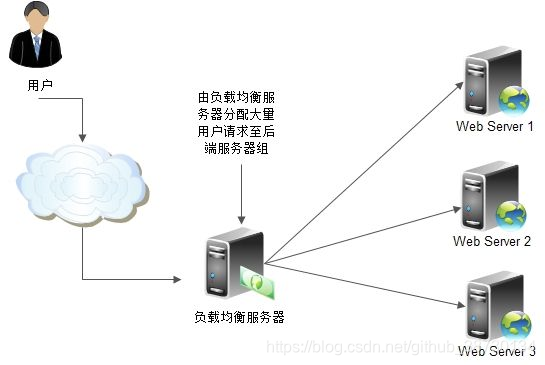
通常说的负载均衡指服务端负载均衡,服务端负载均衡可分为软件负载均衡和硬件负载均衡。但无论是软件负载均衡还是硬件负载均衡都会在服务端维护一个服务列表,当用户调用服务资源时服务端将根据服务列表决定调用那个服务实例。
客户端负载均衡不同于服务端负载均衡,客户端负载均衡服务列表维护在客户端,客户端通过心跳维护服务端服务列表。客户端会每隔一段时间更新本地服务列表,Ribbon做为客户端负载均衡框架,可以负载均衡的方式调用服务实例,默认采用轮询的方式
- 服务提供者启动多个服务实例
- 服务调用方通过使用@LoadBalanced注解修饰过的RestTemplate来实现向服务接口调用
常用配置属性
ribbon.key=value全局通用设置模式
-
ribbon.ReadTimeout: 客户端读取超时时间,超时时间要小于Hystrix的超时时间,否则重试机制就无意义了
-
ribbon.ConnectTimeout: 客户端连接超时时间
-
ribbon.OkToRetryOnAllOperations: 访问实例失败(超时),允许自动重试
-
ribbon.MaxAutoRetries: 设置重试次数,失败后会更换实例访问,请一定确保接口的幂等性,否则重试可能导致数据异常
-
ribbon.MaxAutoRetriesNextServer: 切换服务器实例的重试次数
.ribbon.key=value针对不同客户端设置模式:
-
.ribbon.ReadTimeout: 客户端读取超时时间,超时时间要小于Hystrix的超时时间,否则重试机制就无意义了
-
.ribbon.ConnectTimeout: 客户端连接超时时间
-
.ribbon.OkToRetryOnAllOperations: 访问实例失败(超时),允许自动重试
-
.ribbon.MaxAutoRetries: 设置重试次数,失败后会更换实例访问,请一定确保接口的幂等性,否则重试可能导致数据异常
-
.ribbon.MaxAutoRetriesNextServer: 切换服务器实例的重试次数
Hystrix 简介
Spring Cloud Hystrix具备服务降级、服务熔断、线程和信号隔离、请求缓存、请求合并、服务监控等功能。在微服务系统中存在多个服务单元,服务单元之间存在广泛依赖关系,当一个服务节点发生故障时可能会引发故障的蔓延导致整个系统不可用。在分布式架构中,断路器模式的作用就是为了解决这种问题。当某个单元发生故障是,熔断监控器将向调用方返回一个错误响应,防止线程因故障长时间占用得不到释放,导致故障蔓延系统瘫痪。
快速入门
1.创建一个Spring boot项目,命名为hello-service,在pom.xml中添加Hystrix依赖
  <dependency>
      <groupId>org.springframework.cloud</groupId>
      <artifactId>spring-cloud-starter-hystrix</artifactId>
  </dependency>
2.在主类中使用@EnableCircuitBreaker注解开启断路器功能
    @EnableCircuitBreaker
    @EnableDiscoveryClient
    @SpringBooApplication
    public class ConsumerApplication{

        @Bean
        @LoadBalanced
        RestTemplate restTemplate(){

            return new RestTemplate;

        }

        public static void main(String[] args){

            SpringApplication.run(ConsumerApplication.class, args);

        }
    }
3.添加服务方法,@HystrixCommand启动熔断功能,fallbackMethod指定服务降级调用方法,当调用服务发生故障或长时间未响应将调用服务降级方法,做后续处理
    @Service
    public class HelloService{

        @Autowired
        RestTemplate restTemplate;

        @HystrixCommand(fallbackMethod = "helloFallback")
        public String helloService(){

            return restTemplate.getForEntity("http://HELLO-SERVICE/hello", String.class).getBody();

        }

        public String helloFallback(){

            return "error";
        }

    }
属性详情
属性配置优先级
- 全局默认值: 没有显示设置属性值,Hystrix默认属性值
- 全局配置属性: 在配置文件中显示指定属性值覆盖默认值。系统启动时或通过Spring Cloud Config和Spring Cloud Bus动态刷新配置功能配合下,实现对系统默认值覆盖。
- 实例默认值: 通过代码对实例设置属性值覆盖默认值
- 实例配置属性: 通过配置文件来为实例进行属性配置
常用配置属性
-
hystrix.command.default.execution.isolation.strategy: 配置执行隔离策略,THREAD通过线程池隔离,默认值。SEMAPHORE通过信号量隔离。
-
hystrix.command.default.execution.isolation.thread.timeoutInMilliseconds: 配置执行超时时间,单位毫秒。调用接口超过设置时间将触发服务降级。
-
hystrix.command.default.execution.timeout.enabled: 设置是否启用超时时间,默认是true,如果设置成false,则超时时间配置不起作用。
-
hystrix.command.default.fallback.enabled: 是否启用服务降级策略,默认为true。
-
hystrix.threadpool.default.coreSize: 执行命令线程池的核心线程数,即命令执行的最大并发数。默认值为10。
-
hystrix.threadpool.default.maximumSize: 最大执行线程数。
-
hystrix.threadpool.default.maxQueueSize: 设置线程池最大队列大小。当为-1使用SynchronousQueue实现的队列,否则使用LinekedBlockingQueue实现的队列。
Feign 简介
Spring Cloud Feign整合了Spring Cloud Ribbon与Spring Cloud Hystrix,除提供两者强大功能外,提供了一种声明式的web服务客户端定义方式。只用使用注解便能轻松使用Feign客户端。
快速入门
1.创建一个Spring boot项目,命名为hello-service,在pom.xml中添加Hystrix依赖
  <dependency>
      <groupId>org.springframework.cloud</groupId>
      <artifactId>spring-cloud-starter-feign</artifactId>
  </dependency>
2.在主类中使用@EnableFeignClients注解开启Feign功能支持
    @EnableFeignClients
    @EnableDiscoveryClient
    @SpringBooApplication
    public class ConsumerApplication{

        public static void main(String[] args){

            SpringApplication.run(ConsumerApplication.class, args);

        }

    }
3.定义SslmRemoteService接口,通过@FeignClient的value属性指定服务名来绑定服务,fallback属性指定服务降级调用方法类,path属性指定公共的URL
    @FeignClient(value = "srm-supplier-lifecycle", fallback = SslmRemoteServiceFallback.class, path = "/v1/{organizationId}")
    public interface SslmRemoteService{

        /**
        *创建调查表头并发布调查表
        *
        * @param organizationId
        * @param investigateHeaderList
        * @return List<InvestigateHeaderVO>
        */
        @PostMapping("/investigate/save-release")
        List<InvestigateHeaderVO> batchSaveAndReleaseInvestgHeader(@PathVariable("organizationId") Long organizationId,
                                                                    @RequestBody List<InvestigateHeaderVO> investigateHeaderList);


    }
4.定义SslmRemoteServiceFallback回调方法类::
    @Component
    @SuppressWarnings("all")
    public class SslmRemoteServiceFallback implements SslmRemoteService{

        private static final Logger LOGGER = LoggerFactory.getLogger(SslmRemoteServiceFallback.class);

        @Override
        public List<InvestigateHeaderVO> batchSaveAndReleaseInvestgHeader(Long organizationId, List<InvestigateHeaderVO> investigateHeaderList) {
            LOGGER.error("Post batch save and release investgHeader fail");
            throw new CommonException(BaseConstants.ErrorCode.ERROR);
        }
    }
Feign 属性配置
Spring Cloud Feign整合了Spring Cloud Ribbon和Spring Cloud Hystrix,所以对于负载均衡、熔断降级的配置可以按Ribbon和Hystrix的配置。
Ribbon配置
@FeignClient中name或value属性指定的服务名即Ribbon客户端的名,因此Feign中想对不同客户端做不同配置可以根据.ribbon.key=value进行配置
Hystrix配置
feign.hystrix.enabled: 设置是否开启Feign 客户端Hystrix支持。
禁用Hystrix配置
除通过feign.hystrix.enabled设置外还可针对服务客户端关闭Hystrix支持
1.创建关闭Hystrix配置类
    @Configuration
    public class DisableHystrixConfiguration{

        @Bean
        @Scope("prototype")
        public Feign.Builder feignBuilder(){
            return Feign.builder();
        }

    }
2.通过@FeignClient注解中,configuration参数引入配置
    @FeignClient(value = "hello-service", configuration = DisableHystrixConfiguration.class)
    public interface HelloService{

    }
Feign配置属性
- feign.compression.request.enabled: 设置是否开启请求GZIP压缩功能
- feign.compression.response.enabled: 设置是否开启响应GZIP压缩功能
- feign.compression.request.mime-type: 设置GZIP压缩请求的类型,默认text/xml,application/xml,application/json
- feign.compression.request.min-request-size: 设置GZIP压缩请求大小下限,超过的请求将被压缩





 扫一扫
扫一扫


 167万+
167万+

 被折叠的 条评论
为什么被折叠?
被折叠的 条评论
为什么被折叠?
 到【灌水乐园】发言





