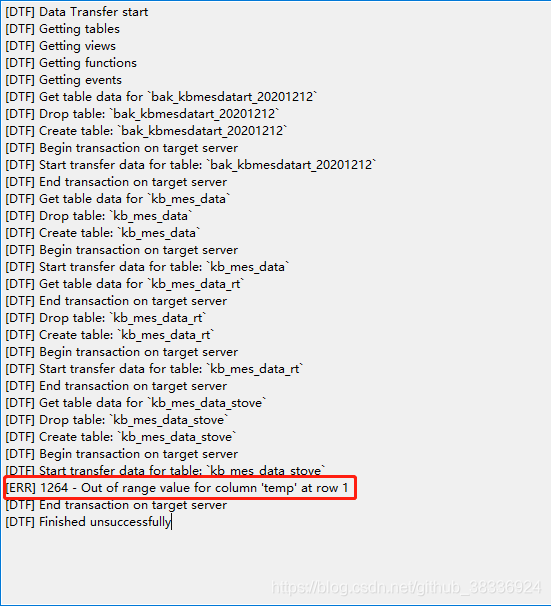
[ERR] 1264 - Out of range value for column ‘temp‘ at row 1

博客围绕MySQL数据库导入数据问题展开。使用MySQL 5.7和Navicat时,运行SQL文件导入数据出现错误代码1264。原因是字段的值超出可输入范围,解决办法是调整字段长度,若长度已达最大则改变字段类型。

前言

  • 数据库:MySQL_5.7
  • 数据库管理工具:Navicat

问题

  • 运行SQL文件导入数据时出现以下错误:
    在这里插入图片描述

原因

  • 字段的值超过其可输入的范围了
  • 例如:temp字段类型:int(5),但是导入的数据中有超出范围的

解决办法

  • 调整temp字段长度,例如:int(10)
  • 如果长度已经是最大,改变temp字段类型,例如:bigint(20)
<template> <div class="app-container table-page-content"> <div class="search-container filter-container-v2" style="margin-bottom: 10px" > <!-- :model="formInline" --> <el-form ref="queryForm" :inline="true" label-position="top" size="mini"> <el-form-item v-for="(item, index) in searchItems" :key="item.name" :label="item.label" :prop="item.name" :rules="item.rules" :class=" item.type == 'daterange' ? 'search-form-item-double search-form-item-daterange' : 'search-form-item' " > <template slot="label"> {{ item.label }} </template> <!-- <template v-if="item.type == 'input'"> <el-input v-model.trim="formInline[item.name]" :placeholder="item.placeholder" maxlength="64" clearable @keyup.enter.native="() => handleFilter()" > <el-button v-if="!item.hideButton" slot="append" icon="el-icon-search" @click="() => handleFilter()" /> </el-input> </template> --> <!-- ip: undefined, type: undefined, dispatchType: undefined, status: undefined, --> <template v-if="item.type == 'input'"> <el-input v-model.trim="listQuery[item.name]" :placeholder="item.placeholder" maxlength="64" clearable > </el-input> </template> <!-- <template v-if="item.type == 'select'"> <el-select v-model="formInline[item.name]" :placeholder="item.placeholder" clearable @focus="handleSelectQueue(item.name)" :filterable="item.filterable ? true : false" > <template v-for="option in item.options"> <el-option :key="option.value" :label="option.label" :value="option.value" /> </template> </el-select> </template> --> <template v-if="item.type == 'select'"> <el-select v-model.trim="listQuery[item.name]" :placeholder="item.placeholder" clearable > <template v-for="option in item.options"> <el-option :key="option.value" :label="option.label" :value="option.value" /> </template> </el-select> </template> </el-form-item> <el-form-item class="search-btns"> <!-- <el-button type="primary" @click="() => handleFilter()" >查询</el-button > --> <el-button type="primary" @click="() => handleFilterItems()" >查询</el-button > <el-button plain @click="reset">重置</el-button> </el-form-item> </el-form> </div> <div class="filter-container"> <el-button v-if="switchBtnVisiable" v-waves style="margin-left: 10px" size="mini" class="filter-item" type="primary" icon="el-icon-plus" @click="handleCreate" >添加</el-button > <el-popconfirm v-if="switchBtnVisiable && startDispatchVisiable" icon="el-icon-info" confirm-button-text="确认" title="请确认是否开始调度?" @onConfirm="operate(1)" > <el-button v-waves slot="reference" style=" margin-left: 10px; padding-top: 7px !important; padding-bottom: 7px !important; " size="mini" class="filter-item" icon="el-icon-video-play" >开始调度</el-button > </el-popconfirm> <el-popconfirm v-if="switchBtnVisiable && closeDispatchVisiable" icon="el-icon-info" confirm-button-text="确认" title="确认停止调度?这将停止新增任务的派发,但不会影响当前执行中的任务。" @onConfirm="operate(2)" > <el-button v-waves slot="reference" style=" margin-left: 10px; padding-top: 7px !important; padding-bottom: 7px !important; " size="mini" class="filter-item" icon="el-icon-video-pause" type="warning" >停止调度</el-button > </el-popconfirm> <el-popconfirm v-if="switchBtnVisiable && closeDispatchVisiable" icon="el-icon-info" confirm-button-text="确认" title="确认停止调度及任务?这将停止新增任务的派发并终止当前所有执行中的任务,请谨慎操作!" @onConfirm="operate(3)" > <el-button v-waves slot="reference" style=" margin-left: 10px; padding-top: 7px !important; padding-bottom: 7px !important; " size="mini" class="filter-item" icon="el-icon-video-pause" type="danger" >停止调度及任务</el-button > </el-popconfirm> <el-button :disabled="refreshBtn" style=" margin-left: 10px; padding-top: 6px !important; padding-bottom: 6px !important; " size="mini" class="filter-item" @click="getList" ><icon-font icon="icon-dataopsshuaxin" style="font-size: 16px" /></el-button> </div> <div class="table-container"> <el-table v-loading="listLoading" :data="list" size="small" header-row-class-name="table-header" style="width: 100%;" height="100%" fit highlight-current-row @selection-change="handleSelectionChange" > <el-table-column type="selection" align="center"></el-table-column> <el-table-column label="执行器名称" align="center" prop="ip" min-width="115px" /> <el-table-column label="当前任务数" align="center" prop="runningCount" sortable width="110px" /> <el-table-column label="周期任务数" align="center" prop="cycleTaskCount" sortable width="110px" /> <el-table-column label="补数任务数" align="center" prop="dataTaskCount" sortable width="110px" /> <el-table-column label="SQL任务数" align="center" prop="sqlCount" sortable width="110px" /> <el-table-column label="脚本任务数" align="center" prop="scriptCount" sortable width="110px" /> <!-- <el-table-column label="IP" align="center" prop="ip" /> <el-table-column label="端口号" align="center" prop="jmxPort" width="100px" /> --> <el-table-column label="执行器类型" align="center" prop="type" width="120px" > <template slot-scope="scope"> {{ scope.row.type === "LT3_TASK" ? "LT3_TASK" : "" }} </template> </el-table-column> <el-table-column :filters="filters" :filter-method="filterHandler" label="脚本集群名称" align="center" prop="dispatchType" width="140px" > <template slot-scope="scope"> {{ dispatchTypeMap[scope.row.dispatchType] }} </template> </el-table-column> <el-table-column label="并发数" align="center" prop="taskParallel" width="140px" > <template slot-scope="scope"> {{ scope.row.taskParallel }} </template> </el-table-column> <!-- <el-table-column label="角色" align="center" width="120px"> <template slot-scope="scope"> <el-tag v-if="scope.row.executorState.leader === true" type="success" >Leader</el-tag > <el-tag v-if="scope.row.executorState.leader === false" type="success" >Member</el-tag > </template> </el-table-column> --> <el-table-column label="角色" align="center" width="120px"> <template slot-scope="scope"> <el-tag type="success">{{ scope.row.type }}</el-tag> </template> </el-table-column> <el-table-column label="运行状态" align="center" width="80px"> <template slot-scope="scope"> <el-tag v-if="scope.row.executorState.live === true" type="success" >运行</el-tag > <el-tag v-if="scope.row.executorState.live === false" type="danger" >异常</el-tag > </template> </el-table-column> <el-table-column label="是否启用" align="center" width="80px"> <template slot-scope="scope"> <el-popconfirm v-if="switchBtnVisiable" :title="`请确认是否${ scope.row.status ? '停用' : '启用' }当前执行器`" icon="el-icon-info" confirm-button-text="确认" @onConfirm="handleUpdateState(scope.row)" > <el-switch slot="reference" :disabled="true" :width="30" v-model="scope.row.status" :active-value="true" :inactive-value="false" class="el-switch-mini" /> </el-popconfirm> <span v-else>{{ scope.row.status ? "启用" : "停用" }}</span> </template> </el-table-column> <el-table-column label="操作" align="center" class-name="small-padding" width="145px" fixed="right" > <template slot-scope="scope"> <el-button v-if="scope.row.executorState.live == true" type="text" size="mini" @click="checkRunTaskList(scope.row.id, scope.row.ip)" >详情</el-button > <el-button v-if="switchBtnVisiable" type="text" size="mini" @click="handleUpdate(scope.row)" >编辑</el-button > <ds-pop-comfirm v-if="switchBtnVisiable" @on-ok="handleDelete(scope.row)" > <el-button type="text" style="margin-left: 10px" size="mini" >删除</el-button > </ds-pop-comfirm> </template> </el-table-column> </el-table> </div> <div class="pagination-container"> <div> <el-button size="mini" type="success" icon="el-icon-open" @click="changeExecutorStatus(1)" >启动</el-button > <el-button size="mini" type="danger" icon="el-icon-open" @click="changeExecutorStatus(0)" >禁止</el-button > </div> <el-pagination v-show="total > 0" :current-page="listQuery.pageNum" :pager-count="5" :page-sizes="[10, 20, 50, 100]" :page-size="listQuery.pageSize" :total="total" layout="total, sizes, prev, pager, next, jumper" @size-change="handleSizeChange" @current-change="handleCurrentChange" /> </div> <el-dialog :title="textMap[dialogStatus]" :visible.sync="dialogFormVisible" :close-on-click-modal="false" width="560px" > <el-form ref="dataForm" :rules="rules" :model="temp" label-position="left" label-width="100px" style="width: 400px" > <el-form-item label="执行器名称" prop="name"> <el-input v-model="temp.name" maxlength="30" /> </el-form-item> <el-form-item label="IP地址" prop="ip"> <el-input v-model="temp.ip" maxlength="30" /> </el-form-item> <el-form-item label="端口" prop="jmxPort"> <el-input v-model="temp.jmxPort" maxlength="30" /> </el-form-item> <el-form-item label="并发数" prop="taskParallel"> <el-input-number v-model="temp.taskParallel" controls-position="right" ></el-input-number> </el-form-item> <!-- <el-form-item label="执行器类型" prop="type"> <el-select v-model="temp.type" placeholder="请选择执行器类型" class="filter-item" style="width: 200px" > <el-option label="TASK" value="TASK" /> <el-option label="SCRIPT" value="SCRIPT" /> <el-option label="PY_SPARK" value="PY_SPARK" /> <el-option label="LT3_TASK" value="LT3_TASK" /> <el-option label="LT3_SCRIPT" value="LT3_SCRIPT" /> <el-option label="R" value="R" /> </el-select> </el-form-item> --> <el-form-item label="角色" prop="type"> <el-select v-model="temp.type" placeholder="请选择执行器类型" class="filter-item" style="width: 200px" > <el-option label="Master" value="Master" /> <el-option label="Worker" value="Worker" /> </el-select> </el-form-item> <el-form-item label="脚本集群名称" prop="dispatchType"> <el-select v-model="temp.dispatchType" placeholder="请选择脚本集群名称" class="filter-item" style="width: 200px" > <el-option v-for="item in dispatchTypeOptions" :key="item.value" :label="item.label" :value="item.value" /> </el-select> </el-form-item> <el-form-item label="描述" prop="description"> <el-input v-model="temp.description" maxlength="64" /> </el-form-item> <el-form-item label="是否启用" label-width="110px"> <el-switch v-model="temp.status" :active-value="true" :inactive-value="false" /> </el-form-item> </el-form> <div slot="footer" class="dialog-footer"> <el-button @click="dialogFormVisible = false">取消</el-button> <el-button v-if="dialogStatus == 'create'" :disabled="!submitBtn" type="primary" @click="createData" >确定</el-button > <el-button v-else :disabled="!submitBtn" type="primary" @click="updateData" >确定</el-button > </div> </el-dialog> <el-dialog :visible.sync="runTaskDialogFormVisible" :title="`正在执行的任务列表-${this.currentExecutorName}`" width="70%" > <!-- <div class="count-class"> <el-tag>正在运行的任务数</el-tag> <span>{{ runningTaskCount }}</span> </div> <div class="count-class"> <el-tag>节点类型统计</el-tag> <span>{{ nodeTypeCount }}</span> </div> <div class="count-class"> <el-tag>实例类型统计</el-tag> <span>{{ instanceTypeCount }}</span> </div> <div class="count-class"> <el-tag>计算资源统计</el-tag> <span>{{ queueCount }}</span> </div> --> <div class="count-class"> <el-button :disabled="taskRefresh" type="primary" @click="checkRunTaskList(currentId, currentExecutorName)" >刷新</el-button > </div> <div> <el-table v-loading="runTaskListLoading" :data="runTaskList" border stripe highlight-current-row label-width="100px" width="100%" class="count-class" > <el-table-column label="实例ID" align="center" prop="id" width="90px" /> <el-table-column label="项目名称" align="center" prop="projectName" /> <el-table-column label="所属环境" align="center" prop="envString" :filters="[ { text: '2016-05-01', value: '2016-05-01' }, { text: '2016-05-02', value: '2016-05-02' }, ]" :filter-method="filterNodeTypeTag" /> <el-table-column label="任务名称" align="center" prop="name" /> <el-table-column :filters="nodeTypeTags" :filter-method="filterNodeTypeTag" label="节点类型" align="center" prop="nodeTypeString" width="100px" /> <el-table-column :filters="instanceTypeTags" :filter-method="filterInstanceTypeTag" label="实例类型" align="center" prop="taskInstanceTypeString" width="100px" /> <el-table-column label="开始执行时间" align="center" prop="startTime" width="150px" /> <el-table-column :filters="queueTags" :filter-method="filterQueueTag" label="计算资源" align="center" prop="yarnQueueName" width="90px" /> <el-table-column label="实例状态" align="center" prop="statusString" width="70px" /> </el-table> <!-- <div slot="footer" class="dialog-footer"> <el-button :disabled="taskRefresh" type="primary" @click="checkRunTaskList(currentId)">刷新</el-button> </div> --> </div> </el-dialog> </div> </template> <script> import { listExecutor, editExecutor, delExecutor, listRunTaskList, operateDispatchSwitch, setExecutorState, dispatchSwitch, changeStatus, getDispatchType, } from "@/api/ops"; import waves from "@/directive/waves"; // 水波纹指令 import { dispatchTypeMap } from "@/views/dev/utils/model"; import { accessDict } from "./access"; import buttonIsAccess from "@/mixins/buttonIsAccess.js"; export default { name: "Executor", mixins: [buttonIsAccess], directives: { waves, }, data() { return { currentExecutorName: "", currentSelectIds: [], currentId: undefined, submitBtn: true, // 防止重复提交 refreshBtn: true, taskRefresh: true, runningTaskCount: 0, list: null, total: null, listLoading: true, dialogStatus: "", dialogFormVisible: false, runTaskDialogFormVisible: false, runTaskListLoading: true, runTaskList: [], nodeTypeTags: [], queueTags: [], instanceTypeTags: [], nodeTypeCount: "", instanceTypeCount: "", queueCount: "", executorDetail: undefined, temp: { id: undefined, name: undefined, type: undefined, ip: undefined, jmxPort: undefined, description: undefined, status: true, dispatchType: undefined, taskParallel: undefined, }, listQuery: { ip: undefined, type: undefined, dispatchType: undefined, status: undefined, pageNum: 1, pageSize: 10, }, textMap: { update: "编辑", create: "新增", }, rules: { name: [ { required: true, message: "请输入执行器名称", trigger: "blur" }, ], ip: [{ required: true, message: "请输入IP", trigger: "blur" }], type: [ { required: true, message: "请选择执行器类型", trigger: "blur" }, ], description: [ { required: true, message: "请输入执行器描述", trigger: "blur" }, ], jmxPort: [ { required: true, message: "请输入端口号", trigger: "blur" }, { pattern: /^[0-9]+$/, message: "请输入数字" }, ], taskParallel: [ { required: true, message: "请选择并发数", trigger: "blur" }, ], }, switchBtnVisiable: false, startDispatchVisiable: false, closeDispatchVisiable: false, dispatchTypeMap, dispatchTypeOptions: [ // { value: 5, label: "普通脚本集群" }, // { value: 6, label: "模型脚本集群" }, // { value: 4, label: "Spark脚本集群" }, // { value: 7, label: "R脚本任务集群" }, // { value: 8, label: "Neo4j-community集群" }, // { value: 11, label: "Neo4j-relative集群" }, // { value: 9, label: "新账务核心集群" }, // { value: 10, label: "数据集成集群" }, // { value: 12, label: "AI脚本集群" }, // { value: 13, label: "风控生产模型脚本集群" }, // { value: 14, label: "风控生产Spark脚本集群" }, ], searchItems: [ { name: "ip", label: "ip地址", type: "input", placeholder: "请输入ip地址", hideButton: true, }, { name: "status", label: "状态", type: "select", placeholder: "请选择状态", options: [ { value: "1", label: "启动", }, { value: "0", label: "禁用", }, ], }, { name: "type", label: "角色", type: "select", placeholder: "请选择角色", options: [ { value: "Master", label: "Master", }, { value: "Worker", label: "Worker", }, ], }, { name: "dispatchType", label: "脚本集群", type: "select", placeholder: "请选择脚本集群", options: this.dispatchTypeOptions, }, ], }; }, computed: { filters() { const filterList = []; if (this.list && this.list.length > 0) { this.list.map((item) => { if ( filterList.findIndex((a) => a.value === item.dispatchType) === -1 ) { filterList.push({ text: this.dispatchTypeMap[item.dispatchType], value: item.dispatchType, }); } }); } return filterList; }, }, created() { this.switchBtnVisiable = this.buttonIsAccess(accessDict.change); getDispatchType().then((response) => { this.dispatchTypeOptions = response.data; console.log("response", response.data); }); this.getList(); this.getDispatchSwitch(); }, methods: { reset() { this.$nextTick(() => { this.$refs["queryForm"].resetFields(); }); }, handleFilterItems() { this.$refs["queryForm"].validate((valid) => { if (valid) { console.log("valid", valid); } else { return; } }); }, changeExecutorStatus(status) { if (this.currentSelectIds.length) { changeStatus({ ids: this.currentSelectIds, status }).then(() => { this.$notify({ title: "成功", message: "操作成功", type: "success", duration: 2000, }); }); } else { this.$notify({ title: "提示", message: "请选择执行器", type: "warning", duration: 2000, }); } }, handleSelectionChange(val) { this.currentSelectIds = val.map((item) => { return item.id; }); }, filterHandler(value, row, column) { const property = column["property"]; return row[property] === value; }, getList() { this.refreshBtn = true; this.listLoading = true; listExecutor(this.listQuery).then((response) => { this.refreshBtn = false; this.list = response.data.list; console.log("res", response.data.list); this.total = response.data.total; this.listLoading = false; }); }, getDispatchSwitch() { dispatchSwitch().then((response) => { if (response.data === true) { this.closeDispatchVisiable = true; this.startDispatchVisiable = false; } else { this.closeDispatchVisiable = false; this.startDispatchVisiable = true; } }); }, checkRunTaskList(currentId, currentName) { this.currentExecutorName = currentName; this.taskRefresh = true; this.currentId = currentId; this.runTaskDialogFormVisible = true; listRunTaskList(currentId).then((response) => { // this.executorDetail = response.data this.runTaskListLoading = false; this.taskRefresh = false; this.runTaskList = response.data.list; this.runningTaskCount = response.data.count; this.instanceTypeCount = JSON.stringify( response.data.instanceTypeCount ); this.instanceTypeCount = this.instanceTypeCount .replace("{", "") .replace("}", "") .replace(/\"/g, ""); this.nodeTypeCount = JSON.stringify(response.data.typeCount); this.nodeTypeCount = this.nodeTypeCount .replace("{", "") .replace("}", "") .replace(/\"/g, ""); this.queueCount = JSON.stringify(response.data.queueCount); this.queueCount = this.queueCount .replace("{", "") .replace("}", "") .replace(/\"/g, ""); this.nodeTypeTags = response.data.nodeTypeTags; this.queueTags = response.data.queueTags; this.instanceTypeTags = response.data.instanceTypeTags; }); }, operate(type) { const stopTask = type === 3; if (type === 3) { type = 2; } operateDispatchSwitch(type, stopTask) .then(() => { const running = type === 1; this.$store.dispatch("setGlobalScheduling", running); this.$notify({ title: "成功", message: "更新成功", type: "success", duration: 2000, }); if (running === true) { this.closeDispatchVisiable = true; this.startDispatchVisiable = false; } else { this.closeDispatchVisiable = false; this.startDispatchVisiable = true; } }) .catch((err) => {}); }, getSummaries(param) { const { columns, data } = param; const sums = []; columns.forEach((column, index) => { if (index === 0) { sums[index] = "总数"; return; } const values = data.map((item) => Number(item[column.property])); if (!values.every((value) => isNaN(value))) { sums[index] = values.reduce((prev, curr) => { const value = Number(curr); if (!isNaN(value)) { return prev + curr; } else { return prev; } }, 0); sums[index] += " 个"; } else { sums[index] = ""; } }); return sums; }, handleUpdateState(row) { const params = { id: row.id, status: !row.status, }; setExecutorState(params).then(() => { row.status = !row.status; this.$notify({ title: "成功", message: "修改成功", type: "success", duration: 2000, }); }); }, handleCurrentChange(val) { this.listQuery.pageNum = val; this.getList(); }, handleUpdate(row) { this.temp = Object.assign({}, row); // copy obj this.dialogStatus = "update"; this.dialogFormVisible = true; this.submitBtn = true; this.$nextTick(() => { this.$refs["dataForm"].clearValidate(); }); }, updateData() { this.$refs["dataForm"].validate((valid) => { if (valid) { this.submitBtn = false; const tempData = Object.assign({}, this.temp); editExecutor(tempData).then(() => { this.handleCurrentChange(this.listQuery.pageNum); this.dialogFormVisible = false; this.submitBtn = true; this.$notify({ title: "成功", message: "更新成功", type: "success", duration: 2000, }).catch((err) => { this.submitBtn = true; }); }); } }); }, handleCreate() { this.resetTemp(); this.dialogStatus = "create"; this.dialogFormVisible = true; this.submitBtn = true; this.$nextTick(() => { this.$refs["dataForm"].clearValidate(); }); }, createData() { this.$refs["dataForm"].validate((valid) => { if (valid) { this.submitBtn = false; editExecutor(this.temp) .then(() => { this.handleFilter(); this.dialogFormVisible = false; this.submitBtn = true; this.$notify({ title: "成功", message: "创建成功", type: "success", duration: 2000, }); }) .catch((err) => { this.submitBtn = true; }); } }); }, handleDelete(row) { delExecutor(row.id).then(() => { this.$notify({ title: "成功", message: "删除成功", type: "success", duration: 2000, }); this.handleCurrentChange(this.listQuery.pageNum); }); }, resetTemp() { this.temp = { id: undefined, name: undefined, type: undefined, ip: undefined, jmxPort: undefined, description: undefined, status: true, }; }, handleFilter() { this.listQuery.pageNum = 1; this.getList(); }, handleSizeChange(val) { this.listQuery.pageSize = val; this.getList(); }, filterNodeTypeTag(value, row) { return row.nodeTypeString === value; }, filterQueueTag(value, row) { return row.yarnQueueName === value; }, filterInstanceTypeTag(value, row) { return row.taskInstanceTypeString === value; }, filterHandler(value, row, column) { const property = column["property"]; return row[property] === value; }, }, }; </script> <style lang="scss" scoped> .count-class { margin-bottom: 10px; } .filter-container { text-align: right; background: #fff; min-height: initial !important; padding: 5px 10px; } .filter-container .filter-item { margin-bottom: 0; } ::v-deep .el-switch.is-disabled { opacity: 1 !important; } ::v-deep .el-switch.is-disabled .el-switch__core, .el-switch.is-disabled .el-switch__label { cursor: pointer !important; } .pagination-container { display: flex; justify-content: space-between; align-items: center; } // .task-autocomplete { width: auto !important; min-width: 200px; } .el-cascader-max60-tip-text { &::after { content: "最大时间跨度 60天"; font-size: 12px; color: #aaaaaa; position: absolute; bottom: 0px; left: 4px; z-index: 1; } } ::v-deep .el-range-editor--mini .el-range-separator { min-width: fit-content; width: 20px; } .el-range-editor--mini .el-range-separator { width: 20px; } .search-form-item { width: 12.5% !important; margin-right: 0 !important; padding-right: 4px; padding-left: 4px; } @media (max-width: 1191px) { .search-form-item { width: 25% !important; } .search-form-item-double.search-form-item-daterange { width: 25% !important; } .search-form-item-double { width: 50% !important; } .search-btns { width: 24% !important; } } @media (min-width: 1192px) and (max-width: 1505px) { .search-form-item { width: 16.666666% !important; } .search-form-item-double.search-form-item-daterange { width: 16.666666% !important; } .search-form-item-double { width: 33.3333333% !important; } .search-btns { width: 16% !important; } } @media screen and (min-width: 2560px) and (max-width: 3071px) { .search-form-item { width: 10% !important; } .search-form-item-double.search-form-item-daterange { width: 10% !important; } .search-form-item-double { width: 20% !important; } .search-btns { width: 9% !important; } } @media (min-width: 3072px) { .search-form-item { width: 8.333333% !important; } .search-form-item-double.search-form-item-daterange { width: 8.333333% !important; } .search-form-item-double { width: 16.666666% !important; } .search-btns { width: 8.2% !important; } } </style> 这段代码中的searchItems的 { name: "dispatchType", label: "脚本集群", type: "select", placeholder: "请选择脚本集群", options: this.dispatchTypeOptions, },这一项数据的options的dispatchTypeOptions的值是通过接口获取的,但是接口获取了后,界面的<template v-if="item.type == 'select'"> <el-select v-model.trim="listQuery[item.name]" :placeholder="item.placeholder" clearable > <template v-for="option in item.options"> <el-option :key="option.value" :label="option.label" :value="option.value" /> </template> </el-select> </template>选择框的选项没有,是因为什么,怎么改
09-04
Sub Modify6_56(wdDoc As Object, wb As Workbook, headlinelevel As String, title As String, Columnindex As Integer, chartindex As Integer) Dim para As Object, nextPara As Object, wdRange As Object, cht As ChartObject Dim ws As Worksheet Set ws = wb.Sheets("to report2") For Each para In wdDoc.Paragraphs If para.Style = headlinelevel And InStr(para.Range.Text, title) > 0 Then With para.Range.Duplicate .Collapse wdCollapseStart .End = Application.Min(.End + 5000, wdDoc.Content.End) If .Tables.Count >= 1 Then Set tbl = .Tables(3) Do While tbl.Rows.Count > 2: tbl.Rows(tbl.Rows.Count).Delete: Loop For i = 4 To ws.Cells(Rows.Count, Columnindex).End(xlUp).row With tbl.Rows.Add .Cells(1).Range.Text = ws.Cells(i, Columnindex).Value .Cells(2).Range.Text = ws.Cells(i, Columnindex + 1).Value .Cells(3).Range.Text = ws.Cells(i, Columnindex + 2).Value .Cells(4).Range.Text = ws.Cells(i, Columnindex + 3).Value .Cells(5).Range.Text = ws.Cells(i, Columnindex + 4).Value End With Next If tbl.Rows.Count >= 2 Then tbl.Rows(2).Delete End If End With '--------------------------------------------- Dim startPos As Long: startPos = para.Range.End Dim endPos As Long: endPos = wdDoc.Content.End For Each nextPara In wdDoc.Paragraphs If nextPara.Style = "Normal" And nextPara.Range.Start > startPos Then endPos = nextPara.Range.Start - 1 Exit For End If Next nextPara Set wdRange = wdDoc.Range(startPos, endPos) wdRange.Delete ws.ChartObjects(2).Copy wdRange.Paste wdRange.InsertAfter vbCrLf & vbCrLf & vbCrLf & vbCrLf wdRange.Collapse 0 'wdCollapseEnd = 0 Exit For End If Next para End Sub解释一下这段代码,在不影响功能的前提下,这段代码可否更精简,请返回给我更精简的代码
09-08
帮我把这三个代码合成一个代码,执行先后顺序就是代码1,2,3。代码1:Public wbName Sub AR() Set sht = ActiveWorkbook.ActiveSheet wbName = ActiveWorkbook.Name ShtName = ActiveSheet.Name PathName = ThisWorkbook.Path MacroWbName = ThisWorkbook.Name 'Datefrom = sht.Range("C2").Value 'Dateto = sht.Range("D2").Value DataShtName = "WIP DN" filePath = “C:\TEMP\EXPORT.XLSX” If Dir(filePath) <> “” Then Kill filePath End If '连接SAP,运行Tcode*************** Call SAPConnection_Chk(“ZPM022”) '调用SAP连接 If ConnectingStatus = False Then Exit Sub End If Set Sbar = session.findById(“wnd[0]/sbar”) If InStr(1, Sbar.Text, “You are not authorized”) > 0 Then AppActivate (wbName) MsgBox "Please Check: " & Sbar.Text Exit Sub End If '执行SAP************************ 'Sheets(“Input”).Select 'Range(“A2”).Select 'Range(Selection, Selection.End(xlDown)).Select 'Selection.Copy Application.ScreenUpdating = True Application.WindowState = xlMinimized session.findById(“wnd[0]/tbar[0]/okcd”).Text = “zpm022” session.findById(“wnd[0]”).sendVKey 0 session.findById(“wnd[0]/tbar[1]/btn[8]”).press session.findById(“wnd[0]/usr/cntlGRID1/shellcont/shell”).currentCellColumn = “QMNUM” session.findById(“wnd[0]/usr/cntlGRID1/shellcont/shell”).contextMenu session.findById(“wnd[0]/usr/cntlGRID1/shellcont/shell”).selectContextMenuItem “&XXL” session.findById(“wnd[1]/tbar[0]/btn[0]”).press session.findById(“wnd[1]/tbar[0]/btn[11]”).press '??layout************************ 'Call layoutfilter(“/WBS”) '??Layout?? 'If LayoutStatus = False Then ’ Exit Sub 'End If '??spreedsheet???************************ 'Call Spreedsheet '??spreedsheet??? '??local file???************************ 'Call LocalFile(“C:\Users\CNLIXU21\Desktop”, “789.xls”) '??local file??? wait 3 Windows(MacroWbName).Activate 'AppActivate (“Data.xlsm”) Worksheets(DataShtName).Activate If ActiveSheet.AutoFilterMode = True Then Cells.AutoFilter Range(“A1:Q2000”).Clear Workbooks(“EXPORT.XLSX”).Activate Range(“A1”).Select Range(Selection, Selection.End(xlToRight)).Select Range(Selection, Selection.End(xlDown)).Select ’ Range(Selection, Selection.End(xlDown)).Select 'Range(Selection, Selection.End(xlUp)).Select Selection.Copy Workbooks(MacroWbName).Activate Worksheets(DataShtName).Activate Range(“A1”).Select 'Range(“A” & Cells(Rows.Count, 1).End(xlUp).Row + 1).Select ActiveSheet.Paste Columns(“G:G”).Select Selection.TextToColumns Destination:=Range(“G1”), DataType:=xlDelimited, _ TextQualifier:=xlDoubleQuote, ConsecutiveDelimiter:=False, Tab:=True, _ Semicolon:=False, Comma:=False, Space:=False, Other:=False, FieldInfo _ :=Array(1, 1), TrailingMinusNumbers:=True Selection.NumberFormat = “General” With Selection .HorizontalAlignment = xlLeft .WrapText = False .Orientation = 0 .AddIndent = False .IndentLevel = 0 .ShrinkToFit = False .ReadingOrder = xlContext .MergeCells = False End With Columns(“J:J”).Select Selection.TextToColumns Destination:=Range(“J1”), DataType:=xlDelimited, _ TextQualifier:=xlDoubleQuote, ConsecutiveDelimiter:=False, Tab:=True, _ Semicolon:=False, Comma:=False, Space:=False, Other:=True, OtherChar _ :=“,”, FieldInfo:=Array(Array(1, 1), Array(2, 9)), TrailingMinusNumbers:=True Workbooks(“EXPORT.XLSX”).Activate Application.CutCopyMode = False ActiveWorkbook.Close SaveChanges:=False '************** Set sht = ActiveWorkbook.ActiveSheet wbName = ActiveWorkbook.Name ShtName = ActiveSheet.Name PathName = ThisWorkbook.Path MacroWbName = ThisWorkbook.Name 'Datefrom = sht.Range("C2").Value 'Dateto = sht.Range("D2").Value DataShtName = "WIP DR" filePath = “C:\TEMP\EXPORT.XLSX” If Dir(filePath) <> “” Then Kill filePath End If '连接SAP,运行Tcode*************** Call SAPConnection_Chk(“ZDNDR003”) '调用SAP连接 If ConnectingStatus = False Then Exit Sub End If Set Sbar = session.findById(“wnd[0]/sbar”) If InStr(1, Sbar.Text, “You are not authorized”) > 0 Then AppActivate (wbName) MsgBox "Please Check: " & Sbar.Text Exit Sub End If '执行SAP************************ 'Windows(MacroWbName).Activate 'Sheets(“VBA”).Select 'Range(“A2”).Select 'Range(Selection, Selection.End(xlDown)).Select 'Selection.Copy Application.ScreenUpdating = True Application.WindowState = xlMinimized session.findById(“wnd[0]/tbar[0]/okcd”).Text = “ZDNDR003” session.findById(“wnd[0]”).sendVKey 0 session.findById(“wnd[0]/usr/ctxtS_VBELN-LOW”).SetFocus session.findById(“wnd[0]/usr/ctxtS_VBELN-LOW”).caretPosition = 0 session.findById(“wnd[0]/usr/btn%S_VBELN%APP%-VALU_PUSH”).press session.findById(“wnd[1]/tbar[0]/btn[24]”).press session.findById(“wnd[1]/tbar[0]/btn[8]”).press session.findById(“wnd[0]/tbar[1]/btn[8]”).press session.findById(“wnd[0]”).sendVKey 33 session.findById(“wnd[1]/usr/ssubD0500_SUBSCREEN:SAPLSLVC_DIALOG:0501/cntlG51_CONTAINER/shellcont/shell”).setCurrentCell 5, “TEXT” session.findById(“wnd[1]/usr/ssubD0500_SUBSCREEN:SAPLSLVC_DIALOG:0501/cntlG51_CONTAINER/shellcont/shell”).selectedRows = “5” session.findById(“wnd[1]/usr/ssubD0500_SUBSCREEN:SAPLSLVC_DIALOG:0501/cntlG51_CONTAINER/shellcont/shell”).clickCurrentCell session.findById(“wnd[0]/usr/cntlGRID1/shellcont/shell”).currentCellColumn = “ZZMATNR” session.findById(“wnd[0]/usr/cntlGRID1/shellcont/shell”).SelectAll session.findById(“wnd[0]/usr/cntlGRID1/shellcont/shell”).contextMenu session.findById(“wnd[0]/usr/cntlGRID1/shellcont/shell”).selectContextMenuItem “&XXL” session.findById(“wnd[1]/tbar[0]/btn[0]”).press session.findById(“wnd[1]/tbar[0]/btn[11]”).press '??layout************************ 'Call layoutfilter(“/WBS”) '??Layout?? 'If LayoutStatus = False Then ’ Exit Sub 'End If '??spreedsheet???************************ 'Call Spreedsheet '??spreedsheet??? '??local file???************************ 'Call LocalFile(“C:\Users\CNLIXU21\Desktop”, “789.xls”) '??local file??? wait 3 Windows(MacroWbName).Activate 'AppActivate (“LPG OCF Forecast.xlsm”) Worksheets(DataShtName).Activate If ActiveSheet.AutoFilterMode = True Then Cells.AutoFilter Range(“A1:BK6666”).Clear Workbooks(“EXPORT.XLSX”).Activate Range(“A1”).Select Range(Selection, Selection.End(xlToRight)).Select Range(Selection, Selection.End(xlDown)).Select ’ Range(Selection, Selection.End(xlDown)).Select 'Range(Selection, Selection.End(xlUp)).Select Selection.Copy Workbooks(MacroWbName).Activate Worksheets(DataShtName).Activate Range(“A1”).Select 'Range(“A” & Cells(Rows.Count, 1).End(xlUp).Row + 1).Select ActiveSheet.Paste Columns(“A:A”).Select Selection.TextToColumns Destination:=Range(“A1”), DataType:=xlDelimited, _ TextQualifier:=xlDoubleQuote, ConsecutiveDelimiter:=False, Tab:=True, _ Semicolon:=False, Comma:=False, Space:=False, Other:=False, FieldInfo _ :=Array(1, 1), TrailingMinusNumbers:=True Selection.NumberFormat = “General” With Selection .HorizontalAlignment = xlLeft .WrapText = False .Orientation = 0 .AddIndent = False .IndentLevel = 0 .ShrinkToFit = False .ReadingOrder = xlContext .MergeCells = False End With Workbooks(“EXPORT.XLSX”).Activate Application.CutCopyMode = False ActiveWorkbook.Close SaveChanges:=False MsgBox “Done” End Sub Public Function wait(Second) Savetime = Timer While Timer < Savetime + Second DoEvents Wend End Function代码2:Sub ProcessExcelData_HighSpeed() ’ ??? On Error GoTo ErrorHandler Application.ScreenUpdating = False Application.Calculation = xlCalculationManual Application.EnableEvents = False Application.StatusBar = "??????..." Dim startTime As Double: startTime = Timer Dim wb1 As Workbook, wb2 As Workbook Dim ws1 As Worksheet, ws2 As Worksheet Dim dict As Object, newDataDict As Object Dim dataArr As Variant, delRows() As Boolean Dim i As Long, k As Long, counter As Long Dim deleteCount1 As Long, deleteCount2 As Long, updateCount As Long Dim output As String ' ?????? Const PATH1 As String = "C:\Users\Skyler.zheng\OneDrive - Taikoo Engine Services (Xiamen) Company Limited\CR Planning\Inhouse repair control\VBA resource data\Data test.xlsm" Const PATH2 As String = "C:\Users\Skyler.zheng\OneDrive - Taikoo Engine Services (Xiamen) Company Limited\CR Planning\Inhouse repair control\new inhouse repair status.xlsm" ' ?????(????) Set wb1 = Workbooks.Open(PATH1, False, True) Set wb2 = Workbooks.Open(PATH2, False, True) Set ws1 = wb1.Sheets("ZPM008") Set ws2 = wb2.Sheets("All") ' ===== ??1 & 2: ??Excel1 ===== Dim lastRow1 As Long lastRow1 = ws1.Cells(ws1.Rows.Count, "J").End(xlUp).Row dataArr = ws1.Range("A2:J" & lastRow1).Value ' ????????(??Boolean??) ReDim delRows(1 To UBound(dataArr, 1)) As Boolean deleteCount1 = 0 ' ????????? For i = 1 To UBound(dataArr, 1) ' ??1: J?????? If CStr(dataArr(i, 10)) = "HPT STG2 NOZZLE DUMMY ASSY" Then delRows(i) = True deleteCount1 = deleteCount1 + 1 ' ??2: D???5000 ElseIf IsNumeric(dataArr(i, 4)) Then If dataArr(i, 4) > 5000 Then delRows(i) = True deleteCount1 = deleteCount1 + 1 End If End If Next i ' ???????(????:?????) If deleteCount1 > 0 Then Dim newArr() As Variant, idx As Long ReDim newArr(1 To UBound(dataArr, 1) - deleteCount1, 1 To UBound(dataArr, 2)) idx = 0 For i = 1 To UBound(dataArr, 1) If Not delRows(i) Then idx = idx + 1 For k = 1 To UBound(dataArr, 2) newArr(idx, k) = dataArr(i, k) Next k End If Next i ' ???? ws1.Range("A2").Resize(UBound(newArr, 1), UBound(newArr, 2)).Value = newArr End If ' ===== ??3: ??????? ===== Set dict = CreateObject("Scripting.Dictionary") Set newDataDict = CreateObject("Scripting.Dictionary") dict.CompareMode = vbTextCompare ' ????Excel1?F???(??????????) lastRow1 = ws1.Cells(ws1.Rows.Count, "F").End(xlUp).Row dataArr = ws1.Range("F2:F" & lastRow1).Value For i = 1 To UBound(dataArr, 1) If Not IsEmpty(dataArr(i, 1)) Then dict(CStr(dataArr(i, 1))) = 1 End If Next i ' ??Excel2?A??? Dim lastRow2 As Long lastRow2 = ws2.Cells(ws2.Rows.Count, "A").End(xlUp).Row dataArr = ws2.Range("A2:A" & lastRow2).Value ' ?????? deleteCount2 = 0 updateCount = 0 ReDim delRows(1 To UBound(dataArr, 1)) As Boolean ' ??????? For i = 1 To UBound(dataArr, 1) If Not IsEmpty(dataArr(i, 1)) Then Dim cellValue As String cellValue = CStr(dataArr(i, 1)) If dict.Exists(cellValue) Then newDataDict(cellValue) = 1 Else delRows(i) = True deleteCount2 = deleteCount2 + 1 End If End If Next i ' ?????(????) If deleteCount2 > 0 Then counter = 0 For i = UBound(delRows) To 1 Step -1 If delRows(i) Then ws2.Rows(i + 1).Delete ' ??:????2???,???+1 counter = counter + 1 If counter Mod 500 = 0 Then Application.StatusBar = "????Excel2?: " & counter & "/" & deleteCount2 DoEvents End If End If Next i End If ' ????? lastRow2 = ws2.Cells(ws2.Rows.Count, "A").End(xlUp).Row Dim newData() As Variant ReDim newData(1 To dict.Count, 1 To 1) counter = 0 ' ????????? Dim key As Variant For Each key In dict.Keys If Not newDataDict.Exists(key) Then counter = counter + 1 newData(counter, 1) = key End If Next key ' ????? If counter > 0 Then ws2.Cells(lastRow2 + 1, 1).Resize(counter, 1).Value = newData updateCount = counter End If ' ???? wb1.Save wb2.Save Cleanup: ’ ??Excel?? Application.ScreenUpdating = True Application.Calculation = xlCalculationAutomatic Application.EnableEvents = True Application.StatusBar = False ' ???? Dim execTime As String execTime = Format(Timer - startTime, "0.00") MsgBox "? ????!?? " & execTime & " ?" & vbCrLf & _ "Excel1 ????: " & deleteCount1 & vbCrLf & _ "Excel2 ????: " & deleteCount2 & vbCrLf & _ "Excel2 ????: " & updateCount, _ vbInformation, "????" Exit Sub ErrorHandler: MsgBox "?? " & Err.Number & ": " & Err.Description & vbCrLf & _ "??? " & Erl, vbCritical, “VBA???” Resume Cleanup End Sub 代码3:Sub UpdateInhouseRepairStatus() Application.ScreenUpdating = False Application.Calculation = xlCalculationManual Application.EnableEvents = False Dim wsAll As Worksheet, wsZPM008 As Worksheet, wsWIPDN As Worksheet, wsWIPDR As Worksheet Dim wbData As Workbook Dim lastRowAll As Long, lastRowZPM008 As Long, lastRowWIPDN As Long, lastRowWIPDR As Long Dim dictZPM008 As Object, dictWIPDN As Object, dictWIPDR As Object Dim i As Long, matchRow As Long Dim key As String, keyDN As String, keyDR As String Dim startTime As Double startTime = Timer On Error GoTo ErrorHandler ' Initialize dictionaries for fast lookup Set dictZPM008 = CreateObject("Scripting.Dictionary") Set dictWIPDN = CreateObject("Scripting.Dictionary") Set dictWIPDR = CreateObject("Scripting.Dictionary") ' Set reference to current workbook sheets Set wsAll = ThisWorkbook.Sheets("All") ' Open Data workbook Set wbData = Workbooks.Open("C:\Users\Skyler.zheng\OneDrive - Taikoo Engine Services (Xiamen) Company Limited\CR Planning\Inhouse repair control\VBA resource data\Data test.xlsm", False, True) ' Set reference to Data workbook sheets Set wsZPM008 = wbData.Sheets("ZPM008") Set wsWIPDN = wbData.Sheets("WIP DN") Set wsWIPDR = wbData.Sheets("WIP DR") ' Get last rows lastRowAll = wsAll.Cells(wsAll.Rows.Count, "A").End(xlUp).Row lastRowZPM008 = wsZPM008.Cells(wsZPM008.Rows.Count, "F").End(xlUp).Row lastRowWIPDN = wsWIPDN.Cells(wsWIPDN.Rows.Count, "G").End(xlUp).Row lastRowWIPDR = wsWIPDR.Cells(wsWIPDR.Rows.Count, "H").End(xlUp).Row ' Build dictionary for ZPM008 (F column as key, row number as value) For i = 2 To lastRowZPM008 If Not IsEmpty(wsZPM008.Cells(i, "F").Value) Then dictZPM008(CStr(wsZPM008.Cells(i, "F").Value)) = i End If Next i ' Build dictionary for WIP DN (G&J concatenated as key, B column as value) For i = 2 To lastRowWIPDN keyDN = CStr(wsWIPDN.Cells(i, "G").Value) & "|" & CStr(wsWIPDN.Cells(i, "J").Value) dictWIPDN(keyDN) = wsWIPDN.Cells(i, "B").Value Next i ' Build dictionary for WIP DR (H&J concatenated as key, A column as value) For i = 2 To lastRowWIPDR keyDR = CStr(wsWIPDR.Cells(i, "A").Value) & "|" & CStr(wsWIPDR.Cells(i, "C").Value) dictWIPDR(keyDR) = wsWIPDR.Cells(i, "I").Value Next i ' Process data in sheet All For i = 2 To lastRowAll ' Task 1: Update B,D,E,F,H,I,W,J columns from ZPM008 key = CStr(wsAll.Cells(i, "A").Value) If dictZPM008.Exists(key) Then matchRow = dictZPM008(key) wsAll.Cells(i, "B").Value = wsZPM008.Cells(matchRow, "L").Value wsAll.Cells(i, "D").Value = wsZPM008.Cells(matchRow, "E").Value wsAll.Cells(i, "E").Value = wsZPM008.Cells(matchRow, "D").Value wsAll.Cells(i, "F").Value = wsZPM008.Cells(matchRow, "J").Value wsAll.Cells(i, "H").Value = wsZPM008.Cells(matchRow, "R").Value wsAll.Cells(i, "I").Value = wsZPM008.Cells(matchRow, "S").Value wsAll.Cells(i, "W").Value = wsZPM008.Cells(matchRow, "Y").Value wsAll.Cells(i, "J").Value = wsZPM008.Cells(matchRow, "P").Value wsAll.Cells(i, "G").Value = wsZPM008.Cells(matchRow, "I").Value End If ' Task 2: Update N column DN NO. from WIP DN If Not IsEmpty(wsAll.Cells(i, "E").Value) And Not IsEmpty(wsAll.Cells(i, "G").Value) Then keyDN = CStr(wsAll.Cells(i, "E").Value) & "|" & CStr(wsAll.Cells(i, "G").Value) If dictWIPDN.Exists(keyDN) Then wsAll.Cells(i, "N").Value = dictWIPDN(keyDN) End If End If ' Task 3: Update U column DN CREATE DATE from WIP DN (using N column) If Not IsEmpty(wsAll.Cells(i, "N").Value) Then ' Need to build another dictionary for WIP DN B to O mapping ' This could be optimized further if needed For matchRow = 2 To lastRowWIPDN If wsWIPDN.Cells(matchRow, "B").Value = wsAll.Cells(i, "N").Value Then wsAll.Cells(i, "U").Value = wsWIPDN.Cells(matchRow, "O").Value Exit For End If Next matchRow End If ' Task 4: Update O column DR NO. from WIP DR If Not IsEmpty(wsAll.Cells(i, "E").Value) And Not IsEmpty(wsAll.Cells(i, "G").Value) Then keyDR = CStr(wsAll.Cells(i, "E").Value) & "|" & CStr(wsAll.Cells(i, "G").Value) If dictWIPDR.Exists(keyDR) Then wsAll.Cells(i, "O").Value = dictWIPDR(keyDR) End If End If ' Update Q,R,S columns from WIP DR (using O column) If Not IsEmpty(wsAll.Cells(i, "O").Value) Then ' Need to build another dictionary for WIP DR A to N,O,P mapping ' This could be optimized further if needed For matchRow = 2 To lastRowWIPDR If wsWIPDR.Cells(matchRow, "I").Value = wsAll.Cells(i, "O").Value Then wsAll.Cells(i, "Q").Value = wsWIPDR.Cells(matchRow, "L").Value 'DR COMMIT DATE wsAll.Cells(i, "R").Value = wsWIPDR.Cells(matchRow, "K").Value 'FINAL SOLUTION DATE wsAll.Cells(i, "S").Value = wsWIPDR.Cells(matchRow, "N").Value 'CUSTOMER CONFIRM DATE Exit For End If Next matchRow End If Next i wbData.Close False Application.ScreenUpdating = True Application.Calculation = xlCalculationAutomatic Application.EnableEvents = True MsgBox "Update completed successfully in " & Format(Timer - startTime, "0.00") & " seconds", vbInformation Exit Sub ErrorHandler: Application.ScreenUpdating = True Application.Calculation = xlCalculationAutomatic Application.EnableEvents = True If Not wbData Is Nothing Then wbData.Close False MsgBox "Error " & Err.Number & ": " & Err.Description, vbCritical End Sub
09-27
为什么现在点击更新Dashboard的时候会报错:创建数据透视表时出错:不能设置类PivotField的Name属性,但是生成的Dashboard是没有问题的 ' ===== 主记录过程 ===== Public Sub RecordHistory() Dim wsSchedule As Worksheet Dim wsHistory As Worksheet Dim lastRowSchedule As Long Dim lastRowHistory As Long Dim partialDictModules As Object Dim partialDictGroups As Object Dim allDictModules As Object Dim allDictGroups As Object Dim cell As Range Dim key As Variant Dim updateDate As Date Dim count As Integer Dim existingDateRow As Long Dim i As Long Dim rowsToDelete As Collection Dim scheduleUpdateDate As Date Dim buttonExists As Boolean Dim buttonPosition As Range Dim status As String Dim moduleName As String Dim groupName As String Dim shp As Shape buttonExists = False On Error GoTo ErrorHandler Application.ScreenUpdating = False Application.Calculation = xlCalculationManual Set wsSchedule = ThisWorkbook.Sheets("schedule") If Not WorksheetExists("HistoryStorage") Then Set wsHistory = ThisWorkbook.Sheets.Add(After:=ThisWorkbook.Sheets(ThisWorkbook.Sheets.count)) wsHistory.Name = "HistoryStorage" wsHistory.Range("A1:E1").value = Array("记录日期", "名称", "数量", "类型", "状态类型") wsHistory.Range("A1:E1").Font.Bold = True wsHistory.Columns("A").NumberFormat = "yyyy-mm-dd" wsHistory.Columns("C").NumberFormat = "0" Else Set wsHistory = ThisWorkbook.Sheets("HistoryStorage") ' 检查按钮是否存在并记录位置 On Error Resume Next Set buttonPosition = Nothing For Each shp In wsHistory.Shapes If shp.Type = msoFormControl And shp.FormControlType = xlButtonControl Then Set buttonPosition = shp.TopLeftCell buttonExists = True Exit For End If Next shp On Error GoTo 0 End If scheduleUpdateDate = GetScheduleUpdateDate(wsSchedule) If scheduleUpdateDate = 0 Then updateDate = Date MsgBox "无法从schedule表获取有效日期", vbExclamation Else updateDate = DateValue(scheduleUpdateDate) End If ' 创建字典存储部分状态数据 Set partialDictModules = CreateObject("Scripting.Dictionary") Set partialDictGroups = CreateObject("Scripting.Dictionary") ' 创建字典存储全部状态数据 Set allDictModules = CreateObject("Scripting.Dictionary") Set allDictGroups = CreateObject("Scripting.Dictionary") lastRowSchedule = wsSchedule.Cells(wsSchedule.rows.count, "D").End(xlUp).row ' 收集数据 For Each cell In wsSchedule.Range("D2:D" & lastRowSchedule) status = Trim(UCase(wsSchedule.Cells(cell.row, "G").value)) moduleName = cell.value groupName = Trim(wsSchedule.Cells(cell.row, "J").value) ' 收集全部状态数据 If moduleName <> "" Then ' 模块统计 allDictModules(moduleName) = allDictModules(moduleName) + 1 ' 责任组统计 If groupName <> "" Then allDictGroups(groupName) = allDictGroups(groupName) + 1 End If End If ' 收集部分状态数据 If moduleName <> "" And _ (status = "ASSIGNED" Or _ status = "OPEN" Or _ status = "NEW") Then ' 模块统计 partialDictModules(moduleName) = partialDictModules(moduleName) + 1 ' 责任组统计 If groupName <> "" Then partialDictGroups(groupName) = partialDictGroups(groupName) + 1 End If End If Next cell lastRowHistory = wsHistory.Cells(wsHistory.rows.count, "A").End(xlUp).row If wsHistory.Range("A1").value = "" Or wsHistory.Range("A1").value <> "记录日期" Then wsHistory.Range("A1:E1").value = Array("记录日期", "名称", "数量", "类型", "状态类型") wsHistory.Range("A1:E1").Font.Bold = True wsHistory.Columns("A").NumberFormat = "yyyy-mm-dd" wsHistory.Columns("C").NumberFormat = "0" End If Set rowsToDelete = New Collection If lastRowHistory > 1 Then For i = 2 To lastRowHistory ' 跳过按钮所在行 If buttonExists Then If i = buttonPosition.row Then GoTo SkipRow End If If IsDate(wsHistory.Cells(i, "A").value) Then If DateValue(wsHistory.Cells(i, "A").value) = updateDate Then rowsToDelete.Add i End If End If SkipRow: Next i End If If rowsToDelete.count > 0 Then For i = rowsToDelete.count To 1 Step -1 wsHistory.rows(rowsToDelete(i)).Delete Next i lastRowHistory = wsHistory.Cells(wsHistory.rows.count, "A").End(xlUp).row End If If lastRowHistory = 1 Then lastRowHistory = 2 Else lastRowHistory = lastRowHistory + 1 End If ' 写入部分状态数据 WriteHistoryData wsHistory, lastRowHistory, updateDate, partialDictModules, "模块", "未解决状态" lastRowHistory = wsHistory.Cells(wsHistory.rows.count, "A").End(xlUp).row + 1 WriteHistoryData wsHistory, lastRowHistory, updateDate, partialDictGroups, "责任组", "未解决状态" lastRowHistory = wsHistory.Cells(wsHistory.rows.count, "A").End(xlUp).row + 1 ' 写入全部状态数据 WriteHistoryData wsHistory, lastRowHistory, updateDate, allDictModules, "模块", "全部状态" lastRowHistory = wsHistory.Cells(wsHistory.rows.count, "A").End(xlUp).row + 1 WriteHistoryData wsHistory, lastRowHistory, updateDate, allDictGroups, "责任组", "全部状态" ' 调整列表对象范围到E列 On Error Resume Next If wsHistory.ListObjects.count = 0 Then wsHistory.Range("A1:E" & wsHistory.Cells(wsHistory.rows.count, "A").End(xlUp).row).Select wsHistory.ListObjects.Add(xlSrcRange, Selection, , xlYes).Name = "HistoryStorage" Else wsHistory.ListObjects("HistoryStorage").Resize wsHistory.Range("A1:E" & wsHistory.Cells(wsHistory.rows.count, "A").End(xlUp).row) End If On Error GoTo 0 wsHistory.Columns("A:E").AutoFit Application.ScreenUpdating = True Application.Calculation = xlCalculationAutomatic Exit Sub ErrorHandler: Application.ScreenUpdating = True Application.Calculation = xlCalculationAutomatic MsgBox "运行时错误:" & Err.Description, vbCritical End Sub ' ===== 新增辅助函数:写入历史数据 ===== Private Sub WriteHistoryData(ws As Worksheet, startRow As Long, recordDate As Date, dict As Object, dataType As String, statusType As String) Dim key As Variant For Each key In dict.keys ws.Cells(startRow, "A").value = recordDate ws.Cells(startRow, "B").value = key ws.Cells(startRow, "C").value = dict(key) ws.Cells(startRow, "D").value = dataType ws.Cells(startRow, "E").value = statusType ' 状态类型列 startRow = startRow + 1 Next key End Sub ' ===== 仪表板创建过程 ===== Public Sub CreateEnhancedHistoryChart() Dim wsHistory As Worksheet Dim wsDashboard As Worksheet Dim pivotTableCache As PivotCache Dim pivotTable As pivotTable Dim lastRow As Long Dim pivotRange As Range Dim chartType As Integer Dim dataField As String Dim chartTitle As String Dim pivotCreated As Boolean ' 字段名称变量 Dim dateFieldName As String Dim itemFieldName As String Dim countFieldName As String Dim typeFieldName As String Dim statusFieldName As String On Error GoTo ErrorHandler Application.ScreenUpdating = False Application.EnableEvents = False ' 检查HistoryStorage表是否存在 If Not WorksheetExists("HistoryStorage") Then MsgBox "HistoryStorage表不存在,请先运行记录历史功能", vbExclamation Exit Sub End If ' === 添加状态类型选择 === Dim statusType As Integer statusType = Application.InputBox("请选择要显示的状态类型:" & vbCrLf & _ "1 - 未解决状态 (ASSIGNED/OPEN/NEW)" & vbCrLf & _ "2 - 全部状态" & vbCrLf & _ "3 - 同时显示两种状态", _ "状态类型选择", 1, Type:=1) ' 验证用户选择 If statusType = 0 Then MsgBox "操作已取消", vbInformation Exit Sub ElseIf statusType < 1 Or statusType > 3 Then MsgBox "无效的选择,请输入1、2或3", vbExclamation Exit Sub End If ' === 添加图表类型选择 === chartType = Application.InputBox("请选择要显示的图表类型:" & vbCrLf & _ "1 - 模块名称" & vbCrLf & _ "2 - 责任组" & vbCrLf & _ "3 - 全部数据", _ "图表类型选择", 1, Type:=1) ' 验证用户选择 If chartType = 0 Then MsgBox "操作已取消", vbInformation Exit Sub ElseIf chartType < 1 Or chartType > 3 Then MsgBox "无效的选择,请输入1、2或3", vbExclamation Exit Sub End If ' 根据用户选择设置参数 Select Case chartType Case 1 ' 仅模块 dataField = "模块" chartTitle = "模块数量历史趋势" Case 2 ' 仅责任组 dataField = "责任组" chartTitle = "责任组数量历史趋势" Case 3 ' 全部 dataField = "" chartTitle = "综合数据历史趋势" End Select ' 添加状态类型到标题 Select Case statusType Case 1: chartTitle = chartTitle & " (未解决状态)" Case 2: chartTitle = chartTitle & " (全部状态)" Case 3: chartTitle = chartTitle & " (全部状态类型)" End Select Set wsHistory = ThisWorkbook.Sheets("HistoryStorage") ' 获取字段名称 dateFieldName = GetValidFieldName(wsHistory, "A") itemFieldName = GetValidFieldName(wsHistory, "B") countFieldName = GetValidFieldName(wsHistory, "C") typeFieldName = GetValidFieldName(wsHistory, "D") statusFieldName = GetValidFieldName(wsHistory, "E") ' 状态类型字段 ' 检查是否有足够数据 lastRow = wsHistory.Cells(wsHistory.rows.count, "A").End(xlUp).row If lastRow <= 1 Then MsgBox "历史数据表为空,请先记录数据", vbExclamation Exit Sub End If ' 创建/重置仪表板工作表 If WorksheetExists("Dashboard") Then Application.DisplayAlerts = False ThisWorkbook.Sheets("Dashboard").Delete Application.DisplayAlerts = True End If Set wsDashboard = ThisWorkbook.Sheets.Add(After:=wsHistory) wsDashboard.Name = "Dashboard" ' === 设置简洁仪表板布局 === With wsDashboard .Range("A1").value = chartTitle .Range("A1").Font.Bold = True .Range("A1").Font.size = 20 .Range("A1").RowHeight = 35 .Columns("A:A").ColumnWidth = 20 .Columns("B:B").ColumnWidth = 35 .Columns("C:C").ColumnWidth = 15 End With ' 准备数据透视表范围 Set pivotRange = wsHistory.Range("A1:E" & lastRow) ' === 创建数据透视表 === CreatePivotTableWithAlternativeMethod wsDashboard, pivotRange, dateFieldName, _ itemFieldName, countFieldName, typeFieldName, dataField, chartType, _ chartTitle, statusFieldName, statusType ' 调整工作表视图 wsDashboard.Activate wsDashboard.Range("A1").Select CleanExit: Application.ScreenUpdating = True Application.EnableEvents = True Exit Sub ErrorHandler: Application.ScreenUpdating = True Application.EnableEvents = True Dim errMsg As String errMsg = "创建图表时出错: " & Err.Description & vbCrLf & _ "错误号: " & Err.Number & vbCrLf & _ "发生位置: " & Erl MsgBox errMsg, vbCritical End Sub ' ===== 修复后的透视表创建方法(保留列总计问题)===== Private Sub CreatePivotTableWithAlternativeMethod(wsDashboard As Worksheet, _ pivotRange As Range, _ dateFieldName As String, _ itemFieldName As String, _ countFieldName As String, _ typeFieldName As String, _ dataField As String, _ chartType As Integer, _ chartTitle As String, _ statusFieldName As String, _ statusType As Integer) On Error GoTo ErrorHandler ' 创建透视缓存 Dim pc As PivotCache Set pc = ThisWorkbook.PivotCaches.Create( _ SourceType:=xlDatabase, _ SourceData:=pivotRange.Address(External:=True)) ' 创建数据透视表 Dim pt As pivotTable Set pt = pc.CreatePivotTable( _ TableDestination:=wsDashboard.Range("A3"), _ TableName:="SafePivot") Application.ScreenUpdating = False ' === 添加字段(关键修复)=== ' 1. 添加行字段(日期) With pt.PivotFields(dateFieldName) .orientation = xlRowField .position = 1 End With ' 2. 添加列字段(项目) With pt.PivotFields(itemFieldName) .orientation = xlColumnField .position = 1 End With ' 3. 添加数据字段(数量) With pt.PivotFields(countFieldName) .orientation = xlDataField .Function = xlSum .NumberFormat = "#,##0" .Name = "数量" End With ' 4. 添加筛选字段(状态类型) If statusType <> 3 Then ' 当选择3时显示全部状态 With pt.PivotFields(statusFieldName) .orientation = xlPageField .position = 1 ' 设置筛选值 If statusType = 1 Then .CurrentPage = "未解决状态" ElseIf statusType = 2 Then .CurrentPage = "全部状态" End If End With End If ' 5. 添加额外筛选字段(数据类型)- 当用户选择特定类型时 If dataField <> "" Then With pt.PivotFields(typeFieldName) .orientation = xlPageField .position = 1 .CurrentPage = dataField End With End If ' === 解决数据为空问题 === ' 强制刷新透视表 pt.RefreshTable DoEvents ' 检查是否有数据 If pt.DataBodyRange Is Nothing Then MsgBox "数据透视表创建成功,但未找到匹配数据。请检查筛选条件。", vbExclamation End If ' 调用简化版图表函数(避免复杂操作) CreateSimpleChart wsDashboard, pt, chartTitle Exit Sub ErrorHandler: MsgBox "创建数据透视表时出错: " & Err.Description, vbCritical Resume Next End Sub ' ===== 简化版图表创建 ==== Private Sub CreateSimpleChart(ws As Worksheet, pt As pivotTable, chartTitle As String) On Error Resume Next ' 确定图表位置 Dim chartTop As Long chartTop = pt.TableRange2.row + pt.TableRange2.rows.count + 2 ' 创建图表对象 Dim chtObj As ChartObject Set chtObj = ws.ChartObjects.Add( _ Left:=50, _ Top:=chartTop, _ Width:=600, _ Height:=400) Dim cht As Chart Set cht = chtObj.Chart ' 设置图表类型和标题 cht.chartType = xlLine cht.HasTitle = True cht.chartTitle.Text = chartTitle ' === 手动添加系列 === Dim srs As Series Dim col As Long ' 添加每个数据系列 For col = 1 To pt.DataBodyRange.Columns.count Set srs = cht.SeriesCollection.NewSeries With srs .Name = pt.ColumnRange.Cells(1, col).value .values = pt.DataBodyRange.Columns(col) .XValues = pt.RowRange.Offset(1).Resize(pt.DataBodyRange.rows.count) End With Next col ' 添加总计系列 Set srs = cht.SeriesCollection.NewSeries With srs .Name = "总计" .values = GetManualRowTotals(pt) .XValues = pt.RowRange.Offset(1).Resize(pt.DataBodyRange.rows.count) .Border.Color = RGB(0, 0, 255) .MarkerStyle = xlMarkerStyleSquare End With End Sub ' ===== 手动计算行总计 ==== Private Function GetManualRowTotals(pt As pivotTable) As Variant Dim dataRange As Range Dim totalValues() As Double Dim i As Long, j As Long Set dataRange = pt.DataBodyRange If dataRange Is Nothing Then ReDim totalValues(1 To 1) totalValues(1) = 0 GetManualRowTotals = totalValues Exit Function End If ReDim totalValues(1 To dataRange.rows.count) For i = 1 To dataRange.rows.count Dim rowTotal As Double rowTotal = 0 For j = 1 To dataRange.Columns.count If IsNumeric(dataRange.Cells(i, j).value) Then rowTotal = rowTotal + dataRange.Cells(i, j).value End If Next j totalValues(i) = rowTotal Next i GetManualRowTotals = totalValues End Function ' === 新增:通过XML操作仅禁用列总计 === Private Sub ForceDisablePivotColumnTotalOnly(pt As pivotTable) On Error Resume Next Dim xmlDoc As Object Dim xmlNode As Object ' 获取透视表XML Dim xml As String xml = pt.PivotTableXML ' 创建XML文档对象 Set xmlDoc = CreateObject("MSXML2.DOMDocument") xmlDoc.async = False xmlDoc.LoadXML xml ' 禁用列总计(showColGrandTotals设为0),保留行总计(showRowGrandTotals设为1) Set xmlNode = xmlDoc.SelectSingleNode("//pivotTableDefinition/showRowGrandTotals") If Not xmlNode Is Nothing Then xmlNode.Text = "1" ' 保留行总计 Set xmlNode = xmlDoc.SelectSingleNode("//pivotTableDefinition/showColGrandTotals") If Not xmlNode Is Nothing Then xmlNode.Text = "0" ' 禁用列总计 ' 应用修改后的XML pt.PivotTableXML = xmlDoc.xml ' 刷新透视表 pt.RefreshTable End Sub ' ===== 完全重写的图表创建函数 ===== Public Sub CreateEnhancedLineChart(ws As Worksheet, pt As pivotTable, chartTitle As String) On Error GoTo ErrorHandler Application.ScreenUpdating = False Application.EnableEvents = False ' 1. 强制刷新透视表 pt.ManualUpdate = False pt.RefreshTable DoEvents ' 2. 验证透视表数据范围 If pt.TableRange2 Is Nothing Or pt.TableRange2.rows.count < 2 Then MsgBox "数据透视表没有足够的数据创建图表", vbExclamation GoTo CleanExit End If ' 3. 创建图表对象(绝对位置) Dim chtObj As ChartObject Set chtObj = ws.ChartObjects.Add(Left:=50, Top:=100, Width:=600, Height:=400) Dim cht As Chart Set cht = chtObj.Chart ' 4. 设置图表基本属性(避免使用SetSourceData) cht.chartType = xlLineMarkers cht.HasTitle = True cht.chartTitle.Text = chartTitle ' === 关键修改1:手动添加数据系列 === Dim srs As Series Dim col As Long Dim lastRow As Long lastRow = pt.DataBodyRange.rows.count ' 添加每个数据系列 For col = 1 To pt.DataBodyRange.Columns.count - 1 ' 排除总计列 Set srs = cht.SeriesCollection.NewSeries With srs .Name = pt.TableRange2.Cells(1, col + 1).value .values = pt.DataBodyRange.Columns(col) .XValues = pt.RowRange.Offset(1).Resize(lastRow) End With Next col ' === 关键修改2:安全添加行总计系列 === Dim totalValues As Variant totalValues = GetSafeRowTotalValues(pt, lastRow) If Not IsEmpty(totalValues) Then Set srs = cht.SeriesCollection.NewSeries With srs .Name = "行总计" .values = totalValues .XValues = pt.RowRange.Offset(1).Resize(lastRow) .Border.Color = RGB(0, 0, 255) .MarkerStyle = xlMarkerStyleSquare .MarkerSize = 7 End With Else MsgBox "无法获取行总计数据", vbExclamation End If ' 5. 设置图表格式 With cht .HasLegend = True .Legend.position = xlLegendPositionBottom With .Axes(xlCategory) .CategoryType = xlCategoryScale .TickLabels.orientation = xlHorizontal End With With .Axes(xlValue) .HasMajorGridlines = True .MajorGridlines.Border.Color = RGB(200, 200, 200) End With End With CleanExit: Application.ScreenUpdating = True Application.EnableEvents = True Exit Sub ErrorHandler: ' 详细错误处理 Dim errMsg As String errMsg = "图表创建错误[" & Err.Number & "]: " & Err.Description & vbCrLf & _ "错误发生在:" & GetErrorLocation(Erl) ' 尝试基础图表作为后备方案 On Error Resume Next CreateBasicLineChart ws, pt.DataBodyRange, chartTitle On Error GoTo 0 MsgBox errMsg, vbCritical Resume CleanExit End Sub ' ===== 安全获取行总计值(带维度验证) ===== Private Function GetSafeRowTotalValues(pt As pivotTable, expectedSize As Long) As Variant On Error Resume Next Dim values() As Double Dim rowTotalRange As Range Dim i As Long ' 方法1:尝试获取总计列 Dim rowTotalCol As Long rowTotalCol = FindTotalColumn(pt, False) ' 查找行总计列 If rowTotalCol > 0 Then Set rowTotalRange = pt.DataBodyRange.Resize(, 1).Offset(, rowTotalCol - 1) ' 验证维度 If rowTotalRange.rows.count = expectedSize Then ReDim values(1 To expectedSize) For i = 1 To expectedSize values(i) = Val(rowTotalRange.Cells(i, 1).value) Next i GetSafeRowTotalValues = values Exit Function End If End If ' 方法2:手动计算总计 GetSafeRowTotalValues = CalculateManualRowTotal(pt, expectedSize) End Function ' ===== 维度安全的行总计计算 ===== Private Function CalculateManualRowTotal(pt As pivotTable, expectedSize As Long) As Variant Dim dataRange As Range Dim values() As Double Dim i As Long, j As Long Set dataRange = pt.DataBodyRange If dataRange Is Nothing Then ReDim values(1 To expectedSize) CalculateManualRowTotal = values Exit Function End If ReDim values(1 To expectedSize) For i = 1 To expectedSize Dim rowTotal As Double rowTotal = 0 ' 排除最后一列(总计列) For j = 1 To dataRange.Columns.count - 1 If IsNumeric(dataRange.Cells(i, j).value) Then rowTotal = rowTotal + dataRange.Cells(i, j).value End If Next j values(i) = rowTotal Next i CalculateManualRowTotal = values End Function ' ===== 错误定位辅助函数 ===== Private Function GetErrorLocation(lineNum As Long) As String Select Case lineNum Case 0: GetErrorLocation = "图表对象创建" Case 1: GetErrorLocation = "透视表刷新" Case 2: GetErrorLocation = "数据范围验证" Case 3: GetErrorLocation = "添加数据系列" Case 4: GetErrorLocation = "添加总计系列" Case 5: GetErrorLocation = "图表格式设置" Case Else: GetErrorLocation = "未知位置" End Select End Function ' ===== 获取分类轴标签 ===== Private Function GetCategoryLabels(pt As pivotTable) As Variant On Error Resume Next Dim labelRange As Range ' 尝试获取行字段标签 If Not pt.RowRange Is Nothing Then Set labelRange = pt.RowRange.Offset(1).Resize(pt.RowRange.rows.count - 1) End If ' 后备方案:使用日期列 If labelRange Is Nothing Then Set labelRange = pt.DataBodyRange.Columns(1) End If Set GetCategoryLabels = labelRange End Function ' ===== 增强版获取行总计值函数 ===== Private Function GetRowTotalValues(pt As pivotTable) As Variant On Error Resume Next Dim rowTotalRange As Range Dim values() As Double Dim i As Long ' 1. 查找行总计列 Dim rowTotalCol As Long rowTotalCol = FindTotalColumn(pt, False) ' False表示查找行总计 ' 2. 如果找到总计列 If rowTotalCol > 0 Then Set rowTotalRange = pt.DataBodyRange.Resize(, 1).Offset(, rowTotalCol - 1) ' 3. 验证数据范围 If Not rowTotalRange Is Nothing And rowTotalRange.rows.count > 0 Then ReDim values(1 To rowTotalRange.rows.count) ' 4. 填充值数组 For i = 1 To rowTotalRange.rows.count If IsNumeric(rowTotalRange.Cells(i, 1).value) Then values(i) = rowTotalRange.Cells(i, 1).value Else values(i) = 0 End If Next i GetRowTotalValues = values Exit Function End If End If ' 5. 后备方案:手工计算行总计 GetRowTotalValues = CalculateManualRowTotal(pt) End Function ' ===== 增强版查找总计列函数 ===== Private Function FindTotalColumn(pt As pivotTable, ByVal findColumnTotal As Boolean) As Long On Error Resume Next Dim rng As Range Dim headerCell As Range Dim searchTerms As Variant Dim i As Long ' 设置搜索术语(多语言支持) If findColumnTotal Then searchTerms = Array("列总计", "Column Total", "Grand Total") Else searchTerms = Array("行总计", "Row Total", "Grand Total") End If ' 获取标题行范围(通常是第一行或第二行) If pt.RowRange.rows.count > 1 Then Set rng = pt.RowRange.rows(1) Else Set rng = pt.TableRange2.rows(1) End If ' 遍历标题行查找匹配项 For i = 1 To rng.Columns.count Set headerCell = rng.Cells(1, i) ' 检查是否匹配任何搜索术语 For Each term In searchTerms If InStr(1, headerCell.value, term, vbTextCompare) > 0 Then FindTotalColumn = i Exit Function End If Next term Next i ' 如果找不到,返回0 FindTotalColumn = 0 End Function ' === 手动计算行总计值 === Private Function GetManualRowTotalValues(pt As pivotTable) As Variant Dim i As Long, j As Long Dim dataRange As Range Dim values() As Double Dim columnCount As Long Set dataRange = pt.DataBodyRange If dataRange Is Nothing Then ReDim values(1 To 1) values(1) = 0 GetManualRowTotalValues = values Exit Function End If columnCount = dataRange.Columns.count ReDim values(1 To dataRange.rows.count) ' 手动计算每行的总和(排除列总计列) For i = 1 To dataRange.rows.count Dim rowTotal As Double rowTotal = 0 ' 排除最后一列(列总计) For j = 1 To columnCount - 1 If IsNumeric(dataRange.Cells(i, j).value) Then rowTotal = rowTotal + dataRange.Cells(i, j).value End If Next j values(i) = rowTotal Next i GetManualRowTotalValues = values End Function ' === 终极方法:通过XML操作强制禁用总计 === Private Sub ForceDisablePivotTotal(pt As pivotTable) On Error Resume Next Dim xmlDoc As Object Dim xmlNode As Object ' 获取透视表XML Dim xml As String xml = pt.PivotTableXML ' 创建XML文档对象 Set xmlDoc = CreateObject("MSXML2.DOMDocument") xmlDoc.async = False xmlDoc.LoadXML xml ' 查找总计设置节点 Set xmlNode = xmlDoc.SelectSingleNode("//pivotTableDefinition/showRowGrandTotals") If Not xmlNode Is Nothing Then xmlNode.Text = "0" Set xmlNode = xmlDoc.SelectSingleNode("//pivotTableDefinition/showColGrandTotals") If Not xmlNode Is Nothing Then xmlNode.Text = "0" ' 应用修改后的XML pt.PivotTableXML = xmlDoc.xml ' 刷新透视表 pt.RefreshTable End Sub ' ===== 后期绑定创建数据透视表 ===== Private Sub CreatePivotUsingLateBinding(wsDashboard As Worksheet, _ pivotRange As Range, _ dateFieldName As String, _ itemFieldName As String, _ countFieldName As String, _ typeFieldName As String, _ dataField As String, _ chartType As Integer, _ chartTitle As String, _ statusFieldName As String, _ statusType As Integer) On Error GoTo ErrorHandler Dim wb As Object, ws As Object, pc As Object, pt As Object, pf As Object Set wb = ThisWorkbook Set ws = wsDashboard ' 创建PivotCache Set pc = wb.PivotCaches.Create(SourceType:=xlDatabase, SourceData:=pivotRange) ' 创建PivotTable Set pt = pc.CreatePivotTable(TableDestination:=ws.Range("A3"), TableName:="LateBoundPivot") ' 添加行字段(日期) Set pf = pt.PivotFields(dateFieldName) pf.orientation = 1 ' xlRowField pf.position = 1 ' 添加列字段(项目) Set pf = pt.PivotFields(itemFieldName) pf.orientation = 2 ' xlColumnField pf.position = 1 ' === 添加状态类型过滤 === If statusType = 1 Or statusType = 2 Then Set pf = pt.PivotFields(statusFieldName) pf.orientation = 3 ' xlPageField pf.position = 1 If statusType = 1 Then pf.CurrentPage = "未解决状态" ElseIf statusType = 2 Then pf.CurrentPage = "全部状态" End If End If ' 添加过滤字段(如果需要) If dataField <> "" Then Set pf = pt.PivotFields(typeFieldName) pf.orientation = 3 ' xlPageField pf.position = 1 pf.CurrentPage = dataField End If ' 添加数据字段 Set pf = pt.PivotFields(countFieldName) pf.orientation = 4 ' xlDataField pf.Function = -4157 ' xlSum pf.NumberFormat = "#,##0" pf.Name = "数量" ' 添加额外的行字段(如果需要) If chartType <> 3 Then Set pf = pt.PivotFields(typeFieldName) pf.orientation = 1 ' xlRowField pf.position = 2 End If ' 【关键修改】禁用所有总计 pt.RowGrand = False pt.ColumnGrand = False ' 禁用列总计 ' === 防止自动格式重置设置 === pt.HasAutoFormat = False ' 再次确认禁用列总计 pt.ColumnGrand = False pt.RefreshTable ' 调用增强版图表函数 CreateEnhancedLineChart wsDashboard, pt, chartTitle Exit Sub ErrorHandler: ' 后备方案:基于原始数据创建简单折线图 CreateBasicLineChart wsDashboard, pivotRange, chartTitle End Sub ' === 新的手动计算总计函数 === Private Function GetManualTotalValues(pt As pivotTable) As Variant Dim i As Long, j As Long Dim dataRange As Range Dim values() As Double Set dataRange = pt.DataBodyRange If dataRange Is Nothing Then ReDim values(1 To 1) values(1) = 0 GetManualTotalValues = values Exit Function End If ReDim values(1 To dataRange.rows.count) ' 手动计算每行的总和 For i = 1 To dataRange.rows.count Dim rowTotal As Double rowTotal = 0 For j = 1 To dataRange.Columns.count If IsNumeric(dataRange.Cells(i, j).value) Then rowTotal = rowTotal + dataRange.Cells(i, j).value End If Next j values(i) = rowTotal Next i GetManualTotalValues = values End Function ' === 辅助函数:获取总计值数组 === Private Function GetTotalValues(pt As pivotTable) As Variant Dim i As Long Dim values() As Double Dim dataRange As Range Dim totalCol As Long ' 查找总计列的位置 totalCol = 0 For i = 1 To pt.ColumnFields.count If InStr(1, pt.ColumnFields(i).Name, "总计") > 0 Or _ InStr(1, pt.ColumnFields(i).Name, "Grand Total") > 0 Then totalCol = i Exit For End If Next i ' 获取总计列数据 If totalCol > 0 Then Set dataRange = pt.DataBodyRange.Offset(0, totalCol - 1).Resize(pt.DataBodyRange.rows.count, 1) ReDim values(1 To dataRange.rows.count) For i = 1 To dataRange.rows.count values(i) = dataRange.Cells(i, 1).value Next i GetTotalValues = values Else ' 计算总计值 Dim j As Long Set dataRange = pt.DataBodyRange ReDim values(1 To dataRange.rows.count) For i = 1 To dataRange.rows.count Dim rowTotal As Double rowTotal = 0 For j = 1 To dataRange.Columns.count rowTotal = rowTotal + dataRange.Cells(i, j).value Next j values(i) = rowTotal Next i GetTotalValues = values End If End Function ' ===== 基础折线图后备方案 ===== Private Sub CreateBasicLineChart(ws As Worksheet, dataRange As Range, chartTitle As String) On Error Resume Next ' 创建图表对象 Dim chartObj As ChartObject Set chartObj = ws.ChartObjects.Add( _ Left:=100, _ Top:=100, _ Width:=600, _ Height:=400) ' 配置基础折线图 With chartObj.Chart .SetSourceData Source:=dataRange .chartType = xlLine .HasTitle = True .chartTitle.Text = chartTitle & " (基础图表)" .HasLegend = True .Legend.position = xlBottom .Axes(xlValue).HasTitle = True .Axes(xlValue).AxisTitle.Text = "数量" End With End Sub Function GetScheduleUpdateDate(wsSchedule As Worksheet) As Date Dim lastRow As Long Dim i As Long Dim cellValue As Variant Dim potentialDate As Date Dim maxDate As Date Dim found As Boolean On Error GoTo ErrorHandler lastRow = wsSchedule.Cells(wsSchedule.rows.count, "I").End(xlUp).row found = False maxDate = 0 For i = 2 To lastRow cellValue = wsSchedule.Cells(i, "I").value If cellValue <> "" Then If IsDate(cellValue) Then potentialDate = CDate(cellValue) If Year(potentialDate) > 1900 Then ' 关键修改:只比较日期部分 If DateValue(potentialDate) > maxDate Or Not found Then maxDate = DateValue(potentialDate) found = True End If End If End If End If Next i If found Then ' 关键修改:返回纯日期(无时间部分) GetScheduleUpdateDate = maxDate Else GetScheduleUpdateDate = 0 End If Exit Function ErrorHandler: GetScheduleUpdateDate = 0 End Function ' ===== 新增按钮创建函数 ===== Sub CreateRecordButton() Dim ws As Worksheet Dim btn As Button ' 确保HistoryStorage表存在 If Not WorksheetExists("HistoryStorage") Then Set ws = ThisWorkbook.Sheets.Add(After:=ThisWorkbook.Sheets(ThisWorkbook.Sheets.count)) ws.Name = "HistoryStorage" Else Set ws = ThisWorkbook.Sheets("HistoryStorage") End If ' 删除现有按钮(如果有) On Error Resume Next For Each shp In ws.Shapes If shp.Type = msoFormControl And shp.FormControlType = xlButtonControl Then shp.Delete End If Next shp On Error GoTo 0 ' 创建新按钮 Set btn = ws.buttons.Add(10, 10, 120, 30) ' 位置和大小 With btn .Caption = "记录历史" .OnAction = "RecordHistory" .Name = "RecordHistoryButton" End With ' 设置按钮位置(固定位置) ws.Range("E1").value = "按钮位置标记" btn.Top = ws.Range("E1").Top btn.Left = ws.Range("E1").Left End Sub ' ===== 修改Workbook_Open事件 ===== Private Sub Workbook_Open() ' 打开工作簿时创建按钮 CreateRecordButton End Sub ' ===== 检查工作表是否存在 ===== Private Function WorksheetExists(sheetName As String) As Boolean On Error Resume Next WorksheetExists = Not ThisWorkbook.Sheets(sheetName) Is Nothing On Error GoTo 0 End Function Function GetValidFieldName(ws As Worksheet, col As String) As String On Error Resume Next GetValidFieldName = Trim(ws.Range(col & "1").value) If GetValidFieldName = "" Or Err.Number <> 0 Then Select Case col Case "A": GetValidFieldName = "记录日期" Case "B": GetValidFieldName = "名称" Case "C": GetValidFieldName = "数量" Case "D": GetValidFieldName = "类型" Case "E": GetValidFieldName = "状态类型" End Select End If End Function
最新发布
09-27
<template> <div class="app-container shop-order-index" style="position: relative; height: calc(100vh - 110px);"> <!-- style="height: calc(100% - 8px);" --> <div class="container" > <!--工具栏--> <div class="head-container work-order-head"> <!-- 搜索 --> <el-form :inline="true" :model="query" class="demo-form-inline" :show-message="false" label-width="90px" > <el-form-item label="客服工单号"> <el-input v-model="query.workOrderNum" clearable size="small" style="width:150px;font-size:12px" placeholder="请输入客服工单号" @keyup.enter.native="toQuery" /> </el-form-item> <el-form-item label="订单号"> <el-input v-model="query.orderId" clearable size="small" style="width:150px;font-size:12px" placeholder="请输入订单号" @keyup.enter.native="toQuery" /> </el-form-item> <el-form-item label="工单来源"> <el-select v-model="query.fromType" clearable size="small" style="width:150px;font-size:12px" placeholder="请选择工单来源" > <el-option v-for="(item, ind) in queryTypeOptions" :key="'laiyuan' + ind" :label="item.display_name" :value="item.key" /> </el-select> </el-form-item> <el-form-item label="订单来源"> <el-select v-model="query.orderSource" clearable size="small" style="width:150px;font-size:12px" placeholder="请选择订单来源" > <el-option label="福利商城" value="1"></el-option> <el-option label="陆海商城" value="0"></el-option> <el-option label="鲁西福礼" value="3"></el-option> <el-option label="浪潮商城" value="2"></el-option> </el-select> </el-form-item> <el-form-item label="提报人姓名"> <el-input v-model="query.linkUserName" clearable size="small" style="width:150px;font-size:12px" placeholder="请输入提报人姓名" @keyup.enter.native="toQuery" /> </el-form-item> <el-form-item label="提报人电话"> <el-input v-model="query.linkUserPhone" clearable size="small" style="width:150px;font-size:12px" placeholder="请输入提报人电话" @keyup.enter.native="toQuery" /> </el-form-item> <el-form-item label="工单添加人"> <el-input v-model="query.addUser" clearable size="small" style="width:150px;font-size:12px" placeholder="请输入工单添加人" @keyup.enter.native="toQuery" /> </el-form-item> <el-form-item label="状态"> <el-select v-model="query.isPass" clearable size="small" style="width:150px;font-size:12px" placeholder="请选择状态" > <el-option v-for="(item, ind) in isPassOptions" :key="'jiejue' + ind" :label="item.label" :value="item.value" /> </el-select> </el-form-item> <el-form-item label="商户" > <el-select v-model="query.merId" clearable filterable size="small" style="width:150px;font-size:12px" placeholder="请选择商户" > <el-option v-for="(item, ind) in queryMersOptions" :key="'sh' + ind" :label="item.merchantName" :value="item.id" /> </el-select> </el-form-item> <el-form-item label="问题分类"> <el-select v-model="query.problemType" clearable size="small" style="width:150px;font-size:12px" placeholder="请选择问题分类" > <el-option v-for="item in problemTypes" :key="item.value" :label="item.label" :value="item.value" /> </el-select> </el-form-item> <el-form-item label="处理方式"> <el-select v-model="query.dealingType" clearable size="small" style="width:150px;font-size:12px" placeholder="请选择处理方式" > <el-option v-for="item in dealingTypes" :key="item.value" :label="item.label" :value="item.value" /> </el-select> </el-form-item> <el-form-item label="售后类型"> <el-select v-model="query.saleType" clearable size="small" style="width:150px;font-size:12px" placeholder="请选择售后类型" > <el-option v-for="item in AftersalesStatus" :key="item.value" :label="item.label" :value="item.value" /> </el-select> </el-form-item> <el-form-item label="创建时间"> <el-date-picker v-model="query.addTime" :default-time="['00:00:00', '23:59:59']" type="datetimerange" :unlink-panels="true" range-separator=":" size="small" class="date-item" style="width:307px;font-size:12px" value-format="yyyy-MM-dd HH:mm:ss" start-placeholder="请选择开始时间" end-placeholder="请选择结束时间" /> </el-form-item> <el-form-item> <el-button class="filter-item" size="small" type="primary" icon="el-icon-search" @click="toQuery">查 询</el-button> <el-button plain class="filter-item" size="small" icon="el-icon-close" @click="toQuerys">清 空</el-button> </el-form-item> </el-form> <!-- 新增 --> <div style="width: 100%;"> <el-button v-if="permission.add" class="filter-item" size="small" type="primary" icon="el-icon-plus" @click="addList">新增</el-button> <el-button class="filter-item" size="small" type="primary" icon="el-icon-check" @click="batchReview">批量复核</el-button> <el-button v-if="permission.delete" class="filter-item" size="small" type="primary" icon="el-icon-close" @click="delList">批量删除</el-button> <el-button class="filter-item" size="small" type="primary" icon="el-icon-check" @click="submitList">批量提交</el-button> <el-button class="filter-item" size="small" type="primary" icon="el-icon-download" @click="exportXlsx">导出工单</el-button> <el-button class="filter-item" size="small" type="primary" icon="el-icon-download" @click="exportXlsxStatistics">导出统计</el-button> </div> </div> <!--表单组件--> <work-form ref="workFormForm" :is-add="isAdd" /> <deliver-good ref="deliverGoodForm" :is-add="isAdd" /> <!--表格渲染--> <div > <el-table v-loading="loading" :data="data" size="small" style="width: 100%;" :height="tableHeight" @selection-change="handleSelectionChange" :row-class-name="tableRowClassName" > <el-table-column type="selection" width="55"> </el-table-column> <!--<el-table-column prop="id" label="ID"/>--> <el-table-column prop="workOrderNum" label="客服工单编号" align="center" width="128"/> <el-table-column prop="orderId" label="订单号" align="center" width="180"/> <el-table-column prop="orderTime" label="订单日期" align="center" width="140"/> <el-table-column prop="saleType" label="售后类型" width="80" align="center"> <template slot-scope="scope"> <div> <div v-if="scope.row.saleType == 1" :type="'success'">退款</div> <div v-if="scope.row.saleType == 2" :type="'success'">退货退款</div> <div v-if="scope.row.saleType == 3" :type="'success'">换货</div> <div v-if="scope.row.saleType == 4" :type="'success'">补寄</div> <div v-if="scope.row.saleType == 5" :type="'success'">待发货退款</div> </div> </template> </el-table-column> <el-table-column prop="isTemp" label="售后状态" width="150" align="center"> <template slot-scope="scope"> {{analysisOrderStatus(scope.row.afterSaleType)}} </template> </el-table-column> <el-table-column prop="isPass" label="解决状态" width="80" align="center"> <template slot-scope="scope"> <div> <!-- <span>{{ scope.row.isPass==0?'未解决':scope.row.isPass==1?'部分解决':scope.row.isPass==2?'全部解决':scope.row.isPass==3?'已复核':'' }}</span> --> <el-tag v-if="scope.row.isPass == 0" :type="'danger'">未解决</el-tag> <el-tag v-else-if="scope.row.isPass == 1" :type="'warning'" >部分解决</el-tag > <el-tag v-else-if="scope.row.isPass == 2" :type="''" >全部解决</el-tag> <el-tag v-else-if="scope.row.isPass == 3" :type="'success'" >已复核</el-tag> </div> </template> </el-table-column> <el-table-column prop="isTemp" label="工单状态" width="80" align="center"> <template slot-scope="scope"> <div> <el-tag v-if="scope.row.isTemp == 1" :type="'warning'">暂存</el-tag> <el-tag v-else :type="'success'">已提交</el-tag> </div> </template> </el-table-column> <el-table-column prop="fromType" label="工单来源" width="80"> <template slot-scope="scope"> <span>{{ scope.row.fromType==1?'小程序':scope.row.fromType==2?'电话':scope.row.fromType==3?'客服评价':'' }}</span> </template> </el-table-column> <el-table-column label="订单来源" align="center" prop="orderSource"> <template slot-scope="scope"> <span v-if="scope.row.orderSource === '0'">陆海商城</span> <span v-if="scope.row.orderSource === '1'">福利商城</span> <span v-if="scope.row.orderSource === '3'">鲁西福礼</span> <span v-if="scope.row.orderSource === '2'">浪潮商城</span> </template> </el-table-column> <el-table-column prop="merName" label="所属商户" width="150" show-overflow-tooltip /> <el-table-column prop="payPrice" label="商品信息" width="320px" > <template slot-scope="scope"> <el-row :gutter="10" v-for="(item,index) in scope.row.detailList" :key="index"> <el-col :span="4" style="height: 46px; padding: 0; overflow: hidden;" v-if="item.image"> <img :src="item.image" :width="45" :height="45" /> </el-col> <el-col :span="20"> <div> <el-tag v-if="item.isCombination == '1'" @click="queryProductCombinationOrderDetail(item.orderCartId)" size="mini" effect="dark"><span style="cursor: pointer;">组</span></el-tag> <span style="border-bottom: 1px dashed #409eff;color: #409eff;cursor: pointer;padding-bottom: 3px;" @click="lookDetail(item.productId)" v-if="item.productId" > {{ item.productName }} </span> <span style="color: #409eff;padding-bottom: 3px;" v-if="!item.productId" > {{ item.productName }} </span> | {{ item.productNum }} </div> <div v-if="item.problemTypeName">问题分类:{{ item.problemTypeName}}</div> <div v-if="item.dealingTypeName">处理方式:{{ item.dealingTypeName}}</div> <div v-if="item.problemDesc">问题描述:{{ item.problemDesc }}</div> </el-col> </el-row> </template> </el-table-column> <el-table-column prop="payPrice" label="图片记录" width="370px" > <template slot-scope="scope"> <div v-if="scope.row.problemPhotoUrlList.length > 0"> <div v-for="item in scope.row.problemPhotoUrlList" :key="item"> <el-image style="width:85px;height:85px;float:left;margin-right:2px;" :src="item" :preview-src-list="scope.row.problemPhotoUrlList" fit="contain" :z-index="999" /> </div> </div> <!-- <img :src="" :preview-src-list="dialogUrl" @click="handlepic(scope.row.problemPhotoUrlList)" :width="85" :height="85" /> --> </template> </el-table-column> <el-table-column prop="linkUserName" label="提报人姓名" width="90" /> <el-table-column prop="linkUserPhone" label="提报人电话" width="100" /> <el-table-column prop="addUser" label="工单添加人" width="80" /> <el-table-column prop="addTime" label="创建时间" width="150"> <template slot-scope="scope"> <span>{{ parseTime(scope.row.addTime) }}</span> </template> </el-table-column> <el-table-column prop="passUser" label="解决人" width="90" /> <el-table-column label="解决时间" width="140" > <template slot-scope="scope"> <span>{{ parseTime(scope.row.passTime) }}</span> </template> </el-table-column> <el-table-column prop="reviewUser" label="复核人" width="90" /> <el-table-column label="复核时间" width="140" > <template slot-scope="scope"> <span>{{ parseTime(scope.row.reviewTime) }}</span> </template> </el-table-column> <el-table-column min-width="280" label="操作" align="center" fixed="right" v-if="permission.coupon_edit||permission.coupon_delete"> <template slot-scope="scope"> <el-link type="info" icon="el-icon-info" @click="detail(scope.row.id,1)" v-if="permission.detail && scope.row.saleType == null">详情</el-link> <el-link type="info" icon="el-icon-info" @click="checkDetail(scope.row)" v-if="permission.detail && scope.row.saleType != null">详情</el-link> <el-link title="修改" type="warning" icon="el-icon-edit" style="margin-left:5px" v-if="scope.row.isTemp == 1 && permission.edit" @click="detail(scope.row.id,2)">修改</el-link> <el-link type="primary" icon="el-icon-truck" @click="deliverGood(scope.row, scope.$index)" :underline="false" v-show="scope.row.isTemp == 0 && scope.row.isPass<2 && scope.row.isDeliveryEnd!='2'" v-if="permission.redelivery && scope.row.saleType == null" style="margin-left:5px">补发快递</el-link> <el-popover :ref="'pass'+scope.row.id" placement="top" width="180"> <p>确定本条工单已处理完成吗?</p> <div style="text-align: right; margin: 0"> <el-button size="mini" type="text" @click="$refs['pass'+scope.row.id].doClose()" >取消 </el-button> <el-button :loading="delLoading" type="primary" size="mini" @click="getWorkOut(scope.row.id)" >确定 </el-button> </div> <el-link slot="reference" type="primary" icon="el-icon-document-checked" :underline="false" v-show="scope.row.isTemp == 0 && scope.row.isPass<2" v-if="permission.workOut && scope.row.saleType == null" style="margin-left:5px">解决</el-link> </el-popover> <el-popover :ref="'review'+scope.row.id" placement="top" width="180"> <p>确定本条工单复核完成吗?</p> <div style="text-align: right; margin: 0"> <el-button size="mini" type="text" @click="$refs['review'+scope.row.id].doClose()" >取消 </el-button> <el-button :loading="delLoading" type="primary" size="mini" @click="getRecordList(scope.row.id)" >确定 </el-button> </div> <!-- <el-link title="复核" icon="el-icon-edit" type="warning" v-if="permission.recheck" style="text-decoration:none;margin-left:5px;" v-show="scope.row.isPass==2">复核</el-link> --> <!-- <el-link slot="reference" type="warning" icon="el-icon-edit" :underline="false" v-if="scope.row.isPass==2" style="text-decoration:none;margin-left:5px;">复核</el-link> --> <el-link slot="reference" type="warning" icon="el-icon-check" :underline="false" v-if="scope.row.isTemp == 0 && scope.row.isPass==2 && permission.recheck" style="margin-left:5px">复核</el-link> </el-popover> <el-popover :ref="scope.row.id" placement="top" width="180"> <p>确定删除本条数据吗?</p> <div style="text-align: right; margin: 0"> <el-button size="mini" type="text" @click="$refs[scope.row.id].doClose()" >取消 </el-button> <el-button :loading="delLoading" type="primary" size="mini" @click="subDelete(scope.row.id)" >确定 </el-button> </div> <el-link slot="reference" type="danger" icon="el-icon-delete" :underline="false" v-if="scope.row.isTemp==1 && permission.delete" style="margin-left:5px">删除</el-link> </el-popover> <!-- <el-link title="处理工单" type="warning" icon="el-icon-edit" style="margin-left:5px" v-show="scope.row.isPass!=2" @click="detail(scope.row.id,2)">处理工单</el-link> --> <el-link title="工单记录" type="warning" icon="el-icon-tickets" style="margin-left:5px" v-if="permission.orderRecord" @click="gdrecord(scope.row.id,2)">工单记录</el-link> <el-link type="primary" icon="el-icon-chat-line-round" @click="sendmessage(scope.row, scope.$index)" v-if="scope.row.isTemp == 1 && scope.row.isSendSms == 0 && scope.row.orderSource == 2" :underline="false" style="margin-left:5px">发送短信</el-link> </template> </el-table-column> </el-table> </div> </div> <el-footer class="footer-contains"> <!--分页组件--> <el-pagination :total="total" :current-page="page + 1" style="margin-top: 8px;" layout="total, prev, pager, next, sizes" @size-change="sizeChange" @current-change="pageChange" /> </el-footer> <!-- 新增 --> <el-dialog :append-to-body="true" :close-on-click-modal="false" :before-close="cancel" :visible.sync="addDialog" title="新增客服工单" width="400px" > <el-form ref="form" :model="form" size="small" label-width="90px" v-loading="loading"> <el-row > <el-col :span="24"> <el-form-item label="订单号:" prop="orderId" :rules=" [{ required: true, message: '请输入订单号', trigger: 'blur',}]"> <input type="text" clearable size="small" v-model=" form.orderId " style="width:80%;"/> </el-form-item> </el-col> </el-row> <div class="dialog-footer"> <el-button :disabled="loading" type="primary" @click="doSubmit">确定</el-button> <el-button plain @click="cancel">关闭</el-button> </div> </el-form> </el-dialog> <work-order ref="workOrderFrom" ></work-order> <order-Record ref="orderRecord" ></order-Record> <product-detail ref="productDetailComp" :pshow.sync="aa"></product-detail> <sendmessage ref="sendmessage" ></sendmessage> <!--组合商品详情组件--> <groupDetail ref="groupDetail"></groupDetail> <detail ref="detail"></detail> </div> </template> <script> import sendmessage from './sendmessage.vue' import checkPermission from '@/utils/permission' import initData from '@/mixins/crud' import { del,delList,submitList,getAllInfo,getWorkOut,getOrderAllInfoByOid,reviewByIds,reviewById,exportData,exportStatistics } from '@/api/store/yxStoreWorkOrder' import workForm from './workForm' import deliverGood from './toDeliverGood' import { parseTime } from '@/utils/index' import { mapGetters } from "vuex"; import workOrder from "./form"; import orderRecord from "./orderRecord"; import { da } from 'date-fns/locale' import productDetail from "../../stock/warning/productDetail"; import { getAllMerchants } from "@/api/store/yxStoreProduct"; import { queryProductCombinationOrderDetail } from "@/api/store/yxStoreOrder"; import groupDetail from '@/views/shop/order/groupDetail.vue' import detail from "./index_detail"; import { dataCustom_to_sheetFormat, exportFile, mergeCell } from "@/utils/processFile"; // import xlsx from "xlsx"; import * as xlsx from 'xlsx-js-style'; import { saveAs } from 'file-saver'; export default { components: { workForm, deliverGood, workOrder, orderRecord, sendmessage, "product-detail": productDetail, groupDetail, detail }, mixins: [initData], data() { return { addDialog:false, delLoading: false, cids:[], cnames:'', query:{ "orderId":undefined, "fromType":undefined, "linkUserName":undefined, "addUser":undefined, "linkUserPhone":undefined, "isPass":undefined, "workOrderNum":undefined, "merId":undefined, "problemType":undefined, "dealingType":undefined, "saleType":undefined, }, queryTypeOptions: [ { key: "1", display_name: "小程序" }, { key: "2", display_name: "电话" }, { key: "3", display_name: "客服评价" } ], problemTypes:[ {label: '漏发', value: 1}, {label: '破损', value: 2}, {label: '错发', value: 3}, {label: '无物流信息', value: 4}, {label: '物流信息错误', value: 5}, {label: '临期产品', value: 6}, {label: '退货', value: 7}, {label: '商品与图片不符', value: 8}, {label: '其他', value: 9}, {label: '质量问题', value: 10}, {label: '待确认', value: -1} ], dealingTypes:[ {label: '补发', value: 1}, {label: '换货', value: 2}, {label: '退货', value: 3}, {label: '退货退款', value: 4}, {label: '仅退款', value: 5}, {label: '等待商户答复', value: 6}, {label: '待确认', value: -1} ], AftersalesStatus:[{label: '退款', value: 1},{label: '退货退款', value: 2},{label: '换货', value: 3},{label: '补寄', value: 4},{label: '待发货退款', value: 5}], isPassOptions: [ { value: "0", label: "未解决" }, { value: "1", label: "部分解决" }, { value: "2", label: "全部解决" }, { value: "3", label: "已复核" }], isAdd:false, workdialog:false, form:{ orderId:'' }, queryMersOptions: [], qustionList:[{ id:1, label:'漏发' },{ id:2, label:'破损' },{ id:3, label:'错发' },{ id:4, label:'无物流信息' },{ id:5, label:'物流信息错误' },{ id:6, label:'临期产品' },{ id:7, label:'退货' },{ id:8, label:'商品与图片不符' },{ id:10, label:'质量问题' },{ id:9, label:'其他' },{ id:-1, label:'待确认' }], orderStatus: [ { key: 0, value: '无售后' }, { key: 1, value: '用户取消售后申请' }, { key: 2, value: '超时自动取消售后申请' }, { key: 3, value: '售后完成' }, { key: 4, value: '赔付E卡' }, { key: 5, value: '待上门取件' }, { key: 6, value: '返品质检不通过' }, { key: 7, value: '待返品质检' }, { key: 8, value: '待用户提交返品物流单号' }, { key: 11, value: '退款待审核' }, { key: 12, value: '退款审核通过' }, { key: 13, value: '退款审核不通过' }, { key: 14, value: '退款补发成功' }, { key: 15, value: '退款成功' }, { key: 21, value: '退货退款待审核' }, { key: 22, value: '退货退款审核不通过' }, { key: 23, value: '待退款' }, { key: 24, value: '退货退款成功' }, { key: 31, value: '换货待审核' }, { key: 32, value: '换货审核不通过' }, { key: 33, value: '待生成换货订单' }, { key: 34, value: '换货成功' }, { key: 41, value: '补寄待审核' }, { key: 42, value: '补寄审核不通过' }, { key: 43, value: '补寄成功' } ], exportLoading:false, tableHeight:document.body.clientHeight - 360, aa:false, dialogVisible:false, dialogUrl:[], } }, created() { this.$nextTick(() => { this.init() }) this.getAllMers() }, computed: { ...mapGetters(["permission"]) }, filters:{ filterType(val){ console.log('val++',val) this.qustionList.forEach(item=>{ if(item.id==val){ return item.label } }) } }, mounted() { this.setTableHeight(); window.addEventListener('resize', this.setTableHeight); }, beforeDestroy() { window.removeEventListener('resize', this.setTableHeight); }, methods: { analysisOrderStatus(val) { const status = this.orderStatus.find(item => item.key == val); return status ? status.value : '未知状态'; }, /** 导出 */ // exportXlsx() { // let addTimeStart // let addTimeEnd // if(this.query.addTime != undefined && this.query.addTime.length>0){ // addTimeStart=this.query.addTime[0] // addTimeEnd=this.query.addTime[1] // }else{ // addTimeStart=null // addTimeEnd=null // } // let params = { // orderId:this.query.orderId, // fromType:this.query.fromType, // linkUserName:this.query.linkUserName, // addUser:this.query.addUser, // linkUserPhone:this.query.linkUserPhone, // isPass:this.query.isPass, // problemType:this.query.problemType, // dealingType:this.query.dealingType, // saleType:this.query.saleType, // orderSource:this.query.orderSource, // workOrderNum:this.query.workOrderNum, // isDel: 0, // addTimeStart:addTimeStart, // addTimeEnd:addTimeEnd, // } // const loading = this.$loading({ // lock: true, // text: '数据正在导出中...', // spinner: 'el-icon-loading', // background: 'rgba(0, 0, 0, 0.7)' // }); // this.exportLoading = true; // exportData(params).then((res) => { // this.exportLoading = false; // if (res.data.success) { // loading.close(); // let flag = null; // let arr = []; // res.data.data.forEach((item, index) => { // if (flag != item.工单编号) { // flag = item.工单编号; // } else { // if (!arr.find((item1) => item1.name == item.工单编号)) { // let len = res.data.data.filter((item1) => item1.工单编号 == item.工单编号).length; // arr.push({ name: item.工单编号, index, len }); // } // } // }); // let header = {}; // header = { // 工单编号: "工单编号", // 订单号: "订单号", // 订单日期: "订单日期", // 状态: "状态", // 订单来源: "订单来源", // 领导工单: '领导工单', // 商户名称: "商户名称", // 商品名称: "商品名称", // 商品编码: "商品编码", // 问题类型: "问题类型", // 处理方式: "处理方式", // 问题描述: "问题描述", // 快递公司: "快递公司", // 快递单号: "快递单号", // 提报人: "提报人", // 提报人联系方式: "提报人联系方式", // 售后收货地址: "售后收货地址", // 创建时间: "创建时间", // 解决人:'解决人', // 图片链接:'图片链接', // }; // exportFile({ // titleStartRow: 0, // titleStartCol: 0, // startRow: 0, // data: res?.data?.data, // header, // fileName: "客服工单", // Func: (ws) => { // arr.forEach((item) => { // mergeCell( // ws, // `A${item.index + 1}`, // `A${item.index + item.len}` // ); // mergeCell( // ws, // `B${item.index + 1}`, // `B${item.index + item.len}` // ); // }); // return ws; // }, // }); // }else{ // loading.close(); // } // }) // .catch((err) => { // loading.close(); // this.exportLoading = false; // }); // }, exportXlsx() { let addTimeStart; let addTimeEnd; if (this.query.addTime && this.query.addTime.length > 0) { addTimeStart = this.query.addTime[0]; addTimeEnd = this.query.addTime[1]; } else { addTimeStart = null; addTimeEnd = null; } let params = { orderId: this.query.orderId, fromType: this.query.fromType, linkUserName: this.query.linkUserName, addUser: this.query.addUser, linkUserPhone: this.query.linkUserPhone, isPass: this.query.isPass, problemType: this.query.problemType, dealingType: this.query.dealingType, saleType: this.query.saleType, orderSource: this.query.orderSource, workOrderNum: this.query.workOrderNum, isDel: 0, addTimeStart, addTimeEnd, }; const loading = this.$loading({ lock: true, text: '数据正在导出中...', spinner: 'el-icon-loading', background: 'rgba(0, 0, 0, 0.7)' }); this.exportLoading = true; exportData(params).then((res) => { this.exportLoading = false; if (res.data.success) { loading.close(); // 定义表头 let header = { 工单编号: "工单编号", 订单号: "订单号", 订单日期: "订单日期", 状态: "状态", 订单来源: "订单来源", 领导工单: "领导工单", 商户名称: "商户名称", 商品名称: "商品名称", 商品编码: "商品编码", 问题类型: "问题类型", 处理方式: "处理方式", 问题描述: "问题描述", 快递公司: "快递公司", 快递单号: "快递单号", 提报人: "提报人", 提报人联系方式: "提报人联系方式", 售后收货地址: "售后收货地址", 创建时间: "创建时间", 解决人: "解决人", 用户上传凭证: "用户上传凭证" }; // 使用 xlsx.utils 创建空工作表 const ws = {}; const wb = xlsx.utils.book_new(); // 表头行 const headerRow = Object.values(header); xlsx.utils.sheet_add_aoa(ws, [headerRow], { origin: "A1" }); // 图片插入准备 const imagePromises = []; const imageInfoList = []; // 每行数据 + 图片处理 res.data.data.forEach((item, rowIndex) => { const rowData = [ item.工单编号, item.订单号, item.订单日期, item.状态, item.订单来源, item.领导工单, item.商户名称, item.商品名称, item.商品编码, item.问题类型, item.处理方式, item.问题描述, item.快递公司, item.快递单号, item.提报人, item.提报人联系方式, item.售后收货地址, item.创建时间, item.解决人 ]; // 插入数据行 xlsx.utils.sheet_add_aoa(ws, [rowData], { origin: `A${rowIndex + 2}` }); // 图片插入 const imageUrl = item['用户上传凭证'][0]; console.log(imageUrl) if (imageUrl) { const imagePromise = fetch(imageUrl) .then(res => res.arrayBuffer()) .then(buffer => { const imageType = imageUrl.split('.').pop().toLowerCase(); const ext = imageType === 'jpg' || imageType === 'jpeg' ? 'jpeg' : imageType; const image = { image: buffer, extension: ext, }; imageInfoList.push({ image, position: `T${rowIndex + 2}`, // 插入到 T 列 }); }); imagePromises.push(imagePromise); } }); console.log(imagePromises) // 等待所有图片加载完成 Promise.all(imagePromises).then(() => { // 插入图片 xlsx.utils.sheet_add_img(ws, 0, imageInfoList); // 添加工作表到工作簿 xlsx.utils.book_append_sheet(wb, ws, "客服工单"); // 导出文件 xlsx.write(wb, { bookType: 'xlsx', type: 'binary', cellStyles: true }); // 使用 FileSaver.js 保存文件 xlsx.writeFile(wb, "客服工单.xlsx"); }); } else { loading.close(); this.$message.error(res.data.message || '导出失败'); } }).catch((err) => { loading.close(); this.exportLoading = false; this.$message.error('导出过程中发生错误'); console.error('导出错误:', err); }); }, checkDetail(row) { let _this = this.$refs.detail getAllInfo(row.id).then(res => { let data = res.data.data _this.form = data _this.form.merchantName = row.merchantName _this.form.merchantPhone = row.merchantPhone; let merchantAddressId = data.merchantAddressId if(merchantAddressId){ _this.queryMerAddressById({id:merchantAddressId}) } _this.dialog = true; }).catch(err => { }) }, queryProductCombinationOrderDetail(id){ queryProductCombinationOrderDetail(id).then((res)=>{ //主商品信息 let mainProduct = res.data.data.productInfo //子商品信息 let subProduct = res.data.data.combinationList this.$refs.groupDetail.form = mainProduct this.$refs.groupDetail.form.image = mainProduct.image.split(',') this.$refs.groupDetail.form.sliderImage = mainProduct.sliderImage.split(',') this.$refs.groupDetail.shopInfoData = subProduct this.$refs.groupDetail.dialog = true }) }, exportXlsxStatistics(){ let time = this.query.addTime let addTimeStart let addTimeEnd if(this.query.addTime != undefined && this.query.addTime.length>0){ addTimeStart=time[0] addTimeEnd=time[1] }else{ addTimeStart=null addTimeEnd=null } let params = { orderId:this.query.orderId, fromType:this.query.fromType, linkUserName:this.query.linkUserName, addUser:this.query.addUser, linkUserPhone:this.query.linkUserPhone, isPass:this.query.isPass, problemType:this.query.problemType, dealingType:this.query.dealingType, saleType:this.query.saleType, workOrderNum:this.query.workOrderNum, isDel: 0, addTimeStart:addTimeStart, addTimeEnd:addTimeEnd, } this.exportLoading = true; exportStatistics(params).then((res) => { this.exportLoading = false; if (res.data.success) { let flag = null; let arr = []; res.data.data.forEach((item, index) => { if (flag != item.id) { flag = item.id; } else { if (!arr.find((item1) => item1.name == item.id)) { let len = res.data.data.filter((item1) => item1.id == item.id).length; arr.push({ name: item.id, index, len }); } } }); let header = {}; header = { 商户名称: "商户名称", 质量问题: "质量问题", 商品与图片不符: "商品与图片不符", 无物流信息: "无物流信息", 物流信息错误: "物流信息错误", 临期产品: "临期产品", 漏发: "漏发", 破损: "破损", 退货: "退货", 错发: "错发", 其他: "其他", }; exportFile({ titleStartRow: 0, titleStartCol: 0, startRow: 0, data: res?.data?.data, header, fileName: "导出统计", Func: (ws) => { // arr.forEach((item) => { // mergeCell( // ws, // `A${item.index + 1}`, // `A${item.index + item.len}` // ); // }); return ws; }, }); } }) .catch((err) => { this.exportLoading = false; }); }, getAllMers() { getAllMerchants().then(({ data }) => { if (data && data.code === 200) { this.queryMersOptions = data.data; } else { this.$message({ message: data.msg, type: "error" }); this.queryMersOptions = []; } }); }, getRecordList(id){ this.delLoading = true reviewById(id).then(res => { console.log(res) // if(res.data.code==200){ // this.init() // this.$notify({ // title: res.data.msg, // type: 'success', // duration: 2500 // }) // } this.delLoading = false this.$refs['review'+id].doClose() this.dleChangePage() this.init() this.$notify({ title: '复核成功', type: 'success', duration: 2500 }) }).catch(err => { this.delLoading = false this.$refs['review'+id].doClose() console.log(err) }) }, lookDetail(id) { this.aa = true; let that=this this.$nextTick(() => { that.$refs.productDetailComp.getProductDetail(id); }) }, gdrecord(id){ let _this = this.$refs.orderRecord; _this.query.workOrderId=id this.$nextTick(() => { _this.init() }) _this.recordDialog=true; }, batchReview(){ if(this.cids.length<=0){ this.$notify({ title: '请至少选择一条数据!', type: 'warning', duration: 2500 }) return false } this.$confirm("确定所选工单复核通过吗?", "提示", { confirmButtonText: "确定", cancelButtonText: "取消", type: "warning" }) .then(() => { reviewByIds(this.cids).then(res => { this.delLoading = false this.dleChangePage() this.init() this.$notify({ title: '复核成功', type: 'success', duration: 2500 }) }).catch(err => { this.delLoading = false console.log(err) }) }) .catch(() => {}); }, setTableHeight() { // console.log(window.innerWidth); // 1328 this.tableHeight = window.innerHeight - 120; // 假设顶部有其他内容占用100px }, cancel() { this.addDialog = false; }, addList(){ this.form.orderId=""; this.addDialog=true; }, doSubmit(){ let _thisAdd = this.$refs.workOrderFrom,orderObj; this.$refs['form'].validate(valid => { if (valid) { getOrderAllInfoByOid(this.form.orderId).then(res => { // console.log('res+++',res) if(res.data.code==200){ this.addDialog=false; orderObj=res.data.data const odeDetailList=JSON.parse(JSON.stringify(orderObj.detailList)) // odeDetailList.map(item => { // item.orderCartId=item.id // }) _thisAdd.goodsList = odeDetailList.map(item => { item.orderCartId=item.id item.maxProductNum = item.productNum; item.previewSrcList = []; return item; }); // console.log(odeDetailList) _thisAdd.form = { id: orderObj.id, //工单ID oid: orderObj.id, //工单ID orderId: orderObj.orderId, //订单编号 fromType:"", rmk:"", linkUserName:orderObj.linkUserName, addUser:orderObj.addUser, linkUserPhone:orderObj.linkUserPhone, linkUserAddress:orderObj.linkUserAddress, detailList:[], }; _thisAdd.workdialog = true; } }) } }) }, deliverGood(row){ const _this = this.$refs.deliverGoodForm; _this.resetForm(); _this.listId=row.id; _this.getMore(); _this.goodDialog = true; _this.loading = false; }, sendmessage(row){ this.$refs.sendmessage.form.linkUserPhone = row.linkUserPhone; this.$refs.sendmessage.form.id = row.id; this.$refs.sendmessage.sendDialog = true; }, //解决 getWorkOut(id){ this.delLoading = true getWorkOut(id).then(res => { this.delLoading = false this.$refs['pass'+id].doClose() this.dleChangePage() this.init() this.$notify({ title: '解决成功', type: 'success', duration: 2500 }) }).catch(err => { this.delLoading = false this.$refs['pass'+id].doClose() console.log(err) }) }, //批量删除 delList(){ if(this.cids.length<=0){ this.$notify({ title: '请至少选择一条数据', type: 'warning', duration: 2500 }) return false } this.$confirm("确定删除所选工单吗?", "提示", { confirmButtonText: "确定", cancelButtonText: "取消", type: "warning" }) .then(() => { delList(this.cids).then(res => { this.delLoading = false // this.$refs[id].doClose() this.dleChangePage() this.init() this.$notify({ title: '删除成功', type: 'success', duration: 2500 }) }).catch(err => { this.delLoading = false console.log(err) }) }) .catch(() => {}); }, //批量提交 submitList(){ if(this.cids.length<=0){ this.$notify({ title: '请至少选择一条数据', type: 'warning', duration: 2500 }) return false } this.$confirm("确定提交所选工单吗?", "提示", { confirmButtonText: "确定", cancelButtonText: "取消", type: "warning" }).then(() => { submitList(this.cids).then(res => { this.delLoading = false // this.$refs[id].doClose() this.dleChangePage() this.init() this.$notify({ title: '提交成功', type: 'success', duration: 2500 }) }).catch(err => { this.delLoading = false console.log(err) }) }) .catch(() => {}); }, parseTime, checkPermission, handleSelectionChange(val){ let delIds = []; // this.cnames = '' val.forEach(x=>{ delIds.push(x.id) this.cnames += x.title + ',' }) console.log(delIds) this.cids=delIds; console.log(this.cids) // console.log(this.cnames) }, beforeInit() { this.url = 'api/lh-yshop-system/yxWorkOrder/list' const sort = 'id,desc' // console.log(this.query.addTime) // let time = this.query.addTime // let addTimeStart = '' // let addTimeEnd = '' // if(this.query.addTime != undefined && this.query.addTime.length>0){ // addTimeStart=time[0] // addTimeEnd=time[1] // }else{ // addTimeStart="" // addTimeEnd="" // } this.params = { addTime: this.query.addTime, current: this.page + 1, orderId:this.query.orderId, fromType:this.query.fromType, linkUserName:this.query.linkUserName, addUser:this.query.addUser, linkUserPhone:this.query.linkUserPhone, isPass:this.query.isPass, problemType:this.query.problemType, dealingType:this.query.dealingType, saleType:this.query.saleType, workOrderNum:this.query.workOrderNum, size: this.size, isDel: 0, } return true }, toQuerys() { delete this.query.fromType; delete this.query.isPass; (this.query.workOrderNum = ""), (this.query.orderId = ""), (this.query.linkUserName = ""), (this.query.addUser = ""), (this.query.linkUserPhone = ""), (this.query.merId = ""), (this.query.problemType = ""), (this.query.dealingType = ""), (this.query.addTime = []), (this.query.saleType = ""), this.$nextTick(() => { this.init(); }); }, subDelete(id) { this.delLoading = true del(id).then(res => { this.delLoading = false this.$refs[id].doClose() this.dleChangePage() this.init() this.$notify({ title: '删除成功', type: 'success', duration: 2500 }) }).catch(err => { this.delLoading = false this.$refs[id].doClose() console.log(err.response.data.message) }) }, detail(rowId,val) { this.isAdd = true const _this = this.$refs.workFormForm,that=this _this.listId=rowId; if(val==1){ _this.formFlag=true }else if(val==2){ _this.formFlag=false } getAllInfo(rowId).then(res => { let data=res.data.data const detailList = JSON.parse(JSON.stringify(data.detailList)); let formDetailList = detailList.map((item,ind)=>{ item.dealingType=Number(item.dealingType); item.problemType=Number(item.problemType); item.isPass=Number(item.isPass) console.log('dizhi +++',item.problemPhotoUrl) if(item.problemPhotoUrl!=''){ let ary = item.problemPhotoUrl.split(',') let previewSrcList = []; // _this.form.detailList[ind].problemPhotoUrl=ary // that.$set('_this.previewSrcList[ind]','srcList','') // _this.previewSrcList.push({srcList:[]}) ary.forEach((image,k)=>{ // _this.previewSrcList[ind].srcList.push({'url':item}) if(image) { previewSrcList.push({'url':image}) } }) item.previewSrcList = previewSrcList }else{ item.previewSrcList=[] // _this.previewSrcList.push({srcList:[]}) // _this.previewSrcList[ind].srcList.push('[]') } // console.log(' _this.previewSrcList', _this.previewSrcList) return item; }) _this.previewSrcList=[] _this.form={ id:data.id, merId:data.merId, orderId:data.orderId, orderSource: data.orderSource, workOrderNum:data.workOrderNum, linkUserName:data.linkUserName, addUser:data.addUser, linkUserPhone:data.linkUserPhone, linkUserAddress:data.linkUserAddress, orderAddTime:data.orderAddTime, orderPayTime:data.orderPayTime, isMultAdress:Number(data.isMultAdress), isDeliveryEnd:Number(data.isDeliveryEnd), isPass:Number(data.isPass), dealingType:Number(data.dealingType), problemType:Number(data.problemType), isTemp: data.isTemp, rmk:data.rmk, addTime:data.addTime, detailList:formDetailList } _this.workdialog = true _this.handelChage() }).catch(err => { // console.log(err.response.data.message) }) }, edit(data) { this.isAdd = false const _this = this.$refs.workFormForm _this.form = { id: data.id, title: data.title, integral: data.integral, couponPrice: data.couponPrice, useMinPrice: data.useMinPrice, couponTime: data.couponTime, sort: data.sort, isTemp: data.isTemp, addTime: data.addTime, isDel: data.isDel } _this.dialog = true }, /** 设置行的样式 */ tableRowClassName({ row, rowIndex }) { if (row.isLeader === "1" && (row.isPass == 0 || row.isPass == 1)) { return "leader-row"; } return ""; }, } } </script> <style lang="scss" scoped> // ::v-deep .el-input { // position: relative; // font-size: 12px; // line-height: normal; // } // ::v-deep .el-range-editor--small .el-range-input { // font-size: 12px; // } // .el-col input{border:#C0C4CC solid 1px !important; border-radius:3px !important;height:32px !important;width:100%;} // ::v-deep .el-form-item__label{font-size:12px !important; font-weight:500 !important;} // .dialog-footer { display: flex; justify-content:flex-end;} ::v-deep .el-form-item{ margin-bottom: 0px; } .el-table ::v-deep .leader-row { background: #e6a23c; } .app-container .app-container { padding: 0; } ::v-deep .app-container { padding-top: 10px; } ::v-deep .el-select { .el-input { .el-icon-circle-close { line-height: 30px !important; } } } .el-table ::v-deep .leader-row { background: #e6a23c; } .el-col ::v-deep { margin-bottom: 0; } ::v-deep .el-button--mini{ padding: 7px 8px; } </style>
07-31
评论
添加红包

请填写红包祝福语或标题

红包个数最小为10个

红包金额最低5元

当前余额3.43前往充值 >
需支付:10.00
成就一亿技术人!
领取后你会自动成为博主和红包主的粉丝 规则
hope_wisdom
发出的红包

打赏作者

dadeity

你的鼓励将是我创作的最大动力

¥1 ¥2 ¥4 ¥6 ¥10 ¥20
扫码支付:¥1
获取中
扫码支付

您的余额不足,请更换扫码支付或充值

打赏作者

实付
使用余额支付
点击重新获取
扫码支付
钱包余额 0

抵扣说明:

1.余额是钱包充值的虚拟货币,按照1:1的比例进行支付金额的抵扣。
2.余额无法直接购买下载,可以购买VIP、付费专栏及课程。

余额充值