



 本文详细介绍了Laravel-admin后台框架的安装步骤,包括数据库配置、Composer依赖安装、资源发布和命令行操作。同时,列举并解决了在安装过程中可能遇到的常见问题,如字段长度限制、助手工具安装、模型创建、数据转换、登录错误等,提供了解决方案和相关配置调整。
laravel-admin 后台框架安装及常见问题
步骤:
首先确保安装好了laravel,并且数据库连接设置正确。
DB_CONNECTION=mysql #连接数据库类型
DB_HOST=127.0.0.1   #数据库IP地址  一般本地是为127.0.0.1最好不要写localhost
DB_PORT=3306        #数据库端口
DB_DATABASE=database#数据库名  你要连接的数据库名称
DB_USERNAME=        #数据库用户名
DB_PASSWORD=        #数据库密码
然后修改根目录下.env文件下的数据库连接
composer require encore/laravel-admin “1.6.*”
//最好对应laravel版本安装对应版本
然后运行下面的命令来发布资源:
php artisan vendor:publish --provider="Encore\Admin\AdminServiceProvider"
在该命令会生成配置文件config/admin.php,可以在里面修改安装的地址、数据库连接、以及表名,建议都是用默认配置不修改。
然后运行下面的命令完成安装:
php artisan admin:install  #安装laravel-admin并进行数据库迁移
访问地址及127.0.0.1:8000/admin
用户名 admin 密码admin
phpstudy nginx环境配配置虚拟站点404解决方法:
在站点管理-首页设置添加
index.php index.html error/index.html; try_files $uri /index.php?$query_string;
常见问题:
(1)[Illuminate\Database\QueryException]SQLSTATE[42000]: Syntax error or access violation: 1071 Specified key was too long; max key length is 767 bytes (SQL: alter table users add unique users_email_unique(email))
解决办法:
看错误显示是字段的问题,修改数据库配置文件 config.php\databases.php
‘charset’ => ‘utf8’,
‘collation’ => ‘utf8_unicode_ci’,
‘prefix’ => ‘’,
‘strict’ => true,
‘engine’ => ‘’,
我们可以在 AppServiceProvider.php 文件里的 boot 方法里设置一个默认值:
文件路径: /app/providers/AppServiceProvider.php,
<?php

namespace App\Providers;

use Illuminate\Support\ServiceProvider;
use Illuminate\Support\Facades\Schema;

class AppServiceProvider extends ServiceProvider
{
    /**
     * Register any application services.
     *
     * @return void
     */
    public function register()
    {
        //
    }

    /**
     * Bootstrap any application services.
     *
     * @return void
     */
    public function boot()
    {
        //
        Schema::defaultStringLength(191);

    }
}
添加这两句话:
use Illuminate\Support\Facades\Schema;


public function boot()
    {
        //
        Schema::defaultStringLength(191);
    }
修改完成后再次运行php artisan admin:install
(2)helpers脚手架工具安装:
composer require laravel-admin-ext/helpers
php artisan admin:import helpers
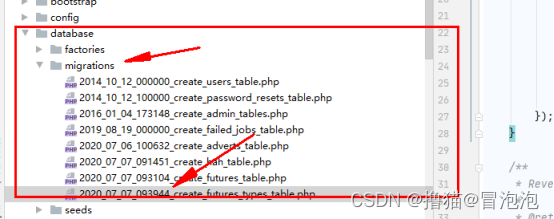
(3)用脚手架工具创建model 数据库 控制器文件 注意事项:
1.创建数据库不需要插入id这一列,工具自动创建id列
2.修改或者新增表字段,需要删除源数据库,且将对应的数据库文件名称+1
例如:
(4)Laravel 查询出来的数据默认为object,需转为数组
解决方案为:
$user_data = DB::table("users")->select('*')->where('popularizeCode', $popularizeCode)->get()->map(function ($value) {
    return (array)$value;
})->toArray();
(5)laravel-admin 初次登陆后login页面出现419错误
解决方案:
laravel 清除之前配置文件缓存,并生成新的配置文件缓存

php artisan config:cache

laravel 清除 /storage/cache 缓存

php artisan cache:clear
laravel 清除配置文件缓存

php artisan config:clear
laravel 优化类加载

php artisan optimize
laravel 清除路由缓存

php artisan route:cache
laravel 清除视图缓存

php artisan view:clear
(6)laravel-admin 用admin创建控制器须先创建数据模型 否则会提示Model does not exists !
larval-admin 1.7.9 报错 Model does not exists !
1.laravel-admin 1.7.9
2.执行 php artisan admin:make BooksController —model=App\Models\Books报错:Model does not exists !
解决方案:
先 php artisan make:model App/Models/Books 生成模型
再次执行
php artisan admin:make BooksController —model=App\Models\Books

App\Admin\Controllers\BooksController created successfully.
Add the following route to app/Admin/routes.php:(最后添加路由)
$router->resource('books', BooksController::class);
(7)新建完控制器后,添加完路由后们一定要清楚路由缓存,不然会路由有缓存
php artisan route:cache





 扫一扫
扫一扫


 1万+
1万+

 被折叠的 条评论
为什么被折叠?
被折叠的 条评论
为什么被折叠?
 到【灌水乐园】发言





