


 本文详细介绍了如何将本地文件上传到GitHub或Git上的基本步骤,并解释了遇到常见错误时的解决方法。具体步骤包括使用git add将更改添加到暂存区、git commit进行提交备注、git remote add设置远程仓库地址以及git push将更改推送到远程仓库。
将本地文件上传到github或git上基本步骤:
git add . ( 将改动添加到暂存区)
git commit -m "first commit" (上传备注或者说明)
git remote add origin https://github.com/babylanion/commitAgain1.git (远程项目地址)
git push -u origin master (上传到远程仓库)
git commit -m "first commit" (上传备注或者说明)
git remote add origin https://github.com/babylanion/commitAgain1.git (远程项目地址)
git push -u origin master (上传到远程仓库)
如果git出现以下错误: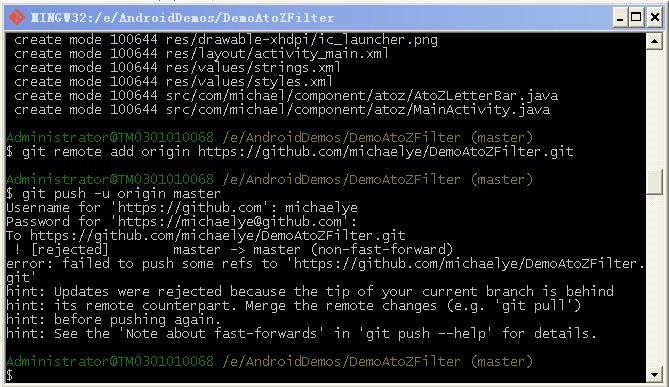
先执行git pull
然后再执行 git push --force origin master 替换原先的git push -u origin master
提交修改
修改文件后,如何提交到git服务器?
(1)首先需要add,比如.config是被修改的文件,则
git add .config
(2)然后执行git commit -m "modify .config for some reason"
(3)然后git push 到git服务器
(4)更新:git pull
(5)查看log:git log





 扫一扫
扫一扫


 1876
1876

 被折叠的 条评论
为什么被折叠?
被折叠的 条评论
为什么被折叠?
 到【灌水乐园】发言





