


 本文介绍了SemanticKernelPlanner如何将用户请求转化为执行计划,重点讲解了如何准备MathPlugin中的函数和描述,以及如何使用Planner进行目标规划和执行,强调了描述清晰度对规划成功的重要性。
前言
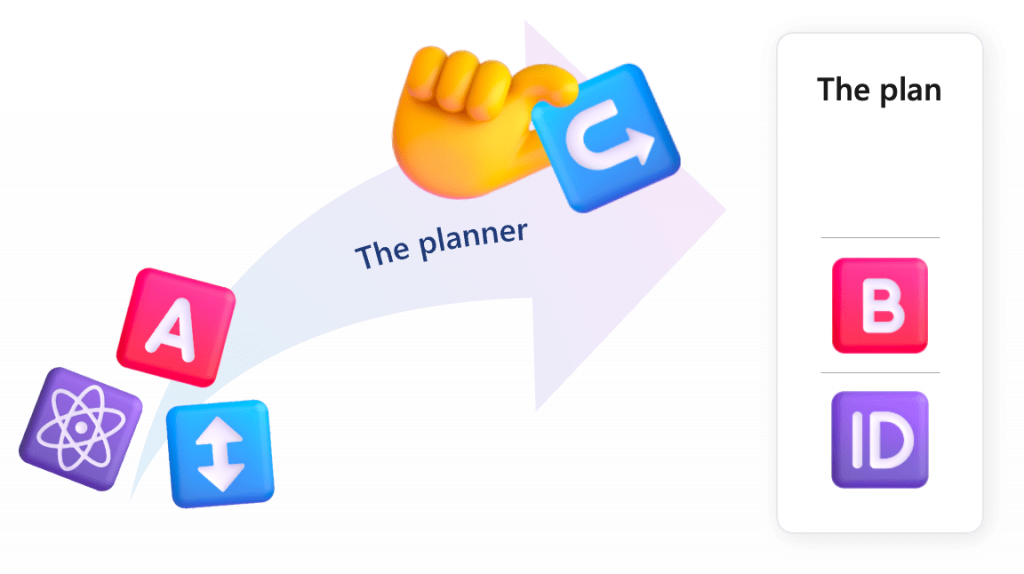
Semantic Kernel Planner 是一款动态工具,可以将用户的请求转换为可执行的计划。换句话说,当它接收到用户请求(目标)后,根据Kernel对象具有的能力(提供的Plugin和Function),自动组合。
由于Planner的自动规划,很可能产生不可预期的执行顺序、不适合的Function的调用,因此这很大的决定因素是编写的Prompt和Function上定义的描述是否准备合理。
准备Plugin
对于Native Function,需要使用特性进行声明,KernelFunction表名可以被Semantic Kernel调用的Function,Descrption用来描述Function和参数的语义含义。
public sealed class MathPlugin
{
    [KernelFunction, Description("Take the square root of a number")]
    public static double Sqrt(
        [Description("The number to take a square root of")]
        double number1
    )
    {
        return Math.Sqrt(number1);
    }

    [KernelFunction, Description("Add two numbers")]
    public static double Add(
        [Description("The first number to add")]
        double number1,
        [Description("The second number to add")]
        double number2
    )
    {
        return number1 + number2;
    }

    [KernelFunction, Description("Subtract two numbers")]
    public static double Subtract(
        [Description("The first number to subtract from")]
        double number1,
        [Description("The second number to subtract away")]
        double number2
    )
    {
        return number1 - number2;
    }

    [KernelFunction, Description("Multiply two numbers. When increasing by a percentage, don't forget to add 1 to the percentage.")]
    public static double Multiply(
        [Description("The first number to multiply")]
        double number1,
        [Description("The second number to multiply")]
        double number2
    )
    {
        return number1 * number2;
    }

    [KernelFunction, Description("Divide two numbers")]
    public static double Divide(
        [Description("The first number to divide from")]
        double number1,
        [Description("The second number to divide by")]
        double number2
    )
    {
        return number1 / number2;
    }

    [KernelFunction, Description("Raise a number to a power")]
    public static double Power(
        [Description("The number to raise")] double number1,
        [Description("The power to raise the number to")]
        double number2
    )
    {
        return Math.Pow(number1, number2);
    }

    [KernelFunction, Description("Take the log of a number")]
    public static double Log(
        [Description("The number to take the log of")]
        double number1,
        [Description("The base of the log")] double number2
    )
    {
        return Math.Log(number1, number2);
    }

    [KernelFunction, Description("Round a number to the target number of decimal places")]
    public static double Round(
        [Description("The number to round")] double number1,
        [Description("The number of decimal places to round to")]
        double number2
    )
    {
        return Math.Round(number1, (int)number2);
    }

    [KernelFunction, Description("Take the absolute value of a number")]
    public static double Abs(
        [Description("The number to take the absolute value of")]
        double number1
    )
    {
        return Math.Abs(number1);
    }

    [KernelFunction, Description("Take the floor of a number")]
    public static double Floor(
        [Description("The number to take the floor of")]
        double number1
    )
    {
        return Math.Floor(number1);
    }

    [KernelFunction, Description("Take the ceiling of a number")]
    public static double Ceiling(
        [Description("The number to take the ceiling of")]
        double number1
    )
    {
        return Math.Ceiling(number1);
    }

    [KernelFunction, Description("Take the sine of a number")]
    public static double Sin(
        [Description("The number to take the sine of")]
        double number1
    )
    {
        return Math.Sin(number1);
    }

    [KernelFunction, Description("Take the cosine of a number")]
    public static double Cos(
        [Description("The number to take the cosine of")]
        double number1
    )
    {
        return Math.Cos(number1);
    }

    [KernelFunction, Description("Take the tangent of a number")]
    public static double Tan(
        [Description("The number to take the tangent of")]
        double number1
    )
    {
        return Math.Tan(number1);
    }

    [KernelFunction, Description("Take the arcsine of a number")]
    public static double Asin(
        [Description("The number to take the arcsine of")]
        double number1
    )
    {
        return Math.Asin(number1);
    }

    [KernelFunction, Description("Take the arccosine of a number")]
    public static double Acos(
        [Description("The number to take the arccosine of")]
        double number1
    )
    {
        return Math.Acos(number1);
    }

    [KernelFunction, Description("Take the arctangent of a number")]
    public static double Atan(
        [Description("The number to take the arctangent of")]
        double number1
    )
    {
        return Math.Atan(number1);
    }
}
使用Planner
1、使用Planner需要引入依赖包Microsoft.SemanticKernel.Planners.Handlebars,创建Planner对象
var planner = new HandlebarsPlanner(new HandlebarsPlannerOptions { AllowLoops = true });
2、定义用户请求目标,在根据目标创建执行。
var goal = "算一下我有多少钱。如果首先我的投资 2130.23 元增加了 23%,然后我花 25 元买了一杯咖啡";
var plan = await planner.CreatePlanAsync(kernel, goal);
3、调用计划,获得结果。
这里调用的计划不稳定,最好要放到try-catch块中进行异常捕获
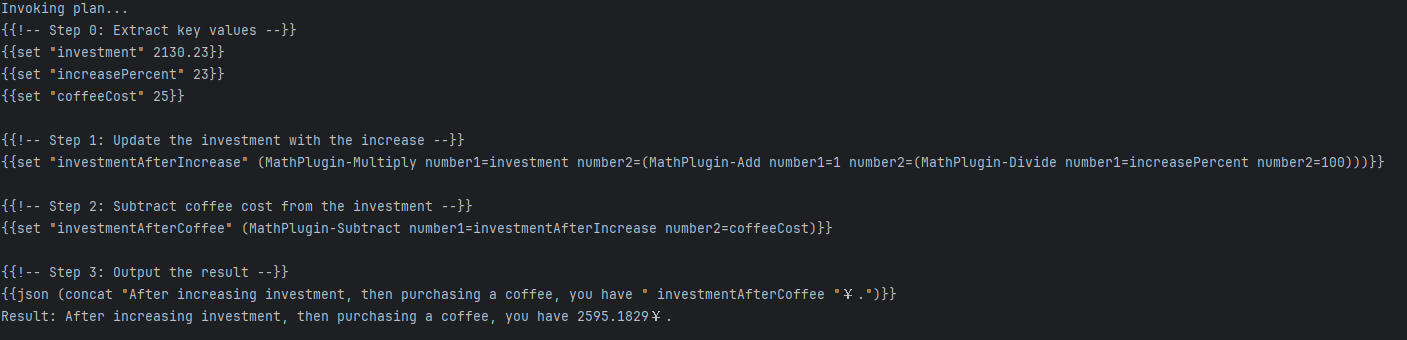
如果想查看计划内容,可以使用
plan.ToString()查看
var result = await plan.InvokeAsync(kernel);
Console.WriteLine("Result: " + result);
执行结果截图
总结
本篇文章中,我主要讲解并演示了Planner,在运行时会发现计划并不是总能执行成功,主要原因还是因为Planner的规划非常依赖用户的Prompt和Plugin的语义化描述。
感谢你的阅读,祝您编码愉快!





 扫一扫
扫一扫


 4044
4044

 被折叠的 条评论
为什么被折叠?
被折叠的 条评论
为什么被折叠?
 到【灌水乐园】发言





