



 本文介绍了JenkinsPipeline中的关键概念,包括triggers用于自动触发pipeline的策略,如cron定时或源代码变更检测;input允许在stage执行前获取用户输入;以及parallel用于并行执行多个stage,提高构建效率。
前言:
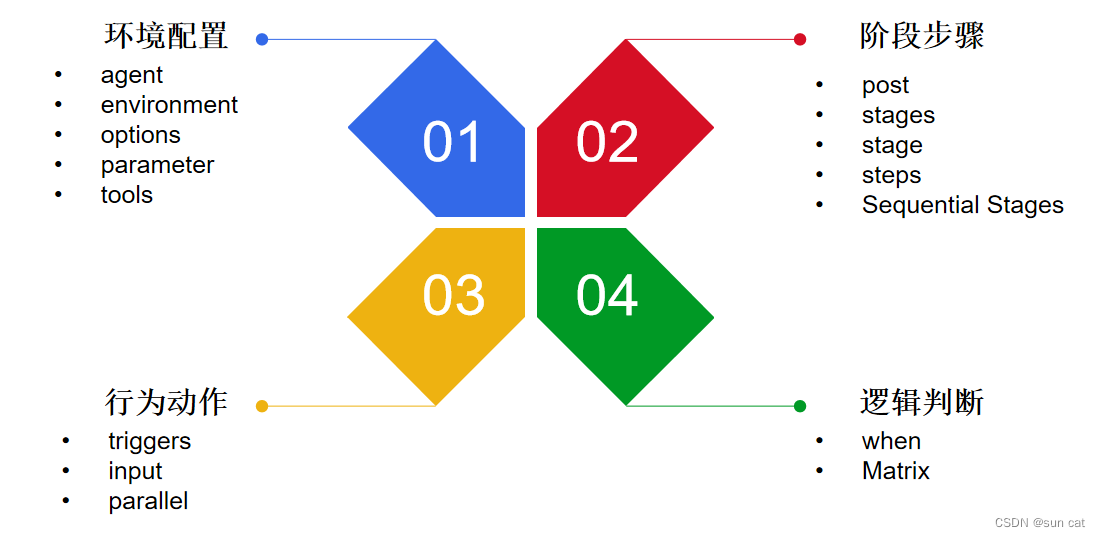
pipeline语法分类一般来说,有四种。分别是环境配置、阶段步骤、行为动作、逻辑判断。
三、行为动作
(1)triggers
该triggers指令定义了重新触发pipeline的自动化方式。
对于与 GitHub 或 BitBucket 等源集成的pipeline,triggers可能没有必要,因为基于 webhook 的集成可能已经存在。
| 参数 | 描述 | 样例 | |||
| cron | 接受一个 cron 风格的字符串来定义管道应该被重新触发的定期间隔 | triggers { cron('H */4 * * 1-5') } | |||
| pollSCM | 接受 cron 样式的字符串来定义 Jenkins 应检查新源更改的定期间隔。如果存在新的更改,pipeline将被重新触发。 | triggers { pollSCM('H */4 * * 1-5') } | |||
| upstream | 接受逗号分隔的作业字符串和阈值。当字符串中的任何作业以最小阈值完成时,pipeline将被重新触发 | triggers { upstream(upstreamProjects: 'job1,job2', threshold: hudson.model.Result.SUCCESS) } |
样例:
pipeline {
    agent any
    triggers {
        cron('H */4 * * 1-5')
    }
    stages {
        stage('Example') {
            steps {
                echo 'Hello World'}
        }
    }
}
(2)input
stage上的输入input允许您使用输入步骤提示输入。应用任何选项后,在进入该stage的代理块或评估该阶段的when条件之前,该stage将暂停。
如果输入被批准,则该stage将继续。作为input提交的一部分提供的任何参数都将在该stage的其余部分的环境中可用。
| 配置选项 | 描述 |
| message | 必需的。这将在用户提交input. |
| id | 可选标识符input。默认为stage名称。 |
| ok | 表单上“确定”按钮的可选文本input。 |
| submitter | 允许提交此 的用户或外部组名称的可选逗号分隔列表input。默认允许任何用户。 |
| submitterParameter | 使用名称设置的环境变量的可选名称submitter(如果存在)。 |
| parameters | 提示提交者提供的可选参数列表。 |
示例:
pipeline {
    agent any
    stages {
        stage('Example') {
            input {
                message "Should we continue?"ok "Yes, we should."submitter "alice,bob"parameters {
                    string(name: 'PERSON', defaultValue: 'Mr Jenkins', description: 'Who should I say hello to?')
                }
            }
            steps {
                echo "Hello, ${PERSON}, nice to meet you."}
        }
    }
}
(3)parallel
pipeline中的阶段可能有一个parallel包含要并行运行的嵌套stage列表的部分。
stage必须具有step、stages、 parallel或matrix中的一个或仅一个。
如果stage指令嵌套在并行或矩阵块本身中,则无法在stage指令中嵌套并行块或矩阵块。然而,parallel或matrix块中的stage指令可以使用stage的所有其他功能,包括agent、tools、when等。
示例:
pipeline {
    agent any
    stages {
        stage('Non-Parallel Stage') {
            steps {
                echo 'This stage will be executed first.'}
        }
        stage('Parallel Stage') {
            when {
                branch 'master'}
            failFast trueparallel {
                stage('Branch A') {
                    agent {
                        label "for-branch-a"}
                    steps {
                        echo "On Branch A"}
                }
                stage('Branch B') {
                    agent {
                        label "for-branch-b"}
                    steps {
                        echo "On Branch B"}
                }
                stage('Branch C') {
                    agent {
                        label "for-branch-c"}
                    stages {
                        stage('Nested 1') {
                            steps {
                                echo "In stage Nested 1 within Branch C"}
                        }
                        stage('Nested 2') {
                            steps {
                                echo "In stage Nested 2 within Branch C"}
                        }
                    }
                }
            }
        }
    }
}此外,您可以parallel通过failFast true添加stage包含 parallel. 添加的另一个选项failfast是在pipeline定义中添加一个选项:parallelsAlwaysFailFast()
示例:
pipeline {
    agent any
    options {
        parallelsAlwaysFailFast()
    }
    stages {
        stage('Non-Parallel Stage') {
            steps {
                echo 'This stage will be executed first.'}
        }
        stage('Parallel Stage') {
            when {
                branch 'master'}
            parallel {
                stage('Branch A') {
                    agent {
                        label "for-branch-a"}
                    steps {
                        echo "On Branch A"}
                }
                stage('Branch B') {
                    agent {
                        label "for-branch-b"}
                    steps {
                        echo "On Branch B"}
                }
                stage('Branch C') {
                    agent {
                        label "for-branch-c"}
                    stages {
                        stage('Nested 1') {
                            steps {
                                echo "In stage Nested 1 within Branch C"}
                        }
                        stage('Nested 2') {
                            steps {
                                echo "In stage Nested 2 within Branch C"}
                        }
                    }
                }
            }
        }
    }
}





 扫一扫
扫一扫


 547
547

 被折叠的 条评论
为什么被折叠?
被折叠的 条评论
为什么被折叠?
 到【灌水乐园】发言





