






 本文介绍了如何封装控制台日志,提供美化功能、支持日志开关、位置保留和node环境,以及通过链式调用来简化日志操作,旨在提高开发效率并增强日志管理的易用性。
控制台日志打印console的封装,加入美化、行显示与打印开关,支持node.js环境
为什么要写这个?
封装这个控制台日志打印工具,主要是在项目中自己做的SDK需要提供给其他开发人员使用,加入了日志美化和打印打开,方便了开发人员查找SDK中的日志(提高了逼格),也加深了自己对日志关键性的理解。
首先讲下封装时遇到的一些问题点:
- 日志开关
- 日志查找便捷性
- 日志打印行数位置需要保留
- web环境外使用(目前支持node环境)
- 支持链式调用
log.setPadStartText('log', 'hello world').info(1234, '4', [3, 5])
对于以上问题点,我是这么解决的:
- 我是用ts写的,我在工具实际调用的方法内进行清除与重置print来解决日志开关的问题;
- 日志查找的便携性,我加入了特殊的日志颜色来区分,也就是美化了一下日志输出;
- 日志打印位置保留,采用了如:
console.info.bind(this, ...this.infoPadStartText)这样,即保留了日志位置,又可以像平常使用console一样进行逗号(,)分隔传参; - 为了区分是否是
node.js环境,进行了typeof process === 'object'判断; close()、open()、setPadStartText()函数支持链式调用,就是在函数结尾加入return this,返回工具对象
希望这次分享给大家带来方便和灵感,谢谢。
目录
介绍
由于大部分日志美化插件都不能定位到代码所在行,所以我自己实现了这个库。
- 这是“console”对象的进一步美化和封装,包括console.log、console.info、console.warn、console.error。
- 可以显示日志打印的所在行数,可以加入自定义的console打印前缀、对内容进行美化(web端规则参考 https://developer.mozilla.org/en-US/docs/Web/API/Console ,node环境参考 https://zh.wikipedia.org/wiki/ANSI%E8%BD%AC%E4%B9%89%E5%BA%8F%E5%88%97), 可随时关闭console打印,支持node环境。
查看效果请在控制台。
效果
version >= V1.2.1 加入了背景色
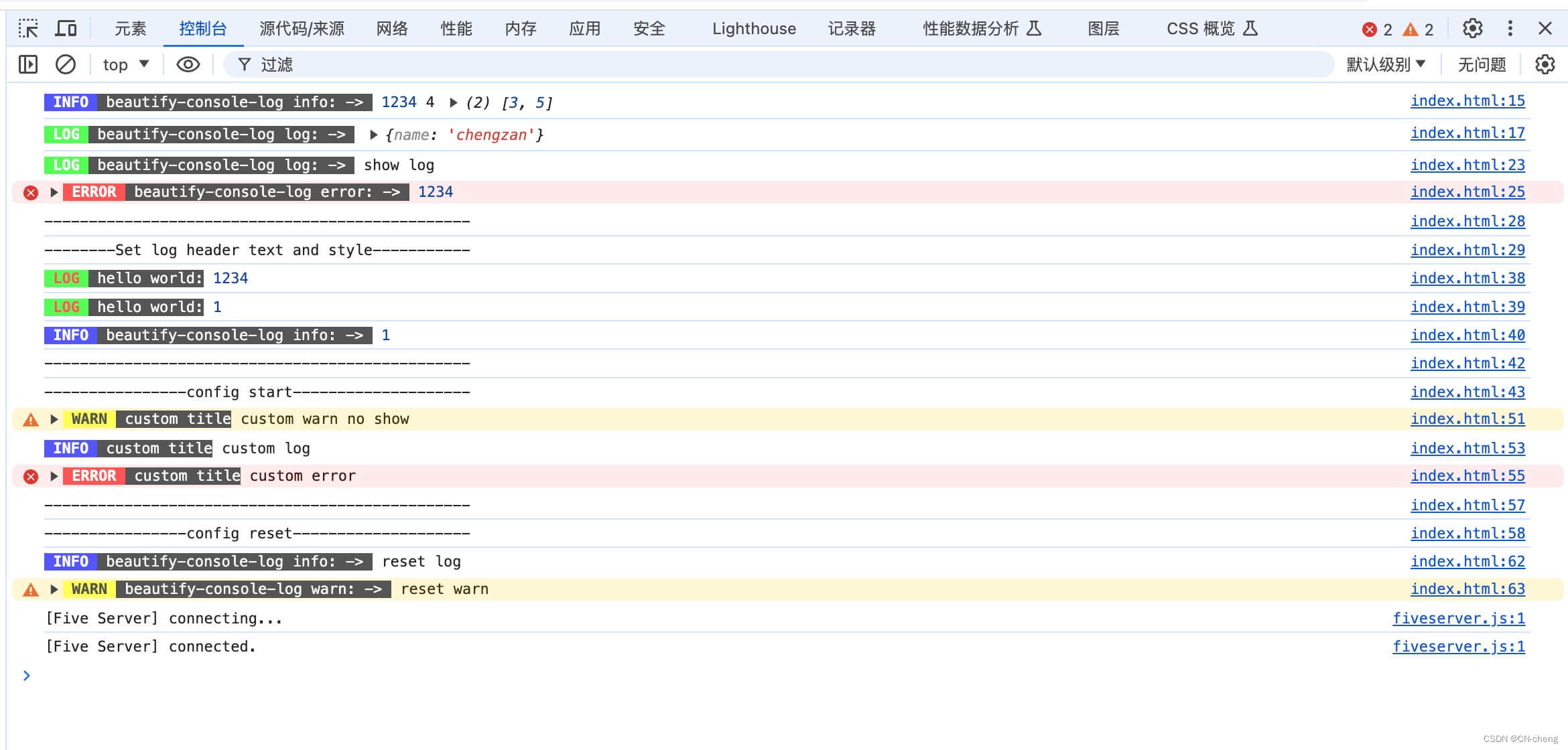
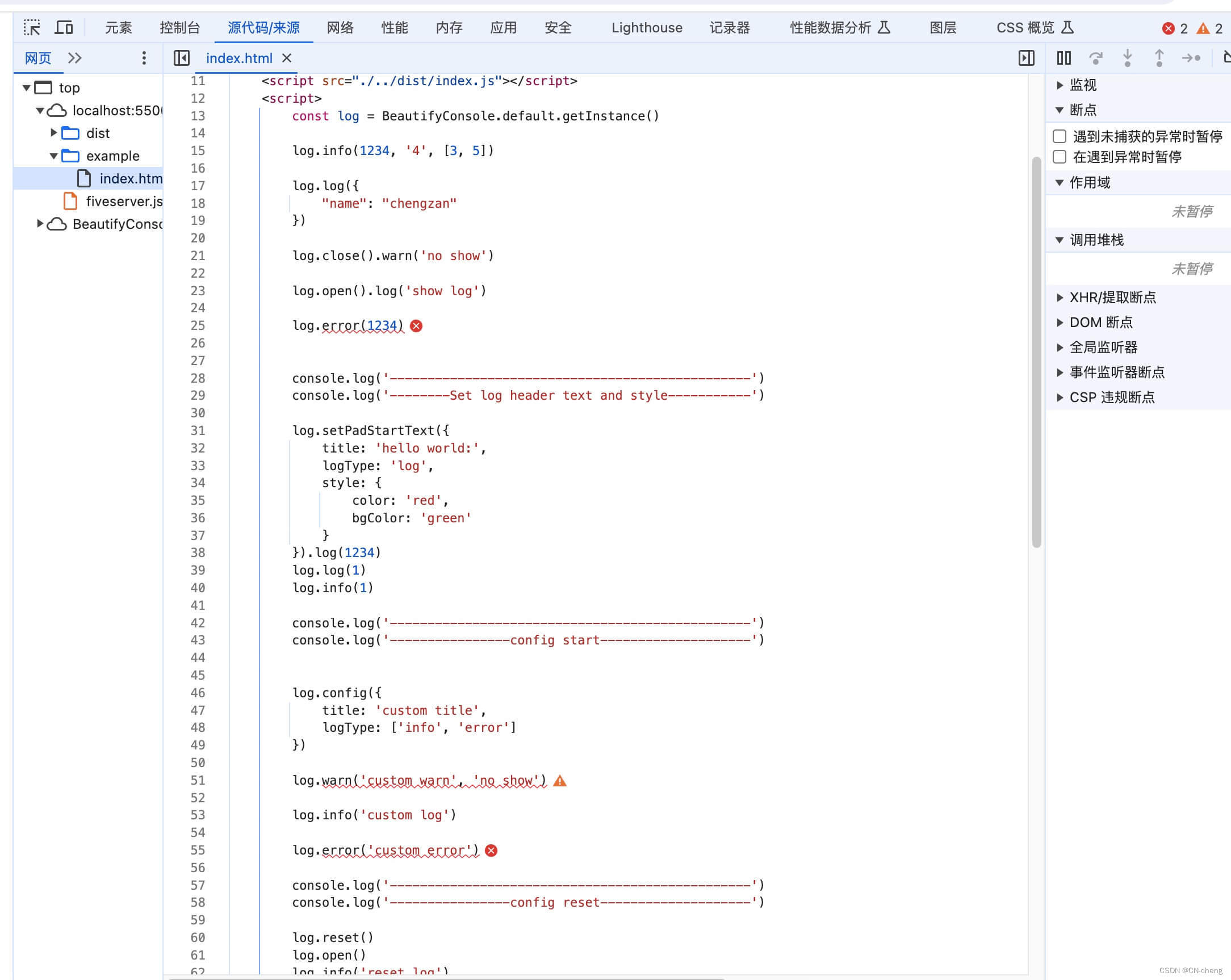
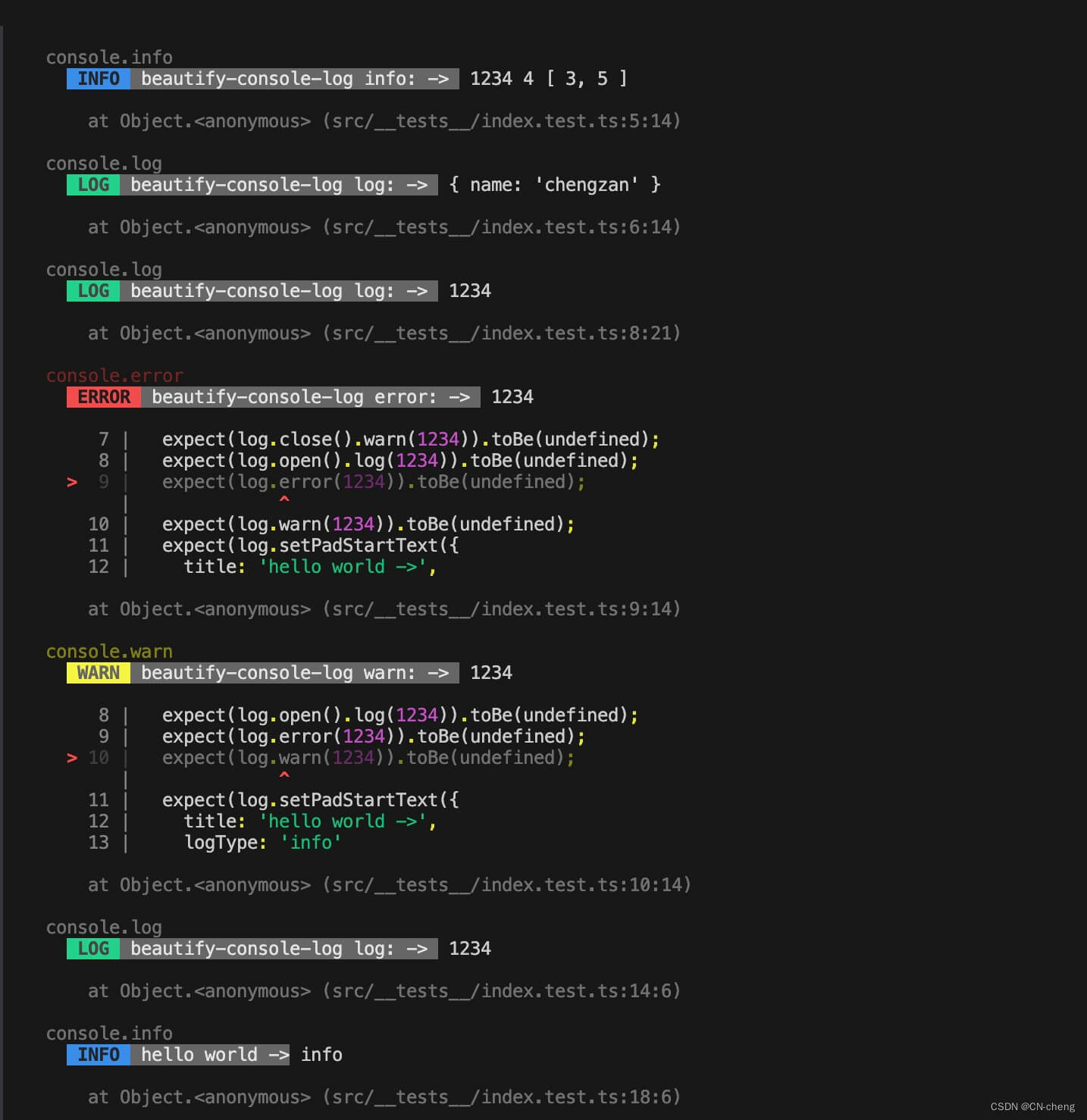
安装教程
npm i beautify-console-log --save
或
yarn add beautify-console-log
API
config
| 参数名 | 值类型 | 描述 |
|---|---|---|
| title | String | 自定义日志头 |
| logType | Array | 显示的日志类型,设置后只显示对应的日志类型("info"、"log"、"warn"、"error") |
import BeautifyConsole from "beautify-console-log";
const log = BeautifyConsole.getInstance();
log.config({
    title: 'custom title',
    logType: ['info', 'error']
})
// 使用方式与正常的console.info()一致
log.info(1234, '4', [3, 5]);
log
使用方式与正常的console.log()一致
import BeautifyConsole from "beautify-console-log";
const log = BeautifyConsole.getInstance();
log.log(1234, '4', [3, 5]);
log.log({
    "name": "chengzan"
});
info
使用方式与正常的console.info()一致
import BeautifyConsole from "beautify-console-log";
const log = BeautifyConsole.getInstance();
log.info(1234, '4', [3, 5]);
log.info({
    "name": "chengzan"
});
warn
使用方式与正常的console.warn()一致
import BeautifyConsole from "beautify-console-log";
const log = BeautifyConsole.getInstance();=
log.warn(1234, '4', [3, 5]);
log.warn('warn');
error
使用方式与正常的console.error()一致
import BeautifyConsole from "beautify-console-log";
const log = BeautifyConsole.getInstance();
log.error(1234, '4', [3, 5]);
log.error('warn');
open
使用log.close()关闭日志后,可以log.open()进行打开对应的日志类型,打开所有类型日志时,不传参(支持链式调用)。
| 值类型 | 描述 |
|---|---|
| String? | info、log、warn、error,或者不传 |
import BeautifyConsole from "beautify-console-log";
const log = BeautifyConsole.getInstance();
log.open() // 打开所有类型日志
// 或者
log.open('info') // 打开info日志
// 或者
log.open('info').open('error') // 打开info日志
close
关闭日志,可以关闭全部日志或者某个类型的日志。
| 值类型 | 描述 |
|---|---|
| String? | info、log、warn、error,或者不传 |
import BeautifyConsole from "beautify-console-log";
const log = BeautifyConsole.getInstance();
log.close() // 关闭所有类型日志
// 或者
log.close('info') // 关闭info日志
// 或者
log.close('info').open('log')
setPadStartText
设置日志头文本内容及文本样式
| 参数名 | 值类型 | 描述 |
|---|---|---|
| title | String | 自定义日志头 |
| logType | String | info,log,warn,error |
| style | Object | info,log,warn,error |
| ├──color | black,red,green,yellow,blue,purple,cyan,white | |
| └──bgColor | black,red,green,yellow,blue,purple,cyan,white |
import BeautifyConsole from "beautify-console-log";
const log = BeautifyConsole.getInstance();
log.close() // 关闭所有类型日志
// 或者
log.close('info') // 关闭info日志
// 或者
log.close('info').open('log')
reset
当设置自定义日志头或关闭部分日志等操作后,可以通过log.reset()重置。
import BeautifyConsole from "beautify-console-log";
const log = BeautifyConsole.getInstance();

log.config({
    title: 'custom title',
    logType: ['info', 'error']
})

log.reset() // 打开所有类型日志
log.info('reset log')
使用说明
- 简单使用
import BeautifyConsole from "beautify-console-log";
const log = BeautifyConsole.getInstance();
// 使用方式与正常的console.info()一致
log.info(1234, '4', [3, 5]);
或
const log = new BeautifyConsole();
// 使用方式与正常的console.info()一致
log.info(1234, '4', [3, 5]);
也可以直接使用 dist/index.js 文件
<script src="./dist/index.js">
const log = BeautifyConsole.default.getInstance()

log.info(1234, '4', [3, 5])

log.log({
    "name": "chengzan"
})

log.close().warn('no show')

log.open().log('show log')

log.error(1234)


console.log('------------------------------------------------')
console.log('--------Set log header text and style-----------')

log.setPadStartText('log', 'hello world:', {
    color: 'red',
    bgColor: 'green'
}).log(1234)
log.log(1)

console.log('------------------------------------------------')
console.log('----------------config start--------------------')


log.config({
    title: 'custom title',
    logType: ['info', 'error']
})

log.warn('custom warn', 'no show')

log.info('custom log')

log.error('custom error')

console.log('------------------------------------------------')
console.log('----------------config reset--------------------')

log.reset()
log.info('reset log')
log.warn('reset warn')
- 初始化配置
const log = BeautifyConsole.getInstance();
log.config({
    title: 'example pad start text', // 左侧填充的日志头内容
    logType: ['info', 'error', 'warn', 'log'], // 显示部分日志类型
})
log.info(1234, '4', [3, 5]);
log.log(1234, '4', [3, 5]);
log.warn(1234, '4', [3, 5]);
log.error(1234, '4', [3, 5]);
- 支持的console类型
const log = BeautifyConsole.getInstance();
log.info(1234, '4', [3, 5]);
log.log(1234, '4', [3, 5]);
log.warn(1234, '4', [3, 5]);
log.error(1234, '4', [3, 5]);
- 加入自定义console日志头
const log = BeautifyConsole.getInstance();
log.setPadStartText('log', 'hello world')
// or
log.setPadStartText('log', 'hello world').info(1234, '4', [3, 5]);
- 关闭日志,传入参数就关闭对应的console日志类型,不传就关闭所有的类型,支持链式调用
const log = BeautifyConsole.getInstance();
log.close('info');
log.close('log');
log.close('warn');
log.close('error');
log.close();
log.close().open('error');

// or
log.open('error').open('log').open('warn').open('info');

// or
log.close('error').info('closed error');
log.close('error').error('closed error');

// or
log.close('error').open('info');
log.close('error').open('info').info('info...');
- 打开日志,传入参数就打开对应的console日志类型,不传就打开所有的类型,支持链式调用
const log = BeautifyConsole.getInstance();
log.open('info');
log.open('log');
log.open('warn');
log.open('error');
log.open();
log.open().close('info');

//or
log.open('error').open('log').open('warn').open('info');

// or
log.open().info('closed error');
log.open('error').error('closed error');

// or
log.close('error').open('info');
log.close('error').open('info').info('info...');





 扫一扫
扫一扫


 872
872

 被折叠的 条评论
为什么被折叠?
被折叠的 条评论
为什么被折叠?
 到【灌水乐园】发言





