


Duplicate class com.amap.api.fence.DistrictItem found in modules location-9.8.1 and navi-3dmap-9.8.1

文章讲述了在使用高德地图API时,amap-location-latest与amap-navi-3dmap之间的jar包冲突问题,提出将非必须的依赖改为`compileOnly`,以避免冲突并确保正确加载所需模块。

高德地图jar包冲突原因

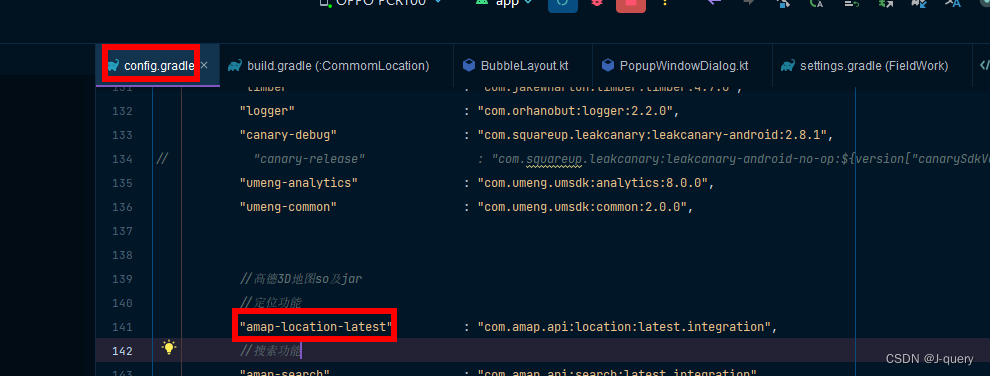
/*高德地图*/
//定位功能
"amap-location-latest" : "com.amap.api:location:latest.integration",
//搜索功能
"amap-search" : "com.amap.api:search:latest.integration",
//导航功能
//导航功能
"amap-navi-3dmap" : "com.amap.api:navi-3dmap:latest.integration",

amap-location-latest与amap-navi-3dmap冲突

报错:Duplicate class com.amap.api.fence.DistrictItem found in modules location-9.8.1 and navi-3dmap-9.8.1的jar包冲突最简单有效方法就是build.gradle的依赖

api rootProject.ext.dependencies["amap-location-latest"]
api rootProject.ext.dependencies["amap-search"]
api rootProject.ext.dependencies["amap-navi-3dmap"]
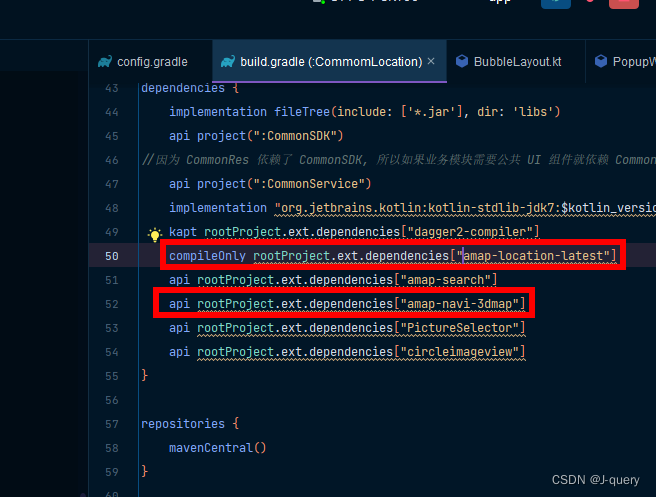
改为

compileOnly rootProject.ext.dependencies["amap-location-latest"]
api rootProject.ext.dependencies["amap-search"]
api rootProject.ext.dependencies["amap-navi-3dmap"]

如果大家使用implementation方式

implementation('com.amap.api:3dmap::latest.integration')

implementation('com.amap.api:location::latest.integration')

compileOnly 'com.google.code.gson:gson:2.6.2'

 改成

compileOnly ('com.amap.api:location::latest.integration')

implementation('com.amap.api:3dmap::latest.integration')

就行!绝对有用!

<think>我们正在解决一个关于OkHttp库冲突的问题,具体是出现了`Duplicateclassokhttp3.internal.http2.PushObserver`的重复类错误。根据引用信息,重复类出现在okhttp-3.10.0和另一个版本(可能是3.8.1)中。我们需要找到解决方案来消除这种冲突。###问题分析1.**错误信息**:`Duplicateclassokhttp3.internal.http2.PushObserver`,这表明两个不同的jar包(或依赖)包含了同一个类。2.**可能原因**:项目中引入了两个不同版本的OkHttp库,且这两个版本都包含了`PushObserver`类,但包路径相同,导致冲突。3.**引用信息**:-引用[1]:直接提到了`Duplicateclassokhttp3.Address`,并指出是okhttp:3.10.0和okhttp:3.8.1的冲突。-引用[3]:说明不同大版本的OkHttp(如2.x和3.x)由于包名不同(`com.squareup.okhttp`vs`okhttp3`)不会冲突,但同为大版本3.x的不同小版本(如3.10.0和3.8.1)则可能冲突。-引用[4]和[5]:提供了一些排除冲突的方法,如使用`exclude`模块或者使用`compileOnly`(仅编译时使用)来避免重复。###解决方案根据引用信息,我们可以采取以下步骤来解决冲突:####1.**检查依赖树**使用Gradle命令检查依赖树,找出哪些模块引入了不同版本的OkHttp:```bash./gradlewapp:dependencies```或者针对具体变体(如debug):```bash./gradlewapp:dependencies--configurationdebugCompileClasspath```####2.**统一OkHttp版本**如果可能,将项目中所有模块使用的OkHttp版本统一到同一个版本(例如3.10.0)。在项目的根build.gradle文件中添加约束:```groovysubprojects{configurations.all{resolutionStrategy{force&#39;com.squareup.okhttp3:okhttp:3.10.0&#39;}}}```####3.**排除冲突依赖**如果某个依赖项传递性地引入了旧版本的OkHttp,可以在引入该依赖时排除okhttp模块:```groovyimplementation(&#39;some:library:version&#39;){excludegroup:&#39;com.squareup.okhttp3&#39;,module:&#39;okhttp&#39;}```####4.**使用compileOnly(仅编译)**如果某个模块只需要在编译时使用某个版本的OkHttp,而运行时由主项目提供,可以使用`compileOnly`(如引用[5]所示):```groovycompileOnly&#39;com.squareup.okhttp3:okhttp:3.10.0&#39;```####5.**使用exclude移除重复类(不推荐)**如果冲突发生在同一个包的不同版本,且无法通过排除模块解决,可以尝试移除重复类(如引用[4]所示):```groovyimplementation(name:&#39;xxx&#39;,ext:&#39;jar&#39;){excludemodule:&#39;okhttp3&#39;}```但这种方法需要谨慎,因为可能破坏依赖。###具体步骤示例假设我们的项目结构如下:-主模块(app)依赖`com.squareup.okhttp3:okhttp:3.10.0`-另一个模块(例如lib_vs)依赖了旧版本(如3.8.1),导致冲突。我们可以在主模块的build.gradle中排除lib_vs模块中的旧版本OkHttp:```groovyimplementation(project(&#39;:lib_vs&#39;)){excludegroup:&#39;com.squareup.okhttp3&#39;,module:&#39;okhttp&#39;}```###验证重新构建项目,确保重复类错误消失。###注意事项-不同大版本的OkHttp(如2.x和3.x)通常不会冲突,因为包名不同(如引用[3]所示)。-如果使用Kotlin,注意OkHttp的Kotlin扩展库(如`okhttp-coroutines`)也要统一版本。§§相关问题§§1.如何查看Gradle项目的依赖树?2.除了排除依赖,还有哪些方法解决类冲突?3.如何统一管理多个模块的依赖版本?</think>### 解决 OkHttp 中 PushObserver 类重复问题 当出现 `Duplicate class okhttp3.internal.http2.PushObserver` 错误时,通常是由于项目中引入了多个冲突的 OkHttp 版本。以下是具体解决方案: #### 1. **统一依赖版本(推荐)** 在 `build.gradle` 中强制统一所有模块的 OkHttp 版本: ```groovy android { configurations.all { resolutionStrategy.force &#39;com.squareup.okhttp3:okhttp:3.14.9&#39; // 指定统一版本 } } ``` - **原理**:强制所有模块使用相同版本的 OkHttp,避免冲突[^1][^3] - **注意**:选择较新稳定版(如 3.14.x 或 4.x) #### 2. **排除冲突依赖** 针对特定模块排除旧版本: ```groovy implementation (&#39;com.example:library:1.0&#39;) { exclude group: &#39;com.squareup.okhttp3&#39;, module: &#39;okhttp&#39; } ``` #### 3. **使用 compileOnly 依赖** 对非主模块使用编译期依赖: ```groovy compileOnly &#39;com.squareup.okhttp3:okhttp:3.10.0&#39; // 不参与打包 ``` #### 4. **检查依赖树** 执行命令查看冲突源: ```bash ./gradlew :app:dependencies --configuration debugCompileClasspath ``` 在输出中搜索 `okhttp3.internal.http2.PushObserver` 定位冲突模块[^1] #### 5. **包重定向(高级)** 在 `gradle.properties` 中添加: ```properties android.enableJetifier=true ``` 这会自动重写旧版依赖的包路径[^3] ### 操作示例 ```gradle // 主模块 build.gradle dependencies { implementation &#39;com.squareup.okhttp3:okhttp:4.9.3&#39; // 统一版本 implementation (&#39;com.example:network-lib:1.5&#39;) { exclude group: &#39;com.squareup.okhttp3&#39; // 排除内部冲突版本 } } ``` > **关键点**:OkHttp 3.x 不同小版本(如 3.8.13.10.0)会产生类冲突,而 2.x 和 3.x 因包名不同(`com.squareup.okhttp` vs `okhttp3`)不会冲突[^3]
评论 2
添加红包

请填写红包祝福语或标题

红包个数最小为10个

红包金额最低5元

当前余额3.43前往充值 >
需支付:10.00
成就一亿技术人!
领取后你会自动成为博主和红包主的粉丝 规则
hope_wisdom
发出的红包
实付
使用余额支付
点击重新获取
扫码支付
钱包余额 0

抵扣说明:

1.余额是钱包充值的虚拟货币,按照1:1的比例进行支付金额的抵扣。
2.余额无法直接购买下载,可以购买VIP、付费专栏及课程。

余额充值


