



 本文介绍了如何在Windows系统上通过一系列步骤来启用MobyLinux所需的特定服务,并详细说明了如何配置Hyper-V角色以支持Linux容器的过程。
Enable-MobyLinuxRequiredService
1, Open “Window Security”
2, Open “App & Browser control”
3, Click “Exploit protection settings” at the bottom
4, Switch to “Program settings” tab
5, Locate “C:\WINDOWS\System32\vmcompute.exe” in the list and expand it
6, Click “Edit”
7, Scroll down to “Code flow guard (CFG)” and uncheck “Override system settings”
8, Start vmcompute from powershell “net start vmcompute”
failed to register layer: re-exec error: strconv.ParseInt:
switch to linux containers
The system cannot find the file specified. In the default daemon configuration on Windows
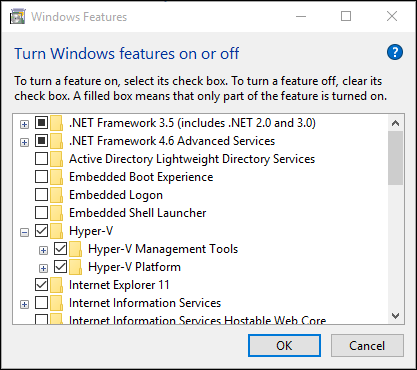
1, 通过“设置”启用 Hyper-V 角色
2, 右键单击 Windows 按钮并选择“应用和功能”。
3, 选择相关设置下右侧的“程序和功能”。
4, 选择“打开或关闭 Windows 功能”。
5, 选择“Hyper-V”,然后单击“确定”。





 扫一扫
扫一扫


 2809
2809

 被折叠的 条评论
为什么被折叠?
被折叠的 条评论
为什么被折叠?
 到【灌水乐园】发言





