


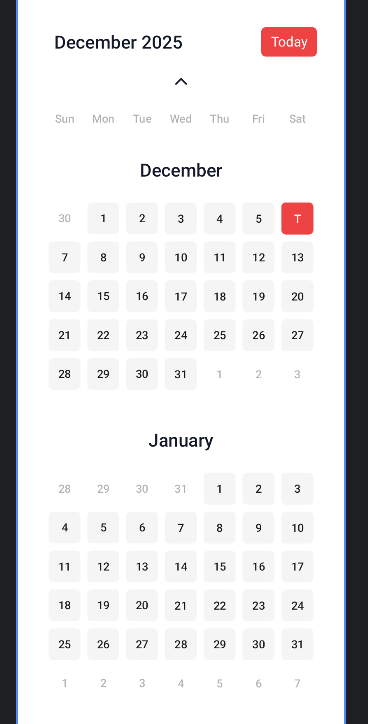
用compose写一个日历组件,默认显示当前月和下一个月的月视图日历,滑动滚动到下发,如果滚到顶了则进行月份切换,主要是嵌套滚动的处理,已经日历相关API的使用
import android.util.Log
import androidx.compose.foundation.Image
import androidx.compose.foundation.background
import androidx.compose.foundation.border
import androidx.compose.foundation.layout.Arrangement
import androidx.compose.foundation.layout.Box
import androidx.compose.foundation.layout.Column
import androidx.compose.foundation.layout.Row
import androidx.compose.foundation.layout.Spacer
import androidx.compose.foundation.layout.aspectRatio
import androidx.compose.foundation.layout.fillMaxHeight
import androidx.compose.foundation.layout.fillMaxSize
import androidx.compose.foundation.layout.fillMaxWidth
import androidx.compose.foundation.layout.height
import androidx.compose.foundation.layout.padding
import androidx.compose.foundation.layout.width
import androidx.compose.foundation.rememberScrollState
import androidx.compose.foundation.shape.RoundedCornerShape
import androidx.compose.foundation.verticalScroll
import androidx.compose.material3.Text
import androidx.compose.runtime.Composable
import androidx.compose.runtime.LaunchedEffect
import androidx.compose.runtime.derivedStateOf
import androidx.compose.runtime.getValue
import androidx.compose.runtime.mutableIntStateOf
import androidx.compose.runtime.mutableStateOf
import androidx.compose.runtime.remember
import androidx.compose.runtime.rememberCoroutineScope
import androidx.compose.runtime.setValue
import androidx.compose.ui.Alignment
import androidx.compose.ui.Modifier
import androidx.compose.ui.geometry.Offset
import androidx.compose.ui.graphics.Color
import androidx.compose.ui.input.nestedscroll.NestedScrollConnection
import androidx.compose.ui.input.nestedscroll.NestedScrollSource
import androidx.compose.ui.input.nestedscroll.nestedScroll
import androidx.compose.ui.platform.LocalDensity
import androidx.compose.ui.res.painterResource
import androidx.compose.ui.text.font.Font
import androidx.compose.ui.text.font.FontFamily
import androidx.compose.ui.text.font.FontWeight
import androidx.compose.ui.text.style.TextAlign
import androidx.compose.ui.tooling.preview.Preview
import androidx.compose.ui.unit.Velocity
import androidx.compose.ui.unit.dp
import androidx.compose.ui.unit.sp

import kotlinx.coroutines.launch
import java.time.LocalDate
import java.time.YearMonth
import java.time.format.DateTimeFormatter
import java.util.Locale
import kotlin.math.abs


@Composable
fun CalendarView(onSelected: (LocalDate) -> Unit) {
    var currentMonthOffset by remember { mutableIntStateOf(0) }
    val scrollState = rememberScrollState()
    val scope = rememberCoroutineScope() // 添加协程作用域
    // 使用 derivedStateOf 来检测是否滚动到边界
    val isAtTop by remember {
        derivedStateOf { scrollState.value == 0 }
    }
    val isAtBottom by remember {
        derivedStateOf {
            val maxScroll = scrollState.maxValue
            val currentScroll = scrollState.value
            // 当接近底部时(允许一定容差)
            currentScroll >= maxScroll - 10
        }
    }


    val currentDate = remember { LocalDate.now() }
    var selectedDate by remember { mutableStateOf(LocalDate.now()) }
    val currentMonth = YearMonth.now().plusMonths(currentMonthOffset.toLong())
    val nextMonth = currentMonth.plusMonths(1)

    val months = listOf(currentMonth, nextMonth)

// 添加状态来跟踪滚动累积量
    var accumulatedScroll by remember { mutableStateOf(0f) }
    val scrollThreshold = with(LocalDensity.current) { 100.dp.toPx() } // 设置阈值为100dp

    // 创建嵌套滚动连接
    val nestedScrollConnection = remember {
        object : NestedScrollConnection {
            override fun onPostScroll(
                consumed: Offset,
                available: Offset,
                source: NestedScrollSource
            ): Offset {
                // 只在拖拽手势时触发,避免滚动动画触发
                if (source == NestedScrollSource.Drag) {
                    // 累积滚动量
                    accumulatedScroll += available.y

                    // 检查是否达到阈值
                    if (abs(accumulatedScroll) > scrollThreshold) {
                        if (available.y < 0 && isAtBottom) { // 向上滚动且在底部
                            currentMonthOffset += 1
                            accumulatedScroll = 0f // 重置累积量
                            return available // 消耗这个滚动
                        }

                        if (available.y > 0 && isAtTop) { // 向下滚动且在顶部
                            currentMonthOffset -= 1
                            accumulatedScroll = 0f // 重置累积量
                            return available // 消耗这个滚动
                        }
                    }

                    // 如果没有达到阈值,不消耗滚动
                    return Offset.Zero
                }

                return Offset.Zero
            }
            // 当手势结束时重置累积量
           override suspend fun onPostFling(consumed: Velocity, available: Velocity): Velocity {
                accumulatedScroll = 0f
                return Velocity.Zero
            }
        }
    }
    Box(
        modifier = Modifier
            .width(576.dp)
            .fillMaxHeight()
            .background(Color.White)
            .padding(48.dp)
            .nestedScroll(nestedScrollConnection) // 添加嵌套滚动
    ) {
        Column(
            modifier = Modifier.fillMaxSize()
        ) {

            Row(modifier = Modifier.fillMaxWidth()) {
                val formatter = remember {
                    DateTimeFormatter.ofPattern("MMMM yyyy", Locale.ENGLISH)
                }
                Text(
                    text = currentMonth.format(formatter),
                    fontSize = 32.sp,
                    lineHeight = 32.sp,
                    fontWeight = FontWeight(500),
                    color = Color_FF131A29,
                    modifier = Modifier.padding(horizontal = 16.dp, vertical = 8.dp)
                )
                Spacer(modifier = Modifier.weight(1f))
                Text(
                    text = "Today",
                    fontSize = 24.sp,
                    lineHeight = 36.sp,
                    textAlign = TextAlign.Center,
                    modifier = Modifier
                        .width(98.dp)
                        .height(52.dp)
                        .background(color = Color_EE4343, shape = RoundedCornerShape(8.dp))
                        .padding(8.dp)
                        .noRippleClick {
                            currentMonthOffset = 0
                            scope.launch {
                                scrollState.animateScrollTo(0)
                            }
                        },
                    color = Color.White,
                )
            }


            Row(
                modifier = Modifier
                    .fillMaxWidth()
                    .noRippleClick {
                        currentMonthOffset -= 1
                    }
                    .padding(vertical = 24.dp), horizontalArrangement = Arrangement.Center) {
                Image(painter = painterResource(R.drawable.calendar_up), contentDescription = null)
            }
            // 星期标题
            Row(
                modifier = Modifier.fillMaxWidth(), horizontalArrangement = Arrangement.SpaceEvenly
            ) {
                listOf("Sun", "Mon", "Tue", "Wed", "Thu", "Fri", "Sat").forEach { day ->
                    Text(
                        text = day,
                        fontSize = 20.sp,
                        lineHeight = 32.sp,
                        fontWeight = FontWeight.Medium,
                        color = Color_000000_30,
                        modifier = Modifier
                            .weight(1f)
                            .padding(vertical = 8.dp),
                        textAlign = TextAlign.Center
                    )
                }
            }
            Column(
                modifier = Modifier
                    .weight(1f)
                    .verticalScroll(scrollState)
            ) {
                months.forEachIndexed { index, month ->
                    MonthView(
                        yearMonth = month,
                        currentDate,
                        selectedDate,
                        isCurrentMonth = index == 0,
                        modifier = Modifier.padding(bottom = 16.dp),
                    ) {
                        selectedDate = it
                        onSelected.invoke(it)
                    }
                }

            }
            Row(
                modifier = Modifier
                    .fillMaxWidth()
                    .noRippleClick {
                        currentMonthOffset += 1
                    }
                    .padding(vertical = 24.dp), horizontalArrangement = Arrangement.Center) {
                Image(
                    painter = painterResource(R.drawable.calendar_down),
                    contentDescription = null
                )
            }

        }
    }
}

@Composable
fun MonthView(
    yearMonth: YearMonth,
    currentDate: LocalDate,
    selectedDate: LocalDate,
    isCurrentMonth: Boolean,
    modifier: Modifier = Modifier,
    onSelected: (LocalDate) -> Unit
) {
    val daysInMonth = yearMonth.lengthOfMonth()
    val firstDayOfMonth = yearMonth.atDay(1)
    val firstDayOfWeek = firstDayOfMonth.dayOfWeek.value // 1=Monday, 7=Sunday
// 调整为以周日为一周开始
    val firstDayIndex = if (firstDayOfWeek == 7) 0 else firstDayOfWeek

    val weeks = mutableListOf<List<LocalDate?>>()
    var currentWeek = mutableListOf<LocalDate?>()

    // 添加上个月的日期(以周日为一周开始)
    val prevMonthDays = if (firstDayIndex == 0) 0 else firstDayIndex
    val prevMonth = yearMonth.minusMonths(1)
    for (i in prevMonthDays downTo 1) {
        val day = prevMonth.atDay(prevMonth.lengthOfMonth() - i + 1)
        currentWeek.add(day)
    }

    // 添加当前月的日期
    for (day in 1..daysInMonth) {
        val date = yearMonth.atDay(day)
        currentWeek.add(date)

        if (currentWeek.size == 7) {
            weeks.add(currentWeek)
            currentWeek = mutableListOf()
        }
    }

    // 添加下个月的日期
    val nextMonth = yearMonth.plusMonths(1)
    var nextDay = 1
    while (currentWeek.size < 7) {
        currentWeek.add(nextMonth.atDay(nextDay))
        nextDay++
    }
    if (currentWeek.isNotEmpty()) {
        weeks.add(currentWeek)
    }

    Column(modifier = modifier, horizontalAlignment = Alignment.CenterHorizontally) {
        // 月份标题
        Text(
            text = yearMonth.format(DateTimeFormatter.ofPattern("MMMM", Locale.ENGLISH)),
            fontSize = 32.sp,
            lineHeight = 32.sp,
            fontWeight = FontWeight.W500,
            color = Color_FF131A29,
            modifier = Modifier.padding(top = 48.dp, bottom = 32.dp)
        )
        // 日期表格
        weeks.forEach { week ->
            Row(
                modifier = Modifier.fillMaxWidth(), horizontalArrangement = Arrangement.SpaceEvenly
            ) {
                week.forEach { date ->
                    val isToday = date != null && date == currentDate
                    val isSelected = date != null && date == selectedDate
                    DayCell(
                        date = date,
                        isSelected = isSelected,
                        isToday = isToday,
                        isCurrentMonth = date?.month == yearMonth.month,
                        modifier = Modifier.weight(1f),
                        onSelected = onSelected
                    )
                }
            }
        }


    }
}

@Composable
fun DayCell(
    date: LocalDate?,
    isSelected: Boolean,
    isToday: Boolean,
    isCurrentMonth: Boolean,
    modifier: Modifier,
    onSelected: (LocalDate) -> Unit
) {
    Box(
        contentAlignment = Alignment.Center,
        modifier = modifier
            .aspectRatio(1f)
            .padding(6.dp)
            .border(
                width = 1.dp, if (isToday) {
                    Color_EE4343
                } else {
                    Color.Transparent
                }, shape = RoundedCornerShape(8.dp)
            )
            .background(
                if (isSelected) {
                    Color_EE4343
                } else if (isToday) {
                    Color(0x33EE4343)
                } else if (isCurrentMonth) {
                    Color(0xFFF5F5F5)
                } else {
                    Color.Transparent
                }, shape = RoundedCornerShape(8.dp)
            )
            .noRippleClick {
                date?.let {
                    onSelected.invoke(date)
                }
            }
    ) {
        if (date != null) {
            Text(
                text = if (isToday) "T" else date.dayOfMonth.toString(),
                fontSize = 20.sp,
                lineHeight = 32.sp,
                fontWeight = FontWeight.W500,
                color = if (isSelected) Color.White else if (isCurrentMonth) COLOR_E5000000 else Color_000000_30,
                modifier = Modifier.padding(4.dp)
            )
        }
    }
}


@Preview(showBackground = true, widthDp = 576, heightDp = 2080)
@Composable
fun PreviewCustomCalendar() {
    CalendarView() {

    }
}





 扫一扫
扫一扫


 1079
1079

 被折叠的 条评论
为什么被折叠?
被折叠的 条评论
为什么被折叠?
 到【灌水乐园】发言





