lua-nginx-module核心指令详解与实践
本文深入解析了OpenResty中lua-nginx-module的核心指令,包括content_by_lua、rewrite_by_lua、access_by_lua、header_filter_by_lua和log_by_lua。文章详细介绍了每个指令的工作原理、执行阶段、使用场景和最佳实践,涵盖了从请求处理到响应生成的全流程,以及性能监控、安全防护和日志记录等关键主题。通过丰富的代码示例和架构图,帮助开发者深入理解如何利用这些指令构建高性能、安全的Web应用和服务。
content_by_lua指令原理与使用场景
content_by_lua指令是lua-nginx-module中最核心的指令之一,它允许开发者在Nginx的内容处理阶段(content phase)直接执行Lua代码来生成HTTP响应内容。这个指令为Nginx提供了强大的动态内容生成能力,使得开发者可以在不依赖外部应用服务器的情况下,直接在Nginx层面实现复杂的业务逻辑。
指令原理与架构设计
content_by_lua指令的工作原理基于Nginx的模块化架构和LuaJIT虚拟机。当Nginx处理HTTP请求到达内容阶段时,content_by_lua指令会启动LuaJIT虚拟机来执行指定的Lua代码。
执行流程
核心组件交互
content_by_lua指令的实现涉及多个核心组件的协同工作:
- Lua虚拟机管理:每个Nginx worker进程维护一个LuaJIT虚拟机实例,所有请求共享这个虚拟机但通过轻量级协程隔离上下文
- 内存管理:采用内存池和引用计数机制,确保Lua模块在worker级别持久化,减少重复加载开销
- 异步IO处理:通过Nginx事件模型与Lua协程结合,实现非阻塞的网络操作
三种使用形式
content_by_lua指令支持三种不同的使用形式,适应不同的开发场景:
1. content_by_lua(字符串形式)
location /hello {
    content_by_lua '
        ngx.say("Hello, World!")
        ngx.log(ngx.INFO, "Request processed")
    ';
}
适用场景:简单的内联脚本,代码量较少的情况
2. content_by_lua_block(代码块形式)
location /api {
    content_by_lua_block {
        local args = ngx.req.get_uri_args()
        local name = args.name or "Guest"

        ngx.header["Content-Type"] = "application/json"
        ngx.say('{"message": "Hello, ' .. name .. '"}')
    }
}
适用场景:推荐使用的方式,代码可读性更好,支持复杂的逻辑
3. content_by_lua_file(文件形式)
location /user {
    content_by_lua_file /path/to/user_handler.lua;
}
适用场景:复杂的业务逻辑,代码需要模块化和重用
核心功能特性
1. 动态内容生成
content_by_lua最核心的功能是动态生成HTTP响应内容:
location /dynamic {
    content_by_lua_block {
        -- 获取当前时间
        local now = ngx.localtime()

        -- 生成动态内容
        ngx.say("Current time: ", now)
        ngx.say("Request URI: ", ngx.var.request_uri)
        ngx.say("Client IP: ", ngx.var.remote_addr)
    }
}
2. 请求参数处理
强大的请求参数解析和处理能力:
location /search {
    content_by_lua_block {
        ngx.req.read_body()
        local args = ngx.req.get_uri_args()
        local post_args = ngx.req.get_post_args()

        -- 参数验证和处理
        local query = args.q or ""
        if query == "" then
            ngx.exit(ngx.HTTP_BAD_REQUEST)
        end

        -- 执行搜索逻辑
        local results = perform_search(query)
        ngx.say(json.encode(results))
    }
}
3. 数据库和缓存操作
支持直接操作后端存储:
location /user-profile {
    content_by_lua_block {
        local redis = require "resty.redis"
        local red = redis:new()

        local ok, err = red:connect("127.0.0.1", 6379)
        if not ok then
            ngx.log(ngx.ERR, "Redis连接失败: ", err)
            ngx.exit(ngx.HTTP_INTERNAL_SERVER_ERROR)
        end

        local user_id = ngx.var.arg_user_id
        local user_data = red:get("user:" .. user_id)

        if user_data == ngx.null then
            ngx.exit(ngx.HTTP_NOT_FOUND)
        end

        ngx.header["Content-Type"] = "application/json"
        ngx.say(user_data)
    }
}
4. 子请求和API聚合
支持发起子请求并聚合结果:
location /aggregate {
    content_by_lua_block {
        local res1 = ngx.location.capture("/api/users")
        local res2 = ngx.location.capture("/api/products")

        if res1.status ~= 200 or res2.status ~= 200 then
            ngx.exit(ngx.HTTP_INTERNAL_SERVER_ERROR)
        end

        local data = {
            users = json.decode(res1.body),
            products = json.decode(res2.body)
        }

        ngx.header["Content-Type"] = "application/json"
        ngx.say(json.encode(data))
    }
}
性能优化实践
1. 代码缓存机制
content_by_lua采用智能的代码缓存策略:
2. 内存管理最佳实践
location /optimized {
    content_by_lua_block {
        -- 避免在循环中创建大量临时表
        local results = {}
        for i = 1, 1000 do
            -- 使用预分配的方式
            results[i] = process_item(i)
        end

        -- 及时释放不再使用的变量
        results = nil
        collectgarbage()

        ngx.say("Processing completed")
    }
}
安全注意事项
1. 输入验证和过滤
location /safe-handler {
    content_by_lua_block {
        local args = ngx.req.get_uri_args()

        -- 输入验证
        local username = args.username
        if not username or #username > 50 then
            ngx.exit(ngx.HTTP_BAD_REQUEST)
        end

        -- SQL注入防护
        if string.match(username, "[%c%p]") then
            ngx.exit(ngx.HTTP_BAD_REQUEST)
        end

        -- 安全处理
        ngx.say("Hello, ", ngx.quote_sql_str(username))
    }
}
2. 文件路径安全
location ~ ^/app/([a-zA-Z0-9_-]+)$ {
    set $endpoint $1;
    content_by_lua_file /path/to/handlers/$endpoint.lua;
}
典型应用场景
1. API网关和路由
location ~ ^/api/(v[0-9]+)/(.*)$ {
    set $api_version $1;
    set $api_endpoint $2;

    content_by_lua_block {
        local router = require "api_router"
        router.dispatch(ngx.var.api_version, ngx.var.api_endpoint)
    }
}
2. 实时数据处理
location /realtime {
    content_by_lua_block {
        -- 处理WebSocket或SSE连接
        local websocket = require "resty.websocket"
        local wb, err = websocket:new()

        if not wb then
            ngx.log(ngx.ERR, "WebSocket创建失败: ", err)
            ngx.exit(ngx.HTTP_INTERNAL_SERVER_ERROR)
        end

        -- 实时数据推送
        while true do
            local data = get_realtime_data()
            local bytes, err = wb:send_text(data)
            if not bytes then
                break
            end
            ngx.sleep(1)  -- 每秒推送一次
        end
    }
}
3. 身份验证和授权
location /protected {
    access_by_lua_block {
        -- 访问控制逻辑
        if not check_authentication() then
            ngx.exit(ngx.HTTP_UNAUTHORIZED)
        end
    }

    content_by_lua_block {
        -- 业务逻辑处理
        local user_info = get_user_info()
        ngx.say(json.encode(user_info))
    }
}
错误处理和日志记录
1. 结构化错误处理
location /robust {
    content_by_lua_block {
        local status, err = pcall(function()
            -- 业务逻辑
            if not validate_input() then
                error("Invalid input")
            end

            return process_request()
        end)

        if not status then
            ngx.log(ngx.ERR, "处理失败: ", err)
            ngx.exit(ngx.HTTP_INTERNAL_SERVER_ERROR)
        end

        ngx.say("Success: ", err)
    }
}
2. 详细的日志记录
location /logged {
    log_by_lua_block {
        -- 请求完成后记录日志
        local request_time = tonumber(ngx.var.request_time)
        ngx.log(ngx.INFO, "请求处理完成, 耗时: ", request_time, "s")
    }

    content_by_lua_block {
        -- 业务处理
        ngx.say("Request processed")

        -- 记录业务日志
        ngx.log(ngx.INFO, "用户操作: ", ngx.var.remote_user)
    }
}
性能监控和调试
1. 执行时间统计
location /monitored {
    content_by_lua_block {
        local start_time = ngx.now()

        -- 业务处理
        process_business_logic()

        local elapsed = ngx.now() - start_time
        ngx.log(ngx.INFO, "业务处理耗时: ", elapsed, "秒")

        if elapsed > 1.0 then
            ngx.log(ngx.WARN, "处理时间过长: ", elapsed, "秒")
        end

        ngx.say("Processing completed in ", elapsed, " seconds")
    }
}
content_by_lua指令为Nginx提供了强大的动态内容处理能力,通过合理的架构设计和最佳实践,可以在保持高性能的同时实现复杂的业务逻辑。掌握其原理和使用场景对于构建高性能的Web应用和服务至关重要。
rewrite_by_lua与access_by_lua指令区别
在OpenResty的lua-nginx-module中,rewrite_by_lua和access_by_lua是两个核心的请求处理指令,它们在Nginx请求处理流程中扮演着不同但互补的角色。理解它们的区别对于构建高效、安全的Web应用至关重要。
执行阶段与处理流程差异
首先,让我们通过流程图来直观展示这两个指令在Nginx请求处理流程中的位置:
从流程图中可以看出,rewrite_by_lua在**重写阶段(Rewrite Phase)执行,而access_by_lua在访问控制阶段(Access Phase)**执行。这是它们最根本的区别。
功能定位与使用场景
rewrite_by_lua:URI处理与重定向
rewrite_by_lua主要用于URI的重写、参数处理和内部重定向逻辑。它是在Nginx的rewrite阶段执行的,这意味着它可以修改请求的URI、参数,甚至发起内部重定向。
典型使用场景:
- 动态URL重写
- 参数验证和规范化
- A/B测试路由
- 基于条件的内部重定向
示例代码:
rewrite_by_lua_block {
    -- 基于用户代理的重写
    local ua = ngx.var.http_user_agent
    if ua and ua:match("Mobile") then
        ngx.var.uri = "/mobile" .. ngx.var.uri
    end

    -- 参数验证
    local args = ngx.req.get_uri_args()
    if not args.token or args.token == "" then
        ngx.redirect("/login?redirect=" .. ngx.var.request_uri)
    end
}
access_by_lua:访问控制与安全验证
access_by_lua专门用于访问控制、权限验证和安全检查。它在access阶段执行,这个阶段专门处理访问权限相关的逻辑。
典型使用场景:
- API密钥验证
- 用户身份认证
- 频率限制
- IP黑白名单
- 请求过滤和安全检查
示例代码:
access_by_lua_block {
    -- IP黑名单检查
    local blacklist = {"192.168.1.100", "10.0.0.5"}
    local client_ip = ngx.var.remote_addr

    for _, ip in ipairs(blacklist) do
        if client_ip == ip then
            ngx.exit(ngx.HTTP_FORBIDDEN)
        end
    end

    -- API密钥验证
    local api_key = ngx.var.arg_api_key or ngx.var.http_x_api_key
    if not validate_api_key(api_key) then
        ngx.exit(ngx.HTTP_UNAUTHORIZED)
    end
}
技术实现细节对比
从源码层面来看,这两个指令的实现有着明显的差异:
| 特性 | rewrite_by_lua | access_by_lua |
|---|---|---|
| 执行阶段 | NGX_HTTP_REWRITE_PHASE | NGX_HTTP_ACCESS_PHASE |
| 主要用途 | URI重写、参数处理 | 访问控制、权限验证 |
| 可修改URI | ✅ 是 | ❌ 否 |
| 可发起重定向 | ✅ 是 | ❌ 否 |
| 典型返回值 | NGX_DECLINED | NGX_OK/NGX_HTTP_* |
| 头部发送时机 | 可发送响应头 | 通常不发送响应头 |
执行顺序与依赖关系
在实际配置中,这两个指令通常需要配合使用:
location /api {
    # 先进行URI重写和参数处理
    rewrite_by_lua_block {
        -- 规范化参数
        local args = ngx.req.get_uri_args()
        if args.page then
            args.page = tonumber(args.page) or 1
            ngx.req.set_uri_args(args)
        end
    }

    # 再进行访问控制和安全验证
    access_by_lua_block {
        -- 验证访问权限
        if not check_access(ngx.var.uri) then
            ngx.exit(ngx.HTTP_FORBIDDEN)
        end
    }

    # 最后处理内容
    content_by_lua_block {
        -- 业务逻辑处理
        process_request()
    }
}
性能考虑与最佳实践
- 执行顺序优化:将轻量级的重写操作放在
rewrite_by_lua中,重量级的安全检查放在access_by_lua中 - 缓存策略:在
rewrite_by_lua中可以使用ngx.ctx共享数据,避免重复计算 - 错误处理:
access_by_lua中应该使用ngx.exit()直接终止请求,而rewrite_by_lua通常返回NGX_DECLINED继续处理
access_by_lua_block {
    -- 正确的访问拒绝方式
    if not has_permission() then
        ngx.exit(ngx.HTTP_FORBIDDEN)
    end
}

rewrite_by_lua_block {
    -- 正确的重写处理方式
    if need_rewrite() then
        ngx.req.set_uri("/new/path")
    end
    return NGX_DECLINED
}
常见误区与注意事项
- 不要混淆阶段:在
access_by_lua中尝试修改URI会导致不可预期的行为 - 响应头处理:在
rewrite_by_lua中发送响应头后,后续阶段可能无法正常工作 - 子请求处理:两个指令在子请求中都会执行,需要注意上下文隔离
通过深入理解rewrite_by_lua和access_by_lua的区别,开发者可以更好地设计OpenResty应用的架构,确保每个阶段都专注于其最擅长的职责,从而构建出既高效又安全的Web服务。
header_filter_by_lua响应头处理技巧
在Nginx的请求处理流程中,响应头过滤阶段是一个关键环节,它允许我们在响应发送给客户端之前对响应头进行最后的修改和调整。header_filter_by_lua指令为开发者提供了强大的Lua脚本能力,使得响应头的处理变得灵活而高效。
指令概述与语法
header_filter_by_lua系列指令包含三种形式:
header_filter_by_lua:直接内联Lua代码(不推荐使用)header_filter_by_lua_block:使用代码块形式的Lua脚本(推荐)header_filter_by_lua_file:从外部文件加载Lua脚本
基本语法:
location /api {
    proxy_pass http://backend;
    header_filter_by_lua_block {
        -- Lua代码在这里执行
        ngx.header["X-Custom-Header"] = "processed"
        ngx.header["Content-Type"] = "application/json; charset=utf-8"
    }
}
核心功能与使用场景
1. 响应头动态修改
header_filter_by_lua最常见的用途是动态修改响应头信息。通过ngx.header表,我们可以轻松地添加、修改或删除响应头字段。
location /dynamic {
    proxy_pass http://backend;
    header_filter_by_lua_block {
        -- 添加自定义响应头
        ngx.header["X-Processed-By"] = "OpenResty"
        ngx.header["X-Request-ID"] = ngx.var.request_id

        -- 修改Content-Type
        if ngx.header["Content-Type"] then
            ngx.header["Content-Type"] = ngx.header["Content-Type"] .. "; charset=utf-8"
        end

        -- 删除不必要的头信息
        ngx.header["Server"] = nil
        ngx.header["X-Powered-By"] = nil
    }
}
2. 安全头信息增强
在安全敏感的应用程序中,使用header_filter_by_lua可以统一添加安全相关的HTTP头信息:
server {
    header_filter_by_lua_block {
        -- 添加安全头信息
        ngx.header["Strict-Transport-Security"] = "max-age=31536000; includeSubDomains"
        ngx.header["X-Content-Type-Options"] = "nosniff"
        ngx.header["X-Frame-Options"] = "DENY"
        ngx.header["X-XSS-Protection"] = "1; mode=block"
        ngx.header["Content-Security-Policy"] = "default-src 'self'"

        -- 根据响应状态码动态设置缓存头
        if ngx.status == 200 then
            ngx.header["Cache-Control"] = "public, max-age=300"
        elseif ngx.status >= 400 then
            ngx.header["Cache-Control"] = "no-cache, no-store, must-revalidate"
        end
    }
}
3. 响应头验证与修正
在处理代理响应时,经常需要验证和修正来自后端的响应头:
location /proxy {
    proxy_pass http://upstream;
    header_filter_by_lua_block {
        -- 确保Content-Length正确性
        local content_length = tonumber(ngx.header["Content-Length"])
        if content_length and content_length < 0 then
            ngx.header["Content-Length"] = nil
        end

        -- 规范化Location头(重定向场景)
        if ngx.header.Location then
            local location = ngx.header.Location
            if not location:find("^https?://") then
                ngx.header.Location = "https://" .. ngx.var.host .. location
            end
        end

        -- 处理Set-Cookie头的安全属性
        local set_cookie = ngx.header["Set-Cookie"]
        if set_cookie then
            if type(set_cookie) == "table" then
                for i, cookie in ipairs(set_cookie) do
                    if not cookie:find("; Secure") and ngx.var.https == "on" then
                        set_cookie[i] = cookie .. "; Secure"
                    end
                    if not cookie:find("; HttpOnly") then
                        set_cookie[i] = cookie .. "; HttpOnly"
                    end
                end
            end
        end
    }
}
高级技巧与最佳实践
1. 性能优化策略
由于header_filter_by_lua在每个响应中都会执行,性能优化至关重要:
header_filter_by_lua_block {
    -- 使用局部变量缓存频繁访问的值
    local status = ngx.status
    local headers = ngx.header

    -- 避免不必要的操作:只在特定状态下处理
    if status == 200 or status == 304 then
        headers["Cache-Control"] = "public, max-age=3600"
        headers["ETag"] = ngx.md5(ngx.var.request_uri .. ngx.var.query_string)
    end

    -- 使用位运算进行状态码检查(性能优化)
    if (status >= 200 and status < 300) or status == 304 then
        headers["X-Cacheable"] = "true"
    else
        headers["X-Cacheable"] = "false"
    end
}
2. 条件性头处理
根据请求特征动态调整响应头:
header_filter_by_lua_block {
    local user_agent = ngx.var.http_user_agent or ""
    local accept = ngx.var.http_accept or ""

    -- 根据User-Agent调整响应头
    if user_agent:find("MSIE") then
        ngx.header["X-UA-Compatible"] = "IE=edge,chrome=1"
    end

    -- 根据Accept头提供适当的Content-Type
    if accept:find("application/json") then
        ngx.header["Content-Type"] = "application/json"
    elseif accept:find("application/xml") then
        ngx.header["Content-Type"] = "application/xml"
    end

    -- 根据客户端IP设置调试头
    local client_ip = ngx.var.remote_addr
    if client_ip == "192.168.1.100" then  -- 开发环境IP
        ngx.header["X-Debug-Mode"] = "enabled"
        ngx.header["X-Request-Time"] = ngx.now() - (ngx.req.start_time() or 0)
    end
}
3. 多值头处理
正确处理包含多个值的响应头:
header_filter_by_lua_block {
    -- 处理多个Set-Cookie头
    local set_cookies = ngx.header["Set-Cookie"]
    if set_cookies and type(set_cookies) == "table" then
        local processed_cookies = {}
        for i, cookie in ipairs(set_cookies) do
            -- 为每个cookie添加安全属性
            if not cookie:find("; Secure") then
                cookie = cookie .. "; Secure"
            end
            if not cookie:find("; HttpOnly") then
                cookie = cookie .. "; HttpOnly"
            end
            processed_cookies[i] = cookie
        end
        ngx.header["Set-Cookie"] = processed_cookies
    end

    -- 处理多个Link头(HTTP/2服务器推送)
    local link_headers = ngx.header["Link"]
    if link_headers and type(link_headers) == "table" then
        local new_links = {}
        for _, link in ipairs(link_headers) do
            if link:find("rel=\"preload\"") then
                table.insert(new_links, link)
            end
        end
        if #new_links > 0 then
            ngx.header["Link"] = new_links
        end
    end
}
实际应用案例
1. API网关响应头标准化
# API网关统一的响应头处理
header_filter_by_lua_block {
    -- 添加API版本信息
    ngx.header["X-API-Version"] = "v2.1.0"

    -- 添加请求追踪信息
    ngx.header["X-Request-ID"] = ngx.var.request_id
    ngx.header["X-Response-Time"] = string.format("%.3f", ngx.now() - (ngx.req.start_time() or 0))

    -- 标准化错误响应
    if ngx.status >= 400 then
        ngx.header["Content-Type"] = "application/problem+json"
        local error_info = {
            type = "https://example.com/errors/" .. ngx.status,
            title = "An error occurred",
            status = ngx.status,
            instance = ngx.var.request_uri
        }
        -- 这里可以记录错误日志或发送到监控系统
    end

    -- 添加速率限制信息
    local remaining = tonumber(ngx.var.rate_limit_remaining) or -1
    if remaining >= 0 then
        ngx.header["X-RateLimit-Limit"] = ngx.var.rate_limit_limit or "60"
        ngx.header["X-RateLimit-Remaining"] = tostring(remaining)
        ngx.header["X-RateLimit-Reset"] = ngx.var.rate_limit_reset or os.time() + 3600
    end
}
2. 静态资源优化头处理
location ~* \.(js|css|png|jpg|jpeg|gif|ico|woff2?|ttf|eot|svg)$ {
    expires 1y;
    add_header Cache-Control "public, immutable";

    header_filter_by_lua_block {
        -- 根据文件类型设置更精确的缓存策略
        local uri = ngx.var.uri
        if uri:match("%.js$") then
            ngx.header["Content-Type"] = "application/javascript; charset=utf-8"
        elseif uri:match("%.css$") then
            ngx.header["Content-Type"] = "text/css; charset=utf-8"
        elseif uri:match("%.svg$") then
            ngx.header["Content-Type"] = "image/svg+xml"
        end

        -- 添加资源完整性校验头
        if ngx.header["ETag"] then
            local etag = ngx.header["ETag"]
            ngx.header["X-Content-Hash"] = etag:gsub('"', '')
        end

        -- 为重要资源添加预加载提示
        if uri:match("critical%.css$") or uri:match("runtime%.js$") then
            ngx.header["Link"] = '<' .. uri .. '>; rel=preload; as=' ..
                                (uri:match("%.css$") and "style" or "script")
        end
    }
}
注意事项与限制
在使用header_filter_by_lua时需要注意以下限制:
- API限制:在该上下文中无法使用输出API(如
ngx.say)、控制API(如ngx.redirect)、子请求API和cosocket API - 性能考虑:避免在头过滤阶段执行耗时操作,特别是I/O操作
- 内存使用:谨慎处理大型头信息,避免内存泄漏
- 错误处理:确保Lua代码的健壮性,任何错误都会导致请求失败
header_filter_by_lua_block {
-- 安全的头处理,包含错误处理
local ok, err = pcall(function()
-- 主要的头处理逻辑
if ngx.status == 200 then
ngx.header["X-Processed-At"] = os.date("%Y-%m-%d %H:%M:%S")
end
-- 复杂的头处理逻辑
process_complex_headers()
end)
if not ok then
-- 记录错误但不让请求失败
ngx.log(ngx.ERR, "header_filter error: ", err)
-- 可以设置一个错误标识头
ngx.header["X-Header-Processing-Error"] = "true"
end
}
## log_by_lua日志记录与性能监控
在现代Web应用架构中,高效的日志记录和性能监控是确保系统稳定性和可观测性的关键要素。OpenResty通过`log_by_lua`指令提供了强大的日志处理能力,使开发者能够在请求处理的最后阶段执行自定义的Lua代码,实现精细化的日志记录和性能数据采集。
### log_by_lua的工作原理与执行时机
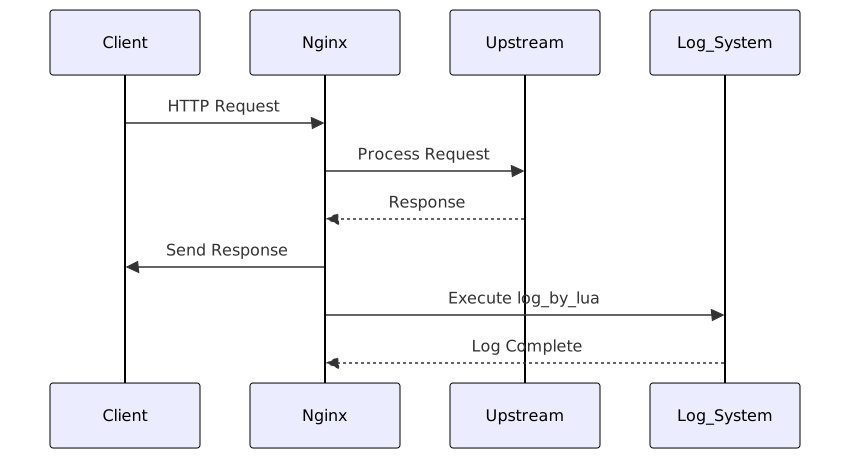
`log_by_lua`指令在Nginx的日志处理阶段执行,这是请求处理流程中的最后一个阶段。在这个阶段,请求已经完成,响应已经发送给客户端,此时执行日志记录操作不会影响请求的响应时间。
### 基础日志记录功能
#### 1. 基本日志输出
`log_by_lua`最基础的用法是记录请求的基本信息:
```nginx
location /api {
proxy_pass http://backend;
log_by_lua '
ngx.log(ngx.INFO, "Request completed: ", ngx.var.uri,
" Status: ", ngx.var.status,
" Upstream: ", ngx.var.upstream_addr,
" Response time: ", ngx.var.upstream_response_time, "s")
';
}
2. 多级别日志控制
OpenResty支持多种日志级别,可以根据需要选择适当的级别:
-- 在log_by_lua中定义日志级别常量
local EMERG = ngx.EMERG    -- 紧急情况
local ALERT = ngx.ALERT    -- 需要立即采取行动
local CRIT = ngx.CRIT      -- 严重情况
local ERR = ngx.ERR        -- 错误
local WARN = ngx.WARN      -- 警告
local NOTICE = ngx.NOTICE  -- 普通但重要的情况
local INFO = ngx.INFO      -- 信息性消息
local DEBUG = ngx.DEBUG    -- 调试级别信息

log_by_lua '
    if ngx.var.status >= 500 then
        ngx.log(ngx.ERR, "Server error: ", ngx.var.status)
    elseif ngx.var.status >= 400 then
        ngx.log(ngx.WARN, "Client error: ", ngx.var.status)
    else
        ngx.log(ngx.INFO, "Request successful: ", ngx.var.status)
    end
';
性能监控与指标采集
1. 响应时间监控
通过log_by_lua可以精确测量请求的处理时间:
location /monitored {
    access_by_lua '
        ngx.ctx.start_time = ngx.now()
    ';

    proxy_pass http://backend;

    log_by_lua '
        local elapsed = ngx.now() - ngx.ctx.start_time
        ngx.log(ngx.INFO, "Request timing - Total: ", elapsed,
                "s, Upstream: ", ngx.var.upstream_response_time, "s")
    ';
}
2. 使用共享字典进行指标聚合
共享字典(shared dict)是在多个worker进程间共享内存的高效数据结构,非常适合用于指标聚合:
http {
    lua_shared_dict metrics 10m;

    server {
        location /api {
            proxy_pass http://backend;

            log_by_lua '
                local metrics = ngx.shared.metrics

                -- 统计请求计数
                local key_count = "request_count:" .. ngx.var.status
                metrics:incr(key_count, 1)

                -- 记录响应时间
                if ngx.var.upstream_response_time then
                    local resp_time = tonumber(ngx.var.upstream_response_time)
                    local key_time = "response_time:" .. ngx.var.status
                    local sum_key = key_time .. ":sum"
                    local count_key = key_time .. ":count"

                    metrics:incr(sum_key, resp_time * 1000)  -- 转换为毫秒
                    metrics:incr(count_key, 1)
                end

                -- 记录上游服务器性能
                if ngx.var.upstream_addr then
                    local upstream_key = "upstream:" .. ngx.var.upstream_addr
                    metrics:incr(upstream_key .. ":requests", 1)

                    if ngx.var.upstream_response_time then
                        local resp_time = tonumber(ngx.var.upstream_response_time)
                        metrics:incr(upstream_key .. ":time_sum", resp_time * 1000)
                    end
                end
            ';
        }

        location /metrics {
            content_by_lua '
                local metrics = ngx.shared.metrics
                local keys = metrics:get_keys(0)  -- 获取所有key

                ngx.header["Content-Type"] = "text/plain"

                for _, key in ipairs(keys) do
                    local value = metrics:get(key)
                    if value then
                        ngx.say(key, " ", value)
                    end
                end
            ';
        }
    }
}
高级日志处理模式
1. 结构化日志输出
对于现代日志处理系统,结构化日志更易于分析和处理:
log_by_lua '
    local log_data = {
        timestamp = ngx.localtime(),
        client_ip = ngx.var.remote_addr,
        method = ngx.var.request_method,
        uri = ngx.var.uri,
        status = tonumber(ngx.var.status),
        response_time = tonumber(ngx.var.upstream_response_time or 0),
        request_length = tonumber(ngx.var.request_length or 0),
        bytes_sent = tonumber(ngx.var.bytes_sent or 0),
        user_agent = ngx.var.http_user_agent,
        referer = ngx.var.http_referer
    }

    -- 转换为JSON格式
    local cjson = require "cjson"
    ngx.log(ngx.INFO, cjson.encode(log_data))
';
2. 条件日志记录与采样
为了避免日志量过大,可以实现条件日志记录和采样机制:
log_by_lua '
    -- 只记录慢请求(响应时间超过1秒)
    if ngx.var.upstream_response_time and
       tonumber(ngx.var.upstream_response_time) > 1 then
        ngx.log(ngx.WARN, "Slow request: ", ngx.var.uri,
                " Time: ", ngx.var.upstream_response_time, "s")
    end

    -- 5%的采样率记录详细日志
    if math.random(100) <= 5 then
        ngx.log(ngx.INFO, "Sampled request - URI: ", ngx.var.uri,
                " Status: ", ngx.var.status,
                " Referer: ", ngx.var.http_referer or "none")
    end

    -- 记录所有错误请求
    if ngx.var.status >= 400 then
        ngx.log(ngx.ERR, "Error request - URI: ", ngx.var.uri,
                " Status: ", ngx.var.status,
                " Client: ", ngx.var.remote_addr)
    end
';
性能监控最佳实践
1. 监控指标分类
通过log_by_lua可以收集多种类型的性能指标:
| 指标类型 | 示例指标 | 描述 |
|---|---|---|
| 吞吐量 | 请求计数、QPS | 系统处理能力 |
| 延迟 | 响应时间、上游时间 | 请求处理速度 |
| 错误率 | HTTP错误计数 | 系统稳定性 |
| 资源使用 | 内存、连接数 | 资源消耗情况 |
2. 实时性能仪表板
结合共享字典和定时器,可以创建实时性能监控:
http {
    lua_shared_dict performance 5m;

    init_worker_by_lua '
        local delay = 5  -- 每5秒聚合一次指标
        local handler
        handler = function(premature)
            if premature then
                return
            end

            local perf = ngx.shared.performance
            local keys = perf:get_keys(0)

            -- 这里可以将聚合数据发送到监控系统
            -- 如Prometheus, InfluxDB, Elasticsearch等

            local ok, err = ngx.timer.at(delay, handler)
            if not ok then
                ngx.log(ngx.ERR, "Failed to create timer: ", err)
            end
        end

        local ok, err = ngx.timer.at(delay, handler)
        if not ok then
            ngx.log(ngx.ERR, "Failed to create timer: ", err)
        end
    ';
}
错误处理与容错机制
在log_by_lua中执行复杂的日志操作时,需要确保错误不会影响主要的请求处理流程:
log_by_lua '
    local ok, err = pcall(function()
        -- 复杂的日志处理逻辑
        local metrics = ngx.shared.metrics

        -- 安全地增加计数器
        local newval, err = metrics:incr("request_count", 1, 0)
        if not newval and err ~= "not found" then
            ngx.log(ngx.ERR, "Failed to increment counter: ", err)
        end

        -- 记录性能数据
        if ngx.var.upstream_response_time then
            local resp_time = tonumber(ngx.var.upstream_response_time)
            local sum, err = metrics:incr("response_time_sum", resp_time * 1000, 0)
            if not sum then
                ngx.log(ngx.ERR, "Failed to record response time: ", err)
            end
        end
    end)

    if not ok then
        ngx.log(ngx.ERR, "Error in log_by_lua: ", err)
    end
';
性能优化建议
- 避免阻塞操作:
log_by_lua中不应执行网络IO等阻塞操作 - 使用共享字典:对于跨worker的指标聚合,使用共享字典而非外部存储
- 控制日志量:通过采样和条件记录避免日志爆炸
- 异步处理:对于复杂的日志处理,可以考虑使用ngx.timer.at进行异步处理
- 监控自身性能:定期检查
log_by_lua的执行时间,确保不会成为性能瓶颈
通过合理运用log_by_lua指令,开发者可以构建出高效、灵活且功能强大的日志记录和性能监控系统,为应用的稳定运行和持续优化提供坚实的数据支撑。
总结
lua-nginx-module的核心指令为Nginx提供了强大的Lua脚本处理能力,使得开发者能够在不同的请求处理阶段实现精细化的控制。content_by_lua负责动态内容生成,rewrite_by_lua处理URI重写,access_by_lua进行访问控制,header_filter_by_lua管理响应头,log_by_lua实现日志记录和性能监控。这些指令协同工作,形成了一个完整的请求处理流水线。通过深入理解每个指令的特性和适用场景,结合最佳实践和性能优化策略,开发者可以构建出高效、安全、可观测的现代Web应用架构,充分发挥OpenResty在高并发场景下的优势。
创作声明:本文部分内容由AI辅助生成(AIGC),仅供参考


