30秒零代码搭建GraphQL API:JSON GraphQL Server实战指南
 项目地址: https://gitcode.com/gh_mirrors/js/json-graphql-server
 你还在为学习GraphQL搭建繁琐的后端环境而苦恼吗?还在为测试前端接口等待后端开发完成吗?本文将带你使用JSON GraphQL Server,无需编写一行后端代码,30秒内搭建一个功能完备的GraphQL API服务,让你专注于数据模型设计与前端开发。读完本文,你将掌握从环境配置到高级定制的全流程技能,包括自动生成CRUD操作、关系型数据查询、权限控制等实战技巧。
为什么选择JSON GraphQL Server?
在现代Web开发中,前后端分离架构已成为主流,但接口联调往往成为效率瓶颈。根据Stack Overflow 2024年开发者调查,68%的前端开发者认为"等待后端接口"是项目延期的主要原因。JSON GraphQL Server作为一款零配置的GraphQL模拟服务器,通过以下特性解决这一痛点:
- 零代码启动:仅需JSON数据文件,无需编写GraphQL Schema和解析器
- 自动类型推断:根据JSON数据自动生成完整的GraphQL类型系统
- 全功能CRUD:内置查询、创建、更新、删除等操作,支持分页、排序、过滤
- 关系数据支持:自动识别
*_id字段,建立实体间关联关系 - 多环境兼容:支持Node.js后端集成、浏览器端Mock及各种HTTP客户端
快速上手:30秒搭建步骤
环境准备
JSON GraphQL Server需要Node.js环境(v14+),通过npm或yarn安装:
# 全局安装(推荐)
npm install -g json-graphql-server

# 或项目本地安装
npm install -D json-graphql-server
第一步:创建数据文件
创建db.js文件,定义实体数据结构:
// db.js
module.exports = {
  posts: [
    { id: 1, title: "GraphQL入门", views: 254, user_id: 123 },
    { id: 2, title: "JSON Server技巧", views: 189, user_id: 456 }
  ],
  users: [
    { id: 123, name: "张三", role: "admin" },
    { id: 456, name: "李四", role: "editor" }
  ],
  comments: [
    { id: 987, post_id: 1, body: "很实用的教程", date: new Date('2024-01-15') },
    { id: 988, post_id: 1, body: "期待更新", date: new Date('2024-01-16') }
  ]
};
第二步:启动服务器
执行以下命令启动GraphQL服务器:
# 使用npx直接运行(无需全局安装)
npx json-graphql-server db.js

# 或指定端口和主机
npx json-graphql-server db.js -p 4000 -h 0.0.0.0
第三步:访问GraphiQL界面
打开浏览器访问http://localhost:3000,即可看到GraphiQL界面,开始交互式查询:
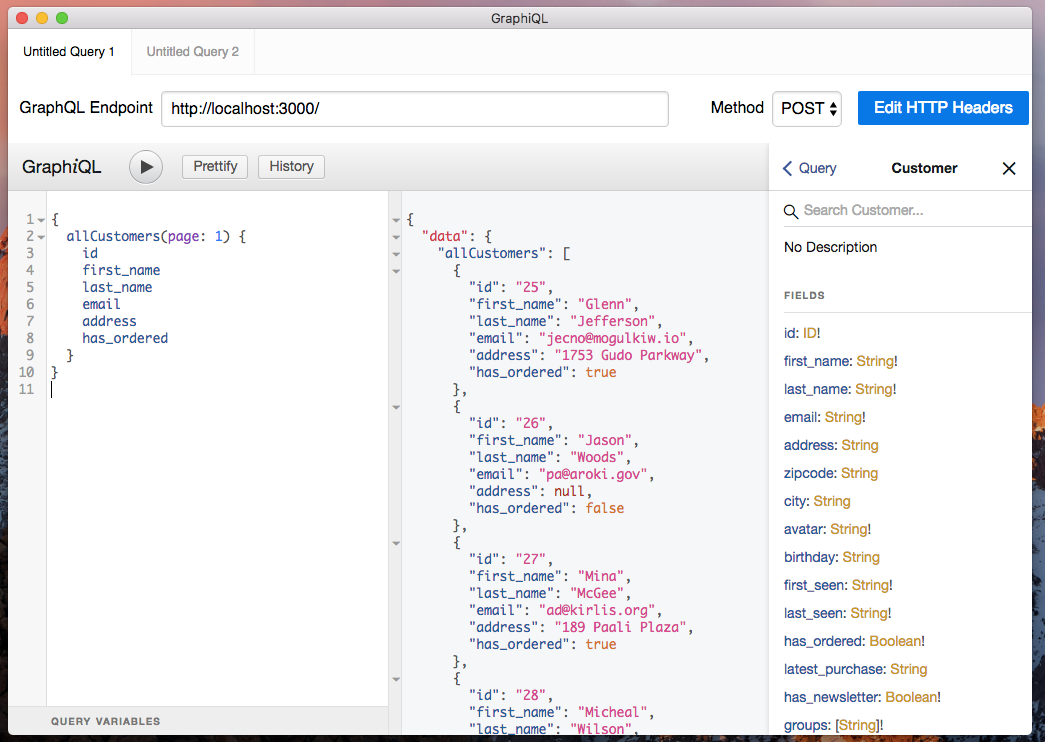
提示:由于无法使用外部图片,实际使用时可描述为:左侧为查询编辑区,支持语法高亮和自动补全;右侧为结果展示区;上方工具栏可切换查询变量和HTTP头部。
数据模型设计指南
实体定义规范
JSON GraphQL Server通过数据文件自动推断实体关系,遵循以下规范可获得最佳体验:
- 主键要求:每个实体必须包含
id字段作为主键 - 关系定义:使用
*_id命名外键字段(如user_id关联users实体) - 数据类型:支持字符串、数字、布尔值、日期、数组和对象类型
类型推断规则
系统会根据字段值自动推断GraphQL类型,以下是常见类型映射:
| 数据类型 | GraphQL类型 | 推断规则 | 示例值 |
|---|---|---|---|
| ID | GraphQLID | 字段名是id或以_id结尾 | 123、"abc" |
| 整数 | GraphQLInt | Number.isInteger(value) | 42 |
| 浮点数 | GraphQLFloat | 数值但非整数 | 3.14 |
| 布尔值 | GraphQLBoolean | typeof value === 'boolean' | true |
| 字符串 | GraphQLString | 默认类型 | "hello" |
| 日期 | Date | value instanceof Date或ISO字符串 | new Date()、"2024-01-01" |
| 数组 | GraphQLList | Array.isArray(value) | [1, 2, 3] |
| 对象 | GraphQLJSON | 复杂对象类型 | {a: 1, b: "x"} |
高级数据模型示例
以下是一个电商系统的数据模型示例,包含用户、产品、订单等实体及关联关系:
// 复杂数据模型示例(db.js)
module.exports = {
  users: [
    { id: 1, name: "张三", email: "zhangsan@example.com" },
    { id: 2, name: "李四", email: "lisi@example.com" }
  ],
  products: [
    { id: 101, name: "笔记本电脑", price: 5999, category_id: 1 },
    { id: 102, name: "智能手机", price: 3999, category_id: 2 }
  ],
  categories: [
    { id: 1, name: "电脑设备" },
    { id: 2, name: "移动设备" }
  ],
  orders: [
    { id: 1001, user_id: 1, total: 9998, status: "paid" },
    { id: 1002, user_id: 2, total: 3999, status: "shipped" }
  ],
  order_items: [
    { id: 1, order_id: 1001, product_id: 101, quantity: 1 },
    { id: 2, order_id: 1001, product_id: 102, quantity: 1 },
    { id: 3, order_id: 1002, product_id: 102, quantity: 1 }
  ]
};
查询操作完全指南
基础查询操作
JSON GraphQL Server为每个实体自动生成三类查询:单个实体查询、实体列表查询和列表元数据查询。
获取单个实体
# 查询ID为1的帖子及其关联的用户和评论
query GetPostWithRelations {
  Post(id: 1) {
    id
    title
    views
    # 关联查询:通过user_id关联到User实体
    User {
      id
      name
    }
    # 反向关联:获取所有关联到该帖子的评论
    Comments {
      id
      body
      date
    }
  }
}
列表查询与过滤
# 查询所有帖子,带分页、排序和过滤
query ListPosts {
  allPosts(
    page: 1,          # 页码(从1开始)
    perPage: 10,      # 每页条数
    sortField: "views", # 排序字段
    sortOrder: "desc",  # 排序方向(asc/desc)
    filter: {         # 过滤条件
      views_gte: 100,  # 浏览量大于等于100
      title_contains: "GraphQL" # 标题包含"GraphQL"
    }
  ) {
    id
    title
    views
    user_id
  }
  # 获取符合条件的总记录数
  _allPostsMeta(filter: { views_gte: 100 }) {
    count
  }
}
高级过滤条件
系统为每种类型自动生成丰富的过滤字段,命名规则如下:
| 过滤类型 | 字段后缀 | 适用类型 | 示例 |
|---|---|---|---|
| 等于 | 无后缀 | 所有类型 | id: 1 |
| 不等于 | _neq | 所有类型 | status_neq: "draft" |
| 包含 | _contains | 字符串 | title_contains: "test" |
| 不包含 | _not_contains | 字符串 | name_not_contains: "admin" |
| 小于 | _lt | 数字/日期 | price_lt: 100 |
| 小于等于 | _lte | 数字/日期 | created_at_lte: "2024-01-01" |
| 大于 | _gt | 数字/日期 | score_gt: 90 |
| 大于等于 | _gte | 数字/日期 | age_gte: 18 |
| 为空 | _null | 所有类型 | email_null: true |
| 在列表中 | _in | 所有类型 | id_in: [1, 2, 3] |
| 不在列表中 | _nin | 所有类型 | status_nin: ["deleted", "draft"] |
关系查询深度控制
# 多深度关联查询示例
query ComplexRelationQuery {
  User(id: 1) {
    name
    # 获取用户的所有订单
    Orders {
      id
      total
      status
      # 获取订单中的商品
      OrderItems {
        quantity
        # 获取商品详情
        Product {
          name
          price
          # 获取商品分类
          Category {
            name
          }
        }
      }
    }
  }
}
突变操作详解
创建实体
# 创建单个实体
mutation CreateNewPost {
  createPost(data: "{\"title\":\"新文章\",\"views\":0,\"user_id\":1}") {
    id
    title
    views
    user_id
  }
}

# 批量创建实体
mutation CreateMultiplePosts {
  createManyPost(data: [
    {"data":"{\"title\":\"批量文章1\",\"views\":0,\"user_id\":1}"},
    {"data":"{\"title\":\"批量文章2\",\"views\":0,\"user_id\":2}"}
  ]) {
    id
    title
  }
}
更新与删除
# 更新实体
mutation UpdatePost {
  updatePost(data: "{\"id\":1,\"title\":\"更新后的标题\",\"views\":100}") {
    id
    title
    views
  }
}

# 删除实体
mutation DeletePost {
  deletePost(id: 1) {
    id # 返回被删除的实体ID
  }
}
集成与部署
Node.js后端集成
// server.js
import express from 'express';
import jsonGraphqlExpress from 'json-graphql-server/node';
import data from './db.js';

const app = express();
const PORT = 3000;

// 添加自定义中间件(如CORS、认证等)
app.use(express.json());

// 挂载GraphQL服务
app.use('/graphql', jsonGraphqlExpress(data));

// 添加自定义路由
app.get('/health', (req, res) => {
  res.send('OK');
});

app.listen(PORT, () => {
  console.log(`Server running on http://localhost:${PORT}/graphql`);
});
启动服务:
node server.js
浏览器端Mock服务
<!-- browser-mock.html -->
<!DOCTYPE html>
<html>
<body>
  <script src="https://cdn.jsdelivr.net/npm/json-graphql-server@2.3.2/dist/json-graphql-server.umd.cjs"></script>
  <script>
    // 定义模拟数据
    const data = {
      posts: [
        { id: 1, title: "浏览器端Mock示例" }
      ]
    };

    // 启动Mock服务器
    const server = JsonGraphqlServer({
      data,
      url: '/graphql' // 模拟的API路径
    });
    server.start();

    // 测试查询
    fetch('/graphql', {
      method: 'POST',
      headers: { 'Content-Type': 'application/json' },
      body: JSON.stringify({
        query: '{ allPosts { id, title } }'
      })
    })
    .then(res => res.json())
    .then(data => console.log('Mock数据:', data));
  </script>
</body>
</html>
生产环境部署选项
| 部署方式 | 复杂度 | 适用场景 | 部署命令 |
|---|---|---|---|
| 直接部署 | 低 | 开发/演示 | node server.js |
| Docker容器 | 中 | 测试/生产 | docker run -p 3000:3000 -v $(pwd)/db.js:/app/db.js node node /app/server.js |
| 云函数 | 高 | 无服务器架构 | 需适配各平台API(AWS Lambda/阿里云FC等) |
高级特性
自定义Schema
// custom-schema.js
export default `
  type CustomUser {
    id: ID!
    name: String!
    fullName: String # 自定义字段
    posts: [Post] # 自定义关联
  }

  type Query {
    # 自定义查询
    searchUsers(keyword: String): [CustomUser]
  }
`;

// 在启动时指定自定义schema
const server = jsonGraphqlExpress(data, { schema: customSchema });
权限控制中间件
// 权限控制示例
import express from 'express';
import jsonGraphqlExpress from 'json-graphql-server/node';
import data from './db.js';

const app = express();

// JWT认证中间件
const authMiddleware = (req, res, next) => {
  const token = req.headers.authorization?.split(' ')[1];
  if (!token && req.path === '/graphql') {
    return res.status(401).send('Unauthorized');
  }
  next();
};

app.use(authMiddleware);
app.use('/graphql', jsonGraphqlExpress(data));
app.listen(3000);
性能优化建议
- 数据分片:对于大型数据集,使用
page和perPage参数进行分页查询 - 字段筛选:只请求需要的字段,减少数据传输量
- 缓存策略:对频繁查询的结果实施缓存(可使用Redis等)
- 索引优化:对常用过滤字段建立内存索引(实验性功能)
// 启用内存索引(实验性)
app.use('/graphql', jsonGraphqlExpress(data, {
  indexes: {
    posts: ['user_id', 'created_at'] // 为posts集合的user_id和created_at字段建立索引
  }
}));
常见问题与解决方案
Q: 如何处理循环引用?
A: 系统会自动检测并处理循环引用,但在深度查询时建议限制查询深度,避免性能问题。
Q: 支持文件上传吗?
A: 核心库不直接支持,可通过添加中间件(如express-fileupload)结合自定义解析器实现。
Q: 如何与真实数据库集成?
A: JSON GraphQL Server主要用于模拟,生产环境可考虑使用Prisma、TypeORM等ORM工具连接真实数据库。
Q: 支持 subscriptions(订阅)吗?
A: 当前版本不支持,可关注GitHub仓库获取更新。临时解决方案:结合Socket.io自行实现实时通知。
总结与展望
JSON GraphQL Server作为一款零配置的GraphQL模拟工具,极大降低了GraphQL的学习和使用门槛。通过本文介绍的方法,你可以快速搭建功能完备的GraphQL API,加速前端开发流程。
项目目前正在活跃开发中,未来计划支持更多高级特性如 subscriptions、自定义标量类型等。建议通过以下方式获取最新动态:
- 项目仓库:https://gitcode.com/gh_mirrors/js/json-graphql-server
- 提交Issue:https://gitcode.com/gh_mirrors/js/json-graphql-server/issues
最后,不妨立即动手尝试:
# 快速体验
npx json-graphql-server https://gitcode.com/gh_mirrors/js/json-graphql-server/raw/master/example/data.cjs
通过实践掌握这一强大工具,让你的GraphQL开发效率提升10倍!
附录:命令行参数参考
| 参数 | 别名 | 描述 | 默认值 |
|---|---|---|---|
--port | -p | 服务端口 | 3000 |
--host | -h | 绑定主机 | localhost |
--data | -d | 数据文件路径 | db.js |
--graphiql | -g | 是否启用GraphiQL | true |
--cors | -c | 是否启用CORS | true |
--json | -j | 输出JSON格式日志 | false |
创作声明:本文部分内容由AI辅助生成(AIGC),仅供参考


