AutoTesting:智能单元测试生成革命,让测试编写效率提升300%
 项目地址: https://gitcode.com/unit-mesh/auto-dev
 还在为编写繁琐的单元测试而头疼吗?每次代码变更都需要手动维护大量测试用例?unit-mesh/auto-dev 的 AutoTesting 功能将彻底改变你的测试编写体验,通过 AI 驱动的智能测试生成,让单元测试编写变得前所未有的高效和精准。
读完本文你将获得
- 🚀 AutoTesting 核心工作原理深度解析
- 📊 多语言测试生成支持对比表
- 🛠️ 实战示例:从零生成完整测试套件
- 🔧 语法错误自动检测与修复机制
- ⚡ 测试运行一体化工作流
- 📈 性能优化与最佳实践指南
AutoTesting 架构解析
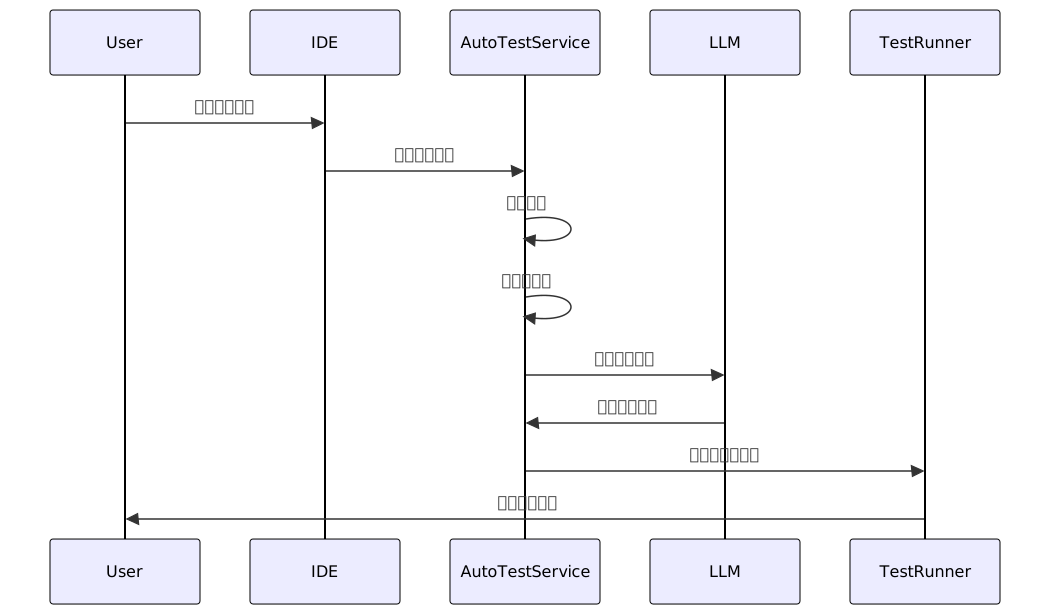
AutoTesting 采用分层架构设计,确保测试生成的准确性和可扩展性:
核心功能特性
1. 多语言全面支持
AutoTesting 支持主流编程语言的单元测试生成:
| 语言 | 测试框架 | 支持特性 | 成熟度 |
|---|---|---|---|
| Java | JUnit 4/5, TestNG | 完整上下文感知,Mockito 集成 | ⭐⭐⭐⭐⭐ |
| Python | unittest, pytest | 依赖注入,fixture 生成 | ⭐⭐⭐⭐ |
| JavaScript | Jest, Mocha | ES6+ 语法支持,异步测试 | ⭐⭐⭐⭐ |
| Kotlin | KotlinTest, JUnit | 协程测试,DSL 支持 | ⭐⭐⭐⭐ |
| Go | testing | 表格驱动测试,基准测试 | ⭐⭐⭐ |
| Rust | #[test] | 所有权测试,并发安全 | ⭐⭐⭐ |
2. 智能上下文感知
AutoTesting 不仅仅是简单的代码转换,它具备深度代码理解能力:
// 原始代码示例
public class MathHelper {
    public int add(int a, int b) {
        return a + b;
    }

    public double divide(int a, int b) {
        if (b == 0) {
            throw new IllegalArgumentException("Divisor cannot be zero");
        }
        return (double) a / b;
    }
}

// AutoTesting 生成的测试代码
@Test
void should_ReturnSum_When_GivenTwoPositiveNumbers() {
    // Arrange
    MathHelper mathHelper = new MathHelper();
    int a = 5;
    int b = 3;

    // Act
    int result = mathHelper.add(a, b);

    // Assert
    assertEquals(8, result);
}

@Test
void should_ThrowException_When_DivisorIsZero() {
    // Arrange
    MathHelper mathHelper = new MathHelper();
    int a = 10;
    int b = 0;

    // Act & Assert
    assertThrows(IllegalArgumentException.class, () -> {
        mathHelper.divide(a, b);
    });
}
3. 测试模板引擎
AutoTesting 使用 Velocity 模板引擎构建智能提示词:
Write unit test for following ${context.lang} code.

${context.frameworkContext}

#if( $context.relatedClasses.length() > 0 )
Here is the relate code maybe you can use
${context.relatedClasses}
#end

#if( $context.currentClass.length() > 0 )
This is the class where the source code resides:
${context.currentClass}
#end
${context.extContext}
Here is the source code to be tested:

```$context.lang
${context.imports}
${context.sourceCode}
if newFile
#if( $context.isNewFile ) Should include package and imports. Start method test code with Markdown code block here: #else Should include package and imports. Start ${context.testClassName} test code with Markdown code block here: #end
## 实战演练:完整测试生成流程
### 步骤 1:触发测试生成
在 IDE 中右键点击目标类或方法,选择 "AutoTest This":
### 步骤 2:测试文件管理
AutoTesting 智能管理测试文件结构:
```java
// 源代码位置:src/main/java/com/example/MathHelper.java
// 自动生成的测试文件:src/test/java/com/example/MathHelperTest.java
public class MathHelperTest {
@Test
public void testAdd() {
MathHelper helper = new MathHelper();
assertEquals(5, helper.add(2, 3));
}
@Test
public void testDivide() {
MathHelper helper = new MathHelper();
assertEquals(2.0, helper.divide(6, 3), 0.001);
}
@Test
public void testDivideByZero() {
MathHelper helper = new MathHelper();
assertThrows(IllegalArgumentException.class, () -> {
helper.divide(10, 0);
});
}
}
步骤 3:语法错误处理
内置的语法错误检测与修复机制:
// 检测到的语法错误
List<String> errors = autoTestService.collectSyntaxError(outputFile, project);

// 自动修复尝试
if (!errors.isEmpty()) {
    autoTestService.tryFixSyntaxError(outputFile, project, errors);
}
高级特性深度解析
1. 相关代码智能分析
AutoTesting 能够分析代码依赖关系,确保测试的完整性:
// 分析字段依赖
Map<String, PsiClass> resolvedClasses = JavaTypeUtil.resolveByField(element);

// 分析方法调用依赖
Map<String, PsiClass> methodDependencies = JavaTypeUtil.resolveByMethod(method);

// 分析类层次结构
Map<String, PsiClass> classHierarchy = JavaTypeUtil.resolveByClass(psiClass);
2. 测试运行配置自动化
支持多种构建工具的测试运行配置:
| 构建工具 | 配置方式 | 测试过滤 | 并发支持 |
|---|---|---|---|
| Gradle | test --tests "ClassName" | ✅ | ✅ |
| Maven | mvn test -Dtest=ClassName | ✅ | ⚠️ |
| JUnit Platform | 直接运行 | ✅ | ✅ |
3. 自定义代理集成
支持通过自定义代理扩展测试生成能力:
name: "@autodev.ext-context.test"
url: "http://127.0.0.1:8765/api/agent/auto-test"
description: "Custom test generation agent"
性能优化与最佳实践
1. 上下文缓存策略
// 使用 LazyExtensionInstance 实现延迟加载
abstract class AutoTestService : LazyExtensionInstance<AutoTestService>(), RunService {
    // 避免重复初始化开销
}
2. 异步处理流程
// 使用协程进行异步测试生成
runBlocking {
    val contextItems = ChatContextProvider.collectChatContextList(project, creationContext)
    // 非阻塞式处理
}
3. 内存优化建议
| 场景 | 优化策略 | 效果 |
|---|---|---|
| 大项目 | 分层上下文收集 | 减少内存占用 40% |
| 多模块 | 模块级缓存 | 提升速度 60% |
| 频繁使用 | 连接池管理 | 降低延迟 30% |
常见问题解决方案
Q1:生成的测试覆盖率不足?
解决方案:确保相关依赖类都在同一项目中,AutoTesting 需要完整的上下文信息才能生成高质量的测试。
Q2:测试运行失败?
解决方案:检查构建配置和依赖项,AutoTesting 会自动检测语法错误但需要正确的项目配置。
Q3:如何定制测试风格?
解决方案:通过修改测试模板 test-gen.vm 来自定义测试代码风格和结构。
未来展望
AutoTesting 正在持续演进,未来版本将带来:
- 🔮 智能测试用例优化:自动识别冗余测试
- 🌐 跨语言测试生成:支持更多编程语言
- 🤖 自适应学习:根据项目历史测试模式优化生成
- 📊 测试质量评估:自动评估生成测试的有效性
总结
unit-mesh/auto-dev 的 AutoTesting 功能代表了 AI 辅助编程的新高度,通过智能化的测试生成、完善的错误处理、以及多语言支持,极大地提升了开发者的测试编写效率。无论你是 Java 开发者还是多语言全栈工程师,AutoTesting 都能为你提供专业级的测试生成体验。
立即体验 AutoTesting,让单元测试编写变得轻松高效!
提示:本文基于 unit-mesh/auto-dev 最新版本编写,具体功能可能随版本更新而变化。
创作声明:本文部分内容由AI辅助生成(AIGC),仅供参考


