如何快速实现高效语音识别?Distil-Whisper让AI语音转文本提速6倍的终极指南 🚀
 项目地址: https://gitcode.com/gh_mirrors/di/distil-whisper
 Distil-Whisper是一款基于Whisper模型的精简版语音识别工具,专为英语语音识别优化,实现了6倍更快的推理速度、49%的模型体积缩减,同时保持与原版Whisper仅1%的词错误率(WER)差距。无论是资源受限的设备还是实时应用场景,这款轻量级模型都能提供高效、准确的语音转文本能力,让开发者和普通用户轻松集成专业级语音识别功能。
📊 核心性能对比:为什么选择Distil-Whisper?
Distil-Whisper在速度与精度之间实现了完美平衡,以下是与原版Whisper的关键性能指标对比:
| 模型名称 | 参数规模(百万) | 相对速度提升 | 短音频WER | 长音频WER |
|---|---|---|---|---|
| Whisper large-v3 | 1550 | 1.0 | 8.4 | 11.0 |
| Distil-Whisper large-v3 | 756 | 6.3 | 9.7 | 10.8 |
| Distil-Whisper medium.en | 394 | 6.8 | 11.1 | 12.4 |
| Distil-Whisper small.en | 166 | 5.6 | 12.1 | 12.8 |
✨ 五大核心优势
- 极速推理:6倍提速让实时语音转写成为可能,适合直播、会议等低延迟场景
- 抗噪声能力:在低信噪比环境下仍保持稳定性能,优于原版Whisper
- 减少幻觉现象:重复词错误率降低1.3倍,插入错误率(IER)降低2.1%
- 投机解码支持:作为辅助模型与Whisper配合使用,确保输出一致性的同时再提速2倍
- MIT开源许可:完全免费商用,无需担心版权限制
🚀 快速开始:三步安装与基础使用
1️⃣ 环境准备(推荐Python 3.8+)
pip install --upgrade pip
pip install --upgrade transformers accelerate datasets[audio]
2️⃣ 克隆项目仓库
git clone https://gitcode.com/gh_mirrors/di/distil-whisper
cd distil-whisper
3️⃣ 30秒实现语音转文本
以下代码示例展示如何使用Distil-Whisper进行短音频转录(支持MP3/WAV等格式):
import torch
from transformers import AutoModelForSpeechSeq2Seq, AutoProcessor, pipeline

# 配置设备与精度(自动选择GPU/CPU)
device = "cuda:0" if torch.cuda.is_available() else "cpu"
torch_dtype = torch.float16 if torch.cuda.is_available() else torch.float32

# 加载模型与处理器
model_id = "distil-whisper/distil-large-v3"
model = AutoModelForSpeechSeq2Seq.from_pretrained(
    model_id, torch_dtype=torch_dtype, low_cpu_mem_usage=True, use_safetensors=True
)
model.to(device)
processor = AutoProcessor.from_pretrained(model_id)

# 创建语音识别管道
pipe = pipeline(
    "automatic-speech-recognition",
    model=model,
    tokenizer=processor.tokenizer,
    feature_extractor=processor.feature_extractor,
    max_new_tokens=128,
    torch_dtype=torch_dtype,
    device=device,
)

# 转录本地音频文件
result = pipe("your_audio_file.mp3")
print("转录结果:", result["text"])
🎯 场景化应用指南
🔍 短音频转录(<30秒)
适合语音命令、语音消息等场景,直接一次性处理完整音频:
# 从数据集加载示例音频(或替换为本地文件路径)
from datasets import load_dataset
dataset = load_dataset("hf-internal-testing/librispeech_asr_dummy", "clean", split="validation")
sample = dataset[0]["audio"]

# 快速转录
result = pipe(sample)
print("短音频转录结果:", result["text"])
🎙️ 长音频处理(>30秒)
针对播客、会议录音等长内容,支持两种高效处理模式:
模式1:顺序滑动窗口算法(高精度优先)
# 加载长音频示例(可替换为本地文件路径)
dataset = load_dataset("distil-whisper/librispeech_long", "clean", split="validation")
sample = dataset[0]["audio"]

# 自动应用滑动窗口处理
result = pipe(sample)
print("长音频转录结果:", result["text"])
模式2:分块批处理算法(速度优先)
# 配置25秒分块与批量处理
pipe = pipeline(
    "automatic-speech-recognition",
    model=model,
    tokenizer=processor.tokenizer,
    feature_extractor=processor.feature_extractor,
    max_new_tokens=128,
    chunk_length_s=25,  # 最优分块长度
    batch_size=16,       # 批处理大小
    torch_dtype=torch_dtype,
    device=device,
)

# 处理超长音频(如1小时会议录音)
result = pipe("long_meeting_recording.mp3")
🚀 高级提速技巧:投机解码
将Distil-Whisper作为辅助模型与原版Whisper配合,实现2倍速度提升且保证输出完全一致:
# 加载Whisper教师模型
teacher_model = AutoModelForSpeechSeq2Seq.from_pretrained(
    "openai/whisper-large-v3", torch_dtype=torch_dtype, low_cpu_mem_usage=True
)
teacher_model.to(device)

# 加载Distil-Whisper辅助模型
assistant_model = AutoModelForCausalLM.from_pretrained(
    "distil-whisper/distil-large-v3", torch_dtype=torch_dtype
)
assistant_model.to(device)

# 启用投机解码
speculative_pipe = pipeline(
    "automatic-speech-recognition",
    model=teacher_model,
    tokenizer=processor.tokenizer,
    feature_extractor=processor.feature_extractor,
    generate_kwargs={"assistant_model": assistant_model},  # 关键参数
    torch_dtype=torch_dtype,
    device=device,
)
🧪 模型性能深度解析
🛡️ 抗噪声能力测试
Distil-Whisper在不同信噪比(SNR)环境下的表现显著优于原版模型,尤其在低噪声环境中优势明显:
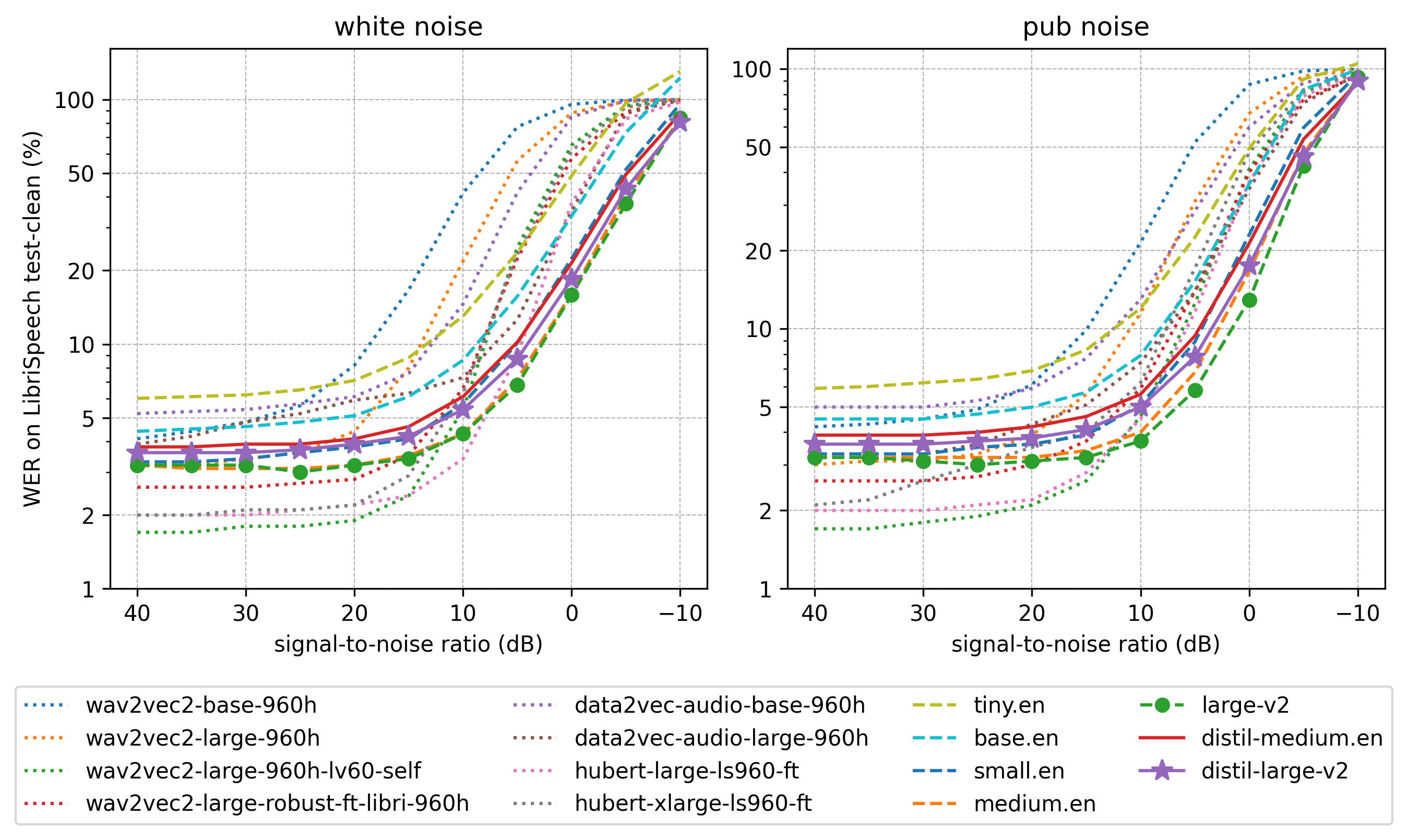 图:不同信噪比下的词错误率对比,Distil-Whisper(蓝线)在-5dB至20dB区间表现更稳定
🧠 架构优化解析
模型通过以下创新实现高效能:
- 保留完整编码器:复用Whisper的特征提取能力
- 精简解码器:仅保留2层解码器(源自原版的第1层和最后1层)
- 知识蒸馏技术:通过KL散度损失和伪标签训练优化性能
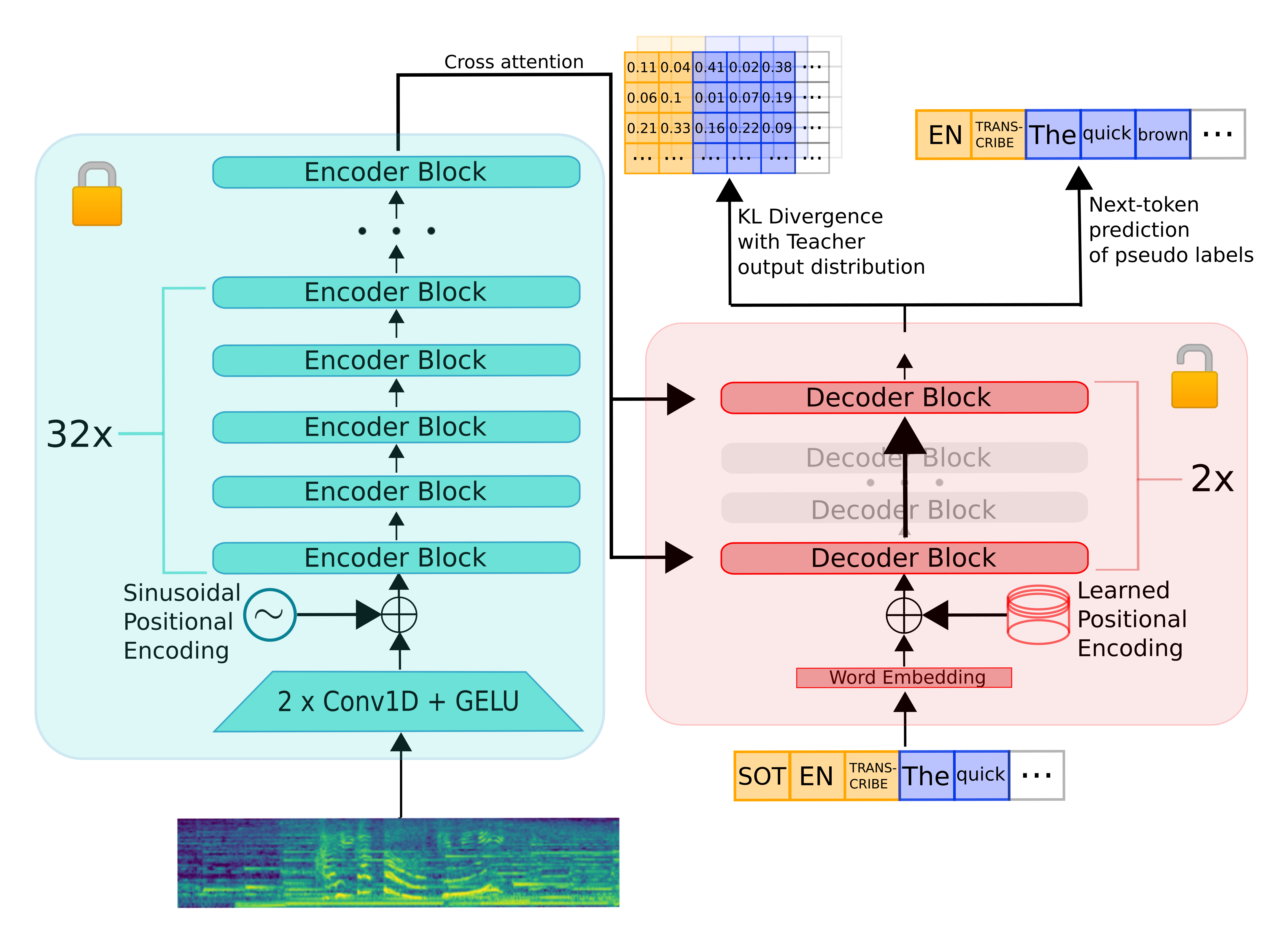 图:Distil-Whisper与原版Whisper的架构对比,红色框为精简部分
💡 实用优化技巧
1️⃣ 内存占用优化
- 使用
low_cpu_mem_usage=True减少加载时内存峰值 - 优先采用
float16精度(需GPU支持),模型体积减半
2️⃣ 推理速度提升
- Flash Attention:GPU用户安装
flash-attn库并启用use_flash_attention_2=True - BetterTransformer:CPU用户通过
model.to_bettertransformer()启用优化
# Flash Attention安装(需CUDA支持)
pip install flash-attn --no-build-isolation

# BetterTransformer优化(CPU/GPU通用)
pip install --upgrade optimum
model = model.to_bettertransformer()  # 加载模型后执行
3️⃣ 多平台部署支持
Distil-Whisper已适配主流部署框架,包括:
- OpenAI Whisper原生库
- Whisper.cpp(C/C++轻量部署)
- Transformers.js(浏览器端运行)
- Candle(Rust高性能推理)
📚 项目资源与社区支持
核心代码目录结构
distil-whisper/
├── training/                # 训练脚本与配置
│   ├── create_student_model.py  # 模型创建工具
│   ├── run_distillation.py      # 蒸馏训练主程序
│   └── flax/                   # Flax框架实现
├── Distil_Whisper.pdf        # 技术白皮书
└── README.md                 # 官方文档
学习资源
- 技术白皮书:项目根目录下的
Distil_Whisper.pdf详细解析模型原理 - 训练代码:
training/目录包含完整蒸馏训练流程,支持自定义数据集微调 - 评估脚本:
training/evaluation_scripts/提供性能测试工具
📝 总结:开启高效语音识别之旅
Distil-Whisper凭借其极致的性能优化和易用性,彻底改变了语音识别的应用门槛。无论是开发智能助手、实时字幕工具,还是构建无障碍应用,这款轻量级模型都能以更低的资源消耗提供专业级效果。
✨ 立即行动:克隆项目仓库,3行代码实现语音转文本,体验6倍速带来的效率提升!适合初学者的完整示例代码已包含在项目文档中,让每个人都能轻松掌握AI语音识别技术。
通过Distil-Whisper,语音识别不再是高门槛的专业技术,而是触手可及的实用工具。现在就加入这个快速成长的社区,探索语音交互的无限可能!
创作声明:本文部分内容由AI辅助生成(AIGC),仅供参考


