Coco AI Markdown:富文本渲染组件深度解析
 项目地址: https://gitcode.com/infinilabs/coco-app
 引言:AI对话中的富文本渲染挑战
在现代AI助手应用中,如何优雅地呈现复杂的格式化内容是一个关键技术挑战。传统的纯文本显示无法满足代码高亮、数学公式、流程图等专业需求。Coco AI通过其强大的Markdown渲染组件,为用户提供了媲美专业编辑器的富文本展示体验。
读完本文,您将获得:
- Coco AI Markdown组件的完整架构解析
- 多格式支持的技术实现细节
- 深色/浅色主题的无缝切换机制
- 代码高亮和数学公式渲染的最佳实践
- 性能优化和用户体验提升策略
组件架构设计
核心依赖与技术栈
Coco AI的Markdown渲染组件基于现代化的React技术栈构建:
核心代码结构
// Markdown组件主入口
export default function Markdown(props: {
  content: string;
  loading?: boolean;
  fontSize?: number;
  fontFamily?: string;
  parentRef?: RefObject<HTMLDivElement>;
  defaultShow?: boolean;
} & React.DOMAttributes<HTMLDivElement>) {
  const mdRef = useRef<HTMLDivElement>(null);

  return (
    <div className="coco-chat">
      <div
        className="markdown-body"
        style={{
          fontSize: `${props.fontSize ?? 14}px`,
          fontFamily: props.fontFamily || "inherit",
        }}
        ref={mdRef}
        onContextMenu={props.onContextMenu}
        onDoubleClickCapture={props.onDoubleClickCapture}
        dir="auto"
      >
        <MarkdownContent content={props.content} />
      </div>
    </div>
  );
}
多格式支持实现
1. 代码高亮与语法突出
Coco AI采用Rehype Highlight插件实现专业的代码高亮:
rehypePlugins: [
  RehypeKatex,
  [
    RehypeHighlight,
    {
      detect: false,
      ignoreMissing: true,
    },
  ],
]
支持的语言类型包括:
- 编程语言:JavaScript、TypeScript、Python、Rust等
- 标记语言:HTML、CSS、Markdown、XML
- 数据格式:JSON、YAML、TOML
- 配置语言:Dockerfile、Makefile
2. 数学公式渲染
通过RemarkMath和RehypeKatex实现LaTeX数学公式支持:
当我们需要展示数学公式时:

$$
f(x) = \int_{-\infty}^{\infty} \hat f(\xi)\,e^{2 \pi i \xi x} \,d\xi
$$

或者行内公式:$E = mc^2$
3. Mermaid流程图集成
Coco AI内置Mermaid.js支持,可渲染各类图表:
4. GitHub风格Markdown扩展
支持GFM(GitHub Flavored Markdown)标准:
| 功能 | 示例 | 渲染效果 |
|---|---|---|
| 任务列表 | - [x] 完成任务 | ✅ 带复选框的任务项 |
| 表格 | \| 列1 \| 列2 \| | 格式化表格 |
| 删除线 | ~~删除文本~~ | |
| 自动链接 | https://example.com | 可点击的链接 |
主题系统与样式管理
双主题支持架构
Coco AI采用CSS变量实现深色/浅色主题无缝切换:
@mixin light {
  color-scheme: light;
  --color-prettylights-syntax-comment: #6e7781;
  --color-prettylights-syntax-constant: #0550ae;
  // ... 更多颜色变量
}

@mixin dark {
  color-scheme: dark;
  --color-prettylights-syntax-comment: #8b949e;
  --color-prettylights-syntax-constant: #79c0ff;
  // ... 更多颜色变量
}

.light { @include light; }
.dark { @include dark; }
响应式设计原则
组件采用现代化的响应式设计:
.markdown-body {
  -ms-text-size-adjust: 100%;
  -webkit-text-size-adjust: 100%;
  color: var(--color-fg-default);
  background-color: var(--color-canvas-default);
  font-size: 14px;
  line-height: 1.5;
  word-wrap: break-word;

  /* 移动端适配 */
  @media (max-width: 768px) {
    font-size: 16px;
    padding: 0 12px;
  }
}
性能优化策略
1. 组件记忆化
使用React.memo避免不必要的重渲染:
const MarkdownContent = React.memo(_MarkDownContent);
2. 防抖处理
对Mermaid图表渲染进行防抖优化:
const renderArtifacts = useDebouncedCallback(() => {
  if (!ref.current) return;
  const mermaidDom = ref.current.querySelector("code.language-mermaid");
  if (mermaidDom) {
    setMermaidCode((mermaidDom as HTMLElement).innerText);
  }
}, 600);
3. 懒加载机制
大型代码块和图表采用懒加载策略:
useEffect(() => {
  if (props.code && ref.current) {
    mermaid
      .run({
        nodes: [ref.current],
        suppressErrors: true,
      })
      .catch((e) => {
        setHasError(true);
        console.error("[Mermaid] ", e.message);
      });
  }
}, [props.code]);
用户体验增强功能
1. 代码复制功能
每个代码块都内置一键复制按钮:
<span
  className="copy-code-button"
  onClick={() => {
    if (ref.current) {
      copyToClipboard(
        ref.current.querySelector("code")?.innerText ?? ""
      );
    }
  }}
></span>
2. 代码折叠支持
长代码块支持展开/折叠功能:
const [collapsed, setCollapsed] = useState(true);
const [showToggle, setShowToggle] = useState(false);

useEffect(() => {
  if (ref.current) {
    const codeHeight = ref.current.scrollHeight;
    setShowToggle(codeHeight > 400);
  }
}, [props.children]);
3. 多媒体内容支持
自动识别并渲染音频、视频内容:
a: (aProps) => {
  const href = aProps.href || "";
  if (/\.(aac|mp3|opus|wav)$/.test(href)) {
    return (
      <figure>
        <audio controls src={href}></audio>
      </figure>
    );
  }
  if (/\.(3gp|3g2|webm|ogv|mpeg|mp4|avi)$/.test(href)) {
    return (
      <video controls width="99.9%">
        <source src={href} />
      </video>
    );
  }
  return <a {...aProps} target="_blank" />;
}
实际应用场景
技术文档展示
# API接口文档

## 用户管理接口

### 获取用户信息
```http
GET /api/v1/users/{id}
Authorization: Bearer {token}
响应示例:
{
  "id": "user_123",
  "name": "张三",
  "email": "zhangsan@example.com",
  "created_at": "2024-01-01T00:00:00Z"
}
数学公式示例
在机器学习中,损失函数可以表示为:
$$ \mathcal{L}(\theta) = \frac{1}{m} \sum_{i=1}^{m} \left[ -y^{(i)} \log(h_\theta(x^{(i)})) - (1 - y^{(i)}) \log(1 - h_\theta(x^{(i)})) \right] $$
其中 $h_\theta(x) = \frac{1}{1 + e^{-\theta^T x}}$ 是sigmoid函数。
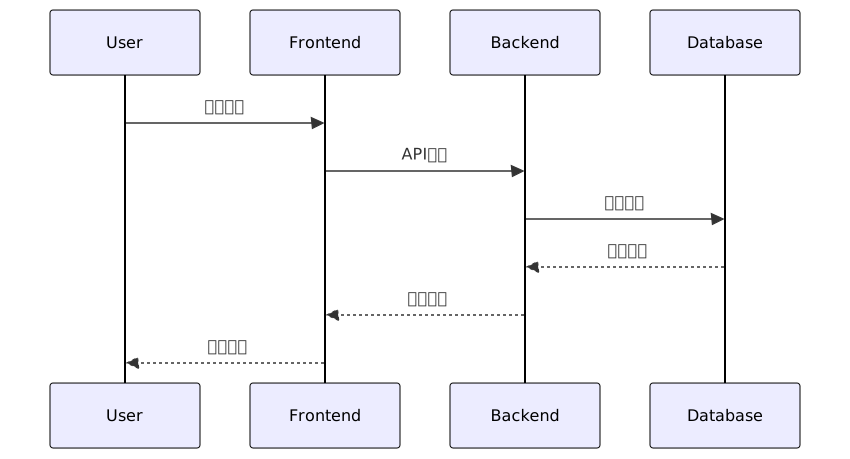
### 系统架构说明
## 最佳实践与开发建议
### 1. 内容安全处理
```typescript
function escapeBrackets(text: string) {
const pattern = /(```[\s\S]*?```|`.*?`)|\\\[([\s\S]*?[^\\])\\\]|\\\((.*?)\\\)/g;
return text.replace(pattern, (match, codeBlock, squareBracket, roundBracket) => {
if (codeBlock) return codeBlock;
else if (squareBracket) return `$$${squareBracket}$$`;
else if (roundBracket) return `$${roundBracket}$`;
return match;
});
}
2. 错误边界处理
function Mermaid(props: { code: string }) {
  const ref = useRef<HTMLDivElement>(null);
  const [hasError, setHasError] = useState(false);

  useEffect(() => {
    if (props.code && ref.current) {
      mermaid
        .run({
          nodes: [ref.current],
          suppressErrors: true,
        })
        .catch((e) => {
          setHasError(true);
          console.error("[Mermaid] ", e.message);
        });
    }
  }, [props.code]);

  if (hasError) {
    return null; // 优雅降级
  }

  return <div className="mermaid" ref={ref}>{props.code}</div>;
}
3. 性能监控指标
| 指标 | 目标值 | 监控方法 |
|---|---|---|
| 首次渲染时间 | < 100ms | Performance API |
| 大型文档渲染 | < 500ms | 分块渲染 |
| 内存占用 | < 50MB | 内存分析工具 |
| 交互响应时间 | < 50ms | 用户交互监控 |
总结与展望
Coco AI的Markdown渲染组件代表了现代Web应用中富文本处理的技术巅峰。通过精心设计的架构、全面的格式支持和优秀的性能表现,它为AI对话场景提供了专业级的文档展示能力。
未来发展方向包括:
- 更丰富的插件生态系统:支持更多自定义渲染器
- 实时协作功能:集成协同编辑能力
- AI增强渲染:智能内容分析和优化建议
- 无障碍访问:全面提升可访问性支持
无论您是开发者、技术文档作者还是AI应用设计师,Coco AI的Markdown组件都为您提供了强大而灵活的工具,帮助您创建出色的内容体验。
立即体验:下载Coco AI应用,亲身体验这款强大的Markdown渲染组件带来的卓越内容展示效果。
创作声明:本文部分内容由AI辅助生成(AIGC),仅供参考


