


题目如下:
造出如图所示的网页
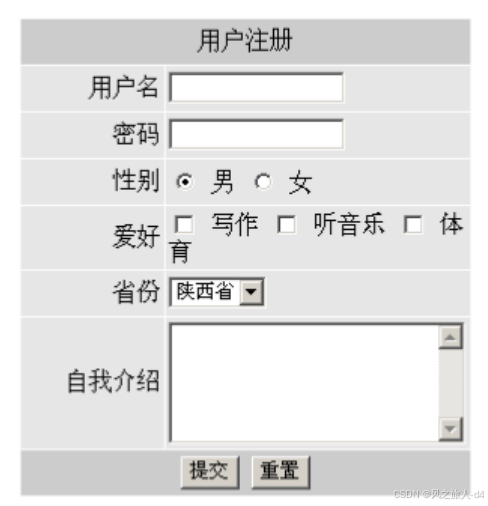
首先有7行标签
7行使用tr标签
那么7行标签的主要代码如下:
<tr>
						<td bgcolor="#cccccc" align="center" colspan="2">用户注册</td>
					</tr>
					<tr>
						<td bgcolor="#e6e6e6" align="right">用户名</td>
						<td bgcolor="e6e6e6">
							<input type="edit" />
						</td>
					</tr>
					<tr>
						<td bgcolor="#e6e6e6" align="right">密码</td>
						<td bgcolor="e6e6e6">
							<input type="password" name="pwd"/>
					</tr>
					<tr>
						<td bgcolor="#e6e6e6" align="right">性别</td>
						<td bgcolor="e6e6e6">
						<input type="radio" name="gender" id=""/>男
						<input type="radio" name="gender" id=""/>女
					</tr>
					<tr>
						<td bgcolor="#e6e6e6" align="right">爱好</td>
						<td bgcolor="e6e6e6">
							<input type="checkbox" name="habby"/>写作
							<input type="checkbox" name="habby"/>听音乐
							<input type="checkbox" name="habby"/>体育
					</tr>
					<tr>
						<td bgcolor="#e6e6e6" align="right">省份</td>
						<td bgcolor="e6e6e6">
							<select name="province">
								<option>陕西</option>
								<option>广西</option>
								<option>山西</option>
							</select>
					</tr>
					<tr>
						<td bgcolor="#e6e6e6" align="right">自我介绍</td>
						<td bgcolor="e6e6e6">
							<textarea name="" id="" cols="30" rows="5"></textarea>
					</tr>
在自我介绍插入如下标签:
<tr>
						<td colspan="2" bgcolor="e6e6e6" align="center">
							<input type="submit" name="" id=""/>
							<input type="reset"/>
						</td>
</tr>
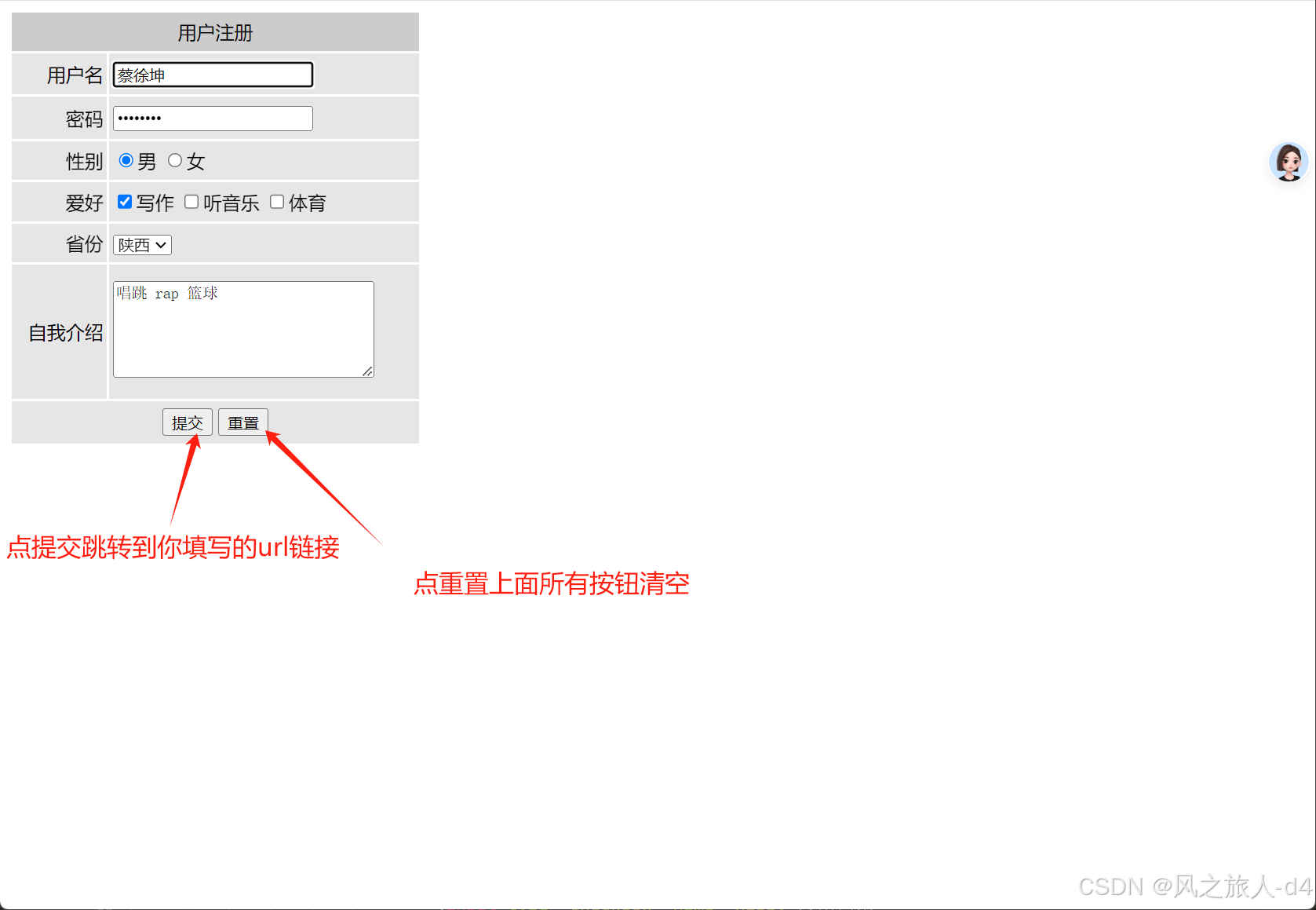
最后注意 必须在首行加入form标签 否则上面图的按钮只是样子活 无实际功能
<form action="#" method="post" enctype="application/x-www-form-urlencoded">
最后完整代码如下:
<!DOCTYPE html>
<html>
	<head>
		<meta charset="utf-8">
		<title></title>
	</head>
	<body>
		<div class="haha">
			<form action="#" method="post" enctype="application/x-www-form-urlencoded">
				<table width=350 height=370 cellpadding=3>
					<tr>
						<td bgcolor="#cccccc" align="center" colspan="2">用户注册</td>
					</tr>
					<tr>
						<td bgcolor="#e6e6e6" align="right">用户名</td>
						<td bgcolor="e6e6e6">
							<input type="edit" />
						</td>
					</tr>
					<tr>
						<td bgcolor="#e6e6e6" align="right">密码</td>
						<td bgcolor="e6e6e6">
							<input type="password" name="pwd"/>
					</tr>
					<tr>
						<td bgcolor="#e6e6e6" align="right">性别</td>
						<td bgcolor="e6e6e6">
						<input type="radio" name="gender" id=""/>男
						<input type="radio" name="gender" id=""/>女
					</tr>
					<tr>
						<td bgcolor="#e6e6e6" align="right">爱好</td>
						<td bgcolor="e6e6e6">
							<input type="checkbox" name="habby"/>写作
							<input type="checkbox" name="habby"/>听音乐
							<input type="checkbox" name="habby"/>体育
					</tr>
					<tr>
						<td bgcolor="#e6e6e6" align="right">省份</td>
						<td bgcolor="e6e6e6">
							<select name="province">
								<option>陕西</option>
								<option>广西</option>
								<option>山西</option>
							</select>
					</tr>
					<tr>
						<td bgcolor="#e6e6e6" align="right">自我介绍</td>
						<td bgcolor="e6e6e6">
							<textarea name="" id="" cols="30" rows="5"></textarea>
					</tr>
					<tr>
						<td colspan="2" bgcolor="e6e6e6" align="center">
							<input type="submit" name="" id=""/>
							<input type="reset"/>
						</td>
					</tr>
				</table>
			</form>
		</div>
	</body>
</html>
如图所示:





 扫一扫
扫一扫


 1323
1323

 被折叠的 条评论
为什么被折叠?
被折叠的 条评论
为什么被折叠?
 到【灌水乐园】发言





